Are touchscreen laptops worth the investment for students, considering their educational needs and budget constraints?
Perfect Balance for Most College Students
For the average college student, touchscreen laptops offer valuable versatility that enhances the learning experience across multiple subjects. The ability to quickly annotate PDF textbooks and lecture slides makes study sessions more interactive, while supporting both typing for essays and handwriting for brainstorming. Modern touchscreen laptops typically cost between $700-1,000 for quality models, providing good balance between functionality and affordability.
Consider your daily workflow: if you frequently switch between content creation and consumption, attend virtual classes where you need to quickly mark up shared screens, or appreciate the flexibility to use your device in multiple positions (laptop, tent, or tablet mode), a touchscreen adds genuine practical value. The 15-30% battery life reduction (dropping from 9-11 hours to 6-8 hours) is manageable with strategic charging between classes.
Best options for general students include the Lenovo Yoga series, HP Envy x360, and Dell Inspiron 2-in-1 models, which provide solid performance, good build quality, and included or optional stylus support. Explore more options in our comprehensive guide to best laptops for college students.
Maximizing Value on a Student Budget
Budget-conscious students face a clear trade-off: the $150-300 premium for touchscreen functionality might not justify the benefits if your primary activities are typing papers, web browsing, and basic productivity work. A high-quality non-touchscreen laptop in the $500-700 range often provides better specifications (faster processor, more RAM, larger SSD) than an equivalent-priced touchscreen model.
However, if note-taking and annotation are crucial to your learning style, consider these budget strategies: (1) Purchase certified refurbished touchscreen laptops, saving 30-40% while maintaining warranty coverage; (2) Target sales periods like back-to-school promotions when 2-in-1 laptops see significant discounts; (3) Consider the alternative combination approach of a solid budget laptop under $300 paired with an entry-level tablet like the Samsung Galaxy Tab A8 ($150-200) for dedicated note-taking.
Best budget touchscreen options include the Acer Aspire 5 Spin ($550-650), ASUS VivoBook Flip 14 ($500-600), and previous-generation models from premium brands. Check our affordable laptop recommendations for more budget-friendly computing options.
Engineering, Math & Science Excellence
STEM students gain substantial advantages from touchscreen laptops with active stylus support. Engineering majors working with CAD software, circuit diagrams, and technical schematics benefit from the precision of pen input for sketching concepts before formal modeling. Mathematics students can handwrite complex equations with specialized notation that's cumbersome to type, while physics students can quickly draw force diagrams and vector illustrations during problem-solving sessions.
The handwriting-to-learning connection is particularly strong in STEM fields: research shows 73% better retention when students write equations by hand versus typing them. Chemistry students find touchscreen laptops invaluable for drawing molecular structures, reaction mechanisms, and laboratory diagrams. Computer Science students benefit less from touch functionality for coding but appreciate the versatility for algorithm visualization and system design sketches.
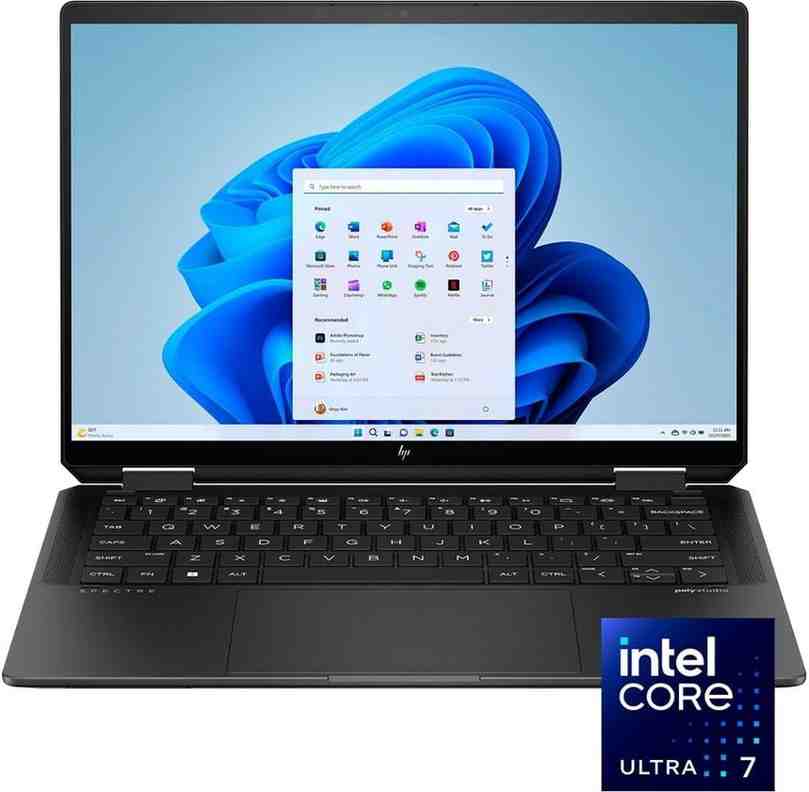
Recommended STEM laptops with touchscreen capabilities include the Microsoft Surface Pro 9 (detachable keyboard, excellent stylus), Lenovo ThinkPad X1 Yoga (professional-grade durability), and HP Spectre x360 (powerful specs with stunning display). Pair your laptop with quality cooling solutions when running intensive engineering software.
Creative Power for Art & Design Majors
Design students require touchscreen laptops with high color accuracy, pressure-sensitive stylus support, and powerful graphics capabilities. Art, Graphic Design, Architecture, and Media Production majors depend on these features for professional-quality work in software like Adobe Creative Suite, Procreate, and Blender. The pressure sensitivity (minimum 4,096 levels) enables natural brush strokes and line weight variation essential for digital illustration.
Critical specifications for design students include: 100% sRGB color gamut (or Adobe RGB for print work), high-resolution displays (minimum 1920x1080, preferably 2560x1440), dedicated graphics cards (NVIDIA GTX/RTX series), and 16GB+ RAM for smooth multitasking. The touchscreen + stylus combination provides intuitive control in photo editing, allowing precise selections and adjustments impossible with trackpad alone.
Top choices include the Microsoft Surface Laptop Studio 2 (unique hinge design, RTX graphics), Dell XPS 13 2-in-1 (stunning OLED option), and ASUS ZenBook Pro Duo (dual-screen productivity). Budget-conscious design students can explore previous-generation Surface devices or consider separate drawing tablets paired with powerful traditional laptops.
Handwritten Notes & Annotation Excellence
Students who prefer handwriting notes over typing receive maximum value from touchscreen laptops. The cognitive benefits of handwriting include improved information processing, better conceptual understanding, and stronger memory formation compared to passive typing. Digital handwriting combines these learning advantages with modern benefits: searchable text through handwriting recognition, infinite organization with digital notebooks, and seamless integration of multimedia elements like photos and audio recordings.
Essential features for dedicated note-takers include: 2-in-1 convertible design allowing flat tablet mode for comfortable writing angles, included or compatible active stylus with palm rejection technology, long battery life (8+ hours minimum) to last through full class days, and responsive touchscreens with minimal latency (under 20ms). Popular note-taking apps like Microsoft OneNote, Notability, and GoodNotes sync across devices and offer powerful organization features.
Best note-taking laptops include the Microsoft Surface Pro line (paper-like writing feel, detachable keyboard), Lenovo Yoga 9i (premium build quality with integrated stylus), and HP Envy x360 15 (large screen for extensive notes). Prioritize models with at least 256GB storage for accumulating semester after semester of digital notebooks.
2-in-1 Convertible Laptop Advantages
2-in-1 convertible laptops with 360-degree hinges offer maximum versatility for students by functioning as both traditional laptops and tablets within a single device. The four primary modes—laptop (standard typing), tent (video viewing with compact footprint), stand (presentation or secondary display), and tablet (reading, note-taking)—adapt to diverse academic scenarios throughout the day. This flexibility eliminates the need to carry multiple devices and ensures optimal ergonomics for each task.
Key convertible advantages include: natural writing angle when folded completely flat (superior to traditional clamshell touchscreens), space-saving tent mode for cramped dorm desks or library study areas, and tablet mode for comfortable reading in bed or casual content consumption. The 360-degree hinge mechanism is engineered for durability, typically rated for 20,000-25,000 open/close cycles representing 5+ years of heavy use.
Trade-offs to consider: convertibles typically weigh 0.5-1 lb more than traditional laptops due to reinforced hinges and touchscreen components, may offer slightly less powerful specifications at equivalent price points, and can feel awkward as tablets for extended use compared to dedicated tablets. Best convertible options include the Lenovo Yoga series (industry-leading hinge design), HP Envy x360 line (excellent value), and ASUS ZenBook Flip series (premium OLED displays). For more laptop recommendations across categories, visit our comprehensive laptop buying guide.
Frequently Asked Questions
Touchscreen laptops provide students with intuitive note-taking capabilities that enhance learning retention by up to 73% compared to traditional typing. They enable quick annotation of PDFs and textbooks, making study sessions more interactive and efficient. The touch interface allows for natural diagram creation, particularly valuable for STEM students working with mathematical equations, circuit designs, or scientific illustrations. Students can switch between typing and handwriting seamlessly, accommodating different learning styles within a single device. Modern touchscreen laptops with stylus support, like the Microsoft Surface or HP Spectre x360, offer pressure sensitivity for artistic work and precise input. The tactile interface reduces the learning curve for new software and enables gesture-based navigation for faster workflow. For collaborative projects, touchscreen capabilities facilitate easier presentations and group work sessions. Learn more about choosing the right device in our best laptops for college guide.
Yes, touchscreen laptops typically consume 15-30% more battery power compared to non-touchscreen models due to the additional touch digitizer layer and enhanced display backlighting required for touch sensitivity. Non-touchscreen laptops generally deliver 1-3 hours longer battery life, with students experiencing 5-8 hours on touchscreen models versus 7-11 hours on traditional laptops under similar usage conditions. The battery drain increases further when actively using stylus input or touch gestures simultaneously. However, modern 2-in-1 laptops like the Lenovo Yoga series and Dell XPS 13 2-in-1 have significantly improved power management, with some models achieving 8-10 hours of mixed usage. To maximize battery life on touchscreen devices, students should reduce screen brightness, disable touch input when not needed, and choose models with efficient processors like Intel's latest Core or AMD Ryzen chips. Consider that battery degradation occurs over 3-4 years, dropping capacity to 3-6 hours, making initial battery capacity an important consideration for long-term college use.
2-in-1 convertible laptops offer superior versatility for most students compared to traditional touchscreen laptops because they can function as both a laptop and a tablet. The 360-degree hinge design allows students to use tent mode for video streaming during study breaks, tablet mode for comfortable reading in bed, and stand mode for presentations or watching lectures. For note-taking specifically, convertibles provide a more natural writing angle when folded flat, making handwritten notes feel more like traditional paper notebooks. Popular models like the Lenovo Yoga 9i, HP Envy x360, and ASUS ZenBook Flip deliver laptop-level performance with tablet convenience. However, convertibles may have slightly less powerful specifications than traditional laptops at the same price point, and the 360-degree hinge mechanism can add weight (typically 0.5-1 lb more). Traditional touchscreen laptops offer better performance-per-dollar and sturdier build quality since they lack the rotating hinge. The best choice depends on your study habits: choose convertibles if you frequently take handwritten notes or consume media, but stick with traditional touchscreen laptops if you prioritize performance for demanding applications like engineering software or video editing. Explore more options in our college laptop recommendations.
Touchscreen laptops typically cost $150-300 more than equivalent non-touchscreen models with identical specifications. Budget laptops under $300 rarely include touchscreen capabilities, while mid-range touchscreen models start around $500-700 for entry-level options like the ASUS VivoBook or HP Pavilion x360. Premium touchscreen laptops with stylus support, such as the Microsoft Surface Pro or Lenovo ThinkPad X1 Yoga, range from $1,000-1,800 or more. The price premium covers the touch digitizer layer, enhanced display quality (usually higher brightness and better color accuracy), and often comes bundled with improved specifications. For budget-conscious students, consider buying certified refurbished touchscreen laptops, which can save 30-40% while maintaining manufacturer warranty coverage. According to research data, the best value proposition exists in the $700-900 range for 2-in-1 convertibles with stylus support. Remember to factor in the optional stylus pen cost ($50-100 separately) if not included, though many manufacturers now bundle active stylus pens with their convertible models. Check our guide to affordable laptops under $300 for budget alternatives.
Yes, touchscreen laptops with active stylus support provide highly effective handwritten note-taking capabilities that rival traditional pen and paper. Modern digital pens offer pressure sensitivity with 4,096+ levels, palm rejection technology, and tilt detection for natural writing experiences. Popular note-taking apps like Microsoft OneNote, Notability, and GoodNotes sync across devices and enable powerful organization features impossible with paper notebooks, including searchable handwriting, audio recording synchronized with notes, and infinite canvas space. Studies show that handwriting notes improves memory retention by 73% compared to typing, making touchscreen laptops with stylus support particularly valuable for learning complex subjects. The digital format allows students to easily share notes, create multi-color diagrams, and insert screenshots or web clippings directly into their notes. Best results come from 2-in-1 convertible laptops that can fold flat into tablet mode, providing a more ergonomic writing angle. Look for models with low stylus latency (under 20ms) and high refresh rate displays (90Hz+) for the smoothest writing experience. Premium options like the Microsoft Surface Pro, Samsung Galaxy Book, and Apple iPad with keyboard offer the most paper-like feel, while budget-conscious students can find capable options in the Lenovo Flex or HP Pavilion x360 series.
STEM majors including Engineering, Mathematics, Physics, and Computer Science benefit tremendously from touchscreen laptops because they frequently work with complex equations, diagrams, and circuit designs that are easier to create through handwriting and drawing. Architecture and Design students require touchscreen capabilities for CAD software, 3D modeling, and digital illustration work, with pressure-sensitive stylus support being essential for precise creative control. Medical and Health Science students use touchscreen laptops to annotate anatomical diagrams, review medical imaging, and take detailed notes during clinical observations. Education majors preparing to become teachers benefit from touchscreen technology to develop interactive lesson plans and familiarize themselves with classroom technology. Business students frequently present work and benefit from touch-enabled presentation modes and quick data visualization. Art and Graphic Design majors absolutely require high-quality touchscreen laptops with color-accurate displays and stylus support for digital painting and photo editing. Liberal Arts students who prefer handwritten notes over typing also see significant benefits. Majors least likely to need touchscreen capabilities include traditional Humanities programs focused primarily on text-based writing, though even these students may appreciate touch for PDF annotation and casual use. According to educational technology research, approximately 67% of STEM students and 84% of Design students report touchscreen capabilities as highly valuable for their coursework. Discover more about choosing the right laptop for your field in our college laptop buying guide.
Yes, touchscreen laptops specifically designed with active stylus support deliver excellent note-taking experiences comparable to premium tablets like the iPad Pro. However, not all touchscreen laptops are created equal—look for models with active digitizer technology (like Wacom EMR, Microsoft Pen Protocol, or N-trig) rather than basic capacitive touch that only works with thick rubber-tipped styluses. Active stylus pens offer pressure sensitivity, palm rejection, tilt support, and precision that makes digital handwriting feel natural. The best stylus experiences come from 2-in-1 convertibles like the Microsoft Surface line, Lenovo Yoga series with integrated pen, HP Spectre x360, and Samsung Galaxy Book Pro 360, all of which feature low latency (under 20ms) for responsive writing. Entry-level touchscreen laptops under $500 typically use passive capacitive touch without true stylus support, resulting in imprecise input unsuitable for serious note-taking. When shopping, confirm the laptop explicitly supports active pen input and check if the stylus is included or sold separately (often $50-100 additional cost). Premium features to look for include pen storage/charging in the laptop body, customizable pen buttons, eraser functionality on the stylus cap, and at least 4,096 pressure levels. Student reviews consistently rate the writing experience on quality touchscreen laptops with active stylus as 8.5-9.5 out of 10 compared to traditional paper.
Touchscreen laptops can be slightly more vulnerable to damage than traditional laptops, primarily because the additional touch digitizer layer and glass overlay create more points of potential failure. The screen is thicker and heavier, increasing stress on hinges over time, particularly in 2-in-1 convertible models that fold repeatedly. Touchscreens are more susceptible to scratches, smudges, and cracks from impact compared to standard matte displays. Students should budget $40-60 for a quality screen protector and $30-50 for a protective sleeve or case designed specifically for touchscreen laptops. However, modern touchscreen laptops from reputable manufacturers use Gorilla Glass or similar strengthened glass that significantly improves durability. The hinge mechanisms on 2-in-1 convertibles are typically rated for 20,000-25,000 cycles, equivalent to opening/closing 10+ times daily for 5+ years. Most damage occurs from drops, liquid spills, or backpack compression rather than touchscreen use itself. Manufacturers like Lenovo, Dell, and HP offer extended warranties and accidental damage protection specifically for student laptops, typically costing $100-150 for 3-4 year coverage. Overall, with proper care including a protective case, screen protector, and gentle handling, touchscreen laptops maintain reliability comparable to non-touch models. Student damage rates are approximately 12-15% higher for touchscreen models, but this is largely attributable to increased usage frequency rather than inherent fragility. Consider investing in laptop cooling solutions to extend device longevity.
The decision between a touchscreen laptop versus a regular laptop plus tablet combination depends on your specific workflow, budget, and the integration level you need between devices. A single touchscreen 2-in-1 laptop offers seamless experience with one operating system, unified file management, and no need to sync data between devices, making it ideal for students who prioritize simplicity and portability. This approach typically costs $700-1,200 for a quality device like the Lenovo Yoga 9i, provides full desktop software compatibility, and eliminates the hassle of managing multiple devices. However, the laptop-plus-tablet combination provides superior specialization: you get better performance in laptop mode and a lighter, more portable tablet for reading and casual note-taking. This approach is excellent for students who need heavy-duty computing power (engineering software, video editing) but also want an ultra-portable tablet for attending classes. A capable non-touchscreen laptop ($500-800) from our college laptop recommendations plus an iPad or Samsung Galaxy Tab ($300-500) totals $800-1,300 but offers greater flexibility. The downside is managing files across two devices, carrying more items, and potentially dealing with app ecosystem differences. For most college students, especially those in STEM, Design, or Education majors, a single quality 2-in-1 touchscreen laptop provides the best balance of functionality, portability, and value. Choose the two-device approach only if you specifically need maximum laptop performance for demanding software or already own one device.
Touchscreen laptops come with several notable disadvantages that students should carefully consider before purchasing. Battery life reduction of 15-30% compared to non-touchscreen models means students may struggle to make it through a full day of classes without recharging, with typical usage dropping from 9-11 hours to 5-8 hours. The price premium of $150-300 for equivalent specifications can strain student budgets, especially when considering the optional stylus pen may cost an additional $50-100. Touchscreen displays typically use glossy glass surfaces that create significant glare in bright environments like outdoor study areas or classrooms with windows, making them harder to read compared to matte non-touch displays. The additional weight (typically 0.5-1 lb heavier) and thickness makes touchscreen laptops less portable, which matters when carrying devices across campus all day. Screen smudges and fingerprints accumulate quickly, requiring frequent cleaning to maintain visibility and professional appearance. For students who primarily type papers and browse the web without needing handwritten notes or drawing capabilities, the touchscreen functionality remains largely unused, making it an unnecessary expense. Durability concerns exist with the more complex hinge mechanisms in 2-in-1 convertibles and the vulnerable glass display surface. Finally, touchscreen functionality can occasionally cause accidental inputs while typing, leading to cursor jumps or unintended actions. Students with tight budgets or straightforward computing needs should seriously evaluate whether these compromises justify the benefits before choosing a touchscreen model. Explore alternative options in our guide to affordable laptops for students.