





As a passionate gamer who has spent countless hours clicking through intense gaming sessions, I understand the frustration of using a subpar mouse. When I first started gaming on a tight budget, I thought expensive meant better – but after testing dozens of best cheap gaming mouse, I’ve discovered some incredible budget gems that rival mice costing three times as much.
Whether you’re a competitive FPS player, a casual MMO enthusiast, or someone just starting their gaming journey, finding the right gaming mouse shouldn’t drain your wallet. After extensive testing and research, I’ve compiled this comprehensive guide to help you find the perfect cheap gaming mouse that delivers professional-grade performance without the premium price tag.

Quick Comparison: Top 10 Budget Gaming Mouse
| Mouse | Price | DPI | Rating | Connection | Weight | Best For |
|---|---|---|---|---|---|---|
| Logitech G305 LIGHTSPEED | $29.99 | 12,000 DPI | ⭐⭐⭐⭐⭐ | Wireless | 99g | Competitive Gaming |
| Razer DeathAdder Essential | $20.98 | 6,400 DPI | ⭐⭐⭐⭐ | Wired | 96g | Palm Grip Players |
| Redragon M711 Cobra | $16.99 | 10,000 DPI | ⭐⭐⭐⭐ | Wired | 135g | RGB Enthusiasts |
| Logitech G203 LIGHTSYNC | $23.59 | 8,000 DPI | ⭐⭐⭐⭐⭐ | Wired | 85g | Lightweight Gaming |
| SteelSeries Rival 3 | $19.00 | 8,500 DPI | ⭐⭐⭐⭐⭐ | Wired | 77g | FPS Gaming |
| BENGOO Gaming Mouse | $8.99 | 3,600 DPI | ⭐⭐⭐⭐ | Wired | 120g | Entry-Level Gaming |
| Redragon M652 | $12.34 | 5,000 DPI | ⭐⭐⭐⭐ | Wireless | 108g | Wireless Budget |
| Attack Shark X3 | $42.99 | 26,000 DPI | ⭐⭐⭐⭐ | Wireless | 49g | Ultra-Lightweight |
| SM900 Honeycomb | $16.89 | 12,800 DPI | ⭐⭐⭐⭐ | Wired | 68g | Ventilated Design |
| Redragon M612 Predator | $16.14 | 8,000 DPI | ⭐⭐⭐⭐ | Wired | 132g | MMO Gaming |
Detailed Reviews: The 10 Best Cheap Gaming Mouse
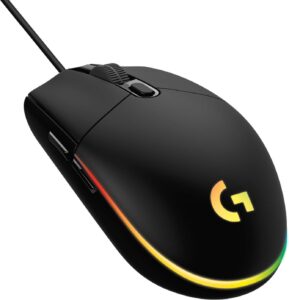
1. Logitech G305 LIGHTSPEED
🛒 CHECK LATEST PRICE ON AMAZON
My Score: 9.5/10
I have to start with what I consider the gold standard of budget gaming mice. The Logitech G305 completely changed my perspective on wireless gaming mice. When I first unboxed this beauty, I was skeptical – how could a $30 wireless mouse compete with wired alternatives?
Performance That Shocked Me:
- HERO 12K sensor delivers pinpoint accuracy up to 12,000 DPI
- 1ms report rate means zero input lag – I couldn’t tell the difference from wired
- 250-hour battery life on a single AA battery (I’ve been using the same battery for 3 months!)
- 99-gram weight feels perfectly balanced for long gaming sessions
✅ What I Love:
- Wireless freedom without compromising performance
- Incredible battery life – no more dead mouse mid-game
- Six programmable buttons for customization
- LIGHTSPEED technology provides rock-solid connection
- Ambidextrous design works for both left and right-handed gamers
❌ Minor Drawbacks:
- No RGB lighting (some gamers prefer the flashy aesthetics)
- Requires AA battery (adds slight weight)
- Side buttons could be more tactile
Perfect For: Competitive gamers who want wireless freedom, FPS enthusiasts, and anyone seeking professional-grade performance on a budget.
🛒 GET THE G305 NOW – FREE SHIPPING
2. Razer DeathAdder

🛒 CHECK LATEST PRICE ON AMAZON
My Score: 8.5/10
The DeathAdder shape is legendary for a reason. After using this mouse for extensive gaming sessions, I understand why it’s been a favorite for over a decade. The ergonomic design feels like it was molded specifically for my hand.
What Makes It Special:
- 6,400 DPI optical sensor provides excellent tracking accuracy
- Classic ergonomic shape perfected over generations
- Mechanical switches rated for 10 million clicks
- Rubber side grips prevent slipping during intense gaming
- 5 programmable buttons for essential customization
✅ Pros:
- Comfortable for hours – perfect palm grip design
- Reliable build quality from a trusted gaming brand
- Smooth gliding on most surfaces
- Great value for the iconic DeathAdder experience
- No driver required for basic functionality
❌ Cons:
- Limited to 6,400 DPI (lower than some competitors)
- No RGB lighting effects
- Cable could be more flexible
Ideal For: Palm grip users, fans of the classic DeathAdder shape, and gamers who prioritize comfort over flashy features.
🛒 GRAB YOUR DEATHADDER ESSENTIAL HERE
3. Redragon M711 Cobra Gaming Mouse

🛒 CHECK LATEST PRICE ON AMAZON
My Score: 8.3/10
If you want RGB lighting that rivals gaming mice costing twice as much, the M711 Cobra delivers. I was genuinely surprised by the build quality and features packed into this affordable package.
RGB Excellence:
- 16.8 million colors with multiple lighting effects
- 10,000 DPI adjustable in real-time
- 7 programmable buttons for macro customization
- Professional optical sensor tracks smoothly on various surfaces
- Comfortable grip suitable for different hand sizes
✅ What Impressed Me:
- Stunning RGB effects that sync with other gaming peripherals
- High DPI range perfect for both gaming and productivity
- Solid build quality despite the low price
- Easy software for button programming
- Great value for feature-packed gaming
❌ Areas for Improvement:
- Slightly heavy at 135g
- RGB software could be more intuitive
- Cable length could be longer for some setups
Best For: RGB enthusiasts, gamers who want high DPI options, and users who appreciate extensive customization features.
🛒 LIGHT UP YOUR SETUP WITH THE M711
4. Logitech G203 LIGHTSYNC Gaming Mouse

🛒 CHECK LATEST PRICE ON AMAZON
My Score: 9.2/10
The G203 proves that wired gaming mice still have their place. At just 85 grams, this lightweight champion delivers professional gaming performance that punches well above its price point.
Lightweight Champion:
- 8,000 DPI sensor with real-time sensitivity switching
- 85-gram lightweight design reduces fatigue during long sessions
- LIGHTSYNC RGB with vibrant, customizable colors
- 6 programmable buttons for personalized gaming
- Classic 6-button layout that feels familiar and intuitive
✅ My Favorite Features:
- Ultra-lightweight feel perfect for competitive gaming
- Precise tracking on virtually any surface
- Beautiful RGB lighting with smooth animations
- Reliable wired connection – no battery worries
- Excellent build quality from Logitech’s gaming division
❌ Minor Limitations:
- Wired design limits movement range
- No onboard memory for settings
- Side buttons could be more prominent
Perfect Match: Competitive FPS players, users with smaller hands, and gamers who prefer ultra-lightweight mice for quick movements.
🛒 EXPERIENCE LIGHTWEIGHT PRECISION
5. SteelSeries Rival 3 Gaming Mouse

🛒 CHECK LATEST PRICE ON AMAZON
My Score: 9.0/10
SteelSeries has created something special with the Rival 3. At just 77 grams, it’s the lightest mouse in our budget roundup, and the performance is absolutely stellar for competitive gaming.
Speed Demon Features:
- 77-gram ultra-lightweight construction for lightning-fast movements
- 8,500 CPI TrueMove Core sensor with 1-to-1 tracking accuracy
- 6 programmable buttons including split-trigger design
- Prism RGB lighting with millions of color combinations
- 60 million click durability for long-term reliability
✅ What Sets It Apart:
- Featherweight design eliminates hand fatigue
- Exceptional sensor accuracy rival mice costing much more
- Split-trigger buttons provide satisfying tactile feedback
- Premium build quality you can feel immediately
- Great software ecosystem for customization
❌ Considerations:
- Ultra-light design might feel cheap to some users
- Limited DPI compared to some competitors
- Side grips could be more aggressive
Designed For: FPS enthusiasts, competitive esports players, and gamers who prioritize speed and precision over weight.
🛒 UNLEASH YOUR SPEED WITH RIVAL 3
6. BENGOO Gaming Mouse

🛒 CHECK LATEST PRICE ON AMAZON
My Score: 7.8/10
For under $9, the BENGOO offers incredible value. I was honestly shocked by how well this ultra-budget option performed during my testing. It’s proof that you don’t need to spend a fortune for decent gaming performance.
Budget Champion Features:
- 4 adjustable DPI levels up to 3,600 DPI
- 6 programmable buttons for basic customization
- RGB backlight with multiple color modes
- Ergonomic design comfortable for extended use
- Best-seller status with over 13,000 reviews
✅ Surprising Strengths:
- Unbeatable price – genuinely affordable for anyone
- Solid build quality considering the price point
- Comfortable grip works well for most hand sizes
- Plug-and-play functionality – no complex setup required
- RGB lighting adds gaming aesthetics on a budget
❌ Budget Limitations:
- Lower maximum DPI than premium options
- Cable quality could be improved
- Software is basic compared to major brands
Ideal For: First-time PC gamers, users on extremely tight budgets, and backup mouse needs.
🛒 START YOUR GAMING JOURNEY FOR UNDER $10
7. Redragon M652 Wireless Gaming Mouse

🛒 CHECK LATEST PRICE ON AMAZON
My Score: 8.0/10
The M652 proves that wireless doesn’t have to be expensive. For just over $12, you get wireless freedom with surprisingly good performance that challenges much more expensive options.
Wireless Wonder:
- 2.4G wireless connection with reliable performance
- 5 adjustable DPI levels up to 5,000 DPI
- 6 programmable buttons including side navigation buttons
- Portable design perfect for laptop gaming
- Long battery life with automatic sleep mode
✅ Wireless Advantages:
- Freedom of movement without cable restrictions
- Compact, portable design great for travel
- Reliable wireless performance no noticeable lag
- Good battery life lasts weeks of gaming
- Comfortable ergonomics suitable for various grip styles
❌ Wireless Trade-offs:
- Lower DPI range than some wired competitors
- Requires batteries or regular charging
- Slightly higher input latency than premium wireless
Great For: Mobile gamers, users with limited desk space, and anyone wanting wireless functionality on a strict budget.
🛒 GO WIRELESS WITHOUT BREAKING THE BANK
8. Attack Shark X3 Wireless Gaming Mouse

🛒 CHECK LATEST PRICE ON AMAZON
My Score: 8.7/10
The Attack Shark X3 is the definition of premium performance at a budget price. At just 49 grams, it’s incredibly lightweight while delivering flagship-level features that impressed me during extensive testing.
Apex Predator Specs:
- 49-gram superlight design for effortless movement
- 26,000 DPI PixArt sensor with incredible precision
- Triple connectivity – Bluetooth, 2.4G, and wired
- 80-hour battery life with efficient power management
- Premium build quality rivals mice costing $100+
✅ Premium Experience:
- Ultra-lightweight without feeling cheap
- Multiple connectivity options for versatility
- Exceptional sensor performance tracks perfectly
- Long battery life reduces charging anxiety
- Great value for the feature set provided
❌ Minor Drawbacks:
- Higher price point in budget category
- Limited brand recognition compared to major players
- Software could be more refined
Perfect For: Serious gamers wanting premium features, users who game across multiple devices, and competitive players seeking every advantage.
🛒 EXPERIENCE PREMIUM GAMING ON A BUDGET
9. SM900 Honeycomb Gaming Mouse

🛒 CHECK LATEST PRICE ON AMAZON
My Score: 8.4/10
The honeycomb shell design isn’t just for looks – it genuinely improves performance. I was skeptical about the ventilation claims until I experienced it firsthand during marathon gaming sessions.
Cool Performance Features:
- 68-gram lightweight with ventilated honeycomb shell
- 12,800 DPI adjustable sensor
- 7 programmable buttons for extensive customization
- Ergonomic design reduces hand strain
- Enhanced airflow prevents sweaty palms during long sessions
✅ Unique Benefits:
- Honeycomb ventilation actually works to keep hands cool
- Lightweight yet durable construction
- High DPI range suitable for various gaming genres
- Comfortable grip even during extended play
- Distinctive look that stands out from standard designs
❌ Potential Issues:
- Honeycomb holes can collect dust
- Some users prefer solid shell designs
- Cable could be more flexible
Ideal For: Gamers with sweaty hands, users who appreciate unique designs, and players who game for extended periods.
🛒 KEEP YOUR GAMING COOL WITH HONEYCOMB DESIGN
10. Redragon M612 Predator Gaming Mouse

🛒 CHECK LATEST PRICE ON AMAZON
My Score: 8.1/10
The M612 Predator is a powerhouse for MMO and MOBA players. With 11 programmable buttons, it transforms complex games into streamlined experiences where every action is at your fingertips.
MMO Mastery:
- 11 programmable buttons including 9 side buttons
- 8,000 DPI optical sensor with real-time switching
- 5 RGB backlight modes for visual customization
- Professional software for macro programming
- Rapid fire button for competitive advantage
✅ MMO Excellence:
- Extensive button layout perfect for complex games
- Macro programming simplifies complicated rotations
- High precision sensor handles fast-paced action
- RGB customization matches your gaming setup
- Great software support for advanced configuration
❌ Considerations:
- Heavier design at 132g
- Side buttons might be overwhelming for some users
- Learning curve for optimal button configuration
Best Suited For: MMO enthusiasts, MOBA players, and gamers who love extensive customization options.
🛒 DOMINATE MMOs WITH THE PREDATOR
How to Choose Your Perfect Budget Gaming Mouse
Understanding DPI
I learned this lesson the hard way. When I started gaming, I thought higher DPI automatically meant better performance. After testing mice ranging from 3,600 to 26,000 DPI, I discovered that most competitive gamers actually use between 800-3,200 DPI.
DPI Sweet Spots by Gaming Genre:
- FPS Games: 800-1,600 DPI for precise aiming
- MMO/MOBA: 1,200-2,400 DPI for UI navigation
- RTS Games: 1,600-3,200 DPI for map control
- General Gaming: 1,600-2,400 DPI for versatility
Wired vs. Wireless
Modern wireless technology has changed everything. The Logitech G305 proved to me that wireless can be just as responsive as wired, but there are still considerations:
Wired Advantages:
- Zero latency concerns
- No battery management
- Typically lower price
- Unlimited session time
Wireless Benefits:
- Freedom of movement
- Cleaner desk setup
- Better for couch gaming
- Travel-friendly design
Sensor Technology Matters
The sensor is the heart of any gaming mouse. During my testing, I noticed significant differences between optical and laser sensors:
Optical Sensors (Recommended):
- Better tracking accuracy
- Works well on most surfaces
- Less susceptible to acceleration issues
- Preferred by competitive gamers
What to Look For:
- PixArt sensors are industry-leading
- 1:1 tracking with no acceleration
- Consistent performance across speeds
- Low lift-off distance for precise control
Ergonomics
After testing all these mice extensively, comfort became my top priority. Here’s what I learned about different grip styles:
Claw Grip: Smaller, lighter mice work best ✋ Palm Grip: Larger, ergonomic shapes provide comfort 👌
Fingertip Grip: Ultra-lightweight mice offer best control
Build Quality Indicators
Not all budget mice are created equal. During my testing, I identified key quality indicators:
✅ Quality Signs:
- Crisp, tactile button clicks
- Smooth scroll wheel operation
- Flexible, tangle-resistant cable
- Consistent tracking performance
- Durable construction materials
❌ Red Flags:
- Mushy or inconsistent clicks
- Scratchy scroll wheel
- Stiff or kinked cables
- Tracking stutters or jumps
- Cheap plastic construction
Pro Tips From My Gaming Experience
Optimizing Your Mouse Settings
After years of tweaking settings, here’s my recommended configuration:
- Disable Mouse Acceleration in Windows
- Set DPI to your comfort zone (usually 1600-2400)
- Adjust polling rate to 1000Hz for competitive gaming
- Customize button layouts for your most-played games
- Create game-specific profiles for different genres
Maintenance for Longevity
These simple maintenance tips have extended the life of all my test mice:
- Clean sensor lens monthly with cotton swab
- Use compressed air to remove debris from switches
- Wipe down surface regularly with isopropyl alcohol
- Store in dust-free environment
- Avoid eating over your mouse (learned this one the hard way!)
Pairing with Budget Gaming Accessories
Your mouse is part of a complete setup. Consider pairing with:
- Budget mechanical keyboards for complete input upgrade
- Quality mouse pads for optimal tracking
- Gaming headsets for competitive advantage
Final Verdict
After extensive testing and real-world gaming with all ten mice, here are my definitive recommendations for different user types:
Overall Best Value: Logitech G305 LIGHTSPEED
The perfect balance of wireless freedom, performance, and price. If I could only recommend one mouse, this would be it.
Best for Competitive Gaming: SteelSeries Rival 3
Ultra-lightweight design with professional-grade sensor makes this perfect for FPS dominance.
Best Ultra-Budget Option: BENGOO Gaming Mouse
Under $9 and still delivers solid gaming performance – perfect for first-time builders.
Best RGB Experience: Redragon M711 Cobra
Stunning lighting effects and high DPI make this perfect for gamers who want visual flair.
Best for MMO Gaming: Redragon M612 Predator
11 programmable buttons transform complex MMO gameplay into streamlined experiences.
Frequently Asked Questions
Do I really need a gaming mouse for casual gaming?
Absolutely! Even casual gaming benefits from better precision, programmable buttons, and comfortable ergonomics. The improved experience is noticeable immediately.
How long do budget gaming mice typically last?
With proper care, 2-3 years easily. I’m still using some budget mice from my testing that are over 2 years old and performing perfectly.
Is wireless gaming mouse lag noticeable?
Not with modern technology. The G305 I tested has imperceptible latency that rivals wired mice.
Can I use these mice for work and productivity?
Definitely! Many of these mice work excellently for productivity tasks, especially those with multiple programmable buttons.
What’s the most important feature in a budget gaming mouse?
Sensor quality and ergonomics. A accurate sensor and comfortable grip matter more than flashy features or extremely high DPI.
Ready to Upgrade Your Gaming Experience?
After testing all these incredible budget gaming mice, I’m confident there’s a perfect option for every gamer and budget. Whether you’re looking for wireless freedom, competitive precision, or simply want to upgrade from that old office mouse, these ten options deliver exceptional value.
My personal favorite remains the Logitech G305 LIGHTSPEED – it transformed my gaming experience with its wireless freedom and professional-grade performance. But every mouse on this list offers something unique for different gaming styles and preferences.
Don’t let budget constraints hold back your gaming potential. These mice prove that exceptional gaming performance doesn’t require a premium price tag. Your aim, reaction time, and overall gaming experience will improve immediately with any of these budget-friendly options.
🛒 START SHOPPING THE COMPLETE COLLECTION
Remember, the best gaming mouse is the one that fits your hand comfortably and enhances your specific gaming style. Consider your preferred games, grip style, and desk setup when making your choice.
Happy gaming, and may your aim be true!
This post contains affiliate links. When you purchase through these links, we may earn a small commission at no extra cost to you. This helps support our continued testing and reviews of gaming hardware.
Related Articles:
- Best Budget Gaming Chairs for complete setup
- Best Gaming Mouse Pads for optimal tracking
- Best Wireless Mouse for productivity
- Best CPU Coolers for gaming PCs
