


Apple’s next MacBook Pro announcement could mark a significant change in the company’s laptop strategy. Reports suggest that the company is preparing 14-inch and 16-inch MacBook Pro models with touchscreen OLED displays, potentially introducing touch interaction to a product family that has traditionally relied on a keyboard and trackpad.
The timing matters. Apple has confirmed a product event in Los Angeles for October 28, 2026, and the latest reporting from Bloomberg, summarized by MacRumors, points to a touchscreen MacBook Pro as a possible highlight. However, Apple has not yet officially confirmed the reported laptop’s specifications, pricing, or retail availability.
For consumers, the important question is not simply whether Apple will add a touchscreen. It is whether the change will make the MacBook Pro meaningfully more useful—and whether waiting for the announcement makes financial sense.
The current MacBook Pro is already a powerful machine. Apple’s March announcement describes M5 Pro and M5 Max configurations, high-speed storage, Thunderbolt 5 connectivity, and claimed battery life of up to 24 hours. Existing hardware may therefore be more than sufficient for buyers who prioritize established performance over an unconfirmed redesign.
This guide separates confirmed information from reporting and speculation, explains the practical implications of touchscreen and OLED technology, and outlines what buyers should evaluate before making a purchasing decision.
Key Takeaways
- Wait for official specifications if you can: Apple’s October 28 event is confirmed, but the touchscreen MacBook Pro’s features and pricing remain unannounced.
- Buy for your workload, not the rumor: Existing M5 Pro and M5 Max MacBook Pro models already offer substantial computing capabilities for professional work.
- Compare the complete experience: Touch input, display quality, battery life, application compatibility, and price matter more than any single specification.
What Apple Has Confirmed
Apple has confirmed its October 28 “Pro and tell” product event in Los Angeles. Reuters reported the announcement on October 19 and noted that Bloomberg expects a touchscreen MacBook Pro to feature among the products associated with the event. The event date is confirmed; the rumored laptop specifications are not.
That distinction is essential when evaluating Apple’s next laptop.
A confirmed event does not establish that every product described by journalists will appear. It also does not confirm the final specifications, launch prices, or shipping dates of any unannounced device.
The most reliable starting point is Apple’s existing MacBook Pro lineup.
What the current MacBook Pro offers
In March 2026, Apple announced 14-inch and 16-inch MacBook Pro models with M5 Pro and M5 Max processors. The company’s published specifications include Thunderbolt 5, Wi-Fi 7, Bluetooth 6, a Liquid Retina XDR display, and storage configurations starting at 1TB for M5 Pro and 2TB for M5 Max models. Apple also advertises up to 24 hours of battery life.
These are official specifications, but the performance and battery-life figures should be interpreted in context.
Apple’s battery-life figure is a manufacturer claim based on its own testing conditions. Actual battery life varies with workload, screen brightness, wireless activity, applications, and configuration.
The same principle applies to processor performance. A chip’s advertised capabilities do not establish how quickly every application will run.
For video editors, developers, photographers, and other professionals, the current MacBook Pro already provides a substantial hardware foundation. The question is whether the rumored redesign adds enough practical value to justify waiting or potentially paying more.
What the Latest MacBook Pro Reports Say
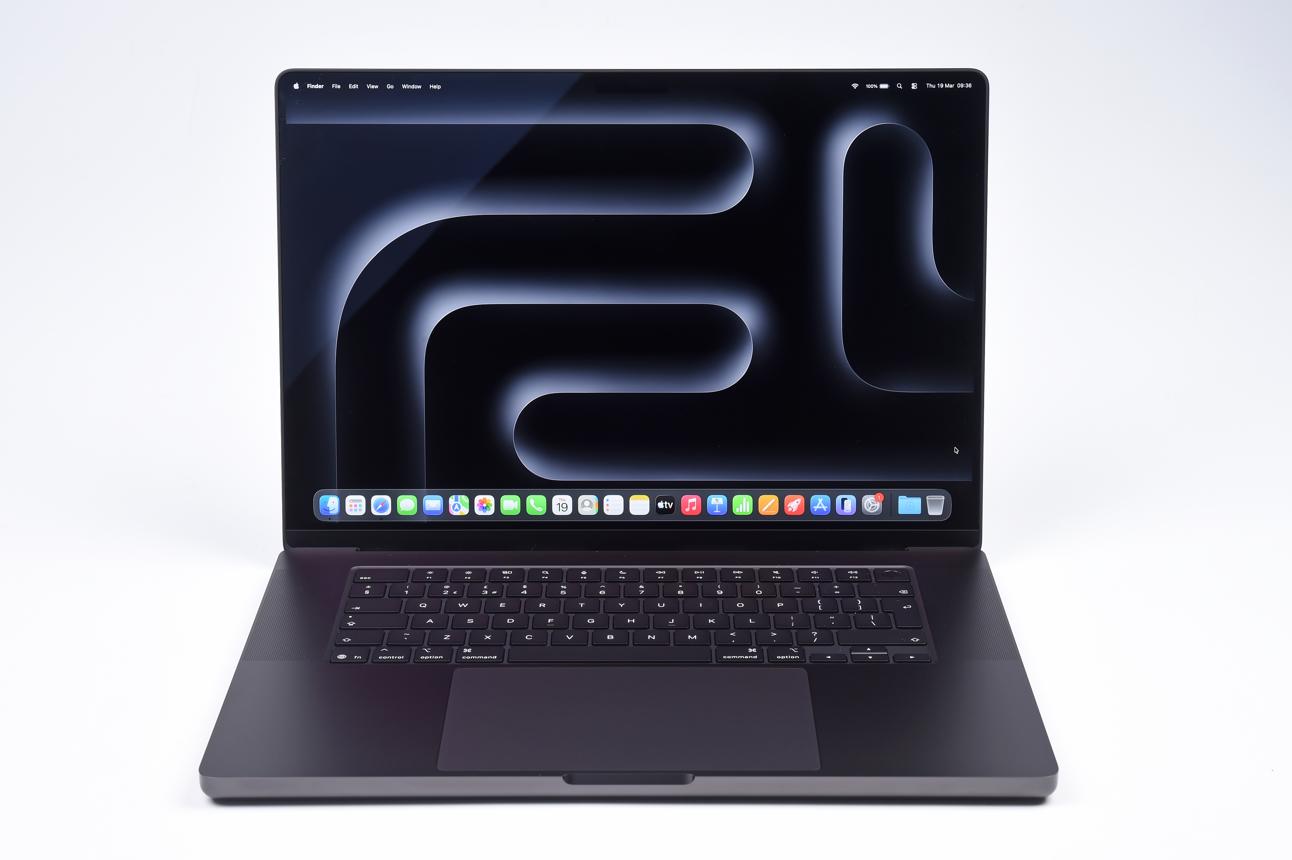
MacRumors reported on October 25 that Apple could announce touchscreen 14-inch and 16-inch MacBook Pro models on October 28, drawing on reporting from Bloomberg journalist Mark Gurman.
The reported changes include several potentially important features.
A touchscreen OLED display
The most prominent reported change is a touchscreen OLED panel.
OLED displays produce light at the pixel level, allowing individual pixels to turn off to display black. This can provide strong contrast and deep blacks, particularly when viewing dark content.
The touchscreen component would add another method of interacting with macOS. Users might be able to tap interface elements, manipulate images, zoom into content, or navigate certain applications directly on the display.
Neither the display technology nor the touch functionality has been officially confirmed for the rumored MacBook Pro.
A possible Dynamic Island
Reports also suggest that the laptop could replace the current display notch with a Dynamic Island-style interface.
This would represent a departure from the current MacBook Pro design. However, buyers should not assume the feature will appear simply because it has been discussed in reporting.
Its practical value would depend on how well it integrates with notifications, background tasks, media controls, and other macOS functions.
Processor uncertainty
The latest MacRumors report says the anticipated touchscreen models could use Apple’s existing M5 Pro and M5 Max chips. Those processors were announced in March 2026.
That possibility matters because a major redesign does not necessarily require a new processor generation.
Apple could prioritize the display, chassis, and user interface while retaining the existing processors. Alternatively, the final product could differ from current reporting.
Until Apple publishes specifications, claims about processor upgrades or performance improvements should be treated as unconfirmed.
Potentially higher prices
The existing 14-inch and 16-inch MacBook Pro models are already premium products. MacRumors reports that the new OLED models could cost more, potentially by as much as $500 at the starting-price level. This is an estimate, not an announced price.
For buyers, the distinction is important.
A touchscreen may be valuable to some users, but it will not automatically justify a price increase for everyone. The final decision should depend on the hardware, software, and workflow benefits Apple actually delivers.
Why a Touchscreen MacBook Could Matter
A touchscreen can make a laptop more flexible, but its value depends on how people work.
For example, photographers may benefit from direct image manipulation, while spreadsheet users might prefer a keyboard and trackpad. Students could appreciate tapping controls during presentations, but they may rarely touch the screen during long writing sessions.
The potential advantage is an additional input method—not the elimination of the traditional laptop interface.
Direct interaction with creative applications
Creative professionals often work with content that benefits from direct manipulation.
A photographer might want to zoom into an image, move around a canvas, or adjust a selection. A designer might want to reposition objects with a finger. A presenter could use touch input to navigate slides or interact with a visual demonstration.
However, the benefit depends on application support.
If the interface is designed primarily for a pointer, tapping small controls can be awkward. A touchscreen is more useful when the operating system and application deliberately accommodate touch.
The Verge’s October 24 analysis of the Lenovo Yoga 9n highlights this distinction by examining the usefulness of stylus support, convertible hardware, and multiple operating modes.
Touch should complement the keyboard and trackpad
For most laptop users, the keyboard and trackpad remain central to everyday productivity.
Typing reports, editing documents, programming, managing spreadsheets, and using keyboard shortcuts are often more efficient with conventional input devices.
A touchscreen MacBook would therefore be most successful if it allowed users to switch naturally between input methods.
Consider a video editor who spends most of the day using keyboard shortcuts and a trackpad. Touch input could be useful for occasional timeline adjustments, but it would not necessarily replace established editing techniques.
A developer might appreciate direct interaction with diagrams or interface previews but still rely on the keyboard for coding.
The best implementation would make touch available when it is helpful without forcing users to adopt it.
Would a touchscreen make the MacBook an iPad replacement?
Not necessarily.
A MacBook Pro and an iPad serve overlapping but different purposes. The MacBook is designed around desktop applications, a physical keyboard, and a pointer-based interface. An iPad emphasizes touch interaction and can support a more tablet-oriented workflow.
A touchscreen would narrow part of that difference, but it would not automatically make the devices interchangeable.
Application compatibility, operating-system behavior, file management, external displays, peripherals, and professional software support would continue to matter.
Buyers should also distinguish a touchscreen clamshell laptop from a convertible 2-in-1. A laptop that supports touch but cannot fold into tablet mode will not offer the same physical flexibility as a convertible Windows laptop.
For a current overview of touch-enabled alternatives, see TechOzea’s guide to the best touchscreen laptops.
OLED Versus Mini-LED: What Buyers Should Understand
OLED is one of the most important reported features of the upcoming MacBook Pro. Understanding the difference between OLED and Mini-LED helps buyers assess whether the potential display upgrade would be worthwhile.
How OLED works
OLED stands for organic light-emitting diode.
Unlike LCD-based displays, OLED panels generate light at the pixel level. This allows individual pixels to turn off, producing very dark blacks and high contrast.
For movie watching, dark video footage, and some creative workflows, those characteristics can be particularly appealing.
OLED can also provide strong color performance and fast pixel response. However, the quality of a particular panel depends on its implementation, calibration, brightness behavior, and other design choices.
The presence of OLED alone does not guarantee superior results in every measurement.
How Mini-LED works
Mini-LED displays use an LCD panel illuminated by many small backlight LEDs divided into local-dimming zones.
The display can dim or brighten groups of LEDs to improve contrast. However, each zone may cover many pixels, so bright objects against dark backgrounds can produce visible halos or blooming.
The effect depends on the number of dimming zones, the display’s processing, and how aggressively local dimming is implemented.
Apple’s existing MacBook Pro uses a Liquid Retina XDR display, which is based on Mini-LED technology. Apple’s published specifications include peak HDR brightness of up to 1,600 nits.
Why display measurements matter
The difference between OLED and Mini-LED is not simply a contest over maximum brightness.
Buyers should consider:
- Black levels and contrast.
- Full-screen and peak brightness.
- Color accuracy.
- Reflection handling.
- Response times.
- Power consumption.
- The type of content they regularly view.
Notebookcheck’s October 24 coverage of the Surface Laptop Ultra illustrates why advertised brightness alone is insufficient. The publication reports display limitations involving local dimming, contrast, and response times despite the laptop’s high peak-brightness specification.
This does not establish that OLED will automatically outperform every Mini-LED display. It demonstrates the need to evaluate the complete panel rather than relying on one number.
Would OLED be worth a higher MacBook Pro price?
For some professionals, potentially.
Photographers and video editors may value the contrast and visual characteristics of a high-quality OLED panel. Users who spend most of their time editing documents, browsing, programming, or communicating might benefit less.
The price difference is also important. If Apple charges a premium for OLED and touch input, buyers should ask whether they need those features or whether an existing MacBook Pro already meets their requirements.
The reported OLED upgrade remains unconfirmed, so no final value judgment is possible until the actual hardware is available.
Performance and Battery-Life Implications
A display redesign can affect a laptop’s overall experience without necessarily producing a substantial processor-performance improvement.
The rumored MacBook Pro illustrates why buyers should evaluate these characteristics separately.
Processor performance
Apple’s M5 Pro and M5 Max are designed for demanding professional workloads. Apple’s official announcement describes CPU, GPU, memory-bandwidth, and on-device AI improvements compared with previous generations. These are company-reported performance claims and should not be treated as independent benchmark results.
If the reported touchscreen models use the same processors as the current generation, their primary advantages may come from display and interface changes rather than a major increase in computing performance.
That could still be worthwhile for users who value the new display. It would be less compelling for someone upgrading exclusively to obtain a faster processor.
Local AI performance
Local AI processing allows compatible workloads to run on the computer instead of depending entirely on remote servers.
The benefits can include reduced network dependence and the ability to process certain data locally. Actual results depend on the model, application, hardware, memory capacity, and software optimization.
Apple already promotes on-device AI capabilities for the current MacBook Pro. The potential touchscreen redesign should not be assumed to introduce a completely new AI architecture without official confirmation.
Battery life
Apple advertises up to 24 hours of battery life for the current MacBook Pro. Actual endurance varies with workload and configuration.
A new OLED panel could affect power consumption, but the result would depend on display size, brightness, refresh rate, panel implementation, and software behavior.
Touch hardware can also introduce additional power demands, although the total effect cannot be quantified without testing the actual product.
Buyers should therefore wait for independent battery tests before concluding that an OLED touchscreen MacBook would last longer—or shorter—than the existing model.
For frequent travelers, battery endurance in realistic productivity workloads is more useful than a manufacturer’s maximum figure.
Compatibility and Software Considerations
The practical value of a touchscreen MacBook depends on software support as much as hardware.
A laptop may have excellent touch hardware but deliver an inconsistent experience if applications are not designed for direct interaction.
macOS must accommodate touch input
A conventional desktop interface uses small controls, menus, and pointer interactions. Touch interfaces need to account for finger size, gestures, screen reach, and accidental input.
If Apple introduces touch support, the important questions will include:
- Can users comfortably operate common system controls?
- Do menus and buttons adapt to touch?
- Do professional applications support useful touch gestures?
- Does the interface work equally well with a trackpad?
- Can users avoid touching the screen when they prefer conventional input?
Reports suggest that Apple may develop a more touch-aware macOS interface, but this behavior has not been officially confirmed for the rumored laptop.
Professional applications need to work properly
Creative professionals should check support for their essential applications before upgrading.
Touch support in the operating system does not guarantee that every application will provide a useful touch interface.
For example, a video editor may support basic touch navigation but still depend heavily on keyboard shortcuts. A design application may benefit from direct manipulation, while another may work best with a mouse or trackpad.
Users should also verify external-monitor support, storage requirements, peripheral compatibility, and software licensing before changing computers.
What Windows laptop buyers can learn from the reports
Windows manufacturers have offered touchscreen laptops for years, including conventional clamshells and convertible 2-in-1 designs.
For users who want touch input today, there is no need to wait for an unannounced Apple product.
TechOzea’s Best Windows Laptops guide provides a starting point for comparing Windows alternatives. Its HP OmniBook 5 14 coverage also examines a more affordable Windows laptop with OLED display options.
These alternatives are useful comparisons, not automatic recommendations. Buyers should check the exact configuration, application requirements, display specifications, and real-world performance before purchasing.
Should You Buy a MacBook Pro Now or Wait?
The answer depends on how urgently you need a laptop and what you want from the next model.
Apple’s event is scheduled for October 28, only three days after this briefing. Buyers who can comfortably postpone their decision have a straightforward reason to wait for the announcement.
However, waiting does not mean the new product will necessarily be a better purchase.
Buy an existing MacBook Pro if you need one now
The current MacBook Pro already offers high-end processing, a professional display, Thunderbolt 5 connectivity, and substantial storage configurations. Apple’s published specifications make it a credible option for demanding work today.
An existing model may be the better choice if:
- Your current computer has failed or is no longer adequate.
- You need a specific application or hardware configuration now.
- You primarily care about processor performance rather than touch input.
- You find a discount that fits your budget.
- You have already verified that the current model supports your workload.
A confirmed, available laptop can be more useful than waiting indefinitely for a rumored feature.
Wait if the reported changes matter to you
Waiting makes more sense if your purchasing decision depends on:
- A touchscreen.
- An OLED display.
- A thinner or lighter chassis.
- A redesigned interface.
- A different starting price or storage configuration.
The announcement could clarify which features are real, which configurations are available, and how much Apple expects customers to pay.
It could also reveal that some rumored details were inaccurate.
Consider the current M5 Max discount
WIRED reports that a 16-inch M5 Max MacBook Pro with 36GB of memory and 2TB of storage has dropped to $3,499 at Amazon. The publication compares that price with a listed retail price of $4,399.
That is a substantial reported discount, but it should not automatically determine your purchase.
First, verify that the deal remains active. Retail prices can change quickly.
Second, compare the configuration with your workload. The M5 Max may be unnecessary if your main tasks involve web browsing, office applications, and light creative work.
Third, compare the cost of buying now with the possibility of waiting for new hardware.
A discount on an existing model is valuable only if that model is the right fit.
Avoid buying solely because of rumors
A product rumor can be useful when it helps buyers anticipate a real purchasing decision. It becomes less useful when consumers treat speculative specifications as guaranteed benefits.
A rumored touchscreen does not establish better battery life. OLED does not automatically mean a more accurate display. A new interface does not guarantee that every professional application will improve.
The sensible approach is to identify the features you actually need, then compare official specifications and independent testing when available.
Windows Alternatives Worth Considering
Apple’s potential move toward touch input is also a reminder that laptop buyers have several ways to obtain a premium display and direct interaction.
Convertible laptops
A convertible 2-in-1 combines a laptop keyboard with a hinge that can fold the display into tablet or tent modes.
This can be useful for students, presenters, designers, and people who frequently switch between typing and touch interaction.
The trade-off is that a convertible design may prioritize flexibility over other characteristics, depending on the model.
A touchscreen clamshell MacBook, if released, would not automatically offer the same tablet-mode experience.
Premium Windows laptops
Windows laptops span a wide range of prices, processors, displays, and form factors.
Some models prioritize long battery life and portability. Others focus on creative work, gaming, or professional software.
The important consideration is the complete configuration. Memory capacity, storage, processor choice, screen quality, ports, and repairability can matter more than the product category alone.
TechOzea’s Best Lightweight Laptops guide can help buyers compare portable options, while its NVIDIA RTX Spark laptop coverage explores a different category of premium Windows hardware aimed at demanding AI and creative workloads.
OLED is already available outside the MacBook Pro
OLED is not an exclusive advantage that Apple could introduce to the laptop market for the first time.
Windows laptops already offer OLED displays, including premium models aimed at creators and everyday users.
Consequently, the potential MacBook Pro upgrade should be evaluated on its implementation, calibration, brightness behavior, software integration, and price—not simply on the presence of OLED.
For consumers who want a touchscreen laptop immediately, existing Windows models may provide a more direct path to that feature.
Risks and Limitations
Several important uncertainties remain before Apple’s October 28 event.
The specifications may differ from the reports
Apple has not officially confirmed the rumored touchscreen MacBook Pro’s display technology, processor, interface, or price.
The final product could differ from what journalists currently expect.
Touch may add limited value for some users
Some people may appreciate direct interaction. Others may continue using the keyboard and trackpad almost exclusively.
A touchscreen is not automatically an improvement for every laptop workflow.
OLED may come with trade-offs
OLED can deliver strong contrast and deep blacks, but display performance depends on more than panel type.
Brightness, color accuracy, reflections, power consumption, and the implementation of display controls remain important.
The price could determine the value
If the redesigned MacBook Pro costs substantially more, buyers should consider whether the new features justify the additional expense.
For users who need performance rather than touch input, an existing model may offer better value.
Early reviews will matter
Even if Apple announces the expected features, the first specifications will not answer every practical question.
Independent reviewers should evaluate touch responsiveness, display quality, battery life, thermal behavior, application support, and sustained performance.
Until those results are available, buyers should avoid assuming the redesigned product will outperform the current MacBook Pro in every category.
What to Watch on October 28
Apple’s event should help resolve several of the most important questions surrounding the rumored MacBook Pro.
1. Does Apple actually announce a touchscreen MacBook Pro?
This is the central question. The event date is confirmed, but the rumored product remains unconfirmed.
2. Which display technology does Apple use?
If Apple announces an OLED model, examine the resolution, brightness specifications, refresh rate, color characteristics, and other display details.
3. Which processors and memory configurations are available?
The processor will affect performance expectations, while memory and storage determine how suitable the laptop is for particular workloads.
4. How does touch input work in macOS?
The interface matters as much as the hardware. Buyers should look for demonstrations that show whether touch is useful in real applications rather than merely in promotional animations.
5. What is the starting price?
Price will determine whether the redesigned model competes effectively with existing MacBook Pro configurations and premium Windows alternatives.
6. When can customers buy it?
The announcement date does not necessarily establish the first retail date. Buyers should wait for official availability information before planning an upgrade around a particular deadline.
Conclusion
The reported touchscreen MacBook Pro is an important story because it could change how Apple approaches laptop interaction and display technology.
However, the confirmed news is narrower than the rumors suggest. Apple has announced an October 28 event, while the touchscreen, OLED panel, Dynamic Island, processor configuration, and price of the anticipated MacBook Pro remain unconfirmed.
For buyers who need a laptop immediately, the existing MacBook Pro remains a viable option. Its M5 Pro and M5 Max configurations already provide substantial computing capabilities, and current retail discounts may improve the value proposition.
For buyers who specifically want a touchscreen MacBook, waiting for Apple’s announcement is the more sensible decision.
The final purchase should depend on confirmed specifications, independent testing, software compatibility, and price—not on the excitement surrounding a rumored redesign.
Frequently Asked Questions
Has Apple confirmed a touchscreen MacBook Pro?
No. Apple has confirmed its October 28, 2026, “Pro and tell” event, but the touchscreen MacBook Pro‘s specifications have not been officially announced. Bloomberg reporting summarized by MacRumors identifies it as an expected product.
When is Apple’s next MacBook Pro event?
Apple’s “Pro and tell” event is scheduled for October 28, 2026, in Los Angeles. The event date is confirmed; the products to be announced should not be treated as confirmed until Apple reveals them.
Will the new MacBook Pro have an OLED display?
Reports suggest that Apple may introduce OLED displays in the anticipated touchscreen models. Apple has not officially confirmed the display technology for those unannounced products.
Will the touchscreen MacBook Pro use an M6 processor?
The final processor configuration remains unconfirmed. MacRumors’ October 25 report says the anticipated touchscreen models could use the existing M5 Pro and M5 Max chips. Buyers should wait for official specifications.
Should I buy the current MacBook Pro or wait?
If your current laptop is adequate and you specifically want a touchscreen or OLED display, waiting for the October 28 announcement makes sense. If you need a computer immediately and the existing model meets your requirements, compare its specifications and current price with your budget.
Is OLED better than Mini-LED for laptops?
Neither technology is automatically better in every situation. OLED can offer deep blacks and strong contrast, while Mini-LED can deliver high brightness and effective local dimming. Actual display quality depends on the implementation, calibration, brightness, response times, and intended use.
Are there touchscreen laptop alternatives available now?
Yes. Windows manufacturers already offer touchscreen laptops, including conventional clamshell models and convertible 2-in-1 devices.
