


Apple has announced a new 14-inch MacBook Pro powered by its M6 chip, positioning the laptop as a premium option for professionals, students, developers and content creators. The new model starts at $1,999 in the United States and combines updated processing hardware with on-device AI capabilities, Wi-Fi 7, Bluetooth 6 and a claimed battery life of up to 24 hours.
The announcement matters because laptop buyers increasingly have to decide whether a new processor and AI features justify replacing a computer that may already handle their daily work comfortably. A higher benchmark score is useful, but it does not automatically translate into a better experience for writing, browsing, video calls or ordinary multitasking.
Apple’s headline figures also require context. The company says the M6 delivers up to 30% faster graphics and up to 25% faster AI workloads than its M5 comparison system. Those are manufacturer-reported results, and independent testing is still needed to establish how the new laptop performs under sustained workloads and ordinary battery-powered use.
For buyers considering a MacBook Pro M6, the important questions are straightforward: what has changed, which improvements will matter in daily use, and when is it worth paying the premium rather than keeping an existing laptop?
Table of Contents
- Key Takeaways
- What Apple Announced
- M6 MacBook Pro Price and Availability
- What Is New About the M6 Chip?
- Apple’s Performance Claims Need Context
- On-Device AI: What It Means for Laptop Buyers
- Battery Life: Up to 24 Hours, According to Apple
- Wi-Fi 7 and Bluetooth 6 Are Important Upgrades
- Display, Design, Ports, and Everyday Usability
- macOS 27 and Apple Intelligence
- How the M6 MacBook Pro Compares With the M5 Model
- Who Should Buy the M6 MacBook Pro?
- Who Should Wait Before Buying?
- How It Fits Into the Laptop Market
- What Buyers Should Check Before Ordering
- What to Watch Next
- Conclusion
- Frequently Asked Questions
Key Takeaways
- The M6 MacBook Pro starts at $1,999 in the US. Apple opens preorders on October 28, 2026, with availability beginning November 6.
- The biggest upgrades are processing power, graphics, AI acceleration, and wireless connectivity. Apple claims up to 30% faster graphics than the M5 model, but independent testing is needed to establish real-world performance.
- M5 MacBook Pro owners do not automatically need to upgrade. Buyers using an older Intel or M1 Mac may have a stronger reason to consider the new model, depending on their workload, budget, and software requirements.
What Apple Announced
Apple announced a refreshed 14-inch MacBook Pro powered by its M6 chip on October 27, 2026. The laptop targets professionals, students, developers, creative workers, and other users who need a portable computer capable of handling demanding applications.
The announcement brings a new generation of Apple’s laptop processor to the entry-level 14-inch MacBook Pro. It also introduces faster wireless connectivity and updated AI processing capabilities.
According to Apple’s official M6 MacBook Pro announcement, the computer combines a 12-core CPU, a 12-core GPU, a dual 16-core Neural Engine, Wi-Fi 7, Bluetooth 6, and a claimed battery life of up to 24 hours.
Apple also retains several features associated with the existing MacBook Pro experience, including the Liquid Retina XDR display, a 12-megapixel Center Stage camera, a six-speaker sound system, and a selection of physical ports.
The result is primarily a performance-focused refresh rather than a complete redesign.
That distinction matters. A new processor can improve responsiveness, rendering times, and energy efficiency, but it does not automatically make a laptop a better purchase for every user. Display quality, memory capacity, software compatibility, storage, price, and actual workload performance remain important.
For consumers, the central question is whether the M6 MacBook Pro delivers enough practical improvement to justify its $1,999 starting price.
M6 MacBook Pro Price and Availability
Apple has confirmed the US starting price and release schedule.
| Detail | Confirmed information |
|---|---|
| Product | 14-inch MacBook Pro with M6 |
| Announcement date | October 27, 2026 |
| US starting price | $1,999 |
| Education starting price | $1,899 |
| Preorders begin | October 28, 2026 |
| Availability begins | November 6, 2026 |
| Colors | Space Black and Silver |
| Standard memory | 16GB unified memory |
| Maximum configurable memory | 32GB |
| Advertised battery life | Up to 24 hours |
| Wireless connectivity | Wi-Fi 7 and Bluetooth 6 |
The $1,999 starting price puts the M6 MacBook Pro firmly in the premium laptop category. It is not an entry-level computer for people who primarily browse the web, send email, and edit documents.
Instead, the price is aimed at buyers who can benefit from the combination of processor performance, graphics capabilities, display quality, and macOS software.
For students, educators, and eligible buyers, Apple’s education pricing reduces the starting price to $1,899. Actual eligibility and available configurations should be confirmed through the Apple Store.
The important point is that the starting price does not tell the entire purchasing story. Buyers should check memory and storage configurations before comparing this laptop with Windows alternatives.
A machine with more memory or a larger SSD may cost considerably more than its advertised base price. The same is true of competing premium laptops.
Should you preorder immediately?
Not necessarily.
Preordering can make sense for buyers who need a new computer by a particular date or already know that the new configuration meets their requirements. However, waiting for independent reviews is usually the better decision when performance and battery life are central to the purchase.
Reviews should help establish whether the M6 chip improves sustained workloads, whether the laptop remains quiet under demanding tasks, and how much battery life it delivers during realistic use.
Those results matter more than a processor-generation label.
What Is New About the M6 Chip?
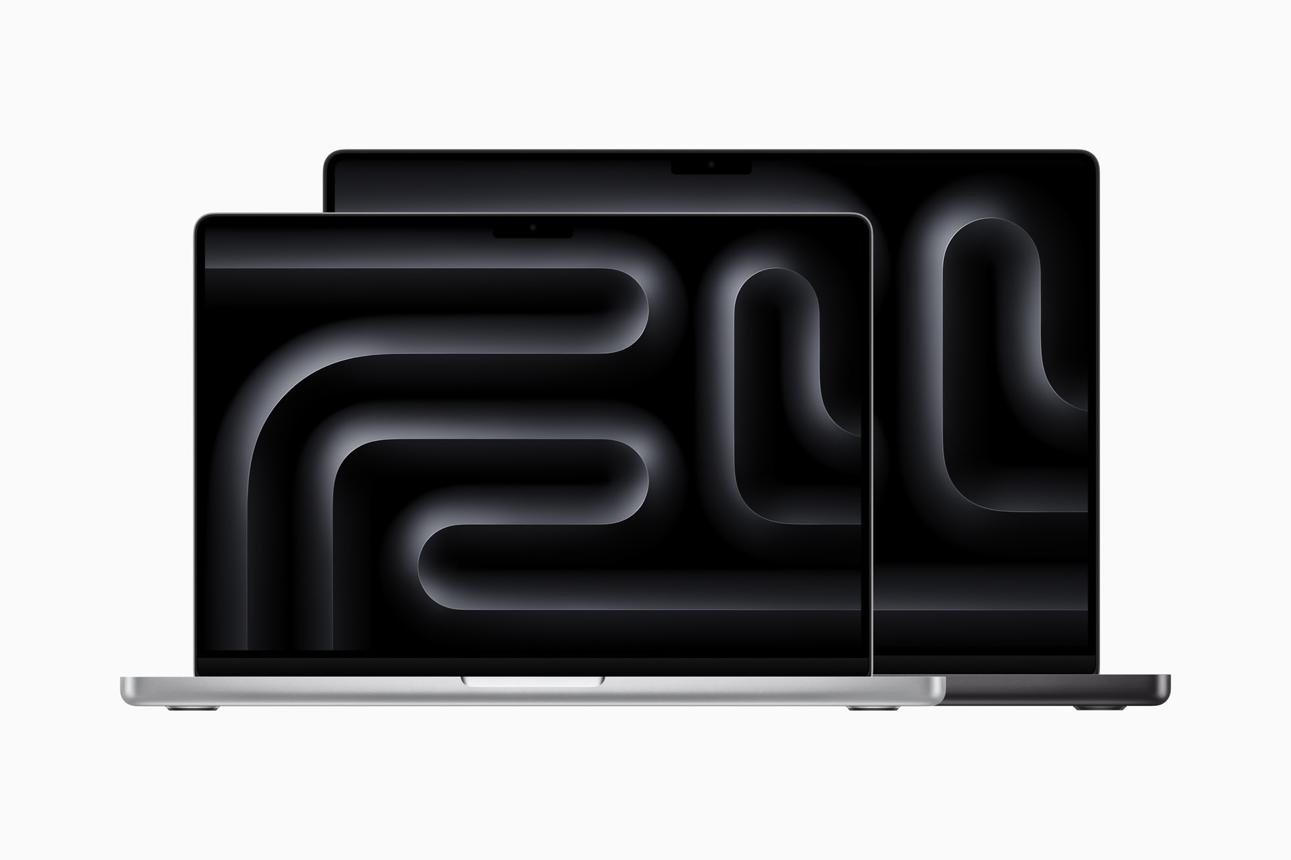
The M6 is the most important hardware change in the new MacBook Pro.
Apple specifies a 12-core CPU and a 12-core GPU. The chip also includes Neural Accelerators in its GPU cores and a dual 16-core Neural Engine designed to accelerate supported AI workloads.
Apple says the new CPU has two more cores than the M5 generation’s CPU, while the GPU also gains two cores.
More processing cores can help with workloads that are designed to use them efficiently. Examples include video rendering, compiling software, complex image processing, and certain scientific or creative applications.
However, additional cores do not guarantee proportional performance improvements.
Software optimization, memory bandwidth, cooling, power limits, and the specific instructions used by an application all influence the outcome.
CPU performance: What buyers should expect
The CPU handles general-purpose computing tasks, including application logic, multitasking, document processing, and many professional workloads.
For everyday users, a faster CPU may make large spreadsheets more responsive, reduce waiting during software exports, and help demanding applications complete work sooner.
Developers may benefit from shorter compilation times when their projects can use the available processing resources efficiently. Creative professionals may also see improvements in applications that rely heavily on CPU processing.
Nevertheless, Apple’s performance statements should be treated as manufacturer claims until independent tests establish how the new computer performs across a broader range of applications.
Buyers should look for both single-core and multicore benchmarks.
Single-core performance can influence the responsiveness of applications that depend on a small number of CPU cores. Multicore performance matters more when software can distribute work across several cores.
Neither measurement tells the whole story. Real application tests are needed to understand performance in the software a buyer actually uses.
GPU performance: More than gaming
The GPU handles graphics-related workloads, including visual effects, 3D rendering, certain video-editing operations, and supported AI calculations.
Apple claims the M6 GPU delivers up to 30% faster graphics performance than the M5 GPU.
The phrase “up to” is important. It describes a maximum result under particular conditions, not a guarantee that every application will run 30% faster.
Performance can vary substantially between games, 3D applications, video editors, and other GPU-accelerated software.
Mac gaming is another area where buyers should evaluate individual titles rather than assume that a stronger GPU will make every game perform well. Native macOS support, graphics settings, compatibility layers, and game optimization all affect the experience.
For creative professionals, GPU acceleration may be more valuable than gaming benchmarks. Video effects, image processing, and rendering can benefit from stronger graphics hardware when the application supports the relevant acceleration.
For general office work, however, the GPU upgrade may have little noticeable effect.
Memory and storage considerations
Apple says the M6 MacBook Pro offers memory bandwidth of up to 170GB/s. The previous M5 model’s maximum is reported as 153GB/s by independent coverage.
Memory bandwidth describes how quickly data can move between memory and the processor. It can affect workloads that repeatedly move large amounts of data, including some graphics, video, and AI tasks.
But bandwidth is only one part of memory performance.
Memory capacity also matters. Applications that need more working memory can become constrained if the computer does not have enough capacity, regardless of its theoretical bandwidth.
The M6 MacBook Pro starts with 16GB of unified memory and can be configured with up to 32GB. Buyers should choose capacity based on their expected workload rather than assuming that a newer processor compensates for insufficient memory.
People working with large video projects, multiple professional applications, virtual machines, or local AI models should pay particular attention to this decision.
Because unified memory is integrated into Apple’s system architecture, buyers should treat the initial capacity choice as an important long-term commitment. Confirm the available configurations and upgrade costs before ordering.
Apple’s Performance Claims Need Context
Apple’s announcement includes several impressive comparisons, but they need to be interpreted carefully.
The company says the M6 GPU is up to 30% faster than the M5 GPU and that on-device AI workloads can improve by up to 25%. Apple also advertises substantial improvements for selected workflows compared with the M1 MacBook Pro.
These claims can help identify where Apple expects the new hardware to excel. They do not replace independent benchmarking.
A comparison with an M1 MacBook Pro also answers a different question from a comparison with the immediately preceding M5 model. The larger the generational gap, the more likely it is that improvements in architecture, software, graphics, and memory contribute to the overall result.
For a buyer moving from an older Mac, those improvements may be meaningful. For someone using an M5 system, the difference may be much smaller in everyday work.
Independent reviewers should test several types of workload, including:
- CPU-intensive tasks such as compilation and rendering.
- GPU-intensive tasks such as supported 3D workloads.
- Video editing and export.
- Battery life during light and demanding use.
- Sustained performance after the laptop has been under load for an extended period.
- Application performance with realistic memory requirements.
- Thermal behavior, fan noise, and power consumption.
A benchmark that lasts only a few seconds may not reveal how the computer behaves during a lengthy export or a long development session.
Likewise, a single synthetic benchmark cannot establish whether the laptop is the best choice for a particular buyer.
Consumer takeaway: Treat Apple’s figures as useful starting points, not universal performance guarantees. Wait for independent reviews if your purchasing decision depends on a specific application or workload.
On-Device AI: What It Means for Laptop Buyers
AI acceleration is a major part of Apple’s M6 messaging.
The chip combines Neural Accelerators in its GPU cores with a dual 16-core Neural Engine. These components are designed to speed up supported machine-learning operations.
For consumers, the potential benefits include faster AI-assisted image editing, local language-model processing, and features integrated into supported applications.
On-device processing can also reduce the need to send certain information to a remote service. However, local execution does not automatically mean that every AI feature is private or that no data ever leaves the computer.
Privacy depends on the implementation of each feature, its permissions, the data it processes, and whether it uses cloud services.
What is a Neural Engine?
A Neural Engine is specialized hardware designed to accelerate particular machine-learning operations.
Instead of asking the CPU to perform every calculation, compatible software can use specialized hardware to complete supported tasks more efficiently.
This can improve responsiveness and reduce energy consumption for certain workloads.
However, the existence of an AI accelerator does not mean every AI application will run faster. Developers must support the relevant frameworks and hardware, and the performance of a particular model depends on its size, precision, memory requirements, and implementation.
The amount of available unified memory can also limit which models a user can run locally.
Does the M6 make a MacBook an AI PC?
In a broad sense, the M6 MacBook Pro is designed to support AI workloads locally. But the term “AI PC” can cover different hardware configurations and software capabilities.
Windows laptops marketed around AI features may use a dedicated neural processing unit, GPU acceleration, or a combination of hardware components. Apple’s architecture distributes supported workloads across its own processing units.
For consumers, the useful question is not simply whether a laptop qualifies as an AI PC. It is whether the computer supports the AI features they want to use.
Before buying, check:
- Whether your preferred applications support local AI processing.
- Whether a feature requires an internet connection.
- Whether the software uses a subscription or usage limits.
- Whether the model you want to run fits within available memory.
- Whether the feature is available in your country and language.
- Whether your organization permits the use of local or cloud-based AI tools.
These considerations are particularly important for developers, journalists, designers, and business users who handle sensitive information.
Apple’s AI promises versus practical availability
Apple says the new MacBook Pro works with macOS 27 and its Apple Intelligence features, including the updated Siri experience.
However, Apple’s announcement also states that Siri AI is available in beta in macOS 27.2 and requires a supported device and language. Certain features may rely on server-side models and can be subject to usage limits.
That qualification matters because a laptop’s hardware capability and the availability of a particular software feature are separate issues.
A feature may be technically supported but not yet available to every user, region, or language.
Buyers should therefore avoid purchasing the M6 MacBook Pro solely on the assumption that every announced AI feature is immediately available in its final form.
The more sensible approach is to buy based on capabilities that are available and useful now, while treating future software improvements as additional potential value.
Battery Life: Up to 24 Hours
Apple advertises up to 24 hours of battery life for the M6 MacBook Pro.
Long battery life can be valuable for students, travelers, journalists, developers, and professionals who spend time away from a desk.
It can reduce the need to carry a charger throughout the day and make the laptop more convenient for working between meetings, classes, and travel connections.
However, the 24-hour figure is a manufacturer estimate, not a guarantee of how long every buyer will use the laptop between charges.
Battery life depends on the workload, display brightness, network conditions, connected accessories, software behavior, and other factors.
A laptop running a light video playback or browsing workload may consume considerably less power than one performing continuous rendering, gaming, or local AI inference.
Why real-world testing matters
A useful battery review should include more than one test.
Light-use testing can help estimate endurance for browsing, document editing, and other everyday activities. More demanding tests reveal how the laptop behaves during sustained workloads.
Display brightness also needs to be controlled when comparing results. A laptop tested at a lower brightness may last longer than one tested at a brighter setting, even if the underlying hardware is similar.
For a fair comparison, reviewers should explain their testing conditions and compare laptops under consistent workloads.
Until such testing is available, Apple’s 24-hour figure should be presented as an advertised maximum.
Should battery life influence your buying decision?
Yes, but not in isolation.
A laptop with excellent battery life can still be the wrong choice if it lacks the ports, memory, software compatibility, or performance needed for your work.
Similarly, a buyer who primarily uses a computer at a desk may benefit more from additional memory or storage than from an improvement in maximum battery endurance.
For frequent travelers, students, and mobile professionals, battery life deserves greater weight. For workstation-style use, sustained performance and connectivity may matter more.
The best choice depends on how the computer will be used.
Wi-Fi 7 and Bluetooth 6 Are Important Upgrades
The M6 MacBook Pro adds Wi-Fi 7 and Bluetooth 6.
These upgrades improve the laptop’s wireless capabilities, but the actual benefit depends on the network and connected devices.
Wi-Fi 7 is designed to improve wireless performance and efficiency under supported conditions. Its benefits can include higher potential throughput, lower latency in suitable configurations, and better use of compatible wireless networks.
To realize the full benefit, users need a compatible router or access point. Internet service, interference, distance, network congestion, and router capabilities still influence real-world results.
Buying a laptop with Wi-Fi 7 does not automatically make an older Wi-Fi router faster.
Bluetooth 6 is also a standards-generation upgrade, but its practical benefits depend on the supported Bluetooth features and the accessories being used. Buyers should not assume that every existing headset, mouse, keyboard, or other peripheral will gain new functionality simply because the laptop supports a newer version.
Apple says the new MacBook Pro also includes faster connectivity for wireless workflows. Independent tests will be needed to determine how much improvement users experience in specific environments.
For consumers who frequently transfer large files over a compatible local network, wireless connectivity can be important. For people using ordinary home broadband and basic peripherals, the difference may be less noticeable.
The upgrades are useful, but they should not be the only reason to replace an otherwise capable laptop.
Display, Design, Ports, and Everyday Usability
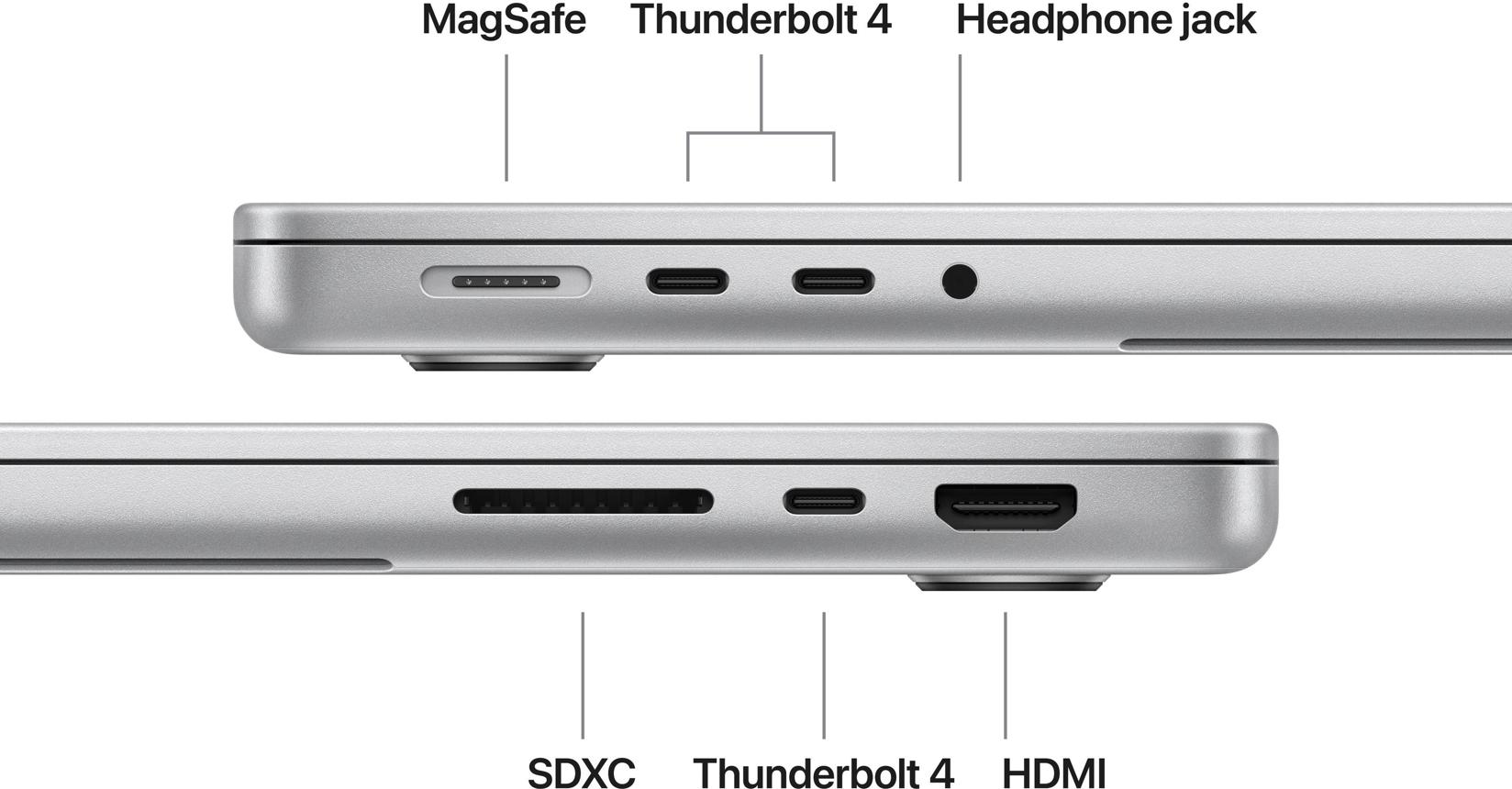
The M6 MacBook Pro retains the Liquid Retina XDR display.
Apple also continues to offer a nano-texture display option, a 12-megapixel Center Stage camera, a six-speaker sound system, and a range of physical ports.
These are important elements of the everyday laptop experience. A processor upgrade matters less if the keyboard, screen, audio, and connectivity do not suit the buyer’s needs.
The display remains a key selling point
A high-quality display can benefit photographers, video editors, designers, and users who spend long hours reading or working with visual content.
Apple’s Liquid Retina XDR branding identifies its high-end display technology, but buyers should verify the specifications of the configuration they intend to purchase.
For professional visual work, relevant considerations include color accuracy, brightness, contrast, reflections, supported color spaces, and the display’s behavior under different lighting conditions.
The optional nano-texture finish may be useful in environments where reflections are distracting. However, buyers should evaluate whether its surface characteristics suit their work and viewing preferences.
Because this is primarily a processor refresh, prospective buyers should not assume the display has undergone a major generational improvement without evidence.
Webcam and audio
The 12-megapixel Center Stage camera is designed to support video calls, while the six-speaker sound system targets users who want good built-in audio.
These features may be useful for remote meetings, online learning, content review, and everyday communication.
Nevertheless, hardware specifications alone cannot establish the quality of every video call or audio experience. Lighting, conferencing software, microphone processing, room acoustics, and network quality all matter.
Users who produce professional video or audio may still prefer dedicated cameras, microphones, headphones, or speakers.
Ports and external displays
Apple says the new model retains a wide array of ports. Buyers who depend on external monitors, high-speed storage, audio interfaces, or other peripherals should check the exact port configuration on the official product page.
This is especially important for people who connect multiple external displays or use specialized equipment.
A port’s physical shape does not tell the whole story. Supported data rates, display output, charging behavior, and compatibility can vary.
For professional workflows, confirm that the laptop supports the required number of displays, the appropriate resolution and refresh rate, and the necessary storage or docking accessories.
macOS 27 and Apple Intelligence
The new M6 MacBook Pro ships with macOS 27, which Apple calls Golden Gate.
Apple describes the software as bringing improvements to the Mac experience, including updated Siri AI capabilities and additional Apple Intelligence features.
The company says the updated Siri can use personal context to assist with information across supported applications, answer questions, and perform tasks across apps.
Apple also describes AI-related tools for Safari, Photos, and Shortcuts, including tab organization, website-change notifications, image editing, and the creation of automations from natural-language descriptions.
These features could make routine computer tasks easier. For example, an automation that once required several manual steps might be created through a written instruction.
However, a feature announcement does not establish that every workflow will operate reliably in every application.
Users should also consider privacy, permissions, cloud processing, language availability, and usage limits before relying on AI tools for important work.
For business buyers, compatibility with company software and security policies remains essential.
Software support and long-term value
A laptop is a long-term purchase, so software support matters almost as much as initial performance.
Buyers should check Apple’s current compatibility and support information when evaluating how the laptop fits into their future workflow.
It is also important to consider the applications that matter most. A Mac can be a strong choice for many creative, educational, and development tasks, but Windows-only applications, specialized enterprise software, and certain games may require different solutions.
For people switching from Windows, verify that essential software is available for macOS or has a suitable alternative.
A faster processor cannot compensate for a missing application or an incompatible peripheral.
How the M6 MacBook Pro Compares With the M5 Model
The M6 MacBook Pro represents an incremental hardware upgrade rather than a complete redesign.
Apple’s new processor has more CPU and GPU cores, while the company advertises improved graphics, AI performance, and wireless connectivity.
The display and broad design approach remain familiar.
| Area | M6 MacBook Pro | Previous M5 MacBook Pro |
|---|---|---|
| CPU | 12-core CPU | 10-core CPU, as reported in independent comparisons |
| GPU | 12-core GPU | 10-core GPU, as reported in independent comparisons |
| Maximum memory bandwidth | Up to 170GB/s, according to Apple | Up to 153GB/s, as reported by independent coverage |
| Wireless | Wi-Fi 7 and Bluetooth 6 | Wi-Fi 6E and Bluetooth 5.3, as reported by independent coverage |
| Advertised battery life | Up to 24 hours | Up to 24 hours, according to comparison coverage |
| Display | Liquid Retina XDR | Liquid Retina XDR |
| Starting price | $1,999 | Historical pricing has changed; check current listings |
The comparison shows why the upgrade decision depends on the starting point.
An M5 owner already has a modern laptop with a high-end display and strong processing capabilities. Unless the M6 improves a specific workload enough to justify the cost, keeping the existing machine may be the more economical choice.
An M1 owner faces a different calculation. A newer processor, improved graphics, updated connectivity, and additional AI acceleration may provide more meaningful benefits, particularly for demanding professional applications.
An Intel Mac owner may have an even stronger reason to evaluate a transition, although compatibility requirements and software needs must be considered.
Does the M6 offer better value?
Value depends on performance relative to price, not simply on the number of new features.
The M6 model costs $1,999 at launch. Buyers should compare that price with available alternatives, including discounted previous-generation laptops, other Mac configurations, and premium Windows machines.
A discounted M5 model may be attractive if it meets the buyer’s requirements. Conversely, the M6 may be worth the premium for someone who benefits from its new processing capabilities and expects to keep the computer for several years.
The right comparison should include memory, storage, display quality, battery life, warranty, and the cost of any necessary accessories.
Who Should Buy the M6 MacBook Pro?
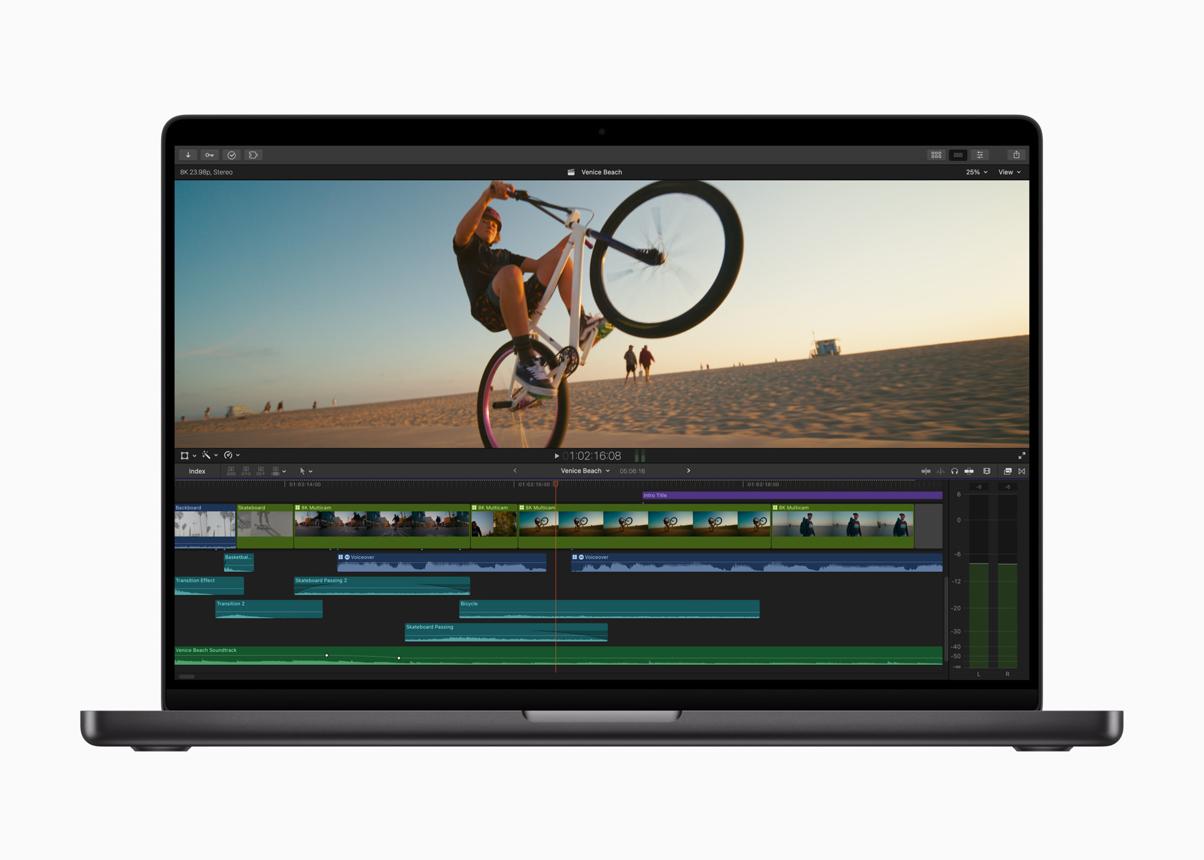
The M6 MacBook Pro is worth considering for several groups of buyers.
Creative professionals
Video editors, photographers, designers, and 3D artists may benefit from stronger CPU and GPU capabilities.
However, the size of the improvement depends on the applications and projects involved. Professionals should wait for independent benchmarks in their primary software before making a purchasing decision based on performance claims.
Software developers
Developers working with large codebases, local AI tools, and demanding development environments may appreciate the updated processor and memory architecture.
The 16GB starting memory capacity deserves attention. Users running virtual machines, containers, development tools, browsers, and local models simultaneously may benefit from a higher-memory configuration.
Students and educators
Students studying computer science, engineering, design, film, or other demanding disciplines may find the M6 MacBook Pro appealing.
The combination of portability, battery life, and processing power can be valuable for mobile study and project work.
However, a $1,999 starting price is substantial. Students whose coursework involves web browsing, document editing, presentations, and video calls may not need a professional laptop.
Education pricing helps, but a less expensive Mac or Windows laptop may offer better value for lighter workloads.
Users upgrading from older computers
People using older Intel-based Macs or early Apple Silicon machines should evaluate whether the performance, connectivity, and software changes address limitations they encounter regularly.
The upgrade may be worthwhile if the current computer struggles with demanding applications, has insufficient memory, or no longer fits the user’s workflow.
The decision should be based on actual needs rather than the appeal of owning the newest processor.
Who Should Wait Before Buying?
Several groups should be cautious about buying immediately.
M5 owners: The new model may be faster, but the benefit could be modest for routine tasks. Wait for workload-specific testing.
Budget-conscious buyers: The M6 MacBook Pro is a premium computer. A less expensive laptop may be sufficient for everyday productivity.
Buyers who need a Windows-only application: Check software compatibility before switching to macOS.
Users who need maximum memory: Confirm the available configuration and total cost before ordering.
People who prioritize a redesign: The M6 refresh does not introduce a fundamentally new chassis or display design in the announcement. Buyers waiting for a broader redesign should distinguish the confirmed M6 model from separate reports and rumors about future MacBook Pro products.
Anyone depending on an unannounced feature: Do not buy based on rumors about future processors, displays, or product names. Evaluate the model Apple has actually announced.
How It Fits Into the Laptop Market
The M6 MacBook Pro arrives in a market where laptop buyers increasingly compare more than traditional CPU performance.
Battery endurance, AI acceleration, wireless connectivity, graphics capabilities, display quality, and long-term software support all influence purchasing decisions.
Apple’s approach integrates the CPU, GPU, Neural Engine, and unified memory into a tightly coordinated platform. This can help the company optimize performance and power consumption across its own hardware and operating system.
Windows laptops use a broader range of processors and graphics architectures. Depending on the model, buyers may find different combinations of x86 or Arm processors, integrated graphics, discrete GPUs, and dedicated AI accelerators.
That diversity creates trade-offs.
A thin-and-light Windows laptop may prioritize portability and battery life. A gaming laptop may emphasize graphics performance and cooling. A workstation may offer more memory, specialized graphics, or support for applications that are not available on macOS.
The MacBook Pro competes most directly with premium laptops for professional users, but the best option depends on software requirements and budget.
AI hardware is not the whole story
The M6’s AI capabilities are an important selling point, but AI acceleration alone does not establish which laptop is best.
Users need compatible software, sufficient memory, useful models, and clear privacy controls.
A dedicated accelerator may improve the performance of supported tasks while providing little benefit in applications that do not use it.
Buyers should therefore compare actual AI workflows instead of relying on a single processor specification.
Connectivity has practical value
Wi-Fi 7 and Bluetooth 6 improve the new MacBook Pro’s wireless specification, but buyers should evaluate their existing equipment.
A Wi-Fi 7 laptop connected to an older router will not automatically achieve the benefits of a compatible Wi-Fi 7 network. Similarly, Bluetooth improvements matter most when the connected accessories and software support the relevant features.
These upgrades can extend the usefulness of a new computer, but they do not guarantee a noticeable improvement in every home or office.
Price remains a major consideration
At $1,999, the M6 MacBook Pro is a significant purchase for most consumers.
Buyers should evaluate total ownership cost, including external storage, adapters, docks, software, and any configuration upgrades required for their work.
It is also worth comparing current discounts on older models before deciding.
The best laptop is not necessarily the one with the newest chip. It is the one that meets the user’s needs at a price that makes sense.
What Buyers Should Check Before Ordering
Before purchasing the M6 MacBook Pro, review the following points.
- Memory: Decide whether 16GB is enough for your applications or whether you need the 32GB configuration.
- Storage: Check the SSD capacity and the cost of upgrading it.
- Software compatibility: Confirm that essential applications and peripherals work with macOS.
- Display requirements: Check the specifications and whether the nano-texture option suits your environment.
- External monitors: Verify support for your required monitor setup and connections.
- Battery expectations: Treat Apple’s 24-hour figure as an advertised maximum until independent tests establish typical endurance.
- AI features: Check availability, supported languages, privacy terms, and whether features depend on cloud services.
- Price: Compare the M6 against discounted previous-generation models and suitable Windows alternatives.
- Warranty and service: Review the available coverage and repair options before committing to a premium laptop.
- Independent reviews: Look for sustained performance, thermal testing, battery tests, and application benchmarks relevant to your workload.
These checks can prevent an expensive purchase from becoming a poor fit.
What to Watch Next
The next important development is independent testing of the M6 MacBook Pro.
Reviews should establish whether Apple’s graphics and AI performance claims translate into meaningful improvements across professional applications, and whether the advertised battery life holds up under realistic conditions.
Buyers should also watch for detailed testing of the new wireless hardware, memory configurations, and sustained performance during long workloads.
Another important question is how the M6 model compares with the existing M5 laptop at current retail prices. Discounts on older configurations can change the value equation significantly.
Apple’s broader Mac announcements may also attract attention, but rumors about other MacBook Pro models should not be confused with confirmed details of the M6 model announced on October 27.
Until Apple confirms additional hardware, specifications, prices, and release dates, those details should remain outside factual claims about the new laptop.
Conclusion
Apple’s M6 MacBook Pro is a focused upgrade to its 14-inch professional laptop lineup.
The new model combines a 12-core CPU, a 12-core GPU, dedicated AI acceleration, Wi-Fi 7, Bluetooth 6, and an advertised battery life of up to 24 hours. Apple claims graphics performance improves by up to 30% compared with the M5 model, although independent testing is necessary to establish how those gains translate into real applications.
The $1,999 starting price places the laptop in the premium category. That price may be justified for professionals who benefit from the additional processing capability, but it is harder to justify for users whose workloads are limited to basic productivity.
For M5 owners, upgrading immediately may not be necessary. People using older Macs or demanding applications have more reason to investigate the new model, provided the memory, storage, software compatibility, and total price meet their needs.
The practical recommendation is straightforward: compare configurations, identify the workloads that matter most, and wait for independent reviews if performance or battery life will determine your decision.
The M6 MacBook Pro looks like a meaningful hardware refresh, but its real value will depend on what users can accomplish with it—not just on the claims in its launch announcement.
Frequently Asked Questions
When does the M6 MacBook Pro go on sale?
Apple says preorders begin October 28, 2026, and availability starts November 6, 2026, in the US and other announced markets.
How much does the M6 MacBook Pro cost?
The 14-inch M6 MacBook Pro starts at $1,999 in the US. Apple’s announced education starting price is $1,899 for eligible buyers.
How much faster is the M6 MacBook Pro than the M5 model?
Apple claims up to 30% faster graphics performance and up to 25% faster performance for certain on-device AI workloads. These are company claims, and actual results vary by application and workload. Independent testing is needed for a complete comparison.
How long does the M6 MacBook Pro battery last?
Apple advertises up to 24 hours of battery life. Actual endurance depends on the workload, screen brightness, network conditions, applications, and other factors.
Does the M6 MacBook Pro support Wi-Fi 7?
Yes. Apple confirms Wi-Fi 7 and Bluetooth 6. To benefit from Wi-Fi 7, users also need compatible network equipment.
Is the M6 MacBook Pro good for AI?
It is designed to accelerate supported AI workloads through its GPU Neural Accelerators and dual 16-core Neural Engine. Actual performance depends on the software, model, memory requirements, and whether processing takes place locally or in the cloud.
Should M5 MacBook Pro owners upgrade to M6?
Not automatically. The M6 adds CPU and GPU cores, improves the advertised graphics and AI performance, and upgrades wireless connectivity. M5 owners should compare independent benchmarks against the price of upgrading before making a decision.
Is the M6 MacBook Pro suitable for students?
It can suit students who need demanding creative, technical, or development software. However, its $1,999 starting price may be unnecessary for students who mainly browse the web, edit documents, attend online classes, and use basic applications.
