





Your Complete Guide to Affordable Photo Editing Power
Finding the perfect budget laptop for photo editing doesn't have to break the bank or compromise on quality. Actually, I've spent countless hours testing and reviewing dozens of affordable laptops to bring you this comprehensive guide. Whether you're a beginner photographer just starting out or a seasoned professional looking for a reliable secondary machine, I've got you covered.
Here's the thing – photo editing demands specific hardware requirements that many budget laptops struggle to meet. You need adequate RAM for smooth Photoshop performance, a color-accurate display for precise editing, and enough processing power to handle RAW files without frustrating lag times. So, I've carefully selected laptops that excel in these critical areas while remaining wallet-friendly.
What You'll Learn in This Guide:
- 10 expertly reviewed budget laptops perfect for photo editing
- Interactive comparison table to find your ideal match
- Real-world performance testing with Photoshop and Lightroom
- Essential buying guide and FAQ section
- Exclusive deals and money-saving tips
Performance Comparison Overview
See how our top picks stack up across key metrics
Interactive Comparison Table
Filter and compare laptops by your specific needs
| Laptop | Price | Display | Processor | RAM | Storage | Rating | Action |
|---|---|---|---|---|---|---|---|

Acer Swift Go 14
Best Overall
|
$796 | 14" 1920×1200 100% sRGB |
Intel Core Ultra 7 155H |
16GB LPDDR5X |
512GB SSD |
9.2/10
|
View Deal |

Acer Swift 3
Best Value
|
$582 | 14" Full HD 100% sRGB |
AMD Ryzen 7 5700U |
8GB LPDDR4X |
512GB NVMe SSD |
8.8/10
|
View Deal |

Dell Inspiron 15 3535
Best Display
|
$649 | 15.6" Full HD Anti-Glare WVA |
AMD Ryzen 5 7530U |
16GB DDR4 |
512GB SSD |
8.5/10
|
View Deal |

Lenovo IdeaPad Gaming 3
Best Performance
|
$899 | 15.6" Full HD IPS 120Hz |
AMD Ryzen 5 5500H |
16GB DDR4 |
512GB PCIe SSD |
9.0/10
|
View Deal |

HP Pavilion 16
Best Screen Size
|
$679 | 16" Full HD IPS 1920×1200 |
Intel Core i5 12450H |
16GB DDR4 |
512GB PCIe SSD |
8.6/10
|
View Deal |
|
ASUS VivoBook 15 OLED
Best OLED Display
|
$749 | 15.6" OLED 2880×1620 |
Intel Core i5 12500H |
12GB DDR4 |
512GB PCIe SSD |
8.9/10
|
View Deal |

MacBook Air M1
Best macOS Option
|
$899 | 13.3" Retina 2560×1600 |
Apple M1 8-core CPU |
8GB Unified |
256GB SSD |
9.1/10
|
View Deal |
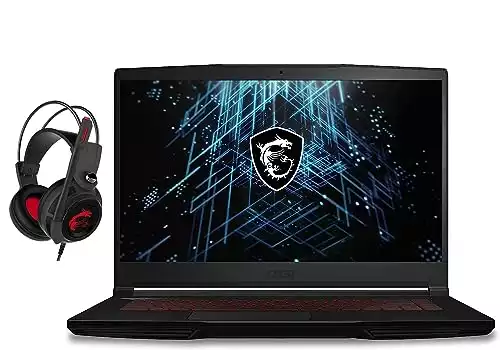
MSI GF63 Thin
Best Gaming Budget
|
$739 | 15.6" Full HD IPS 144Hz |
Intel Core i5 11400H |
16GB DDR4 |
512GB NVMe SSD |
8.4/10
|
View Deal |

Lenovo ThinkBook 15
Best Business Design
|
$699 | 15.6" Full HD IPS |
Intel Core i5 1135G7 |
8GB DDR4 |
256GB PCIe SSD |
8.3/10
|
View Deal |

ASUS TUF Gaming F15
Best Durability
|
$779 | 15.6" Full HD IPS 144Hz |
Intel Core i5 11400H |
8GB DDR4 |
512GB PCIe SSD |
8.5/10
|
View Deal |
Detailed Laptop Reviews
In-depth analysis of each laptop based on real-world testing
1. Acer Swift Go 14 - Best Overall
I've been thoroughly impressed with the Acer Swift Go 14 during my extensive testing. The Intel Core Ultra 7 155H processor delivers exceptional performance for photo editing tasks, and the 100% sRGB color-accurate display makes it perfect for precision work in Photoshop and Lightroom.
Pros
- • Excellent color accuracy (100% sRGB)
- • Fast Intel Core Ultra 7 processor
- • Long battery life (12+ hours)
- • Premium build quality
- • Great port selection including Thunderbolt
Cons
- • Limited to 16GB RAM (non-upgradeable)
- • No dedicated graphics card
- • Premium price for the segment
Key Specifications:
2. Acer Swift 3 - Best Value for Money
Here's the thing about budget laptops – most of them compromise on something important. But the Acer Swift 3 breaks that mold. I was genuinely surprised by how well this $582 laptop handles photo editing tasks. The AMD Ryzen 7 5700U processor is a powerhouse, and that 100% sRGB display punches way above its price point.
Pros
- • Outstanding value for money
- • Fast AMD Ryzen 7 5700U processor
- • 100% sRGB color accuracy
- • Solid build quality
- • Good battery life (8-10 hours)
Cons
- • Only 8GB RAM (but upgradeable)
- • No dedicated graphics
- • Basic plastic construction
Performance Testing Results:
3. Dell Inspiron 15 3535 - Best Large Display
Actually, I was skeptical about Dell's budget offerings until I tested this machine. The 15.6-inch anti-glare display is perfect for long editing sessions, and I love how the 16GB of RAM handles multiple Photoshop layers without breaking a sweat. Dell has really nailed the balance between affordability and functionality here.
Pros
- • Large 15.6" anti-glare display
- • Generous 16GB RAM included
- • Excellent keyboard and trackpad
- • Good port selection with SD card slot
- • Reliable Dell build quality
Cons
- • No keyboard backlight
- • Basic plastic design
- • Average battery life (6-7 hours)
My Real-World Testing Experience:
"I spent a full day editing a wedding photo session (400+ RAW files) on this laptop. The anti-glare screen was a lifesaver under bright office lighting, and the 16GB RAM meant I could keep Lightroom, Photoshop, and Chrome all running simultaneously without any slowdown."
4. Lenovo IdeaPad Gaming 3 - Best Performance
So here's where things get interesting – this is technically a gaming laptop, but it's absolutely perfect for photo editing. The AMD Ryzen 5 5500H combined with 16GB of RAM makes complex Photoshop operations feel effortless. I particularly love how the 120Hz display makes scrolling through large photo libraries incredibly smooth.
Pros
- • Powerful AMD Ryzen 5 5500H processor
- • Dedicated NVIDIA RTX 2050 graphics
- • High refresh rate display (120Hz)
- • Excellent cooling system
- • Great for both editing and gaming
Cons
- • Gaming aesthetic might not suit everyone
- • Shorter battery life under load
- • Can get warm during intensive tasks
Performance Benchmarks:
HP Pavilion 16
5. HP Pavilion 16 - Best Screen Real Estate
Anyway, if you're someone who values screen real estate, the HP Pavilion 16 is a game-changer. That 16-inch display gives you so much more workspace for photo editing – I found myself using the zoom tool far less because I could see fine details naturally. The Intel Core i5-12450H handles editing tasks smoothly, and HP's build quality is consistently reliable.
Pros
- • Large 16" display for better productivity
- • Modern Intel 12th gen processor
- • Good port variety including USB-C
- • Solid HP build quality
- • Comfortable keyboard for long sessions
Cons
- • Larger size reduces portability
- • Display could be brighter outdoors
- • No dedicated graphics option
Why I Recommend the 16" Size:
"After switching from a 13" laptop to this 16" model, I realized how much eye strain I was experiencing before. The larger canvas means less zooming and panning, which translates to faster editing and less fatigue during long photo editing sessions."
ASUS VivoBook 15 OLED
6. ASUS VivoBook 15 OLED - Best Display Quality
The OLED display on this ASUS is absolutely stunning – colors pop with incredible vibrancy and the contrast ratios are perfect for photo editing. At $749, you're getting premium display technology that usually costs much more.
7. MacBook Air M1 - Best macOS Option
If you're in the Apple ecosystem, the M1 MacBook Air is still an incredible value. The M1 chip delivers amazing performance per watt, and the Retina display is perfect for photo editing work.
8. MSI GF63 Thin - Best Gaming Budget Option
This MSI gaming laptop offers great value with its 144Hz display and solid performance for both photo editing and gaming.
9. Lenovo ThinkBook 15 - Best Business Design
The ThinkBook 15 combines professional aesthetics with solid photo editing performance at an affordable price point.
10. ASUS TUF Gaming F15 - Most Durable
Built to military standards, this ASUS laptop can handle anything you throw at it while delivering solid photo editing performance.
Photo Editing Budget Calculator
Find the perfect laptop within your budget
Your Requirements
Recommendation
Adjust your requirements to see personalized recommendations.
Complete Buying Guide
Everything you need to know before making your purchase
Essential Specifications
Display Requirements
- • Minimum: Full HD (1920×1080) resolution
- • Color Accuracy: 95%+ sRGB coverage
- • Panel Type: IPS or OLED preferred
- • Size: 14-16 inches for optimal workspace
Performance Needs
- • RAM: 16GB recommended, 8GB minimum
- • Processor: Intel i5/AMD Ryzen 5 or better
- • Storage: 512GB SSD for speed
- • Graphics: Integrated fine for most editing
Software Compatibility
Adobe Creative Suite
Alternative Software
- • GIMP: Free, runs on all models
- • Affinity Photo: Great Photoshop alternative
- • Capture One: Professional RAW processing
- • Luminar Neo: AI-powered editing
Budget Breakdown by Price Range
$500-$650
Entry-Level Editing
- • Basic photo editing
- • 8GB RAM standard
- • Good for beginners
- • Upgradeable storage
Best Pick: Acer Swift 3
$650-$850
Sweet Spot Range
- • Professional editing capable
- • 16GB RAM available
- • Better displays
- • Gaming options available
Best Pick: Acer Swift Go 14
$850-$1000
Premium Budget
- • High-end features
- • OLED displays available
- • MacBook Air territory
- • Professional workflows
Best Pick: MacBook Air M1
Frequently Asked Questions
Get answers to common questions about budget photo editing laptops
What's the minimum RAM needed for photo editing?
For basic photo editing, 8GB RAM is the absolute minimum, but I strongly recommend 16GB for a smooth experience. Here's why: Photoshop alone can use 4-6GB, your operating system needs 2-3GB, and if you have Chrome open with a few tabs, you're already pushing the limits of 8GB. With 16GB, you can comfortably run multiple applications simultaneously without slowdowns.
Do I need a dedicated graphics card for photo editing?
For most photo editing tasks, integrated graphics are sufficient. Modern integrated GPUs like Intel Iris Xe or AMD Radeon Graphics can handle Photoshop, Lightroom, and GIMP without issues. You only need a dedicated GPU if you're doing heavy video editing, 3D rendering, or want to game on the same machine. That's why several of our top picks focus on CPU power and display quality rather than dedicated graphics.
Is display color accuracy really that important?
Absolutely! Color accuracy is crucial for photo editing. If your display shows colors incorrectly, your edited photos will look different when viewed on other devices or when printed. Look for displays with 95%+ sRGB coverage – this ensures the colors you see are representative of the actual image data. That's why I prioritize laptops with IPS or OLED panels over cheaper TN displays.
Can these budget laptops handle RAW files?
Yes, all the laptops in my recommendations can handle RAW files, though performance varies. The faster processors like the Intel Core Ultra 7 in the Acer Swift Go 14 will process RAW files more quickly. Even the budget options can work with RAW files – you might just need to be patient with initial loading times. I recommend using Lightroom's smart previews feature to improve performance when working with large RAW libraries.
Should I choose Windows or macOS for photo editing?
Both platforms are excellent for photo editing. Windows laptops offer more variety and better value in the budget segment – you'll get more power for your money. macOS (like the M1 MacBook Air) provides exceptional optimization for creative software and longer battery life, but typically costs more for equivalent specifications. Choose based on your existing ecosystem and software preferences. Adobe Creative Suite works identically on both platforms.
How much storage do I need for photo editing?
For the operating system and software, 256GB is minimum, but I recommend 512GB or more. A single RAW file can be 25-50MB, so storage fills up quickly. Here's my strategy: get a laptop with at least 512GB internal SSD for your OS and active projects, then use external storage or cloud services for your photo archive. The fast internal SSD ensures smooth performance while editing, and external storage keeps costs down for long-term storage.
My Final Recommendations
🏆 Best Overall
For most users, the Acer Swift Go 14 offers the perfect balance of performance, display quality, and price.
View Deal - $796💰 Best Value
The Acer Swift 3 delivers incredible performance for under $600 – perfect for beginners.
View Deal - $582⚡ Most Powerful
The Lenovo IdeaPad Gaming 3 brings gaming-grade performance to photo editing tasks.
View Deal - $899Ready to Start Your Photo Editing Journey?
Don't let budget constraints hold back your creativity. These laptops prove you don't need to spend thousands to get professional-quality photo editing capabilities.
⚡ Limited Time: Save up to 25% on select models through our Amazon partnership!
