




HP is taking aim at one of the most competitive parts of the US laptop market with its new OmniBook 5 14.
Announced October 1, the new Windows laptop starts at $699.99 and is expected to arrive at HP.com and Best Buy in the United States during October.
That price alone is not particularly unusual.
What makes the OmniBook 5 interesting is what HP is putting around it.
The company is combining a thin aluminum design, OLED display options, modern Intel processors, an integrated NPU, USB-C connectivity, a compact GaN charger and a claimed battery life of up to 42 hours under HP’s local-video test.
That creates an interesting proposition for students, remote workers and everyday consumers who want something that looks and feels more premium than a conventional $600-to-$700 Windows laptop.
But there is an important catch.
The 42-hour battery figure should not be interpreted as 42 hours of normal laptop use.
HP’s test is based on continuous local video playback under controlled conditions.
That distinction is exactly why this laptop deserves more than a simple specification roundup.
The OmniBook 5 arrives at a moment when laptop manufacturers are competing on three fronts simultaneously: premium displays, AI hardware and battery efficiency.
For buyers, the real question is whether those features produce a better everyday computer—or simply a more attractive specification sheet.
Key Takeaways
- The HP OmniBook 5 14 starts at $699.99, combining a thin aluminum design, OLED display options, modern Intel processors, an NPU, USB-C connectivity and a lightweight chassis aimed at students, remote workers and everyday users.
- The 42-hour battery claim needs context. HP’s figure comes from controlled local-video playback testing, so real-world battery life during web browsing, video calls and multitasking is likely to be significantly different.
- The base configuration may have important compromises. The reported $699.99 model includes 8GB of RAM and 256GB of storage, making a 16GB/512GB configuration potentially more attractive for buyers seeking longer-term usability.
- Independent testing will determine whether the OmniBook 5 is truly a standout $700 laptop. Battery endurance, sustained performance, thermals, fan noise, OLED quality, webcam performance and actual street pricing will be crucial in determining its value.
What HP announced
HP announced the OmniBook 5 on October 1, 2026, describing it as a premium consumer Windows laptop designed for work, school, entertainment and everyday productivity.
The US starting price is $699.99.
HP expects the machine to be available through HP.com and Best Buy in October.
The laptop is available in multiple colors, including Smoke Silver, Starlit Blue, Peony Pink and Soft Honeydew.
That is a deliberate departure from the conservative appearance often associated with business-oriented Windows laptops.
The target audience is also clear.
HP specifically identifies students, young professionals and modern multitaskers as users the OmniBook 5 is designed to serve.
That puts the machine directly into a part of the market where buyers care about:
- portability;
- battery life;
- screen quality;
- webcam quality;
- keyboard comfort;
- everyday performance;
- price.
And HP is trying to address all of them at once.
The $699.99 price changes the value equation
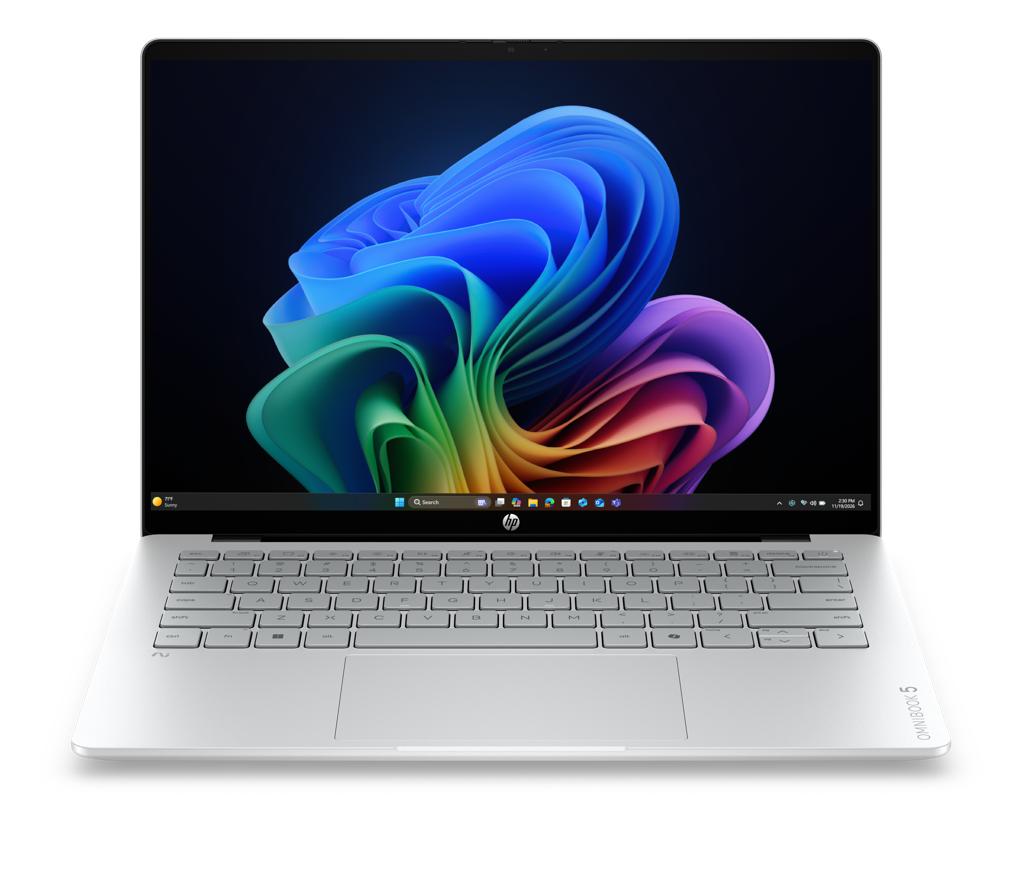
The biggest question is whether $699.99 buys a genuinely premium laptop or simply a premium-looking budget machine.
On paper, HP is making a strong argument.
The OmniBook 5 has an aluminum chassis, a thin profile, OLED display options and modern Intel processors.
Independent reporting from The Verge identifies the entry configuration as having an Intel Core 5 315 processor, 8GB of RAM and a 256GB SSD.
That configuration also reveals the biggest compromise.
Eight gigabytes of memory is increasingly restrictive for consumers who keep many browser tabs open or use demanding productivity applications.
For a student primarily using a browser, documents and video calls, 8GB can still be workable.
For a professional using Photoshop, large spreadsheets, multiple browser windows, development tools and communication applications simultaneously, 16GB is a much more comfortable target.
That means the $699.99 headline price should not automatically be treated as the configuration most buyers should purchase.
The better value may come from a higher-memory configuration.
But that depends on final US pricing.
OLED is the OmniBook 5’s biggest visual advantage
The most compelling hardware decision may be the display.
HP is offering OLED options across the OmniBook 5 family.
At launch, HP says a 2K OLED configuration with up to 300 nits is available, while a higher-resolution 2.5K OLED option reaching up to 620 nits is planned for March 2027.
This distinction is important.
A consumer should not assume that buying an OmniBook 5 today automatically means receiving the highest-end 2.5K, 620-nit panel.
That configuration is a future option.
The launch configuration and later display upgrade should therefore be treated separately.
Why OLED matters
OLED panels can deliver substantially better perceived contrast than conventional LCD panels because individual pixels can be turned off to produce very deep blacks.
For movies, photography and general media consumption, that can make a laptop feel significantly more expensive than its price suggests.
It also benefits users who spend hours reading or viewing high-contrast content.
But OLED is not automatically superior in every situation.
Power consumption depends heavily on what appears on the screen.
A mostly black interface can behave differently from a bright white productivity application.
And the higher-end 2.5K panel will likely demand more power than a lower-resolution configuration under some workloads.
This is another reason why display testing matters more than the word “OLED” alone.
The Intel processor is important—but configuration matters
HP says the OmniBook 5 can be configured with up to an Intel Core 7 processor and integrated NPU capabilities.
The entry-level system is expected to use Intel’s Core 5 315 processor, CPU cores, a maximum turbo frequency of 4.4GHz and a 15-TOPS NPU.
This creates a familiar laptop-buying problem.
A product family can have a $699.99 starting price while the configuration most enthusiasts actually want costs considerably more.
Consumers should therefore compare:
- processor;
- memory;
- storage;
- display;
- battery;
- price.
Do not compare the model name alone.
The difference between an entry-level Core 5 configuration with 8GB of RAM and a Core 7 system with 16GB could be much more noticeable in demanding workloads than the model name suggests.
What the NPU actually means
The OmniBook 5 is marketed as an AI-ready laptop.
The integrated NPU is part of that story.
An NPU, or neural processing unit, is specialized hardware designed to accelerate certain machine-learning workloads.
The benefit is that supported AI operations can potentially run more efficiently than if every workload were processed entirely by the CPU.
But consumers should be careful with the phrase “AI-ready.”
An NPU does not automatically improve every application.
The software must support the relevant acceleration framework. Microsoft similarly explains that applications must be specifically programmed to take advantage of NPU hardware. Microsoft’s NPU developer documentation describes how Windows applications can use dedicated AI hardware for local inference.
If an application does not use the NPU, the presence of that hardware does not necessarily produce a visible performance improvement.
This distinction is becoming increasingly important as laptop manufacturers compete on AI specifications.
A larger TOPS number can indicate greater theoretical AI throughput, but it does not automatically translate into faster everyday computing.
Real application behavior matters more.
The 42-hour battery claim needs context
This is the most important fact-checking issue in HP’s announcement.
HP says the OmniBook 5 can achieve up to 42 hours of local video playback. The figure comes from HP’s published testing methodology.
That sounds extraordinary.
But it is not the same as saying:
“The HP OmniBook 5 lasts 42 hours on a normal workday.”
HP’s own testing conditions explain why.
The company used continuous FHD video playback at 200 nits with audio playing and wireless enabled but not connected.
There is no ordinary multitasking workload in that test.
A typical user might simultaneously run:
- Chrome;
- Microsoft Word;
- Slack or Teams;
- cloud storage synchronization;
- a browser-based AI service;
- email;
- video calls;
- music;
- background updates.
That workload will consume power differently.
Therefore, the responsible interpretation is:
HP claims up to 42 hours under its specific local-video test.
The actual mixed-use runtime remains an independent-testing question.
That does not make HP’s number useless.
It provides a standardized internal measurement.
But consumers should not confuse it with an independent productivity benchmark.
Why battery testing is becoming harder to compare
Laptop battery-life comparisons have always been difficult.
Different manufacturers use different test conditions.
One may test video playback.
Another may test web browsing.
Another may use an automated productivity workload.
Even when two manufacturers use the same general category, differences in:
- screen brightness;
- processor configuration;
- wireless state;
- resolution;
- application mix;
- battery capacity;
can significantly affect results.
That is why TechOzea should eventually evaluate the OmniBook 5 using a repeatable mixed-use test.
For example:
- 40% web browsing;
- 20% documents;
- 15% video;
- 10% video conferencing;
- 10% light photo work;
- 5% background tasks.
That would provide consumers with a much more useful number.
The design is a major selling point
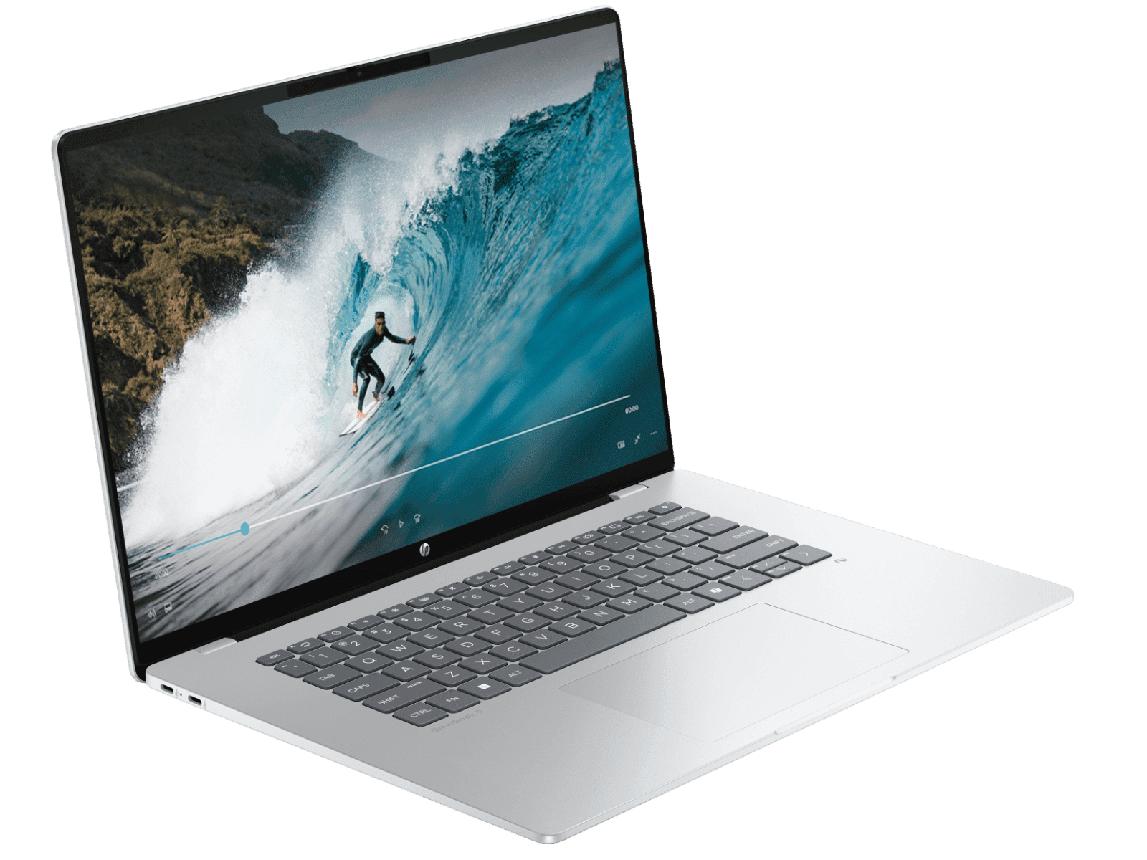
HP says the OmniBook 5 measures approximately 11.77mm thick and starts at 1.16kg, or roughly 2.56 pounds.
The Verge independently reports a similar starting weight and describes the laptop as thinner and lighter than Apple’s MacBook Neo.
That makes portability one of the machine’s strongest characteristics.
For students, this matters.
A laptop that weighs around 2.5 pounds is easier to carry between classes.
For remote workers, it is easier to move between a home office, coffee shop and travel bag.
For commuters, every reduction in weight matters.
But thinness can also create engineering challenges.
There is less physical space for cooling hardware.
That makes sustained performance testing important.
A processor can deliver strong short bursts of performance while still being limited by thermal constraints during long workloads.
Ports and connectivity
HP says the OmniBook 5 includes two full-function USB-C ports.
Independent reporting also identifies HDMI and a 3.5mm headphone jack.
This is important because some thin laptops are increasingly eliminating legacy connectivity.
For consumers, HDMI remains useful.
It allows the laptop to connect directly to:
- classroom projectors;
- office displays;
- TVs;
- conference-room monitors.
The 3.5mm headphone jack is similarly convenient for wired headsets.
The presence of USB-C is expected at this price, but the exact capabilities matter.
Consumers should verify:
- charging support;
- display output;
- USB data speed;
- docking compatibility.
Not every USB-C port offers identical capabilities.
Webcam and video calls
HP includes an FHD IR camera with Windows Hello facial recognition, along with dual microphones.
That is a useful feature for students and remote workers.
The important improvement is not merely resolution.
An IR camera can support biometric authentication through Windows Hello.
That can make signing into the laptop faster while avoiding password entry.
The camera also matters for today’s increasingly video-centric work environment.
However, image quality depends on more than resolution.
Low-light performance, exposure control, microphone processing and noise reduction all matter.
Independent testing will need to determine how the OmniBook 5 performs in realistic indoor conditions.
HP is targeting the MacBook Neo buyer
One of the clearest competitive comparisons is Apple’s MacBook Neo.
The Verge explicitly frames the OmniBook 5 as a MacBook Neo competitor.
Apple’s official MacBook Neo announcement says the laptop starts at $599 and uses Apple silicon, a 13-inch Liquid Retina display and an aluminum enclosure.
The comparison makes sense.
Both products emphasize:
- thinness;
- portability;
- attractive colors;
- mainstream pricing;
- premium-looking design.
But the operating systems are fundamentally different.
The OmniBook 5 runs Windows.
That means buyers get access to the much broader Windows PC software ecosystem.
The trade-off is that Windows laptops typically offer a much wider range of hardware configurations.
That can make purchasing more complicated.
A MacBook configuration is often easier to understand.
A Windows laptop may require consumers to compare several processor, memory, storage and display options.
Where the OmniBook 5 could be better than a MacBook Neo
The biggest advantage is flexibility.
Windows supports a huge variety of peripherals, applications and enterprise environments.
The OmniBook also provides traditional PC connectivity such as HDMI and a headphone jack.
The OLED display is another strong selling point.
And consumers who prefer Windows do not need to switch operating systems to get a lightweight laptop.
For many buyers, that alone is enough.
Where the MacBook may remain stronger
Apple’s silicon platform has a long track record of strong performance-per-watt characteristics.
That does not mean the OmniBook 5 will necessarily have poor battery life.
It means independent testing needs to establish how Intel’s new platform performs against Apple’s current processors in real workloads.
The same applies to application performance.
Synthetic specifications cannot tell the whole story.
A processor can have a strong theoretical specification and still behave differently depending on workload and software optimization.
Who should buy the HP OmniBook 5?
The OmniBook 5 makes the most sense for consumers who want a combination of:
- Windows;
- portability;
- OLED;
- modern Intel hardware;
- everyday productivity;
- a price around $700.
Students
Students are a particularly strong target.
The laptop is light enough for daily campus use, offers a premium display and supports Windows applications that may be required for school.
The biggest concern is the base model’s 8GB memory.
If the price difference to a 16GB model is reasonable, that would be the configuration worth considering for a four-year college machine.
Remote workers
Remote workers should pay attention to the webcam, Windows Hello, portability and display.
The OLED screen could be excellent for media and general productivity.
However, long video-call sessions are a better test of battery life than local video playback.
Everyday users
For web browsing, streaming, Office applications and communications, the OmniBook 5 should have enough performance in its mainstream configurations.
The question is whether the higher-end configurations provide sufficient value compared with competing laptops.
Who should wait?
Power users should wait for independent testing.
If your workload involves:
- 4K video editing;
- 3D rendering;
- large software builds;
- professional CAD;
- serious gaming;
- heavy local AI;
the OmniBook 5 is not automatically the right choice simply because it has a modern processor and NPU.
Those users need sustained performance testing.
The integrated graphics also make this more of a productivity and general-use laptop than a dedicated gaming machine.
Upgradeability could determine long-term value
One issue that deserves more attention is memory.
The reported configurations use soldered LPDDR5 memory.
If the RAM cannot be upgraded, the purchase decision becomes more important.
An 8GB laptop may be acceptable today but could feel constrained several years from now.
For a laptop intended to remain useful for four or five years, 16GB is a safer target for many Windows users.
Storage is also important.
A 256GB SSD can work for cloud-centric users.
But modern applications, games, photos and video can consume storage quickly.
A 512GB configuration would provide substantially more breathing room.
What independent testing still needs to establish
The OmniBook 5 has an attractive specification sheet.
But the important questions are unanswered.
Battery life
The most obvious test is mixed-use battery endurance.
How close can the laptop get to an entire working day while connected to Wi-Fi and running productivity applications?
Sustained performance
A thin laptop can perform very well for short workloads.
Long-term CPU testing will reveal whether it maintains that performance.
Fan noise
Thin designs can become noisy when cooling demand increases.
Display quality
Reviewers should measure:
- brightness;
- contrast;
- color accuracy;
- PWM behavior;
- refresh rate;
- HDR performance.
SSD performance
Storage performance can influence application loading and file transfers.
Webcam
FHD resolution is promising, but image processing determines actual quality.
Wi-Fi performance
Theoretical wireless specifications do not automatically translate into maximum real-world throughput.
What the OmniBook 5 means for the $700 laptop market
This may be the most important part of the announcement.
The laptop market has been moving toward a new expectation.
Consumers increasingly want premium features without premium flagship pricing.
OLED used to be strongly associated with higher-end laptops.
Thin aluminum designs were more common above the $1,000 range.
Modern AI-capable processors were also initially concentrated in premium systems.
The OmniBook 5 brings several of these features together at $699.99.
That puts pressure on competitors.
If HP can deliver acceptable performance, strong battery life and good build quality at that price, other manufacturers will have to respond.
That could benefit consumers.
The AI label needs skepticism
The OmniBook 5 is an AI PC.
But consumers should ask what they are actually getting.
An NPU can accelerate supported AI tasks.
It does not mean every AI application runs locally.
It does not mean every AI workload is faster.
And it does not automatically mean the laptop will have better AI features than another computer with a different NPU.
The practical question is:
Which applications will use the hardware, and what will they actually do for the user?
That is a better buying question than comparing TOPS figures alone.
Should you buy the $699.99 model?
Not automatically.
The base configuration is attractive because the price is low.
But 8GB RAM and 256GB storage may be limiting for buyers who want long-term flexibility.
If a 16GB/512GB configuration is available at a reasonable premium, it could be the better choice.
That is the configuration consumers should watch.
A $699.99 laptop is only a bargain if its compromises do not create additional costs later.
The most important thing to verify before buying
Look at the exact SKU.
Do not rely on a product family’s headline specifications.
Check:
- exact processor;
- RAM;
- SSD;
- display resolution;
- display brightness;
- touchscreen availability;
- battery capacity;
- ports;
- wireless standard;
- warranty.
HP’s announcement covers multiple configurations and future display options.
The laptop available at $699.99 is not necessarily identical to the highest specification HP has described.
What to watch next
The OmniBook 5 should now enter the independent review cycle.
The most important information will come from reviewers testing actual retail configurations.
Watch for:
- Real-world battery testing
- Core 5 versus Core 7 performance
- OLED brightness measurements
- Fan noise
- Thermal throttling
- SSD upgradeability
- RAM limitations
- Webcam quality
- Windows AI application performance
- Actual US street pricing
Those results will determine whether the OmniBook 5 is merely an attractive launch announcement or a genuinely strong laptop recommendation.
Final verdict before independent testing
The HP OmniBook 5 14 is one of the more interesting new Windows laptops of the current buying season.
Its $699.99 starting price is aggressive.
Its OLED display strategy is even more interesting.
The thin chassis and relatively low weight make it attractive for students and mobile workers, while the Intel NPU gives HP a way to position it within the growing AI PC category.
But consumers should not buy based on the 42-hour battery headline alone.
That is a controlled local-video result, not a normal productivity figure.
The base configuration also deserves scrutiny because 8GB of RAM and 256GB of storage may not be ideal for everyone.
The best version of the OmniBook 5 may ultimately be a higher-memory configuration, provided HP keeps the price reasonable.
For now, the strongest conclusion is simple:
HP has made the $700 Windows laptop category much more interesting.
Whether it has made it better will depend on independent testing.
FAQs
How much does the HP OmniBook 5 14 cost?
The HP OmniBook 5 14 starts at $699.99 in the United States. HP expects it to be available through HP.com and Best Buy in October 2026.
Does the HP OmniBook 5 have an OLED display?
Yes. HP is offering OLED display configurations. The launch range includes a 2K OLED option, while HP says a higher-resolution 2.5K OLED configuration with up to 620 nits is planned for March 2027. ([HP][1])
Does the OmniBook 5 really last 42 hours?
HP claims up to 42 hours of local video playback under its specific laboratory test. That should not be interpreted as 42 hours of ordinary mixed-use battery life. ([HP][7])
What processor does the HP OmniBook 5 use?
The family can be configured with Intel processors up to Core 7. Independent reporting identifies the base configuration with an Intel Core 5 315. ([The Verge][6])
Is the HP OmniBook 5 good for students?
It could be a strong option for students because it combines portability, Windows compatibility and an OLED display. However, students should consider a 16GB configuration if they plan to keep the laptop for several years.
Is the HP OmniBook 5 good for gaming?
It is primarily a thin productivity and consumer laptop with integrated graphics. Buyers looking for serious gaming should consider a laptop with a dedicated GPU instead.
Is the HP OmniBook 5 an AI PC?
Yes. HP positions the OmniBook 5 as an AI PC with an integrated NPU. However, the practical benefit depends on software that actually uses NPU acceleration.
Should you buy the HP OmniBook 5 now?
If you want a thin Windows laptop with OLED around $700, it is worth watching closely. But because the model has just been announced, independent battery, thermal and performance testing should be considered before making a final purchase decision.
