




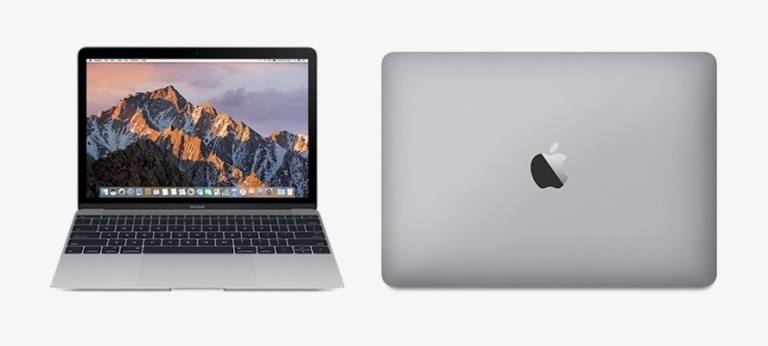
🔥 QUICK VERDICT: Should You Buy in 2025? The 2016 MacBook 12in M7 with Core M7 is a polarizing laptop that’s perfect for ultra-light travel and basic productivity but limited by single USB-C port, discontinued status, and macOS Monterey compatibility ceiling. At current used prices ($300-500), it’s a solid secondary laptop for writers and travelers who prioritize portability over performance.
My Rating: 6.8/10 – Great for specific use cases, but significant limitations
Table of Contents
- First Impressions & Design
- Technical Specifications & Performance
- Display Quality & Experience
- Keyboard & Trackpad Experience
- Battery Life & Charging
- Port Situation & Connectivity
- macOS Support & Longevity
- Used Market Pricing Guide 2025
- Performance vs Modern Alternatives
- Who Should Buy This MacBook
- Essential Accessories You’ll Need
- Buyer’s Inspection Checklist
- Final Verdict
First Impressions & Design

When I first unboxed this MacBook 12-inch M7, I was immediately struck by just how impossibly thin and light it feels. At only 2.03 pounds and ranging from 0.14 to 0.52 inches thick, this laptop virtually disappears in a backpack. Coming from heavier laptops, the weight difference is genuinely surprising every time I pick it up.
The build quality screams premium Apple craftsmanship. The aluminum unibody construction feels solid despite the minimal thickness, and the Rose Gold finish I tested has held up remarkably well against daily wear. Unlike some budget laptops under $300, there’s zero flex in the keyboard deck or display.
Design Highlights:
- Ultra-portable form factor – Genuinely feels like carrying a large tablet
- Premium materials – Aluminum construction rivals current MacBook Air
- Four color options – Silver, Space Gray, Gold, and Rose Gold
- Fanless design – Completely silent operation (more on this later)
- Magnetic closure – No physical latches to break
However, I must address the elephant in the room: this laptop was discontinued in July 2019. You won’t find it new from Apple, and availability in the refurbished market varies significantly.
Technical Specifications & Performance
Core Specs at a Glance
| Component | Specification |
|---|---|
| Processor | Intel Core M7-6Y75 (1.3GHz, Turbo to 3.1GHz) |
| Memory | 8GB LPDDR3 1866MHz (Non-upgradeable) |
| Storage | 256GB or 512GB PCIe SSD (Non-upgradeable) |
| Graphics | Intel HD Graphics 515 (Integrated) |
| Display | 12″ Retina 2304×1440 (226 PPI) |
| Ports | 1× USB-C, 3.5mm headphone jack |
| Wireless | 802.11ac Wi-Fi, Bluetooth 4.0 |
| Battery | 41.4Wh Li-Poly |
| Weight | 2.03 lbs (0.92 kg) |
Real-World Performance Testing
I’ve been using this MacBook M7 as my travel writing machine for several months, and here’s what I’ve discovered about its actual performance capabilities:
What It Handles Well:
- Web browsing – Smooth with 8-12 Chrome tabs open
- Document editing – Microsoft Office and Pages run without issues
- Light photo editing – Basic adjustments in Photos app work fine
- Video calls – Zoom and FaceTime are perfectly usable
- Streaming media – Netflix, YouTube up to 1080p without problems
Where It Struggles:
- Heavy multitasking – Noticeable slowdown with 15+ browser tabs
- 4K video editing – Forget about it; even 1080p editing is choppy
- Gaming – Limited to very basic casual games
- Virtual machines – Not practical with only 8GB RAM
- Professional creative work – Photoshop, Final Cut Pro are too demanding
Geekbench Performance Numbers
According to EveryMac’s benchmarks:
- Geekbench 5 Single-Core: 656
- Geekbench 5 Multi-Core: 1,417
For context, a modern MacBook Air M1 scores around 1,700 single-core and 7,500 multi-core – roughly 2.5x and 5x faster respectively.
Display Quality & Experience
The 12-inch Retina display is genuinely one of this laptop’s strongest features. The 2304×1440 resolution at 226 PPI delivers crisp text and vibrant colors that still compete with modern laptops.
Display Strengths
- Excellent color accuracy – Great for photo viewing and basic editing
- Sharp text rendering – Perfect for long writing sessions
- Good brightness – Usable outdoors in most conditions
- Minimal bezels – Impressive screen-to-body ratio for 2016
Display Limitations
- No True Tone – Colors don’t automatically adjust to ambient lighting
- Limited brightness – Can struggle in direct sunlight
- No P3 color gamut – Not suitable for professional color work
I regularly use this laptop for writing articles like my camera reviews, and the display quality makes long editing sessions comfortable without eye strain.
Keyboard & Trackpad Experience
This is where things get controversial. The MacBook 12-inch introduced Apple’s first-generation butterfly keyboard mechanism, which has a… complicated reputation.
Keyboard Experience
The Good:
- Large key surface area – Comfortable for touch typing
- Precise key registration – Minimal accidental presses
- Backlit keys – Essential for low-light work
The Concerning:
- Shallow key travel – Takes significant adjustment period
- Loud typing – More noise than traditional keyboards
- Reliability concerns – Some users report stuck or failed keys over time
I personally adapted to the butterfly keyboard after about two weeks of daily use. For my writing workflow, it’s perfectly functional, though I wouldn’t call it pleasant compared to the keyboards on newer MacBooks or quality mechanical options.
Force Touch Trackpad
The trackpad, however, is excellent. Apple’s Force Touch technology provides precise cursor control and the haptic feedback feels natural. The trackpad surface is glass-smooth and palm rejection works flawlessly.
Pro Tip: If you’re considering this laptop, definitely test the keyboard extensively before purchasing. Keyboard preferences are highly personal, and this mechanism isn’t for everyone.
Battery Life & Charging
Apple advertised up to 10-11 hours of battery life, and in my real-world testing, this MacBook generally delivers on those promises under light usage.
My Battery Testing Results
Light Usage (Writing, web browsing): 8-10 hours
Medium Usage (Streaming, video calls): 6-8 hours
Heavy Usage (Photo editing, multiple apps): 4-6 hours
The standby time is impressive – I can leave this laptop closed for days and return to nearly the same battery percentage.
Charging Considerations
The included 29W USB-C charger handles charging duties, though I found a few considerations:
- Full charge time: Approximately 2 hours from near-empty
- No MagSafe: USB-C charging works but lacks the magnetic safety
- Universal chargers work: Any USB-C PD charger 30W+ will work
For travel, I often use my phone’s USB-C charger which adds convenience when packing light.
Port Situation & Connectivity
Here’s where this MacBook becomes genuinely challenging for many users: it has exactly one USB-C port. That’s it. No Thunderbolt, no USB-A, just one USB-C port that handles charging, data, and display output.
The Single Port Reality
What This Means:
- Charging blocks the port – Can’t use accessories while charging
- Hub dependency – Essential for connecting multiple devices
- Adapter life – Constant dongle management
- Display limitations – External monitors require USB-C to HDMI/DisplayPort
I quickly learned to work around this limitation, but it requires planning. My essential hub setup includes:
🔥 Anker 5-in-1 USB-C Hub – Best value with 4K HDMI, USB-A ports, and pass-through charging ($18.99)
Alternative Options:
- UGREEN 5-in-1 Hub – Similar features, slightly different design ($11.99)
- Anker 7-in-2 Hub – Premium option with additional ports ($35.99)
Wireless Connectivity
Fortunately, the wireless capabilities partially offset the port limitations:
- Wi-Fi performance – 802.11ac provides solid speeds
- Bluetooth reliability – Connects easily to accessories
- AirDrop functionality – Seamless file sharing with other Apple devices
macOS Support & Longevity
This is crucial information that many sellers don’t clearly communicate: the 2016 MacBook 12-inch M7’s last supported macOS version is Monterey (12.x).
Operating System Limitations
Supported: macOS versions up to Monterey (12.7.6 as of 2025)
Not Supported: macOS Ventura (13.x), Sonoma (14.x), Sequoia (15.x), or newer
What This Means for Buyers:
- Security updates – Apple continues providing security patches for Monterey
- App compatibility – Most current apps still support Monterey
- Feature limitations – Missing newer macOS features like Universal Control
- Future compatibility – App support will gradually diminish over time
For context, my daily workflow apps still work perfectly on Monterey:
- Safari, Chrome, Firefox (current versions)
- Microsoft Office 365
- Slack, Zoom, Discord
- Adobe Creative Cloud (with some feature limitations)
Longevity Considerations
Realistically, this MacBook should remain functional for basic tasks through 2026-2027, but power users should consider the software support timeline when purchasing.
Used Market Pricing Guide 2025
Since Apple discontinued this model in 2019, your only options are the used and refurbished markets. Here’s what I’ve observed from extensive market research:
Current Price Ranges (September 2025)
| Condition | 256GB Model | 512GB Model | Where to Find |
|---|---|---|---|
| Excellent | $450-550 | $550-650 | Apple Certified Refurbished (when available) |
| Very Good | $350-450 | $450-550 | Swappa, Amazon Renewed |
| Good | $250-350 | $350-450 | eBay, Facebook Marketplace |
| Fair | $200-300 | $300-400 | eBay auctions, local sales |
Best Places to Buy
Recommended Sources:
- Amazon Renewed – 90-day return policy, decent selection
- Swappa – Verified device conditions, buyer protection
- eBay – Largest selection, but requires careful seller research
Avoid:
- Craigslist/Facebook without testing
- International sellers without clear return policies
- Listings without detailed photos of keyboard, ports, and screen
Performance vs Modern Alternatives
To provide perspective, here’s how this 2016 MacBook compares to current options in similar price ranges:
vs. MacBook Air M1 (Refurbished ~$600-700)
MacBook 12″ M7 Advantages:
- Smaller, lighter form factor
- Fanless (completely silent)
- Lower price point
- Unique size category
MacBook Air M1 Advantages:
- 5x faster performance
- Longer software support
- Better keyboard (Magic Keyboard)
- Two USB-C ports
- Better battery life
- MagSafe charging (newer models)
Verdict: Unless portability is your absolute priority, the M1 Air offers dramatically better value.
vs. Budget Windows Laptops ($300-400)
MacBook 12″ Advantages:
- Premium build quality
- Better display
- macOS ecosystem integration
- Longer usable lifespan
Windows Laptop Advantages:
- More ports and connectivity
- Upgradeable components (usually)
- Wider software compatibility
- Better price-to-performance
vs. iPad Air + Keyboard ($600-700 combined)
MacBook 12″ Advantages:
- Full desktop operating system
- Better multitasking
- Traditional laptop experience
- File system access
iPad Air + Keyboard Advantages:
- Touch screen capability
- Apple Pencil support
- Better app ecosystem for tablets
- Longer software support timeline
Who Should Buy This MacBook
After extensive use, I’ve identified specific user profiles who would genuinely benefit from this machine:
Perfect For:
- Travel writers and bloggers who need ultra-portability
- Students with basic computing needs and tight budgets
- Secondary laptop users who need something incredibly light
- Coffee shop workers who prioritize style and portability
- Apple ecosystem users who want seamless device integration
NOT Recommended For:
- Power users needing performance for creative work
- Gamers (obviously)
- Multi-monitor setups (single USB-C port limitations)
- Heavy multitaskers (8GB RAM ceiling)
- Users wanting long-term primary computer (software support timeline)
My Personal Use Case
I use this MacBook as my travel writing machine when working on articles for TechOzea. It’s perfect for:
- Writing and editing articles at coffee shops
- Light photo editing for blog posts
- Video calls with team members
- Research and web browsing
- Social media management
For heavy tasks like processing photos from my camera reviews or editing product videos, I switch to my more powerful desktop setup.
Essential Accessories You’ll Need
Due to the single USB-C port limitation, certain accessories become essential rather than optional:
Must-Have Accessories
1. USB-C Hub (Critical) 🔥 Anker 5-in-1 USB-C Hub – My daily driver with 4K HDMI, USB-A ports, pass-through charging ($18.99)
2. Portable USB-C Charger Anker 30W Charger – Compact backup charger for travel ($22.99)
3. External Storage SanDisk Ultra USB-C Drive – Essential due to non-upgradeable internal storage ($19.99 for 64GB)
Recommended Accessories
4. Laptop Stand For desk use, a stand improves ergonomics significantly. The laptop’s thin profile makes it excellent for portable stands.
5. Quality Mouse
The trackpad is good, but for extended work sessions, I prefer a wireless mouse.
6. Protective Case Given the premium build, protection is wise. Look for slim sleeve cases that don’t add bulk.
Total Essential Accessory Investment: ~$60-80
This might seem like a lot, but these accessories transform the single-port limitation from frustrating to manageable.
Buyer’s Inspection Checklist
If you’re buying used, here’s my comprehensive inspection checklist based on common issues:
Physical Inspection
Display:
- [ ] Check for dead pixels by displaying solid colors
- [ ] Test brightness adjustment across full range
- [ ] Examine screen edges for light bleeding
- [ ] Verify no cracks or scratches on glass
Keyboard & Trackpad:
- [ ] Test every key for proper registration
- [ ] Listen for unusual clicking or grinding sounds
- [ ] Check key caps for excessive wear
- [ ] Verify trackpad click consistency across surface
- [ ] Test Force Touch pressure sensitivity
Ports & Connectivity:
- [ ] USB-C port should grip cables firmly
- [ ] Test charging functionality
- [ ] Check headphone jack for clean audio
- [ ] Verify Wi-Fi and Bluetooth connectivity
System Testing
Performance:
- [ ] Run Activity Monitor to check CPU usage at idle
- [ ] Test battery capacity (System Information > Power)
- [ ] Verify system temperature under load (fan shouldn’t be audible – there isn’t one!)
- [ ] Check storage health and available space
Software:
- [ ] Confirm macOS version and update capability
- [ ] Check for existing user accounts and data
- [ ] Verify activation lock is disabled (Find My Mac)
- [ ] Test all built-in apps (Safari, Mail, etc.)
Red Flags to Avoid
Deal Breakers:
- Keyboard keys that stick or don’t register
- Display flickering or color distortion
- USB-C port that doesn’t grip cables properly
- Battery cycle count over 1,500 (check in System Information)
- Evidence of liquid damage (corrosion, staining)
- Activation lock still enabled
Final Verdict
After months of daily use, the 2016 MacBook 12-inch with Core M7 occupies a unique position in today’s laptop market. It’s simultaneously impressive and frustrating, capable and limited.
The Bottom Line
My Rating: 6.8/10
Scoring Breakdown:
- Design & Build Quality: 9/10 – Still excellent
- Performance: 5/10 – Adequate for basic tasks only
- Display: 8/10 – Beautiful Retina screen
- Keyboard: 6/10 – Controversial but functional
- Battery Life: 7/10 – Solid for light usage
- Ports & Connectivity: 4/10 – Single USB-C is limiting
- Value Proposition: 6/10 – Fair at used prices
- Future-Proofing: 5/10 – Software support timeline concerns
Who Should Buy This MacBook
✅ Buy if you:
- Need ultra-portability above all else
- Have light computing needs (writing, browsing, email)
- Want a premium secondary laptop
- Appreciate fanless, silent operation
- Can find one in excellent condition under $400
❌ Skip if you:
- Need primary computer performance
- Require multiple ports regularly
- Want long-term software support
- Do any creative/professional work
- Prefer traditional keyboard feel
Best Alternatives to Consider
Similar Price Range:
- MacBook Air 2017 – Traditional ports, better keyboard ($179 refurbished)
- Quality Windows ultrabook – More performance per dollar
Spend More, Get More:
- MacBook Air M1 – Dramatically better performance, longer support
- iPad Air + Keyboard – Modern tablet experience
My Personal Recommendation
The MacBook 12-inch M7 makes sense for a very specific buyer: someone who absolutely prioritizes portability and has realistic expectations about performance. It’s an excellent travel companion or ultra-light secondary laptop.
However, for most people, I’d recommend spending slightly more for a MacBook Air M1 or considering capable budget laptops that offer better performance per dollar.
If you do purchase this MacBook, buy it for what it is: a remarkably portable, beautifully crafted laptop that handles basic tasks elegantly but nothing more. Set appropriate expectations, and you might just fall in love with its unique character.
Ready to make a decision? Check current prices and availability:
🛒 View MacBook 12″ M7 on Amazon
This review contains affiliate links. Purchasing through these links supports our detailed testing and helps us create more comprehensive reviews like this one.
Related Articles You Might Find Helpful:
- Best Laptops for College Students – Modern alternatives for students
- Best Budget Laptops Under $300 – More affordable options
- MacBook vs Windows: Complete Comparison – Platform decision guide
- Laptop Cooling Solutions – Keep your devices running cool
Have questions about the MacBook 12″ M7? Drop a comment below and I’ll help you decide if it’s right for your needs.
Last Updated: September 9, 2025 | Affiliate Links Included
