

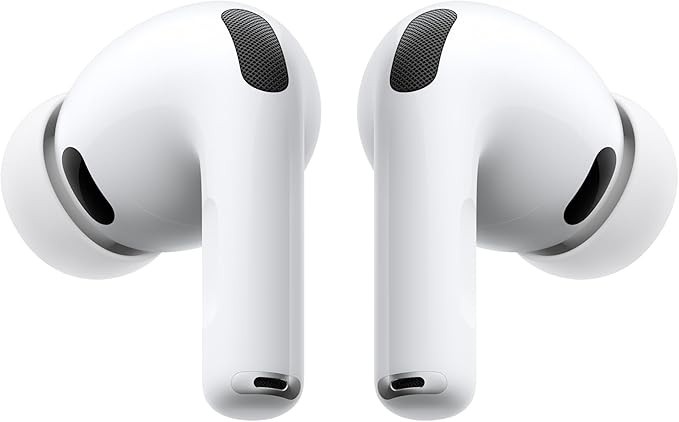
How to Clean Earbuds (Safely): Mesh, Tips, and Case

by Moses
0 comment 14 minutes read
Best ANC Earbuds

How do I safely clean earbuds (and the charging case) to remove earwax/dirt without damaging them?

This block is optimized for quick answers, featured snippets, and Google AI Overviews, using measurable steps backed by manufacturer guidance from Apple Support, Bose, and Sony Support.

Turn earbuds off. Brush mesh 15 seconds, wipe body with barely damp microfiber, wash silicone tips with mild soap/water, dry everything, and clean case with a dry swab—then air‑dry at least 2 hours before charging. Apple cleaning guidance.

Do: Dry tools first Don’t: Run under water Don’t: Poke mesh with pins Internal: How To Clean AirPods (TechOzea)
Brand differences matter: Apple allows limited isopropyl alcohol on the case cloth, while Sony warns solvents (including alcohol) may damage finishes. Compare: Apple vs Sony.

Choose your context

Best for most earbuds: dry cleaning first, minimal moisture, and full drying before charging. If you use AirPods, see the Apple mesh workflow below.

  1. Turn earbuds off and remove tips (if removable).
  2. Brush the mesh gently for ~15 seconds; never use pins/needles. Apple guidance
  3. Wipe exterior with a barely damp microfiber cloth; keep openings dry.
  4. Wash silicone tips with mild soap/water, then dry completely. Apple Pro tips care
  5. Air-dry everything ≥2 hours before charging. Source

Related TechOzea reads: How to pair JBL earbuds (and fix muffled sound), How long headphones last (maintenance tips).

Apple’s mesh method uses micellar water + a soft children’s toothbrush with timed brushing and a strict drying window. Follow the measurable steps and avoid cleaning other areas you shouldn’t. Apple Support

  1. Dip brush in micellar water, brush mesh in circles for ~15 seconds.
  2. Blot mesh on a paper towel; repeat for 3 total cycles.
  3. Rinse brush, repeat with distilled water, then let dry ≥2 hours before charging/using.
Don’t improvise solvents: Sony warns solvents (including alcohol) may damage finishes on some products. If you don’t know your model’s allowance, stick to dry tools first. Sony guidance

Internal: How To Clean AirPods (TechOzea)

Sweat and skincare products increase residue. Apple explicitly recommends cleaning and drying after workouts/exposure to liquids to avoid irritation and long-term damage. Apple Support

  1. Wipe immediately after training with a dry microfiber cloth.
  2. Once per week, remove tips, wash and dry them fully.
  3. Brush mesh ~15 seconds to prevent wax + dust compaction.
  4. Air-dry ≥2 hours before charging to keep moisture out of ports.

If earbuds don’t charge reliably, clean contacts and ports using dry, non-metal tools. Apple advises removing debris with a clean, dry, soft-bristled brush and avoiding liquids in charging ports. Apple Support

  1. Clean earbud contacts with a dry cotton swab.
  2. Brush case charging port with a dry soft-bristled brush (no metal picks).
  3. Wipe case exterior with lint-free cloth; if needed, slightly dampen the cloth with isopropyl alcohol (not poured). Source

Related TechOzea: How to pair Beats earbuds (charging contact tips)

Frequently Asked Questions

Yes—sometimes, but only where the manufacturer allows it. Apple says you can dampen a cloth slightly with isopropyl alcohol for cleaning the charging case and stresses keeping liquid out of ports and openings. Some brands warn against alcohol on finishes, so use alcohol sparingly on hard outer surfaces only and avoid meshes and openings. See Apple cleaning guidance and Sony’s solvent warning.
Use gentle, dry cleaning first: a soft brush loosens wax without tearing mesh or pushing debris inside. Apple’s approach includes brushing in circles for about 15 seconds and repeating cleaning cycles, then allowing at least 2 hours to fully dry before charging or use. Avoid pins, needles, and abrasive tools—they can rip mesh and permanently reduce sound. Follow the measurable method in Apple Support. For an internal walkthrough, see TechOzea’s AirPods cleaning guide.
Silicone tips are usually washable: remove them, rinse with water, and avoid harsh household cleaners; then dry completely before reattaching. Apple specifically advises rinsing tips with water and ensuring they’re fully dry. Foam tips are more fragile; many manufacturers recommend only wiping with a slightly damp cloth and letting them air-dry, since soaking can weaken foam and adhesives. Start with the official steps in Apple’s AirPods Pro cleaning guide and apply similar “fully dry before use” logic to other brands.
Clean charging areas with dry tools first. Apple recommends removing debris from the charging port using a clean, dry, soft-bristled brush and warns not to put anything into the charging ports that could damage contacts. Wipe the case with a soft, dry, lint-free cloth; if needed, lightly dampen the cloth with isopropyl alcohol (never pour liquid into the case). Source: Apple Support. Related: TechOzea Beats pairing guide (includes contact-cleaning tips).
A simple schedule works best: wipe after heavy use, and deep clean regularly. Bose says earbuds should be thoroughly cleaned at least every two months, but frequent gym use or heavy earwax buildup can justify weekly mesh brushing and tip cleaning. Consistency matters more than intensity—small cleanings prevent big clogs that cause muffled audio. See Bose’s earbud cleaning guide and the measurable “dry ≥2 hours” rule in Apple Support.
Avoid water in openings, running earbuds under water, and submerging any electronic parts. Don’t use sharp objects or abrasive materials on the mesh—Apple explicitly warns against sharp objects and abrasive materials. Also avoid strong solvents on finishes; Sony warns not to use solvents such as thinner, benzene, or alcohol because they may damage the finish. References: Apple Support and Sony Support.
Muffled sound usually means debris is still blocking the mesh or is trapped under the ear tips. Remove tips, clean the mesh again with gentle brushing (not poking), and make sure everything fully dries before testing—Apple recommends at least two hours of drying after cleaning. Also clean case contacts: grime can affect charging and lead to low battery behavior that feels like weak audio. See Apple AirPods Pro cleaning and TechOzea’s JBL earbuds guide.
Only if your manufacturer explicitly allows it, and only on hard exterior surfaces. Apple says you may gently wipe AirPods Max exterior surfaces with 70% isopropyl alcohol wipes (or similar), and warns against bleach or hydrogen peroxide products—while still advising you to avoid moisture in openings and not to submerge the device. Keep wipes away from speaker meshes, charging ports, and fabric/foam parts. Reference: Apple AirPods Max cleaning guide.

Leave a Comment

You may also like