Close Menu
Techozea | Product Reviews・Ultimate Guides・Best ProductsTechozea | Product Reviews・Ultimate Guides・Best Products

    Subscribe to Updates

    Get the latest technology news from TechOzea about product reviews, ultimate guides, best products, how-to guides and insights.

    What's Hot

    What Is QLED? What It Really Means on TVs

    July 30, 2026

    What is OLED? Your Guide to Display Technology

    July 30, 2026

    10 Best Projectors Under $500 That Will Transform Your Home Theater Experience (Reviews)

    November 8, 2025
    Facebook X (Twitter) Instagram
    Facebook X (Twitter) Instagram
    Techozea | Product Reviews・Ultimate Guides・Best ProductsTechozea | Product Reviews・Ultimate Guides・Best Products
    • Home
    • Headphones & Audio Gear
    • How-To and Tutorials
    • Laptops & Accessories
    • Camera & Accessories
    • PC & Gaming Gear
    • Mobile Gadgets & Accessories
    • TVs
    • News
    • Uncategorized
    Techozea | Product Reviews・Ultimate Guides・Best ProductsTechozea | Product Reviews・Ultimate Guides・Best Products
    Home | TVs | What Is Mini‑LED?
    TVs

    What Is Mini‑LED?

    MosesBy MosesAugust 1, 2026No Comments13 Mins Read
    Facebook Twitter Pinterest Telegram LinkedIn Copy Link Reddit WhatsApp
    Follow Us
    Facebook Pinterest YouTube
    What Is Mini‑LED
    Share
    Facebook Twitter LinkedIn Pinterest Copy Link WhatsApp

    Mini LED is one of those tech terms that sounds like it should be obvious. Like, smaller LEDs. Done.

    What Is Mini‑LED

    And yeah, that is the basic idea. But the reason people keep talking about Mini LED in 2026 is not because the LEDs are tiny. It’s because Mini LED changes how your screen handles light. Which changes contrast. Which changes HDR. Which changes whether the dark scene you’re watching looks moody and cinematic… or like a gray, washed out blob.

    So let’s do this the simple way. No marketing fluff, no “next gen revolution” language. Just what Mini LED actually is, why it exists, where it’s good, where it still has annoyances, and how to tell if a “Mini LED” product is actually a good one.

    Close-up of a backlit LCD panel concept with many small light zones

    What Is Mini‑LED?

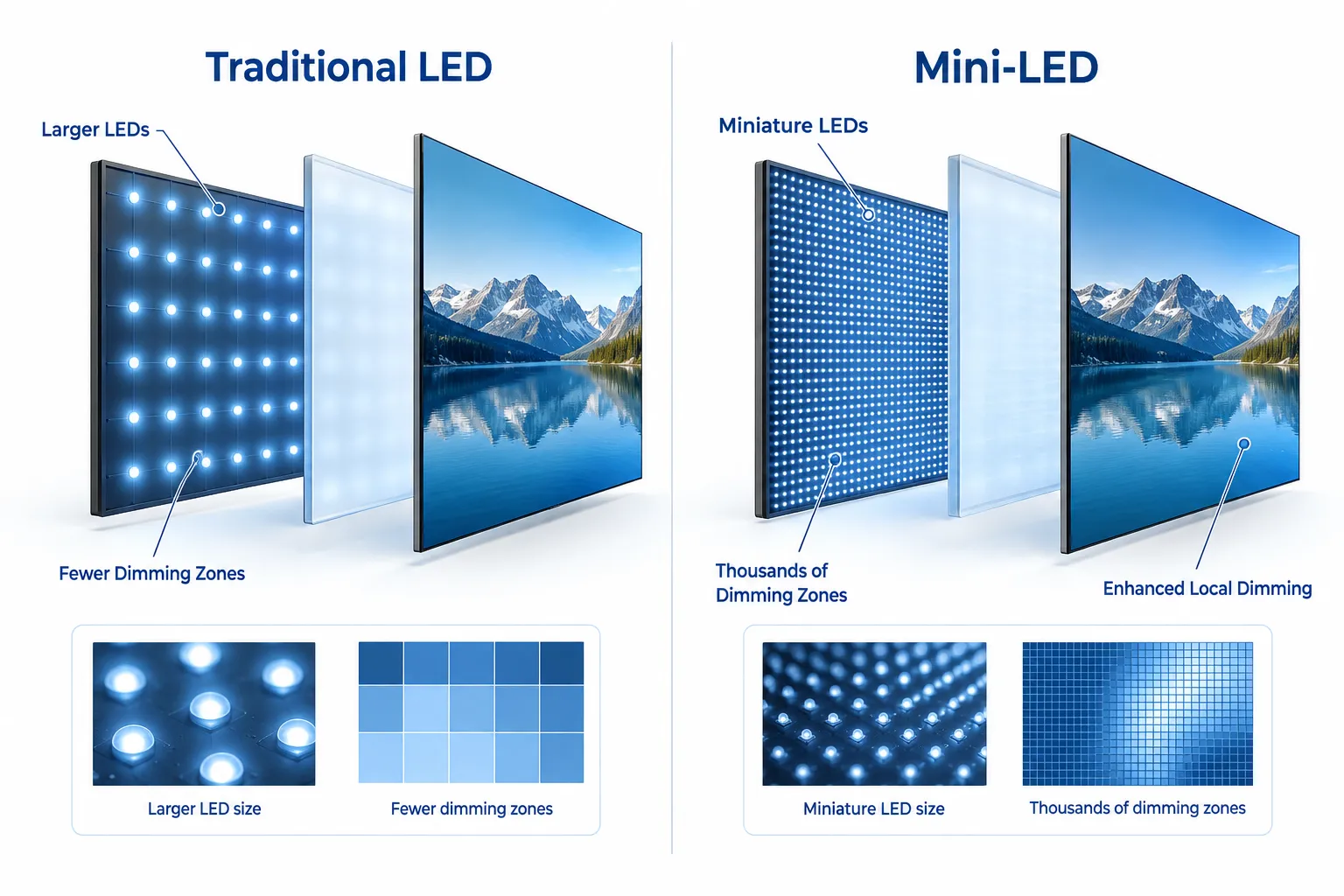
    Mini LED is an LCD screen that uses a backlight made of thousands of tiny LEDs, grouped into many dimming zones, so the TV or monitor can brighten and darken different parts of the screen at the same time.

    That’s it.

    Mini LED is not a new display type like OLED. It’s still an LCD display. It’s just a more advanced backlight system for LCD.

    And that “backlight system” part is the whole story.

    Wait, why does an LCD need a backlight?

    LCD pixels do not create their own light. They’re more like little shutters.

    They can block light, let light through, and change color as light passes through, but they don’t glow on their own.

    So an LCD display needs a lamp behind it. That lamp is the backlight.

    Older LCDs used:

    • CCFL backlights (older, thicker, less efficient)
    • then regular LED backlights (better, thinner, cheaper)

    Mini LED is basically: “What if we made the backlight way more precise?”

    The core problem Mini LED is trying to fix

    If you’ve ever watched a movie on a cheap LCD and the black bars look gray, you’ve seen the problem.

    Because the backlight is shining behind the whole panel, it’s hard for an LCD to do deep blacks. Even if a pixel tries to block light, some light leaks. Also, the backlight is often lit too broadly.

    So display makers added something called local dimming. Meaning, instead of one giant backlight, you control sections of it.

    More sections = more control = better contrast.

    Mini LED is how you get a lot more sections.

    What “Mini” actually means here

    A “normal” LED backlight uses comparatively larger LEDs.

    A Mini LED backlight uses much smaller LEDs, which makes it possible to pack in thousands of them.

    But the screen doesn’t control each LED individually (usually). They’re grouped into local dimming zones.

    So the real spec that matters is not “Mini LED yes/no.”

    It’s:

    • How many local dimming zones does it have?
    • How well does the dimming algorithm behave?
    • How bright can it get without looking weird?

    A Mini LED screen with a low zone count can still look just okay.

    A Mini LED screen with a high zone count and good processing can look shockingly close to OLED in a lot of scenes. Not all. But a lot.

    Mini LED vs OLED (the simple comparison)

    Here’s the cleanest way to think about it.

    OLED

    • Each pixel makes its own light.
    • Pixels can turn fully off.
    • Blacks are basically perfect.
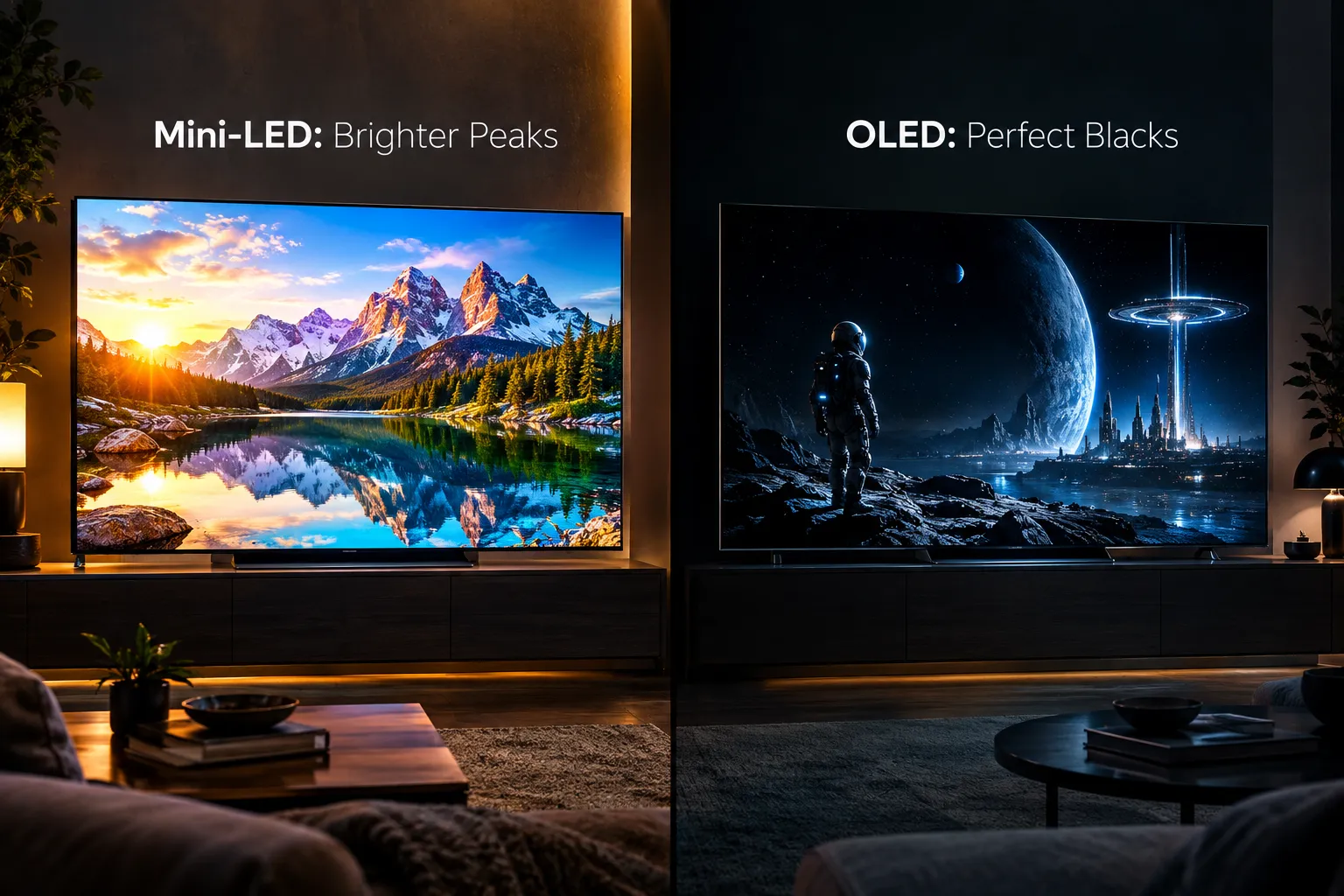
    • But brightness is often lower than the brightest LCDs.
    • Risk of burn in exists, (varies by use, but it’s real enough to consider).
    • Great for dark room movies and cinematic contrast.

    Mini LED (LCD + advanced backlight)

    • Pixels still don’t emit light, backlight does.
    • Backlight is split into many zones.
    • Can get very, very bright (great for HDR highlights and bright rooms).
    • Blacks can be excellent, but not always perfect.
    • Can show blooming around bright objects on dark backgrounds.
    • Usually no burn in risk in typical use.
    • Great for bright rooms, HDR punch, mixed use.

    If you want the shortest advice:

    • If you watch lots of movies in a dark room and you obsess over black levels, OLED is still the king.
    • If you want insane brightness, strong HDR pop, and a screen that’s less stressful for static UI elements, Mini LED is often the safer pick.

    A bright living room setup where screen brightness matters

    The phrase you’ll keep hearing: “local dimming zones”

    This is where Mini LED lives or dies.

    A local dimming zone is a chunk of the backlight that can dim or brighten as a group.

    Example:

    • If a TV has 500 zones, it can dim or brighten 500 different regions behind the LCD panel.
    • If it has 2,000 zones, it has much finer control.

    More zones usually means:

    • better blacks
    • less blooming
    • more realistic HDR
    • less “glow” around subtitles

    But zone count isn’t everything. Sometimes a TV has lots of zones and still does goofy things because the processing is conservative (to avoid blooming) or aggressive (to chase brightness).

    Also, manufacturers don’t always advertise zone count clearly. Convenient, right.

    What blooming is (and why Mini LED can still show it)

    Blooming is that halo you see when a bright object is on a dark background.

    Classic example:

    • white subtitles on a black letterbox bar
    • a streetlamp at night
    • stars in a space scene
    • a mouse cursor on a dark desktop

    Why it happens:

    • The backlight zone behind that bright object has to turn on.
    • But that zone also covers nearby dark pixels.
    • So the dark pixels get a bit of unwanted light.

    That’s blooming.

    Mini LED reduces it because smaller LEDs allow for more zones. But unless you have per pixel lighting (OLED) or something closer to that (MicroLED, which is still wildly expensive and rare), blooming can still happen.

    The real question is: Is it mild and only visible if you look for it, or is it distracting?

    Mini LED vs “regular LED” LCD

    This is where people get tricked.

    A normal LED LCD might have:

    • edge lighting (LEDs on the sides)
    • or a basic full array backlight (LEDs behind the panel)
    • with a low number of dimming zones, or none

    Mini LED usually implies:

    • full array backlighting
    • many more LEDs
    • many more dimming zones

    So compared to a standard LCD, Mini LED typically gives you:

    • better contrast
    • better HDR
    • brighter highlights
    • better dark scene performance

    But again. It’s not magic. A bad Mini LED implementation can still look worse than a well tuned traditional full array local dimming TV.

    Mini LED vs QLED vs “Quantum Dot” (the confusing label situation)

    This part annoys people because brands mix terms.

    Quantum Dot (often marketed as QLED) is about color. Not backlight control.

    • Quantum dots help the LCD produce a wider color gamut.
    • They can make reds and greens look richer, especially in HDR.

    Mini LED is about the backlight size and dimming zone control.

    You can have:

    • QLED without Mini LED
    • Mini LED without quantum dots (less common in higher end)
    • both together (very common in premium LCD TVs)

    So if you see “QLED Mini LED” it basically means:

    • LCD with quantum dots (better color)
    • plus Mini LED backlight (better contrast and brightness control)

    So… is Mini LED good for HDR?

    Yes. This is one of the main reasons it exists.

    HDR looks convincing when a screen can do:

    • very bright highlights (sun glints, explosions, reflections)
    • while keeping nearby dark areas dark

    OLED nails the blacks. Mini LED often nails the brightness.

    In a bright room, Mini LED can actually look more “HDR” than OLED because the highlights have more raw intensity. It’s that eye squinting sparkle. If you’ve seen it, you know.

    Mini LED is also popular for sports because it stays punchy in daylight.

    Why Mini LED is popular in monitors and laptops now

    Mini LED isn’t just a TV thing anymore.

    In 2026, you’ll see it a lot in:

    • pro creator monitors
    • gaming monitors
    • high end laptops and tablets

    Why?

    1. High brightness

    Mini LED gets very bright, which is useful for HDR workflows and viewing in different lighting.

    2. Reduced burn in worry

    OLED monitors are amazing, but static UI elements can be a concern. Taskbars, timelines, HUDs. People do worry about it.

    Mini LED avoids most of that fear.

    3. Better black levels than typical IPS LCD

    Mini LED makes IPS LCD usable for darker content, not perfect, but much better than the old days.

    That said… blooming is often more noticeable on monitors because:

    • you sit closer
    • UI has lots of small bright elements on dark backgrounds

    So it’s a trade.

    A desk setup with a monitor showing a dark UI where blooming can appear

    The “gotchas” people notice with Mini LED

    Mini LED is great when it’s great. But it has quirks.

    Blooming and halos

    We covered it. Still the #1 complaint.

    Black crush or dimming weirdness

    Some screens dim too aggressively to hide blooming, which can cause:

    • shadow details disappearing
    • dark scenes looking a bit “closed in”
    • subtitles causing the whole picture to shift brightness

    Viewing angles (depends on panel type)

    Many Mini LED TVs use VA panels for better contrast, but VA can have worse viewing angles than IPS. Sit off to the side and blacks can lift.

    Some use IPS or ADS type panels and then rely on Mini LED to help contrast. That can look great head on, but it’s not always as deep as a top VA Mini LED in a dark room.

    Motion handling is not automatically better

    Mini LED is backlight tech, not refresh rate tech. Motion depends on refresh rate, response times, processing, and settings.

    How to tell if a Mini LED TV or monitor is actually good

    If you’re shopping, here’s what I would look for in 2026.

    1. Zone count (if you can find it)

    More zones usually helps. If a brand won’t mention it at all, that can be a clue it’s not impressive.

    2. Real HDR brightness, not just marketing

    Look for measured peak brightness from reviews. Not just “HDR1000” on a spec sheet. Certifications can help, but measured tests are better.

    3. Blooming performance in reviews

    Search specifically for:

    • subtitle blooming
    • starfield test
    • UI blooming (for monitors)
    • local dimming behavior

    4. Panel type and your room setup

    • Bright room + daytime viewing: Mini LED is often a win.
    • Dark room movie nights: OLED still has an edge, unless the Mini LED is very high end and well tuned.

    5. How you use it

    • Lots of static UI, spreadsheets, code editors: Mini LED is appealing.
    • Mostly movies at night: OLED is tempting.
    • Mixed use: Mini LED is a strong all arounder.

    Is Mini LED the same thing as MicroLED?

    No. Not even close in terms of how it works.

    • Mini LED: tiny LEDs used as the backlight for an LCD panel.
    • MicroLED: each pixel is its own tiny LED, like OLED but inorganic, super bright, no burn in in the same way, and extremely expensive.

    MicroLED is the “future wall of perfect panels” tech. Mini LED is the “we can mass produce this and it looks really good” tech.

    If you’re buying something normal in 2026, Mini LED is realistic. MicroLED is mostly still in the luxury, custom install world.

    Quick mental model (so it sticks)

    If you remember nothing else, remember this:

    • OLED: light is controlled per pixel.
    • Mini LED: light is controlled per zone behind the pixels.

    Per pixel control is cleaner. Per zone control can be brighter and cheaper at large sizes.

    That’s the whole trade.

    Who should buy Mini LED in 2026?

    Mini LED makes a ton of sense if you are:

    • Watching in a bright living room
    • Big on sports, YouTube, TV shows, mixed content
    • Sensitive to burn in risk (or just don’t want to think about it)
    • Buying a large screen where OLED pricing jumps hard
    • Using it as a desktop monitor for long hours
    • Wanting HDR pop more than perfect black

    Mini LED is also a nice middle ground if you want “premium looking picture” without going full OLED.

    Who should probably buy OLED instead?

    OLED might still be the better pick if:

    • You watch lots of movies in a dark room
    • You care about perfect blacks and zero blooming
    • You love that ink like contrast in night scenes
    • You sit centered and want the cleanest cinematic image

    If blooming drives you crazy, OLED is the easy answer.

    Wrap up

    Mini LED is not a brand. It’s not a magic display type. It’s LCD done better, mostly by using a backlight with many tiny LEDs and lots of dimming zones.

    It can look amazing. Like, genuinely. Especially with HDR in a bright room.

    But it still isn’t the same as OLED, because zones are not pixels. Blooming can show up. Sometimes the dimming gets a little weird. And the best Mini LED screens are still… the best ones. Not all Mini LED is created equal.

    If you want a simple shopping shortcut:

    • Choose Mini LED if you want brightness, punchy HDR, and a solid all around screen.
    • Choose OLED if you want the cleanest blacks and you hate halos.

    That’s Mini LED. Nothing mystical. Just a smarter flashlight behind your LCD.

    FAQs (Frequently Asked Questions)

    What is Mini LED technology in displays?

    Mini LED is an advanced LCD screen backlight system that uses thousands of tiny LEDs grouped into many local dimming zones, allowing the TV or monitor to brighten and darken different parts of the screen simultaneously for improved contrast and HDR performance.

    Why do LCD screens need a backlight, and how does Mini LED improve it?

    LCD pixels don’t emit light themselves; they act like shutters controlling light passage. Therefore, LCDs require a backlight. Mini LED improves this by using much smaller LEDs packed densely into many dimming zones, enabling more precise control of light and better contrast compared to traditional LED backlights.

    What problem does Mini LED technology solve compared to older LCD displays?

    Mini LED addresses the issue of poor black levels and washed-out dark scenes in traditional LCDs caused by broad backlighting. By splitting the backlight into thousands of local dimming zones, Mini LED allows selective brightening and dimming, resulting in deeper blacks and more cinematic contrast.

    How does the number of local dimming zones affect Mini LED display quality?

    The number of local dimming zones determines how precisely the backlight can be controlled. More zones mean finer control over brightness and darkness across the screen, leading to better black levels, reduced blooming around bright objects on dark backgrounds, and overall improved picture quality.

    How does Mini LED compare to OLED displays?

    OLED pixels emit their own light and can turn off individually for perfect blacks but often have lower peak brightness and risk burn-in. Mini LED uses an advanced backlight behind an LCD panel, offering very high brightness ideal for HDR and bright rooms with minimal burn-in risk but may exhibit some blooming and slightly less perfect blacks compared to OLED.

    Which display technology should I choose between Mini LED and OLED?

    If you primarily watch movies in a dark room and prioritize perfect black levels and cinematic contrast, OLED remains the best choice. However, if you want extremely bright HDR highlights, a display suitable for bright environments, and less concern about static image burn-in, Mini LED is often the safer pick with strong HDR punch and excellent mixed-use performance.

    Follow on Google News Follow on Flipboard
    Share. Facebook Twitter Pinterest LinkedIn Telegram Email Copy Link Reddit
    Previous ArticleWhat Is QLED? What It Really Means on TVs
    Moses
    • Facebook
    • X (Twitter)
    • Pinterest
    • Instagram
    • LinkedIn

    I'm Moses, a mechanical engineer by training, a web designer by profession, and a content developer by passion. Since 2019, I've been pouring my heart and soul into blogging about topics that fuel my curiosity and ignite my creativity. ‎ ‎From the latest tech trends to the intricacies of programming languages, I'm always on the lookout for opportunities to expand my knowledge and share my insights with the world. Connect with me on my social media platforms for the latest updates.

    Related Posts

    What Is QLED? What It Really Means on TVs

    July 30, 2026

    What is OLED? Your Guide to Display Technology

    July 30, 2026

    10 Best Projectors Under $500 That Will Transform Your Home Theater Experience (Reviews)

    November 8, 2025

    10 Best Projectors for Golf Simulators

    July 28, 2025
    Leave A Reply Cancel Reply

    techozea
    Demo
    Top Posts

    Can You Connect Two Bluetooth Headphones to iPhone? Complete Guide

    January 4, 2026208 Views

    10 Best Laptops with the Best Speakers: Tested by Sound Experts

    May 6, 2026188 Views

    Focal Utopia Review: Are These $4,999 Headphones Worth It?

    January 22, 2026165 Views

    Complete Guide to PC Water Cooling: Build Your Dream Rig

    July 9, 2026160 Views
    Don't Miss

    What Is Mini‑LED?

    August 1, 202613 Mins Read

    Mini LED is one of those tech terms that sounds like it should be obvious.…

    What Is QLED? What It Really Means on TVs

    July 30, 2026

    What is OLED? Your Guide to Display Technology

    July 30, 2026

    Do Headphones Make Tinnitus Worse? What Experts Say

    July 30, 2026
    Stay In Touch
    • Facebook
    • Twitter
    • Pinterest
    • YouTube
    • LinkedIn

    Subscribe to Updates

    Get the latest technology news from TechOzea about product reviews, ultimate guides, best products, how-to guides and insights.

    Demo
    About Us
    About Us

    Discover cutting-edge technology news, product reviews, ultimate guides, best products, how-to guides and insights at Techozea. Your trusted destination for staying informed about the latest trends in the tech world.
    ‎
    ‎At Techozea, we provide a curated collection of industry news, hands-on product reviews, practical how-to guides, and detailed analysis, keeping you informed and empowered in an ever-evolving digital landscape.

    We're accepting new partnerships right now.

    Email Us: [email protected]

    Facebook X (Twitter) Pinterest YouTube WhatsApp
    Our Picks

    What Is Mini‑LED?

    August 1, 2026

    What Is QLED? What It Really Means on TVs

    July 30, 2026

    What is OLED? Your Guide to Display Technology

    July 30, 2026
    Most Popular

    Silent Mode: How to Turn Off Ringer on iPad

    December 7, 2024

    How to Choose the Best Bluetooth Speakers

    July 28, 2025

    How to clean AirPods – A Step-by-Step Guide

    September 6, 2025
    Categories
    • Camera & Accessories (27)
    • Headphones & Audio Gear (110)
    • How-To and Tutorials (124)
    • Laptops & Accessories (45)
    • Mobile Gadgets & Accessories (13)
    • News (6)
    • PC & Gaming Gear (13)
    • TVs (7)
    • Uncategorized (11)
    Facebook X (Twitter) Instagram Pinterest YouTube
    • Home
    • Affiliate Disclosure
    • Advertise
    • Privacy Policy
    • Contact Us
    • About Us
    © 2026 TechOzea. Designed by Moses.

    Type above and press Enter to search. Press Esc to cancel.

    Ad Blocker Enabled!
    Ad Blocker Enabled!
    Our website is made possible by displaying online advertisements to our visitors. Please support us by disabling your Ad Blocker.