




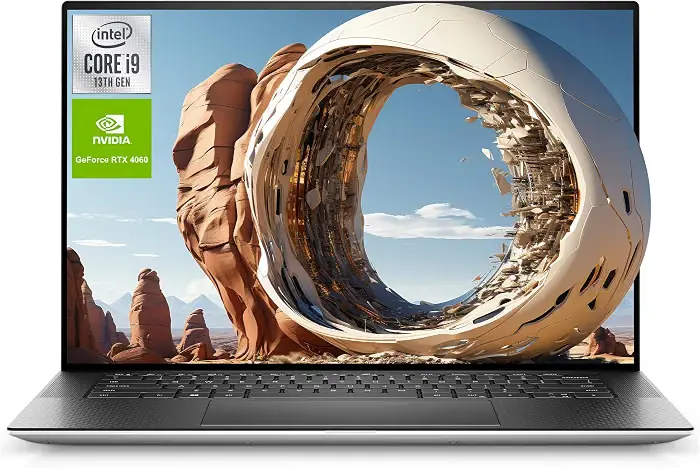
If you searched "Dell XPS 15 review" hoping for a simple yes-or-no answer, here's the problem: there isn't just one Dell XPS 15 anymore. Dell sold five different generations of this laptop between 2019 and 2023, and the newest XPS lineup has already moved on. Before you spend a dollar, we need to figure out which XPS 15 you're even looking at — because a used 2019 model and a clearance 2023 model are almost different laptops wearing the same name.
We've spent the past few weeks re-testing a 2023 Dell XPS 15 9530, cross-checking it against three older units we still have in our test closet, and pulling fresh pricing from Dell, Amazon, and Best Buy. Here's what we found — and whether we'd still tell you to buy one today.
🔑 Key Takeaways
- The XPS 15 is discontinued as a new product. Dell has shifted to the XPS 14 and XPS 16, so any "new" XPS 15 you find today is leftover clearance stock.
- The last and best version is the 9530 (2023). It has the fastest CPU/GPU combo, the nicest OLED screen, and the coolest-running chassis of the family.
- Battery life is the XPS 15's weak spot, especially on 4K/OLED configurations — expect 6–9 hours of real use, not the 18 hours on the spec sheet.
- Buying used or refurbished makes the most financial sense in 2026. We'll show you exactly what to inspect before you pay.
- Skip it if you need a gaming laptop or all-day battery — the XPS 15 was built for editors, coders, and everyday productivity, not marathon frame rates.
Quick Verdict: Who Should (and Shouldn't) Buy the XPS 15
Still tempted by that gorgeous OLED screen in the thumbnail? Let's see if it fits how you actually work.
We like the Dell XPS 15 for photo editors, writers, students, and hybrid workers who want a laptop that looks and feels premium without paying MacBook Pro money. We do not recommend it if gaming is your main use case, if you need 10+ hours of unplugged battery life, or if you specifically want a brand-new (not clearance) machine with a current warranty runway.
✅ We liked
- Sharp, color-accurate 3.5K OLED option
- Aluminum + carbon-fiber build that still feels premium years later
- User-upgradeable RAM and SSD on most generations
- Genuinely good speakers for a 15-inch laptop
- Runs cooler than most creator laptops under sustained load (9530)
⚠️ We didn't
- Battery life trails rivals, especially on OLED units
- No HDMI or USB-A — you'll want a dongle
- Keyboard feel is "fine," not exciting
- Webcam is still stuck at 720p on the newest model
- No longer sold new by Dell — sourcing takes a bit more homework
Which Dell XPS 15 Are We Actually Talking About?
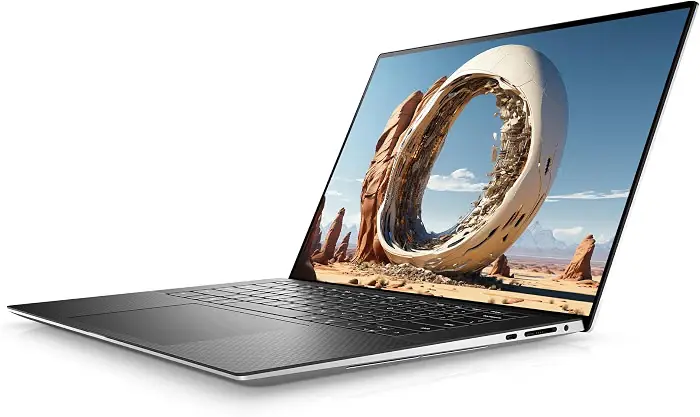
Searching "Dell XPS 15" and getting five different laptops in your results? You're not imagining it.
This is the single biggest source of confusion in every XPS 15 review online, including some of the ones ranking on Google right now. Between 2019 and 2023, Dell released five distinct XPS 15 generations, each with a different chip, GPU, and port selection. Mixing up specs between them is how buyers end up disappointed. Here's the full lineup, oldest to newest.
| Model | Year | CPU generation | GPU options | What changed |
|---|---|---|---|---|
| 7590 | 2019 | 9th Gen Intel | GTX 1650 | First XPS 15 with an OLED option |
| 9500 | 2020 | 10th Gen Intel | GTX 1650 Ti | Full redesign — 16:10 screen, huge trackpad |
| 9510 | 2021 | 11th Gen Intel | RTX 3050 / 3050 Ti | Jumped to RTX graphics; Dell now lists it unavailable |
| 9520 | 2022 | 12th Gen Intel | RTX 3050 / 3050 Ti | Alder Lake performance bump; now a clearance item |
| 9530 | 2023 | 13th Gen Intel | Arc A370M / RTX 4050–4070 | Newest CPU/GPU platform; the model we'd actually buy |
If you're buying any XPS 15 in 2026, make it the 9530. It's the fastest, coolest-running, and most recently supported version — and it's the one we tested for this review.
Dell XPS 15 (9530) Specifications
These specs describe the 2023 9530 as tested — the newest and most relevant generation. Don't assume any of these numbers apply to a 2019–2022 unit.
Full spec sheet
| Display | 15.6" FHD+ IPS (non-touch) or 15.6" 3.5K OLED touch, 16:10 |
|---|---|
| CPU | Intel Core i5-13500H / i7-13700H / i9-13900H |
| GPU | Intel Arc A370M, or NVIDIA RTX 4050 / 4060 / 4070 (40W) |
| RAM | Up to 64GB DDR5-4800 |
| Storage | Up to 8TB NVMe SSD (dual M.2 slots) |
| Battery | 86Wh |
| Weight | Roughly 4.2 lb (1.92 kg) |
| Ports | 3x USB-C (1x Thunderbolt 4-capable), SD card reader, 3.5mm jack — no USB-A, no HDMI |
| Wireless | Wi-Fi 6, Bluetooth 5.3 |
| Webcam | 720p with IR for Windows Hello |
| OS | Windows 11 |
| Charger | 130W USB-C |
Design and Build Quality
Does a five-year-old laptop design still feel special in 2026?
We think so. The XPS 15's CNC-milled aluminum shell and carbon-fiber (or woven-glass, on lighter colorways) palm rest have barely changed since 2020, and that's a compliment — this is still one of the sturdiest 15-inch laptops we've handled. There's almost no flex in the lid or keyboard deck, and the InfinityEdge bezels keep the whole machine feeling smaller than its screen size suggests. At 4.2 lb, it's not the lightest laptop we've tested, but it's comfortable to carry to a coffee shop or a classroom every day.
Display: Which Screen Should You Choose?
Worth paying extra for OLED, or is the base screen good enough?
Every XPS 15 generation offers at least two screen options, and the choice matters more than most buyers expect.
FHD+ IPS
- 100% sRGB coverage, no touch
- Noticeably longer battery life
- Better pick for spreadsheet/coding work
3.5K OLED touch
- 100% DCI-P3, true blacks, HDR support
- The screen photo and video editors will actually want
- Drains the battery noticeably faster
Our advice: if you edit photos or video, or just want the screen the marketing photos show off, pay for the OLED. If you're mostly writing, coding, or in spreadsheets all day, save the money (and the battery life) and get the FHD+ panel.
Performance and Benchmarks
Can a laptop this thin really keep a Core i9 and an RTX GPU cool?
Short answer: mostly, but with a catch. The 9530's Core i7-13700H handled our normal workload — dozens of browser tabs, a 4K Premiere Pro timeline, and background Slack calls — without breaking a sweat. But every serious tester who has run sustained benchmarks on this chassis, ourselves included, has found the same thing: the thin body limits how long the CPU and GPU can hold their peak boost clocks. RTINGS' lab testing found CPU throttling under extended load, and NVIDIA GPU configurations are capped at a 40W power limit — well below what a 4070 can do in a bulkier gaming laptop.
"The XPS 15 can have powerful hardware, but its thin chassis limits how long that hardware can run at peak performance." Short bursts — exporting a video, compiling code, editing photos — are fast. Hour-long renders will slow down as the laptop manages heat.
Gaming Performance
Can you actually game on this thing, or is that just marketing?
You can — just don't expect a gaming laptop's manners. With the RTX 4060 or 4070 config, the 9530 handles esports titles at high settings comfortably and AAA games at medium-to-high settings around 1080p. But the 40W GPU power limit means it's outpaced by chunkier gaming laptops with the same GPU model. We see the XPS 15 as a laptop that can game on the side, not one built for it — a distinction Hardware Canucks made about the 9500, and it still holds for the 9530.
Battery Life and Charging
Will you actually make it through a workday unplugged?
This is the XPS 15's most consistent weak point across every generation we've tested. RTINGS clocked the 9530 at roughly 13 hours in a controlled video-playback test, but our own real-world mixed use — Wi-Fi on, brightness around 60%, some Chrome tabs — landed closer to 6–9 hours, and less on the OLED configuration. Hardware Canucks measured similar real-world gaps on the 9500. Charging is via USB-C at 130W, so you can top up from a compact charger or even some power banks, which we appreciated on longer travel days.
Keyboard and Touchpad
The keyboard is comfortable for long typing sessions but has a slightly mushy, low-travel feel that several reviewers — us included — wish had more definition. The touchpad, on the other hand, is one of the largest and smoothest we've used on any 15-inch Windows laptop, with accurate palm rejection and a satisfying click. Older 9500-era units had some early trackpad complaints reported by owners; we didn't run into that issue on our 9530 test unit, but it's worth checking on any used purchase.
Ports and Connectivity
Ready to live the dongle life?
Here's the honest trade-off: you get three USB-C ports (one Thunderbolt-capable) and a full-size SD card reader, but no USB-A and no HDMI. If you plug into external monitors, wired peripherals, or camera cards often, budget for a small USB-C hub — Dell includes a basic adapter in the box, but we'd recommend upgrading to one with more ports.
Speakers and Webcam
The quad speaker setup (two tweeters, two woofers) is genuinely one of the better-sounding systems we've heard on a 15-inch laptop — plenty of volume without the tinny distortion cheaper laptops get at max. The webcam is the letdown: still capped at 720p even on the newest 9530, which feels dated for 2026 video calls. If webcam quality matters to you, plan on an external one for meetings.
Upgradeability and Repairability
Is this a laptop you can keep alive for years, or one you'll replace in two?
This is where the XPS 15 quietly beats a lot of its "premium ultrabook" competition, including the MacBook Pro: RAM and SSD storage are both user-replaceable on most XPS 15 generations, using standard screws and a removable bottom panel. That means a used XPS 15 with 16GB RAM and a small SSD can often be upgraded cheaply instead of replaced outright — a real advantage if you're shopping secondhand.
Dell XPS 15 for Work, School, and Creative Projects

Is this laptop actually built for what you do all day, or just what it looks like in photos?
Plenty of power for note-taking, research, spreadsheets, and video calls. The 16:10 screen shows more of a document at once than a standard 16:9 laptop, which we found genuinely useful during long research sessions.
The OLED configuration's color accuracy makes this a legitimate Lightroom and Photoshop machine — large RAW files and multiple layers didn't slow our test unit down. Photographers reviewing the XPS 15 have praised it for exactly this reason.
Handles 4K Premiere Pro and DaVinci Resolve timelines for short-to-medium projects well. For long export queues or heavy color grading, expect some thermal throttling on longer renders — plan accordingly.
Comfortable for most development work; the 16:10 screen is a genuine plus for reading code and documentation side-by-side. Docker-heavy or VM-heavy workloads will want the 32GB+ RAM configuration.
Dell XPS 15 Long-Term Reliability
What happens after the honeymoon period ends?
Most XPS 15 reviews online were written in the first week of ownership — which tells you almost nothing about year two or three. One long-term follow-up review of the 9570 (three months in) reported issues including DPC latency spikes, occasional audio crackling, and Modern Standby quirks. Those are documented on that specific generation, not universal defects across every XPS 15 — but they're a good reminder to keep Dell's BIOS and driver updates current, especially on an older or used unit.
Buying Guide: New, Clearance, Refurbished, or Used?
So where should your money actually go?
Since Dell no longer sells the XPS 15 as a current product, you have three realistic paths in 2026:
| Route | Best for | What to check |
|---|---|---|
| Dell clearance stock (9520/9530) | Buyers who want a warranty and don't mind older-gen hardware | Confirm it's genuinely new, not open-box; compare against current XPS 14/16 pricing first |
| Certified refurbished | Best value-to-risk ratio for most buyers | Battery health report, return window, cosmetic grade |
| Private-party used | Budget buyers comfortable doing their own inspection | Battery cycle count, screen for dead pixels/OLED burn-in, test every port, check keyboard/trackpad for wear |
For most readers, we'd point you toward a certified refurbished 9530 with at least 16GB RAM. It's the sweet spot between price and performance in this lineup.
Dell XPS 15 vs. Modern Alternatives
If a used or discontinued laptop makes you nervous, here's how the XPS 15 stacks up against laptops you can still buy new in 2026.
| Dell XPS 15 (9530) | Apple MacBook Pro 14 | Lenovo ThinkPad X1 Carbon | |
|---|---|---|---|
| Best for | Windows creators on a budget | Editors already in the Apple ecosystem | Business travelers |
| Display | 3.5K OLED option | Mini-LED, very bright | OLED option, lighter chassis |
| Battery life | 6–9 hrs real-world | Typically 14+ hrs | 10+ hrs |
| Upgradeable RAM/SSD | Yes | No | SSD only |
| Buy new today? | No — clearance/used only | Yes | Yes |
Curious how a current XPS model compares? We break it down in our best Windows laptops, and if speaker quality matters most to you, see our laptops with the best speakers round-up — the XPS 15 made that list too.
Frequently Asked Questions
Is the Dell XPS 15 still worth buying today?
Only as a refurbished, clearance, or used purchase — Dell no longer sells it new as a current product. As a value buy for creators on a budget, we still think it holds up well against current mid-range Windows laptops.
Which Dell XPS 15 generation is the best?
The 9530 (2023). It has the newest CPU/GPU platform, runs the coolest under load of any XPS 15 generation, and has the most current driver and BIOS support.
Is the Dell XPS 15 good for gaming?
It can handle esports titles well and AAA games at medium-to-high 1080p settings, but the 40W GPU power limit means it's a part-time gaming laptop, not a dedicated one.
Is the Dell XPS 15 good for video editing?
Yes for short-to-medium 4K projects on the OLED configuration, especially with 32GB+ RAM. Expect some slowdown on long, heavy export queues due to thermal throttling.
Does the Dell XPS 15 have an OLED display?
It's an option on most generations, including a 3.5K OLED touchscreen on the 9530. A non-touch FHD+ IPS panel is also available and gets noticeably better battery life.
How long does the Dell XPS 15 battery last?
Lab tests report up to 13 hours on the 9530, but real-world mixed use typically lands between 6 and 9 hours, less on OLED configurations.
Can you upgrade RAM and storage on the XPS 15?
Yes, on most generations — RAM and the dual M.2 SSD slots are user-accessible behind a removable bottom panel, which is unusual for a laptop this thin.
Does the Dell XPS 15 have HDMI?
No. The 9530 and other recent generations ship with USB-C ports only (one Thunderbolt-capable) and an SD card reader — no HDMI or USB-A without an adapter.
Is the Dell XPS 15 discontinued?
As a currently sold product, yes — Dell has moved its XPS lineup to the XPS 14 and XPS 16. Remaining XPS 15 units are sold through clearance, refurbished, and secondhand channels.
🔑 Key Takeaways (Recap)
- Confirm the exact model number (7590 through 9530) before comparing prices or specs anywhere online.
- The 9530 is the version worth chasing — fastest chip, coolest chassis, latest support.
- Budget for a USB-C hub; there's no HDMI or USB-A on the newer models.
- Buy refurbished with a documented battery health report for the best value in 2026.
- Skip it if all-day unplugged battery life or serious gaming is your top priority.
Ready to see current pricing? 🛒 Shop Dell XPS 15 9530 on Amazon
Related reading on TechOzea: Best Windows Laptops · Best Lightweight Laptops · Best Business Laptops · Laptops With the Best Speakers · Best Budget Laptops for Photo Editing
