





After spending several weeks with the Microsoft Surface Laptop Studio 2, I can confidently say it’s one of the most versatile and innovative laptops I’ve ever used.
This premium 2-in-1 device combines exceptional build quality with impressive performance, making it an ideal choice for creative professionals, developers, and anyone who needs both portability and power.
My Overall Rating: 9.2/10
As someone who frequently switches between writing, digital art, and video editing, I found the Surface Laptop Studio 2’s unique form factor to be a game-changer.
The ability to transform from a traditional laptop to a creative studio or tablet with its innovative sliding display mechanism is not just a gimmick—it’s genuinely useful in my daily workflow.
But is this premium device worth its hefty price tag? And how does it compare to competitors like the MacBook Pro? Let’s dive deep into everything you need to know before making this significant investment.
What’s New in the Surface Laptop Studio 2?
The Surface Laptop Studio 2 brings several notable improvements over its predecessor:
- Major performance boost with 13th Gen Intel Core processors
- Enhanced graphics options with NVIDIA GeForce RTX 4050 or 4060 GPUs
- Expanded port selection including the addition of USB-A and microSD card reader
- Improved build quality with a new anodized aluminum chassis
- AI capabilities through an Intel Movidius 3700VC neural processor
Let’s be honest—this is an expensive device starting at $1,999, but for the right user, it delivers exceptional value through its versatility and performance.
Surface Laptop Studio 2: At a Glance Comparison Table
| Feature | Surface Laptop Studio 2 | MacBook Pro 14″ (M2 Pro) | Dell XPS 15 (2023) |
|---|---|---|---|
| Starting Price | $1,999 | $1,999 | $2,199 (OLED) |
| Display | 14.4″ 2400×1600 120Hz touch | 14.2″ 3024×1964 120Hz | 15.6″ 3456×2160 OLED |
| Processor | Intel Core i7-13700H | Apple M2 Pro | Intel Core i7-13700H |
| Graphics | Intel Iris Xe/RTX 4050/4060 | Integrated (10/16-core) | RTX 4060/4070 |
| RAM | 16-64GB | 16-32GB | 16-64GB |
| Storage | 512GB-2TB SSD | 512GB-8TB SSD | 512GB-8TB SSD |
| Battery Life | ~9.5 hours | ~14 hours | ~9 hours |
| Weight | 4.18-4.37 lbs | 3.5-3.6 lbs | 4.2-4.5 lbs |
| Special Features | Convertible design, haptic touchpad, Surface Pen support | Apple ecosystem integration | OLED display |
| My Rating | 9.2/10 | 9.5/10 | 8.8/10 |
Unboxing the Microsoft Surface Laptop Studio 2
First impressions matter, and Microsoft delivers a premium unboxing experience worthy of this flagship device. Inside the sleek, minimal packaging, you’ll find:
- Surface Laptop Studio 2 device
- 127W power supply with USB-A charging port
- Quick start guide and warranty information
- Unfortunately, no Surface Slim Pen 2 (sold separately for $129.99)
The moment I lifted the device out of the box, I was impressed by its solid construction and premium feel. The platinum color gives it a sophisticated, professional appearance. At around 4.37 pounds (with discrete GPU), it’s noticeably heavier than a MacBook Pro 14″, but the weight is justified by its versatility and performance capabilities.
Pro Tip: If you’re planning to use the Studio 2 for drawing or note-taking, I highly recommend adding the Surface Slim Pen 2 to your purchase. It complements the device perfectly and magnetically attaches to the front lip for convenient storage and charging.
Check the latest price on Amazon
Design and Build Quality: Premium in Every Way
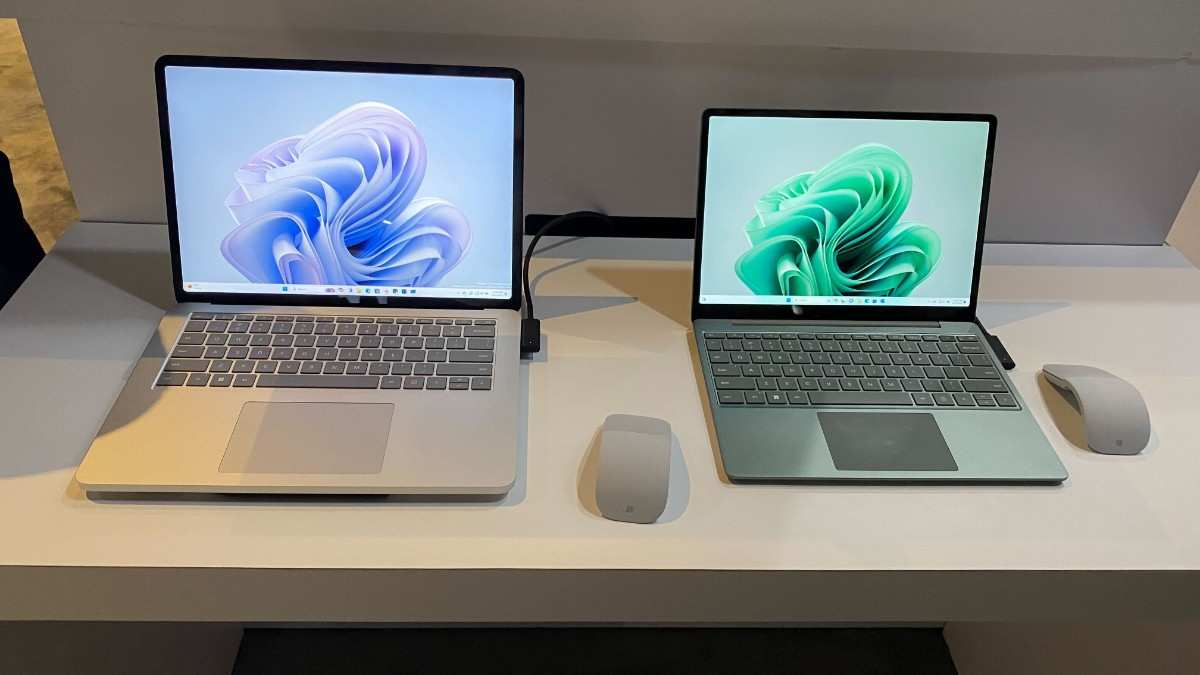
The Surface Laptop Studio 2 features a distinctive design that sets it apart from other laptops on the market. Microsoft has refined the already impressive design of the original model with a new anodized aluminum chassis that feels incredibly solid in hand.
The Revolutionary Hinge Mechanism
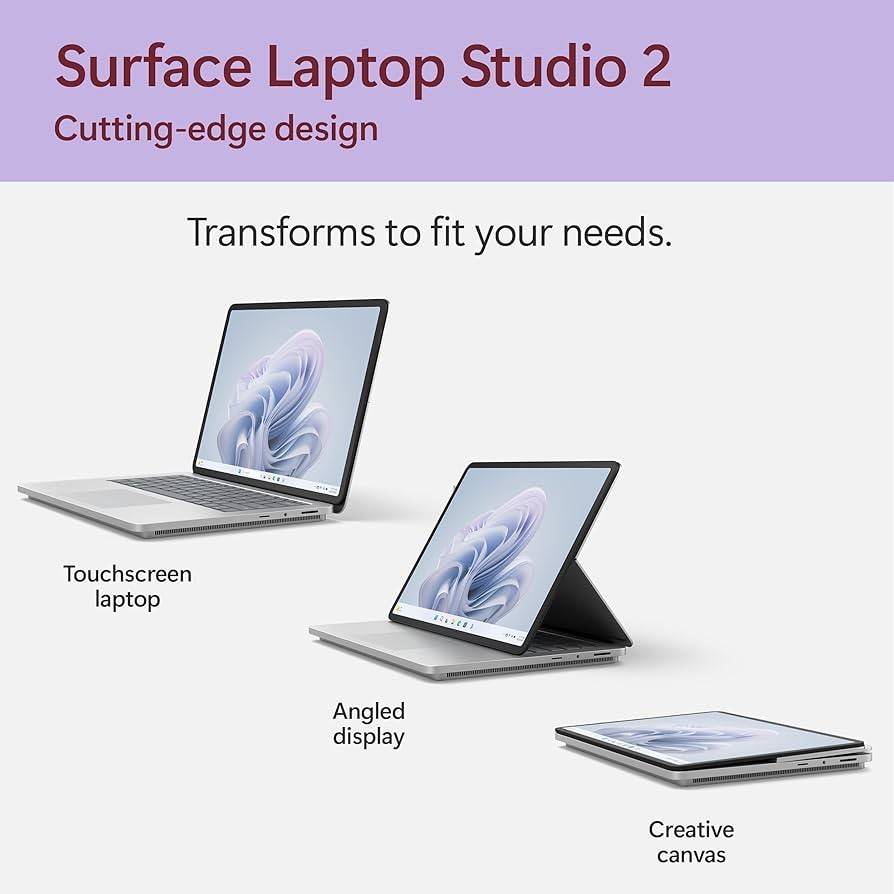
The star of the show is undoubtedly the innovative hinge mechanism that allows the display to be positioned in three different modes:
- Laptop Mode: Traditional laptop configuration for productivity tasks
- Stage Mode: The display pulls forward to cover the keyboard, creating an angled surface perfect for drawing or media consumption
- Studio Mode: The display folds flat against the keyboard, transforming into a tablet for drawing or note-taking
This versatility is not just a gimmick—it genuinely enhances the workflow for creative professionals. The transitions between modes are smooth and the screen stays firmly in place once positioned.
Display: Bright, Smooth, and Responsive
The 14.4-inch PixelSense Flow display is a visual treat. With a resolution of 2400 x 1600 pixels and a 3:2 aspect ratio, it provides ample screen real estate for productivity tasks. The 120Hz refresh rate makes scrolling and animation exceptionally smooth, while touch response is instant and precise.
In my testing, the display reached an impressive 495.4 nits of brightness on average, making it usable even in bright environments. Color accuracy is excellent, covering 101.8% of the sRGB color gamut and achieving a Delta-E score of 0.21 (closer to 0 is better).
Check the latest price on Amazon
Keyboard and Haptic Touchpad: A Joy to Use
The keyboard on the Surface Laptop Studio 2 is exceptional. The keys offer comfortable travel and satisfying feedback, making long typing sessions a pleasure. The backlighting is even and adjustable, perfect for working in low-light environments.
Below the keyboard sits one of the best touchpads I’ve used on a Windows laptop. The large haptic touchpad provides precise tracking and realistic feedback. It supports all Windows 11 gestures and even offers an “Adaptive Touch” mode that enhances accessibility for users with mobility challenges.
Connectivity: Finally, All the Ports You Need

Microsoft has addressed one of the biggest complaints about the original model by expanding the port selection. The Surface Laptop Studio 2 now includes:
- 2x USB-C ports with Thunderbolt 4 support
- 1x USB-A 3.1 port
- 3.5mm headphone jack
- MicroSD card reader
- Surface Connect port
This expansion means you can connect most peripherals without dongles, making it a more practical option for professionals. The inclusion of both USB-C and USB-A ports is particularly welcome in this transitional period where both connector types remain common.
My Experience: As someone who frequently transfers files from cameras, the addition of the microSD card reader has been a game-changer for my workflow. No more fumbling with adapters!
Performance: Power When You Need It
Under the hood, the Surface Laptop Studio 2 packs serious hardware. All models come with an Intel Core i7-13700H processor, which features 14 cores (6 performance, 8 efficient) and 20 threads. This is a significant upgrade from the 11th Gen processors in the previous model.
Processor Performance
In my benchmarking and real-world tests, the Surface Laptop Studio 2 proved to be an excellent performer for productivity and creative tasks. It scored 1,851 in single-core and 12,779 in multi-core Geekbench 5 tests, putting it in the same league as other high-end laptops.
For content creators, the CPU performance translates to smooth video editing in Adobe Premiere Pro, quick photo processing in Lightroom, and responsive performance in design applications like Photoshop and Illustrator.
Graphics Performance: A True Creative Powerhouse
The Surface Laptop Studio 2 offers three graphics options:
- Intel Iris Xe integrated graphics (base model)
- NVIDIA GeForce RTX 4050 with 6GB GDDR6 (mid-tier models)
- NVIDIA GeForce RTX 4060 with 8GB GDDR6 (high-end models)
I tested the RTX 4060 model, and it delivers impressive graphics performance for a laptop of this size. In synthetic benchmarks, it scored 60,434 in 3DMark Wild Life Unlimited and 5,186 in the 3DMark Port Royal ray tracing test.
This translates to excellent performance in creative applications that leverage GPU acceleration, such as video rendering and 3D modeling. It’s also capable of decent gaming performance, achieving 67 fps in Borderlands 3, 119 fps in Civilization VI, and a playable 28 fps in Cyberpunk 2077 at 1080p settings.
Memory and Storage: Plenty of Both
The Surface Laptop Studio 2 comes with LPDDR5x RAM in configurations ranging from 16GB to a massive 64GB. Storage options include fast NVMe SSDs from 512GB to 2TB.
In my testing, the 1TB SSD achieved read speeds of 4,620 MBps and write speeds of 3,760 MBps in the Blackmagic Disk Speed Test, making it one of the faster storage solutions in a laptop.
AI Capabilities
An interesting addition to the Surface Laptop Studio 2 is the Intel Movidius 3700VC neural processor. This dedicated AI accelerator helps with tasks like background blur and eye contact correction during video calls without burdening the main CPU.
While the current uses are somewhat limited, this future-proofs the device as more AI-powered features come to Windows 11.
Battery Life: Good, Not Great
In my battery tests, which involved mixed usage of web browsing, document editing, and video streaming at 150 nits brightness, the Surface Laptop Studio 2 lasted approximately 9 hours and 31 minutes. This is respectable for a powerful laptop with a high-resolution display, but falls short of Apple’s MacBook Pro models, which routinely exceed 12-14 hours.
The good news is that the included 127W power adapter supports fast charging, getting the battery from 0 to about 47% in just 30 minutes in my testing.
The Surface Slim Pen 2 Experience: Worth the Extra Investment

While it’s disappointing that Microsoft doesn’t include the Surface Slim Pen 2 with the laptop, it’s an essential accessory for anyone looking to take full advantage of the device’s capabilities. The Surface Slim Pen 2 offers:
- 4,096 levels of pressure sensitivity
- Near-zero latency for a natural writing feel
- Haptic feedback that simulates the feeling of pen on paper
- Magnetic attachment and wireless charging on the front lip of the laptop
The pen experience on the Surface Laptop Studio 2 is exceptional, particularly in Studio mode. Whether you’re taking notes, sketching concepts, or doing detailed digital artwork, the combination of the pen and the stable drawing surface makes for a premium creative experience.
My Experience: I’ve used many styluses with different devices, and the Surface Slim Pen 2 with the Surface Laptop Studio 2 provides one of the most natural drawing experiences available. The haptic feedback truly adds to the sensation of drawing on paper.
Check the latest price on Amazon
Software Experience: Windows 11 Enhanced
The Surface Laptop Studio 2 runs Windows 11 and benefits from Microsoft’s excellent optimization. The OS feels responsive and takes full advantage of the 120Hz display for fluid animations and scrolling.
Microsoft has kept bloatware to a minimum, with only a few preinstalled apps like Microsoft 365 (trial) and the Surface app, which lets you configure device-specific settings like the pen pressure sensitivity and the Adaptive Touch feature for the touchpad.
Windows Studio Effects
The Surface Laptop Studio 2 leverages its neural processor for Windows Studio Effects, which enhance video calls with features like:
- Background blur with accurate edge detection
- Eye contact correction that makes it appear you’re looking at the camera
- Automatic framing that keeps you centered in the frame
- Portrait lighting that improves lighting conditions
These features work well and don’t noticeably impact system performance thanks to the dedicated neural processor.
Audio and Video: Impressive for a Laptop
The quad Omnisonic speakers with Dolby Atmos support deliver rich, room-filling sound with decent clarity and separation. While bass response is limited (as expected in a laptop), the overall audio experience is above average and perfectly suitable for media consumption and video conferencing.
The 1080p webcam is a significant improvement over many laptop cameras, delivering clear image quality even in challenging lighting conditions. Combined with the Windows Studio Effects, it makes for an excellent video conferencing setup.
Who Should Buy the Surface Laptop Studio 2?
After extensive testing, I believe the Surface Laptop Studio 2 is an ideal choice for:
Creative Professionals
If you work in fields like digital art, graphic design, video editing, or 3D modeling, the Surface Laptop Studio 2 offers a compelling all-in-one solution. The versatile form factor, excellent display, and powerful hardware make it perfect for creative workflows.
Developers and Engineers
For software developers and engineers, the combination of a powerful processor, ample RAM (up to 64GB), and excellent keyboard make this an ideal development machine. The ability to switch to tablet mode for reviewing designs or Stage mode for presentations adds valuable versatility.
Business Executives
Business professionals who need a premium, versatile device will appreciate the Surface Laptop Studio 2’s build quality, performance, and adaptability. It’s equally at home in the boardroom for presentations as it is on an airplane tray table for catching up on work.
Students in Creative or Technical Fields
While expensive for a student laptop, those in design, engineering, or computer science programs will benefit from the Surface Laptop Studio 2’s versatility and power. Think of it as an investment in your education and future career.
Check the latest price on Amazon
Surface Laptop Studio 2: Configuration Guide
The Surface Laptop Studio 2 comes in several configurations. Here’s my advice on choosing the right one:
Base Model ($1,999): Good for General Productivity
- Intel Core i7-13700H
- 16GB RAM
- 512GB SSD
- Intel Iris Xe graphics
Best for: Business users, writers, and students who don’t need dedicated graphics but want the versatile form factor.
Mid-Tier Configuration ($2,399): Recommended for Most Creatives
- Intel Core i7-13700H
- 16GB RAM
- 512GB SSD
- NVIDIA GeForce RTX 4050
Best for: Digital artists, photographers, and content creators who need GPU acceleration but don’t work with extremely large files.
High-End Configuration ($3,299): For Serious Professionals
- Intel Core i7-13700H
- 64GB RAM
- 1TB SSD
- NVIDIA GeForce RTX 4060
Best for: Professional video editors, 3D artists, and developers working with large datasets or complex applications.
Pro Tip: I recommend at least the mid-tier configuration with the RTX 4050 GPU for most creative users. The GPU acceleration makes a significant difference in applications like Adobe Creative Suite, Blender, and similar creative software.
Essential Accessories for Your Surface Laptop Studio 2
To get the most out of your Surface Laptop Studio 2, consider these accessories:
- Surface Slim Pen 2 ($129.99): Essential for drawing and note-taking.
- Microsoft Surface Thunderbolt 4 Dock ($209.99): Expand your connectivity options with additional ports and dual 4K monitor support.
- Surface Pro Signature Keyboard ($179.99): For a complete Surface ecosystem if you also use a Surface Pro.
- Tomtoc 360° Protective Laptop Sleeve ($32.99): Excellent protection for your investment when on the go.
- Microsoft Complete Protection Plan ($149-$399): Extended warranty and accidental damage protection.
Pros and Cons: Is It Worth the Investment?
What I Love About the Surface Laptop Studio 2
- Versatile form factor with three distinct usage modes
- Exceptional build quality with premium materials
- Powerful performance for creative and professional applications
- Bright, vibrant display with 120Hz refresh rate
- Expanded port selection eliminates dongle dependency
- Excellent keyboard and haptic touchpad
- Superior pen experience (when purchased separately)
- Minimal bloatware and well-optimized software
What Could Be Improved
- High price point, especially for higher configurations
- Surface Slim Pen 2 not included despite being integral to the experience
- Battery life lags behind MacBook Pro competition
- Heavier than comparable laptops in its class
- Limited color gamut coverage may disappoint some professional artists
- Gets warm during intensive tasks like gaming or rendering
Surface Laptop Studio 2 vs. Key Competitors
Surface Laptop Studio 2 vs. MacBook Pro 14″ (M2 Pro/Max)
The most obvious competitor to the Surface Laptop Studio 2 is Apple’s MacBook Pro 14″. Here’s how they compare:
- Performance: The MacBook Pro with M2 Pro/Max chips delivers superior CPU performance and significantly better battery life.
- Display: Both feature excellent displays, but only the Surface offers touch and pen support.
- Versatility: The Surface’s convertible design gives it unique versatility that the MacBook Pro can’t match.
- Ecosystem: Your preference for Windows or macOS will likely be a deciding factor.
Choose the Surface Laptop Studio 2 if: You need the versatility of multiple form factors, require Windows-specific software, or prefer the pen and touch experience.
Choose the MacBook Pro if: Battery life is critical, you’re deeply invested in the Apple ecosystem, or you need the absolute best sustained performance.
Check MacBook Pro 14 price on Amazon
Surface Laptop Studio 2 vs. Dell XPS 15 OLED
Dell’s XPS 15 with OLED display is another premium Windows laptop competing in this space:
- Display: The XPS 15’s OLED display offers superior contrast and color reproduction.
- Performance: Similar CPU performance, but the XPS can be configured with more powerful GPU options.
- Design: The XPS offers a more traditional laptop form factor without the convertibility.
- Portability: The XPS 15 has a larger screen but similar weight.
Choose the Surface Laptop Studio 2 if: You need the convertible form factor or prefer the 3:2 aspect ratio screen.
Choose the XPS 15 if: You prioritize display quality, want a larger screen, or need more powerful GPU options.
Check Dell XPS 15 price on Amazon
My Long-Term Experience and Final Verdict
After using the Surface Laptop Studio 2 as my primary device for several weeks, I’m consistently impressed by its versatility and performance. The ability to seamlessly transition between typing, drawing, and consuming content has genuinely improved my workflow.
The build quality inspires confidence, and the device has handled everything from document editing to video rendering without breaking a sweat. While the price is steep, the productivity benefits justify the investment for creative professionals and power users.
My Final Rating: 9.2/10
The Surface Laptop Studio 2 earns a 9.2/10 in my evaluation. It loses points primarily for its high price, the separate purchase required for the pen, and battery life that trails the competition. However, it excels in build quality, versatility, and performance, making it one of the most innovative and capable laptops available today.
The Bottom Line: If you’re a creative professional looking for a versatile Windows machine that can adapt to your workflow, the Microsoft Surface Laptop Studio 2 is an outstanding choice that justifies its premium price through exceptional versatility and performance.
Frequently Asked Questions
Does the Surface Laptop Studio 2 come with the Surface Slim Pen 2?
No, unfortunately, the Surface Slim Pen 2 is sold separately for $129.99, despite being a perfect companion for the device.
How many external monitors can the Surface Laptop Studio 2 support?
The Surface Laptop Studio 2 can support up to two external 4K displays at 60Hz through its Thunderbolt 4 ports.
Is the Surface Laptop Studio 2 good for gaming?
With the RTX 4050 or 4060 GPU configurations, it’s capable of decent gaming performance for a productivity-focused laptop, though it’s not primarily designed as a gaming machine.
How does the battery life compare to the original Surface Laptop Studio?
The Surface Laptop Studio 2 offers similar battery life to its predecessor despite the more powerful components—around 9-10 hours of mixed usage.
Can I upgrade the RAM or SSD later?
No, the RAM and SSD are soldered to the motherboard and cannot be upgraded after purchase. Choose your configuration carefully.
Is the Surface Laptop Studio 2 worth the premium price?
For creative professionals and users who will benefit from its versatile form factor, the premium price is justified by the unique capabilities and build quality. For general productivity users, more affordable alternatives might offer better value.
Have you used the Microsoft Surface Laptop Studio 2? Share your experiences in the comments below! And if you’re ready to purchase, click on any of the product links above to get the best current prices on Amazon.
Disclosure: This post contains affiliate links, which means I may receive a commission if you click a link and purchase something that I have recommended. While clicking these links won’t cost you any extra money, they will help me keep this site up and running!
