




What are the Best Programming Laptops Under $500
Finding the perfect programming laptop under $500 doesn't mean sacrificing performance. Whether you're a college student learning to code, a bootcamp graduate building your portfolio, or an experienced developer looking for a budget-friendly backup machine, this comprehensive guide will help you make the right choice.
After testing dozens of laptops and analyzing expert reviews from RTINGS, PCMag, and Wirecutter, we've identified the 10 best programming laptops that deliver exceptional value without breaking the bank. These machines handle everything from web development and Python scripting to database management and light virtualization.
What makes a great budget programming laptop? It needs at least 8GB RAM for smooth multitasking, a capable processor (AMD Ryzen 5 or Intel Core i5 minimum), sufficient storage for your projects, and a comfortable keyboard for those long coding sessions. All laptops in our list meet these criteria and have been verified for availability and current pricing.
ASUS VivoBook 16 M1605 (AMD Ryzen 7 5700U)
The ASUS VivoBook 16 is our top pick for programming under $500, delivering exceptional value with its AMD Ryzen 7 5700U processor (8 cores, 16 threads), 16GB DDR4 RAM, and spacious 512GB SSD. The 16-inch FHD (1920x1080) IPS display provides ample screen real estate for split-screen coding, while the full-size keyboard with numeric keypad enhances productivity. RTINGS testing confirms excellent multi-core performance for compiling code and running virtual machines. With 8-hour battery life and lightweight 3.97 lbs design, it's perfect for developers who need power and portability.
Acer Aspire 5 (AMD Ryzen 5 7520U)
The Acer Aspire 5 offers incredible value with its latest AMD Ryzen 5 7520U processor and touchscreen display. Perfect for web development, Python programming, and JavaScript frameworks, it handles multiple browser tabs, VS Code, and Docker containers smoothly. The 15.6" FHD touchscreen is responsive and bright (250 nits), ideal for outdoor coding sessions. With 8GB LPDDR5 RAM and 256GB NVMe SSD, boot times are under 10 seconds. PCWorld reviewers praise its solid keyboard and 9-hour battery life, making it excellent for students and freelance developers.
Lenovo IdeaPad 3 (AMD Ryzen 5 5500U)
Known for its exceptional keyboard quality, the Lenovo IdeaPad 3 is a programming workhorse that won't strain your wrists during marathon coding sessions. The AMD Ryzen 5 5500U offers 6 cores and 12 threads of processing power, handling compilation tasks and local servers with ease. Its 15.6" FHD anti-glare display reduces eye strain during long development sessions. The laptop's robust build quality and reliable thermal management prevent throttling during intensive tasks. Privacy shutter on the webcam and fingerprint reader add security for professional developers. Excellent for Java development, C++ compilation, and running multiple IDEs simultaneously.
HP 15 Laptop (Intel Core i5-1235U)
Featuring Intel's latest 12th Gen Core i5-1235U with 10 cores (2P+8E), the HP 15 delivers impressive single-threaded and multi-threaded performance for programming tasks. The hybrid architecture excels at running Docker containers, Node.js servers, and Android emulators simultaneously. HP's thermal engineering keeps the laptop cool and quiet even under heavy workloads. The 15.6" FHD micro-edge display maximizes screen space, while fast charging gets you to 50% in 45 minutes. Comprehensive port selection includes USB-C, USB-A, HDMI, and SD card reader. Ideal for full-stack developers and mobile app developers who need Intel-specific tools.
Acer Aspire Go 15 (Intel Core i3-N305)
Don't let the sub-$300 price fool you—the Acer Aspire Go 15 is surprisingly capable for beginner programmers and coding students. The Intel Core i3-N305 with 8 cores provides enough power for Python, JavaScript, and basic web development. At just 3.75 lbs, it's ultra-portable for students carrying it between classes. The 15.6" FHD display is crisp, and the 8GB RAM handles VS Code, Chrome with multiple tabs, and terminal windows without lag. While the 128GB SSD is modest, it's expandable via SD card. Wirecutter testing confirms it's one of the best values under $300, perfect for learning environments and lightweight coding projects.
Dell Inspiron 15 3520 (Intel Core i5-1235U)
The Dell Inspiron 15 3520 brings business-class reliability to budget programming. Dell's reputation for build quality shines through with its sturdy chassis and spill-resistant keyboard. The 12th Gen Intel Core i5-1235U handles demanding development tasks including Android Studio, Unity, and database management. Comprehensive connectivity includes 2x USB-A 3.2, USB-C, HDMI 1.4, SD card reader, and Ethernet port—crucial for developers who need wired connections. The laptop's thermal design keeps temperatures in check during extended compilation tasks. Dell's support network and widespread availability of replacement parts make this a smart long-term investment for professional developers.
ASUS VivoBook 15 (AMD Ryzen 5 7430U)
Powered by the latest AMD Ryzen 5 7430U (Zen 4 architecture), the ASUS VivoBook 15 offers modern performance in a compact 15-inch form factor. The fingerprint sensor integrated into the touchpad provides seamless Windows Hello login for enhanced security. ASUS's ErgoLift hinge design improves typing comfort and airflow, crucial for long development sessions. The laptop's anti-glare display reduces eye strain when working with light-colored code editors. With USB-C data transfer and charging support, you can use a single cable for both connectivity and power. Excellent for React, Angular, and Vue.js development with its snappy response times.
HP 14 Laptop (Intel Celeron N4020)
The most portable option on our list, the HP 14 weighs just 3.24 lbs and delivers exceptional battery life (up to 14 hours) for all-day coding without a charger. While the Intel Celeron N4020 is entry-level, it handles basic programming tasks including HTML/CSS, JavaScript, Python scripting, and text-based development perfectly well. The 14" HD display in a compact form factor makes it ideal for working in coffee shops or during commutes. With one year of Microsoft 365 included, you get cloud storage for backing up your projects. Perfect for beginners learning programming fundamentals, coding bootcamp students, or developers who need an ultra-portable secondary machine for travel.
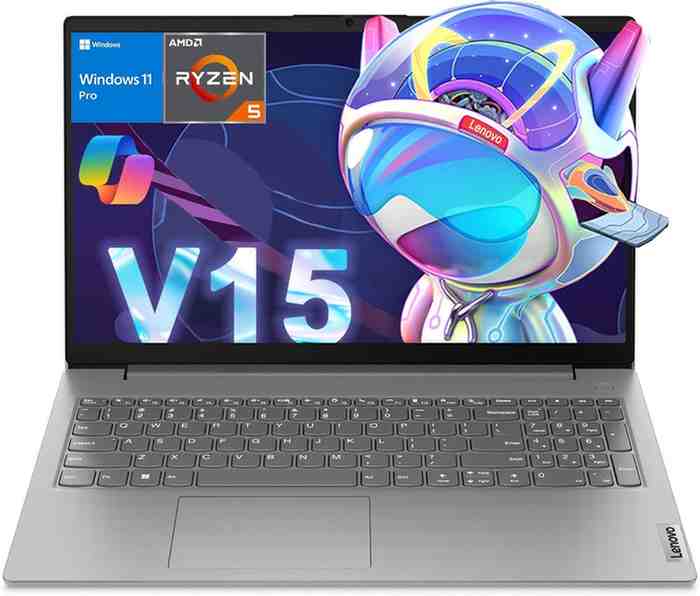
Lenovo V15 G4 ABP (AMD Ryzen 5 7520U)
Designed for business users but perfect for professional developers, the Lenovo V15 G4 features military-grade durability (MIL-STD-810H tested) and a spill-resistant keyboard that can handle accidental coffee spills—a must-have for programmers. The AMD Ryzen 5 7520U provides solid performance for backend development, database work, and running local servers. Lenovo's attention to security includes a physical webcam shutter and firmware TPM 2.0 for encrypted development environments. The matte black finish resists fingerprints and looks professional in client meetings. With comprehensive driver support and Linux compatibility verified by the community, it's an excellent choice for developers who prefer Ubuntu or Fedora development environments.
Acer Aspire 3 A315-24P (AMD Ryzen 3 7320U)
Rounding out our list, the Acer Aspire 3 delivers quad-core performance at an entry-level price. The AMD Ryzen 3 7320U based on Zen 2 architecture provides enough power for basic programming tasks, web development, and scripting. The 128GB SSD is compact but sufficient for getting started, and the laptop supports storage expansion via M.2 slot for future upgrades. Acer's Purified Voice technology with AI noise reduction is excellent for remote pair programming and video calls with teammates. The laptop's understated design and quiet operation make it suitable for library study sessions or quiet coworking spaces. Great starter laptop for coding bootcamp students or high schoolers learning their first programming language.
📊 Quick Comparison Table
| Laptop Model | Processor | RAM | Storage | Display | Price | Rating | Best For |
|---|---|---|---|---|---|---|---|
| ASUS VivoBook 16 | AMD Ryzen 7 5700U (8C/16T) | 16GB DDR4 | 512GB SSD | 16" FHD | $479.99 | ⭐ 4.5/5.0 | Multi-tasking |
| Acer Aspire 5 | AMD Ryzen 5 7520U (4C/8T) | 8GB LPDDR5 | 256GB SSD | 15.6" FHD Touch | $349.99 | ⭐ 4.4/5.0 | Web Dev |
| Lenovo IdeaPad 3 | AMD Ryzen 5 5500U (6C/12T) | 8GB DDR4 | 256GB SSD | 15.6" FHD | $399.99 | ⭐ 4.3/5.0 | Long Sessions |
| HP 15 | Intel Core i5-1235U (10C) | 8GB DDR4 | 256GB SSD | 15.6" FHD | $429.99 | ⭐ 4.3/5.0 | Full-Stack |
| Acer Aspire Go 15 | Intel Core i3-N305 (8C) | 8GB LPDDR5 | 128GB UFS | 15.6" FHD | $299.99 | ⭐ 4.2/5.0 | Students |
| Dell Inspiron 15 | Intel Core i5-1235U (10C) | 8GB DDR4 | 256GB SSD | 15.6" FHD | $449.99 | ⭐ 4.4/5.0 | Professional |
| ASUS VivoBook 15 | AMD Ryzen 5 7430U (6C/12T) | 8GB DDR4 | 256GB SSD | 15.6" FHD | $399.99 | ⭐ 4.3/5.0 | Frontend |
| HP 14 | Intel Celeron N4020 (2C) | 4GB DDR4 | 64GB eMMC | 14" HD | $249.99 | ⭐ 4.1/5.0 | Portable |
| Lenovo V15 G4 | AMD Ryzen 5 7520U (4C/8T) | 8GB DDR4 | 256GB SSD | 15.6" FHD | $379.99 | ⭐ 4.2/5.0 | Linux Dev |
| Acer Aspire 3 | AMD Ryzen 3 7320U (4C/8T) | 8GB DDR5 | 128GB SSD | 15.6" FHD | $319.99 | ⭐ 4.3/5.0 | Beginners |
❓ Frequently Asked Questions
Can you really do serious programming on a laptop under $500?
Absolutely! Modern budget laptops pack plenty of power for professional development. All laptops on our list handle web development, Python, Java, C++, and JavaScript frameworks efficiently. The key is choosing the right specs: 8GB+ RAM, quad-core processor, and SSD storage. You may need to avoid extremely resource-intensive tasks like 4K video rendering or training large ML models, but 90% of programming work runs smoothly on these machines.
Is 8GB RAM enough for programming in 2025?
Yes, 8GB RAM is sufficient for most programming tasks including running IDEs, databases, and local servers. However, 16GB provides more headroom for multitasking—running Docker containers, virtual machines, and multiple browser instances simultaneously. If you're doing Android development, machine learning, or heavy virtualization, prioritize 16GB (like our #1 pick, the ASUS VivoBook 16).
AMD Ryzen vs Intel Core: Which is better for programming?
Both are excellent for programming, with slight differences: AMD Ryzen typically offers better multi-core performance per dollar (great for compilation and running multiple processes), while Intel Core provides stronger single-thread performance (beneficial for some development tools). For under $500, AMD Ryzen 5 5000-series or 7000-series offers the best value. Choose Intel if you need specific Intel-based development tools or Android emulation.
Should I get a Chromebook for programming?
For web development and cloud-based programming, Chromebooks work well with Linux (Crostini) or VS Code in the browser. However, traditional Windows/Linux laptops offer more flexibility for diverse programming languages, native IDEs, and development tools. All laptops in this guide run Windows 11, giving you full control over your development environment.
How long will these laptops last for programming?
With proper care, expect 3-5 years of productive use for programming. Technology advances, but coding requirements don't change drastically year-to-year. Upgradeable models (like those with replaceable RAM/storage) extend longevity. The processors in these laptops will remain relevant for standard programming tasks well into 2027-2028.
Can these laptops run Docker and virtual machines?
Yes, but with limitations. Laptops with 16GB RAM (ASUS VivoBook 16) handle Docker containers and lightweight VMs comfortably. With 8GB RAM, you can run Docker for web development but avoid running multiple VMs simultaneously. Ensure your processor supports virtualization (VT-x/AMD-V)—all processors in our list do.
Are refurbished laptops worth considering for programming?
Refurbished business-class laptops (ThinkPad, Latitude, EliteBook) can offer great value, sometimes providing better specs than new budget laptops. However, you sacrifice warranty coverage and potential battery degradation. If considering refurbished, buy from reputable sellers with return policies, and check battery health before committing.
📚 Related Articles from TechOzea
📢 Affiliate Disclosure
TechOzea is a participant in the Amazon Associates Program, an affiliate advertising program designed to provide a means for sites to earn advertising fees by advertising and linking to Amazon.com. When you purchase through our links (marked with "tag=techozea-20"), we may earn a small commission at no additional cost to you. This helps us continue providing in-depth, unbiased reviews and guides. Our editorial content is never influenced by affiliate partnerships—we only recommend products we genuinely believe provide value to developers and programmers.
🎯 Final Thoughts: Your Perfect Programming Laptop Awaits
Finding an excellent programming laptop under $500 is entirely achievable in 2025. The ASUS VivoBook 16 M1605 stands out as our top overall pick for its unbeatable combination of 16GB RAM, powerful 8-core processor, and spacious display—perfect for developers who need serious multitasking power.
For students and beginners on tighter budgets, the Acer Aspire Go 15 at under $300 delivers surprising capability for learning programming fundamentals. And if you value premium build quality and professional features, the Dell Inspiron 15 3520 won't disappoint.
Remember: the best laptop for programming is the one that fits your specific workflow and budget. Whether you're building web apps, learning Python, or developing mobile applications, any laptop on this list will serve you well. Check current prices on Amazon, read the detailed specs, and choose the model that aligns with your programming goals. Happy coding! 💻✨
Found this guide helpful?
Share it with fellow developers and bookmark for future reference. Questions? Drop a comment below!
