




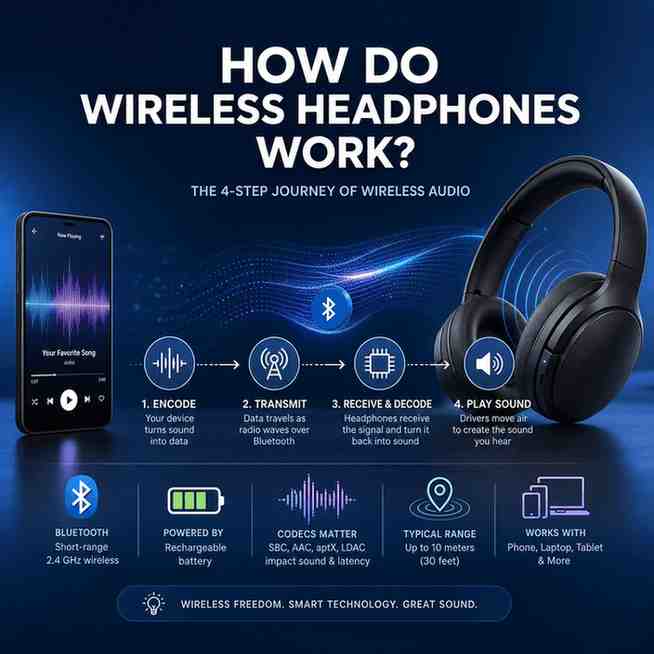
Wireless headphones work by sending audio over a short-range radio connection (usually Bluetooth) instead of a physical cable. The simple mental model is: encode → transmit → receive/decode → play sound, all powered by a built-in rechargeable battery.
In practice, your phone or laptop compresses music into small chunks, sends them as radio packets, your headphones rebuild the audio, and tiny speaker drivers turn it into sound in your ears. However, range, interference, and codec support can affect quality and delay.
Wireless headphones in plain English
Wireless headphones are simply headphones that play audio without a cable, using a wireless connection, most commonly Bluetooth, to move sound from a source device to your headphones.
To understand how they work, we stick to one 4-step model:
- Encode (your device compresses the audio)
- Transmit (Bluetooth sends it as radio waves)
- Receive + decode (your headphones rebuild the audio)
- Play sound (drivers move air, like any other headphone)
The source device is usually a phone/smartphone, laptop, tablet, computer, or a dedicated music player.
That said, wireless is not magic. It’s short-range radio. You can get interference, dropouts, and a small delay, and the codec used for compression can change both sound quality and latency.
Step 1: Your phone turns music into data (encoding + codecs)
Everything starts in the app you’re using: Spotify, Apple Music, YouTube, Netflix, a podcast app, a game, or a video call. That app outputs audio as a digital signal, and your device prepares it for Bluetooth.
Why compression exists at all
Bluetooth has limited bandwidth compared with a cable. So instead of sending “raw” audio, your phone compresses it to fit reliably into a low-power wireless stream. Think of it like packing a suitcase: you can bring a lot more if you fold things efficiently.
This compression happens through an audio codec. A codec is the rulebook that decides how to encode the audio for sending and how to decode it back into audio on the headphone side.
Common Bluetooth codecs (and what they change)
You’ll see these names in specs, developer settings, and marketing:
- SBC: the basic, universal Bluetooth codec. It’s the default fallback and works with everything, though quality and latency are not its strengths.
- AAC: very common on phones, especially in Apple ecosystems. It can sound good, but real-world results depend a lot on the device and implementation.
- aptX: generally aims for solid quality with reasonable efficiency.
- aptX HD: targets higher perceived quality.
- aptX Low Latency: designed to reduce delay for video and gaming, though both devices must support it.
- aptX Adaptive: dynamically balances quality and latency based on signal conditions.
- LDAC: often positioned as “hi-res oriented,” using higher bitrates when conditions allow.
“Lossless audio” vs “compressed audio” (what’s real over Bluetooth)
Most Bluetooth audio is compressed. Some implementations can get very close to transparent for many listeners, but it’s still not the same as a perfect wire in every case.
You’ll also see “lossless” claims around wireless listening. The goal is real, but the result depends on the codec, the bitrate actually used, radio conditions, and how the headphone and phone handle the stream. In buyer terms: you can’t judge “lossless” from a single logo on a box.
What codecs mean for you
Codecs show up as real, noticeable outcomes:
- Sound quality: detail, clarity, and how “clean” the highs and bass feel
- High-resolution audio: sometimes possible in practice, sometimes more of a marketing shortcut
- Latency (audio delay): critical for videos and gaming, less critical for music
If you mostly stream music casually, codec differences can be subtle. However, if you watch a lot of video or play games, codec choice and device support matter fast.
Step 2: The audio becomes radio waves (Bluetooth transmission)
Once your phone has encoded the audio into packets, it sends them using Bluetooth technology, which is a short-range wireless protocol designed for low power and decent reliability.
The frequency band: 2.4 GHz (and why that matters)
Bluetooth operates in the 2.4 GHz ISM band, roughly 2.400 to 2.485 GHz, which is available worldwide for unlicensed use. That’s convenient for global devices.
Still, it’s also a crowded neighborhood. Wi‑Fi, smart home gadgets, and even microwaves can live in the same band. This is why wireless audio can sometimes stutter in busy environments.
To mitigate such issues and enhance your Bluetooth audio experience, investing in high-quality devices like those from Marantz could be beneficial. They offer superior sound quality and better handling of high-resolution audio streams.
Packets over radio frequencies
Instead of a continuous “audio wave” traveling through copper, Bluetooth sends small digital packets over short-wave radio frequencies. Your headphones reassemble them in real time.
After you pair, it becomes a practical one-to-one link: your paired source (phone/laptop) talks to your paired device (headphones) over a secure connection.
Bluetooth versions (what they generally improve)
Bluetooth versions don’t automatically mean “better sound,” but newer versions often improve things buyers actually feel:
- Bluetooth 5.0: better range and stability in many real devices
- Bluetooth 5.2: efficiency improvements and features that can help modern audio setups
- Bluetooth 5.4: incremental upgrades and better behavior in some scenarios
Even if the version is new, the antenna design, chipset quality, and firmware still decide whether your connection is rock solid or annoying.
Step 3: Your headphones receive it (Bluetooth chip + antenna)
Inside your headphones or earbuds is basically a tiny radio system:
- a Bluetooth receiver
- a Bluetooth chip (system-on-chip)
- an antenna
- a small processor that manages audio, controls, and features
What happens during receiving
Your headphones capture the incoming packets and try to keep playback smooth. If a packet is missing or corrupted, the system may attempt correction, concealment, or quick recovery, depending on what’s supported. When it can’t recover fast enough, you hear it as a skip or stutter.
Why Bluetooth range is usually about 10 meters (30 feet)
Typical range is around 10 m / 30 ft, but that’s more of a baseline expectation than a promise.
Range depends on:
- transmit power and Bluetooth “class”
- antenna quality and orientation
- your environment (walls, crowds, metal)
- where your phone is (pocket, bag, desk)
Wireless headphones sound convenient, but the radio still has to reach your head reliably. If your phone is buried in a bag on the opposite side of your body, you can sometimes create your own blockage.
Multipoint and device switching (high level)
Many modern headphones support multipoint, meaning they can stay connected to two devices at once (like your laptop and phone). It’s great for office life. Still, it can also introduce quirks: priorities, notification sounds, and occasional switching delays vary by brand.
Step 4: Data turns back into sound (decoding → drivers → sound waves)
Once the headphones have the data, they reverse the process.
Decoding (decompression)
The codec on the headphone side decodes the stream, turning compressed packets back into a digital audio signal.
Digital-to-analog in simple terms
From there, the headphone electronics create an electrical waveform that represents the sound. A tiny amplifier boosts it, and then it feeds the speaker drivers.
Drivers make the sound you hear
Drivers move air, creating sound waves that reach your eardrum. This is the same final step as wired headphones.
Tuning also matters here. Some models aim for heavy bass and “fun” sound, others aim for balance. You’ll see phrases like deep bass or crystal-clear highs, and sometimes a brand target curve such as JBL Pure Bass Sound. Those are tuning choices layered on top of the basic wireless pipeline.
Extras layered on top
Wireless headphones often add processing features, such as:
- EQ through companion apps
- brand sound profiles
- spatial audio and head tracking (a processing trick that changes how sound is positioned)
These features can be useful. However, they can also add processing time and reduce battery life.
Where the power comes from (batteries, charging cases, and quick charging)
Wireless headphones need power because they can’t pull electricity through a copper wire connected to your phone.
Most use a built-in rechargeable lithium-ion battery, and it powers:
- the Bluetooth receiver and processor
- the DAC/amp stage
- controls and sensors
- microphones
- ANC processing (if included)
Battery life metrics that matter
Brands advertise battery life in a few ways:
- Single-charge playback time (what the headphones do alone)
- Total playback with case for true wireless earbuds (TWS), where the charging case provides multiple recharges
Battery claims are usually measured at moderate volume with features off or standardized. In real life, loud volume, strong ANC, and unstable radio conditions can reduce runtime.
Charging methods
Common charging options include:
- USB-C (most common now)
- Micro-USB (legacy models)
- Wireless charging for some cases and headphones
Quick charging is worth checking because it solves a real buyer problem. If 10 minutes on the charger gets you a couple hours of playback, you worry less about forgetting to charge overnight.
Practical battery care
We don’t overthink battery care, but a few habits help:
- store earbuds in the charging case so they top up and stay protected
- avoid leaving them dead for long periods
- expect battery capacity to shrink over years, especially in tiny earbuds
How do you connect to wireless headphones? (pairing mode → Bluetooth settings)
The first time setup is usually simple, and after that it’s mostly automatic.
Step-by-step pairing process
- Put the headphones into pairing mode (often holding the power button, or using a dedicated Bluetooth button).
- On your phone, laptop, or tablet, open Bluetooth settings.
- Find the headphone name in the list and tap it.
- Confirm pairing if prompted.
After this, most headphones will reconnect automatically when you power them on near the device.
Paired source vs paired device (and “Forget this device”)
- Your paired source is the phone/laptop sending audio.
- Your paired device is the headphones receiving it.
If you’re troubleshooting, “Forget this device” (or “Remove device”) deletes the stored pairing keys so you can start clean. This fixes a surprising number of weird connection loops.
A note on true wireless earbuds (primary vs secondary)
Many earbuds coordinate so one side acts as the primary coordinator and the other syncs. Modern sets are getting better at independent connections, but the core idea remains: the earbuds must stay synchronized for left/right stereo, controls, and stable playback.
Do you need WiFi for wireless headphones? (Bluetooth vs Wi‑Fi vs “wireless internet”)
No. Most wireless Bluetooth headphones do not need Wi‑Fi. They use Bluetooth radio for short-range audio streaming directly from your phone, tablet, or laptop.
When Wi‑Fi headphones exist
Some headphones and speakers use Wi‑Fi for certain ecosystems or higher bandwidth audio paths. These products typically rely on your router and home network, and sometimes the internet connection, depending on what you’re doing.
Bluetooth vs Wi‑Fi headphones (quick comparison)
- Range: Wi‑Fi can cover more of a home network; Bluetooth is typically room-scale.
- Bandwidth: Wi‑Fi can support higher data rates more easily.
- Power draw: Wi‑Fi usually uses more power, which matters for portable headphones.
- Setup: Wi‑Fi is more complex than Bluetooth pairing.
The common confusion is “wireless internet network” language. Wi‑Fi is networking. Bluetooth is short-range device-to-device. For most people commuting, traveling, or working at a desk, Bluetooth is the default.
Why wireless sometimes glitches (interference, obstacles, and range limits)
Wireless audio is convenient. Still, it’s vulnerable to the environment.
Interference in the 2.4 GHz band
Bluetooth shares space with:
- Wi‑Fi routers (especially congested apartments)
- keyboards, mice, smart home devices
- microwave ovens (yes, really)
Crowded radio conditions raise the chance of dropouts.
Obstacles and “human body blockage”
Walls reduce signal. Metal can reflect or absorb it. Even your body can block the path between phone and headphone antenna. That’s why you might get stutters when your phone is in a pocket on the “wrong” side.
Stability tips that actually help
- stay within range and keep the source device closer
- avoid burying the phone in a backpack in crowded places
- update headphone firmware (many brands fix stability issues quietly)
- if your device allows it, try switching codecs for stability vs quality
- reduce extra processing features if you’re getting glitches (ANC/spatial can add load)
Commute and travel conditions are the hardest. Office listening is usually easier. Gyms can be a mixed bag because there are many radios and lots of bodies.
Latency explained (and why it matters for videos and gaming)
Latency is the delay between what happens on screen and when you hear it.
For music, latency usually doesn’t matter. For YouTube, movies, and gaming, it can be the difference between “feels normal” and “why does this sound off?”
What impacts latency
- Codec choice: SBC often has higher latency; AAC varies; aptX Low Latency and aptX Adaptive can be better when supported.
- Device support: both the source and headphones must support the same low-latency path.
- Processing features: ANC, spatial audio, and heavy DSP can add delay.
Practical guidance
If you game a lot or watch on a PC, prioritize low-latency support and strong connection stability. If you mostly listen to music, prioritize reliable connection and the best sounding codec your devices share.
Wired headphones still win for near-zero latency. Even if wireless is “good enough,” wired is simpler and more consistent.
Noise cancellation: what’s actually happening in wireless headphones
Noise control is one of the biggest reasons people buy wireless models.
Passive isolation vs active noise cancellation (ANC)
- Passive isolation is the physical seal: ear tips in your ear canal, or ear pads around your ears. Fit matters a lot.
- ANC uses microphones to listen to outside noise and generates “anti-noise” to reduce what you hear, especially steady low-frequency sounds (engine hum, HVAC, traffic).
ANC feels like a superpower on a plane. However, it can also change the sound signature and it uses extra battery.
ENC for calls
You’ll also see ENC (Environmental Noise Cancellation), mostly for calls. It tries to reduce background noise so your voice sounds clearer. It can help a lot in windy streets or busy offices, though it’s not perfect.
Use-case fit
We recommend ANC most for commute, travel, and office focus. For running and exercise, some people prefer less isolation for awareness, or an open-ear design.
Wireless vs wired headphones (what you gain, what you give up)
Wireless wins on convenience. Wired wins on simplicity and consistency.
What wireless gives you
Wireless headphones are easy to recommend for everyday life because they offer:
- freedom of movement
- portability and cleaner setups
- smart controls, voice assistants
- multipoint switching (on many models)
These are practical benefits. If you take calls, walk around the house, or commute daily, you feel them immediately.
What wired still does better
Wired headphones are harder to beat for:
- consistent audio quality (no codec variables)
- no battery anxiety
- minimal latency
- no pairing or interference problems
A copper wire is boring, but it works.
Hybrid options (best of both)
Some wireless headphones include a backup cable (3.5mm or USB‑C audio). This is great for flights or when the battery dies. It can also help with in-flight entertainment systems, though you might need an airline adapter depending on the seat setup.
Types of wireless headphones (and how the tech differs slightly)
Different designs change comfort, battery, and stability more than the core Bluetooth steps.
Over-ear vs on-ear
Over-ear models are usually best for long listening sessions because they can fit:
- bigger ear cushions
- bigger batteries
- larger drivers
- often stronger ANC
On-ear models are smaller and lighter, but they can clamp more and leak more sound.
In-ear wireless earbuds vs true wireless earbuds (TWS)
In-ear earbuds rely heavily on fit for bass and isolation. True wireless earbuds add the charging case ecosystem and maximum portability.
They can sound excellent. Still, tiny batteries and tight packaging can make longevity and repairability harder than with larger headphones.
Neckband earbuds
Neckbands are less trendy now, but they’re practical for workouts: bigger battery, stable fit, and less risk of losing a bud.
Open-ear and open-back styles
Awareness-first designs let sound in and out. They’re great for safety and comfort. However, they usually give up bass impact and isolation.
Audio Latency in Wireless Headphones
One significant drawback of wireless headphones is potential audio latency. This issue arises from the time it takes for audio signals to be transmitted from your device to your headphones via Bluetooth. While wired headphones eliminate this problem entirely, some high-end wireless models have made strides in reducing latency to a minimum.
What are the disadvantages of wireless headphones? (real tradeoffs)
Wireless is convenient, but there are real costs you should expect.
Battery dependence
You have to charge them. Batteries also age. This is the biggest long-term downside, especially for true wireless earbuds where the cells are tiny.
Potential sound compromises
Bluetooth codecs compress audio, and results vary by device pairing. Even if two headphones support the same codec, the implementation and tuning can change what you actually hear.
Connection issues
Pairing bugs, interference, and range limits can cause stutters. It’s not constant, but it’s common enough that buyers notice.
Latency
If your codec and device combo isn’t optimized, videos and gaming can feel laggy.
Repairability
Small sealed earbuds can be difficult to service. Wired headphones often last longer because there are fewer delicate electronics and the cable can be replaced.
What to check before you choose wireless headphones
We’d buy wireless based on how you’ll actually use them, not on one spec headline.
Match your use case first
- Commute/travel: prioritize ANC and stable connection.
- Office listening: prioritize multipoint and mic quality for calls.
- Workout/running: prioritize fit, stability, and sweat resistance.
- Critical listening: prioritize codec support and consider models with a wired mode.
Codec checklist (don’t skip this)
If you care about high-quality sound, make sure both your device and headphones support the same codec family (AAC/aptX/LDAC). A headphone can’t use LDAC if your phone doesn’t support it, and vice versa.
Comfort and build
Look at ear pads or ear tips quality, clamp force, and weight. Great sound is pointless if you can’t wear them for an hour.
Battery and charging
USB‑C and quick charging are worth it. For TWS, check how many extra charges the case provides.
You’ll see models in the market like Sonos Ace, JBL Live 460NC, JBL Tune 760NC, JBL Tune 125BT, JBL Tune 130NC TWS, TOZO HT2, and TOZO NC9. Treat them as examples of feature bundles, not automatic winners. The best pick depends on your phone, your commute, and how much you care about ANC, latency, and comfort.
Conclusion: How do wireless headphones work?
Wireless headphones work by sending compressed audio from your phone or laptop to your headphones over Bluetooth radio waves, then decoding it back into sound through the drivers, all powered by a rechargeable battery. Once you understand the four steps, you can shop smarter: choose the right codec support, expect short-range limits, and prioritize features like ANC or low latency based on how you actually listen.
FAQs (Frequently Asked Questions)
How do wireless headphones transmit audio without cables?
Wireless headphones transmit audio by encoding sound into digital data on your device, then sending it over a short-range radio connection like Bluetooth. The headphones receive and decode this data, converting it back into sound through speaker drivers powered by a built-in rechargeable battery.
What role do codecs play in wireless headphone audio quality?
Codecs are algorithms that compress and decompress audio to fit within Bluetooth’s limited bandwidth. They determine how audio is encoded for transmission and decoded by the headphones, directly impacting sound quality, latency, and support for high-resolution audio formats.
What are the common Bluetooth audio codecs and their differences?
Common Bluetooth codecs include SBC (basic universal codec), AAC (common in Apple devices), aptX (balanced quality and efficiency), aptX HD (higher quality), aptX Low Latency (reduced delay for gaming/video), aptX Adaptive (dynamic quality-latency balance), and LDAC (supports high-resolution audio with higher bitrates). Each codec affects sound clarity, latency, and compatibility differently.
Why does Bluetooth compression affect wireless headphone sound quality?
Bluetooth has limited bandwidth compared to wired connections, so audio must be compressed before transmission. Compression can reduce detail and introduce latency, meaning wireless headphones often don’t deliver perfectly lossless audio. Real-world sound quality depends on the codec used, bitrate, radio conditions, and device handling.
How does interference impact wireless headphone performance?
Bluetooth operates in the crowded 2.4 GHz ISM band shared with Wi-Fi, microwaves, and smart home devices. This can cause interference leading to stutters or dropouts in audio playback. High-quality devices with better handling of signals can reduce these issues for a smoother listening experience.
What factors should I consider when choosing wireless headphones for video or gaming?
For video watching or gaming, low latency is critical to keep audio synchronized with visuals. Choosing headphones and source devices that support low-latency codecs like aptX Low Latency or aptX Adaptive helps minimize delay. Also consider codec support on both devices to ensure optimal performance.
