


Key Takeaways
- Nothing’s Ear (note) combines wireless earbuds with a charging case designed to record in-person conversations, while the earbuds are reported to support phone-call recording.
- Nothing plans to launch the product on December 8, but price, US availability, battery life, storage, audio specifications and subscription terms have not been confirmed.
- US buyers should treat recording consent, data retention, deletion controls and AI processing as essential buying questions—not secondary software details.
Wireless earbuds have become everyday tools for music, calls, commuting, workouts and remote work. Manufacturers have added active noise cancellation, transparency modes, spatial audio, voice assistants and increasingly advanced microphone systems. Now, another feature is moving into the charging case: AI-powered recording and note-taking.
Nothing’s new Ear (note) is an early example of this direction. The company is combining wireless earbuds with a charging case that can capture in-person conversations. The earbuds are also reported to support phone-call recording. A companion app is expected to organize recordings, transcripts and AI-generated summaries.
That combination makes the product more interesting than a routine earbud refresh. It raises a different question: could the charging case become a small personal recorder and AI interface, while the earbuds remain a familiar wearable?
There is a clear potential benefit. A user may be able to capture a meeting, record a personal voice note or preserve details from a phone call without carrying a separate recorder. But there are important questions about consent, storage, cloud processing, subscription costs and compatibility.
The Ear (note) is not yet a product buyers can judge through a normal headphone review. Nothing has not released a complete specification sheet, and independent testing is not available. The sensible approach is to examine what has been reported, separate it from what remains unknown and identify what buyers should check before spending money.
What happened with Nothing Ear (note)?
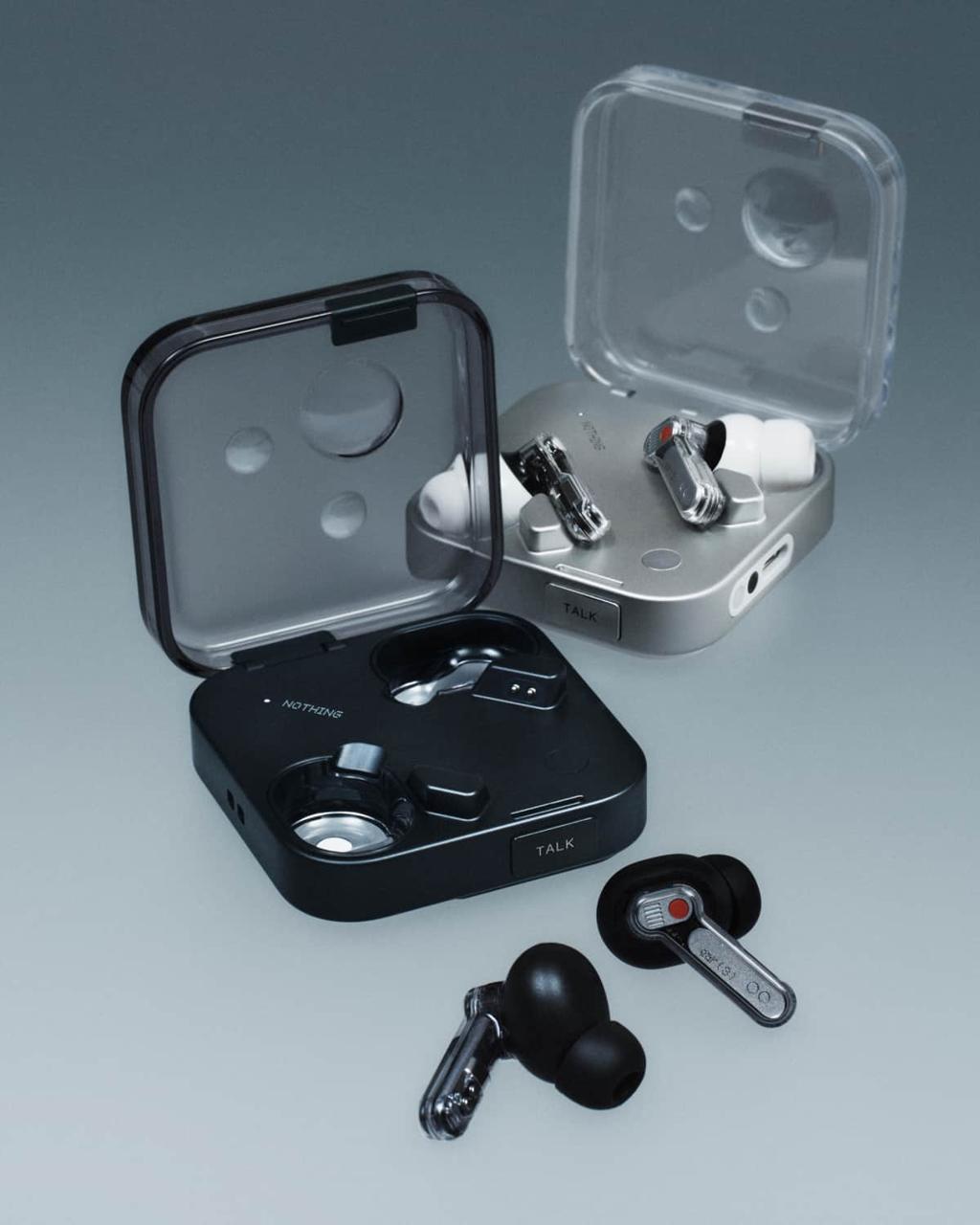
Nothing’s Ear (note) emerged after the company teased a new screen-free AI device for a December launch. The early clues led to speculation about a new wearable. The product was subsequently identified as a pair of earbuds with a recording-focused charging case.
According to The Verge’s report on the Ear (note), Nothing CEO Carl Pei demonstrated the device in a preview. The reported design includes microphones in the charging case for capturing in-person conversations and recording capabilities through the earbuds for phone calls.
The product is expected to work with a companion app. That app will manage recordings, transcripts and AI-generated summaries. The reporting also describes support for interactions with different AI agents, including a voice-control system developed by Nothing.
The company has planned a December 8 launch. That date is important, but it should not be confused with a confirmed US retail delivery date. Nothing has not published a full schedule for US availability.
Price is another major unknown. The company has not announced how much the Ear (note) will cost. There is also no confirmed information about a monthly transcription allowance, premium AI subscription or whether all features will be included with the hardware.
For now, the confirmed story is the product concept and planned launch—not a complete list of specifications.
What is confirmed and what is still unknown?
| Detail | Status as of November 24, 2026 |
|---|---|
| Product name | Ear (note), reported by The Verge |
| Product category | Wireless earbuds with a recording-focused case |
| In-person recording | Case microphones are reported to capture conversations |
| Phone-call recording | Reported through the earbuds |
| App | Reported to manage recordings, transcripts and summaries |
| AI interactions | Support for multiple AI agents is reported |
| Planned launch | December 8 |
| US retail price | Not announced |
| US availability | Not confirmed |
| Battery life | Not announced |
| Recording storage | Not announced |
| Supported codecs | Not announced |
| ANC and transparency | Not announced |
| Subscription terms | Not announced |
| Data retention and processing location | Not announced |
This distinction matters. A product announcement can establish the direction of a device without proving that its software, recording quality or audio performance will meet consumer expectations.
How the recording system is expected to work
The most unusual part of the Ear (note) is the division of recording duties between the charging case and the earbuds.
The charging case records in-person conversations
The charging case reportedly contains microphones that can capture meetings and other conversations taking place nearby. A user could place the case on a desk or table and use its recording controls.
This is different from a standard earbud case, which mainly stores and charges the earbuds. It turns the case into an additional audio device.
That approach could be useful during a work meeting, classroom discussion or interview. The earbuds do not necessarily need to be in the user’s ears for the case to perform its reported meeting-recording role.
However, recording quality will depend on microphone placement, room acoustics, distance from speakers, background noise and how many people are talking at the same time. Nothing has not published independent recordings or measurement results for the Ear (note).
A charging case also has physical limitations. It is smaller than a dedicated tabletop recorder, and its microphone position may not be ideal in every room. A meeting with one speaker sitting nearby is different from a large conference room with several people speaking from different directions.
The earbuds reportedly record phone calls
The second recording path uses the earbuds themselves. The reported design allows phone calls to be captured while the user is using the earbuds.
This is an important distinction because recording a phone call is not the same as recording a meeting in a room. The device needs access to the audio path, and the result may depend on the phone’s operating system, calling application and connection method.
Nothing has not published a compatibility list explaining which iPhones, Android phones or calling applications will support the feature.
Buyers should therefore avoid assuming that every call can be recorded. They should also wait for the company to explain whether the recording function works with standard cellular calls, internet calls, third-party meeting apps or only selected software.
A Talk button adds another control path
The case is also reported to include a Talk button for recording the user’s own voice. That could make it easier to create quick voice notes without opening a phone app.
Nothing has used a dedicated Talk button on previous earbuds. The company’s earlier recording-related features provide context, but the Ear (note) appears to be a more recording-focused product.
For example, Android Central’s coverage of the Nothing Ear 3a describes Audio Snapshot, onboard audio capture and call-recording features. That history suggests Nothing has already been experimenting with ways to capture audio through earbuds.
The Ear (note) takes the idea further by making the charging case a central part of the recording experience.
Why Nothing is putting AI into earbuds
The Ear (note) reflects a wider change in consumer technology. Companies are trying to make AI available through devices people already use instead of asking them to carry another screen or open another application.
Nothing’s CEO has described this direction as a hardware layer for AI. The idea is to use familiar devices to capture useful context and make AI assistance easier to access.
Earbuds are an interesting platform for this approach because they are already worn during many everyday activities. People use them while commuting, working, walking, studying and making calls.
A recording case adds another possibility: it can sit on a table while the earbuds remain stored. That creates two different recording situations in one product.
But the convenience argument should not hide the practical questions.
An AI recorder needs to capture audio, process it, turn speech into text and then create a useful summary. Each stage can fail in a different way. A poor recording can lead to an incomplete transcript. An incomplete transcript can produce a misleading summary. A useful-looking summary can still leave out an important detail.
This is why AI note-taking should be treated as an assistant rather than a replacement for careful records. Users should verify names, dates, amounts, technical terms and decisions before relying on a generated summary.
The device also needs to work when the user is not actively thinking about technology. If recording requires too many steps, the product may be less useful than a normal phone recorder. If the recording process is too automatic, it could create privacy problems.
The design challenge is to make recording easy for the owner while making it clear to everyone else when a conversation is being captured.
How it compares with existing AI recording earbuds
Nothing is not entering an empty market. Other companies have already started combining earbuds, charging cases and AI note-taking.
One relevant example is the Anker soundcore Liberty 5 Pro Max. Its official product information describes an AI Note-Taker feature built into the charging case.
The soundcore case can record in-person meetings and lectures, then send audio through the app for transcription and summaries. The company explicitly says this recording feature is for in-person, in-room audio and does not capture online meetings, video calls or phone calls.
That distinction helps explain where Nothing’s reported design may be different. The Ear (note) is described as combining case-based meeting recording with call recording through the earbuds.
| Feature | Nothing Ear (note) | soundcore Liberty 5 Pro Max |
|---|---|---|
| Charging-case recording | Reported | Officially listed |
| In-person meeting capture | Reported | Officially listed |
| Phone-call recording | Reported through earbuds | Not supported by its case recorder |
| AI transcripts and summaries | Reported | Officially listed |
| AI agent interactions | Reported | soundcore app and AI assistant features |
| US price | Not announced | Listed by soundcore at $229.99 before promotions |
| Independent Ear (note) testing | Not available | Requires separate product testing |
This comparison is based on reported and manufacturer-published features, not independent performance testing.
The soundcore example also shows why buyers should examine the complete feature set rather than the words “AI earbuds.” A product may have AI transcription but only record in-person meetings. Another may support call recording but have limits on which applications work.
The details determine whether the device is useful.
The recording case could become a new product category
For years, the charging case was treated mainly as a battery container. Manufacturers gradually added more functions, including touchscreens, displays, wireless charging and device controls.
Recording adds another layer. A case can be placed on a table, capture a conversation and send the audio to a phone for processing.
This design could spread if consumers find it useful. It could also remain a niche feature if the extra hardware increases cost without improving recording quality enough to justify it.
The outcome will depend on practical performance rather than marketing language.
What AI transcription actually means
AI transcription is often presented as a simple process: record a conversation, turn it into text and generate a summary. In practice, it involves several separate stages.
1. Audio capture
The microphones first need to capture speech clearly. Background music, traffic, air conditioning, room echo and overlapping speakers can affect the recording.
Microphone placement also matters. A case placed near one speaker may capture that person more clearly than someone sitting across a large table.
Nothing has not yet published recording samples or independent tests for the Ear (note). Buyers should wait for real-world tests in quiet rooms, busy offices and noisy environments.
2. Speech recognition
The recorded audio must then be converted into text.
Speech recognition systems need to handle different accents, speaking speeds, specialist vocabulary and interruptions. They may also struggle when several people speak at once.
This is why the quality of the original recording matters. AI software cannot reliably recover words that were never captured clearly.
3. Speaker identification
A useful meeting transcript should help users understand who said what. Speaker identification can make a long discussion easier to review, but it needs to be tested.
A system may confuse people with similar voices or fail to separate speakers who interrupt each other. Nothing has not confirmed exactly how speaker identification will work on the Ear (note).
4. Summarization
The final stage turns a transcript into a shorter set of notes. A summary may include key points, decisions and action items.
That can save time, but summaries should not be treated as perfect records. A summary can omit a qualification, misunderstand a name or present an uncertain statement too confidently.
For work meetings, users should compare important action items with the original transcript or recording.
5. AI agents and connected services
The Ear (note) is also reported to support multiple AI agents. This could make the product more flexible than a recorder that only creates transcripts.
However, agent compatibility creates additional questions. Which services will be supported? Will users choose the AI model? Will recordings or transcripts be shared with third-party providers? Can users disable those integrations?
Nothing has not published enough detail to answer those questions.
The privacy questions US buyers should ask
A device that records conversations handles more sensitive information than a typical pair of headphones.
A music app may process listening history and account information. A meeting recorder can capture business plans, personal details, financial discussions, family conversations and information about people who never bought the device.
That makes privacy a core product feature.
Does the device clearly show when it is recording?
A visible or audible recording indicator helps people understand when a conversation is being captured.
Nothing has not yet published complete information about the Ear (note)’s recording indicators. Buyers should look for a clear light, sound or other signal that cannot easily be missed.
A physical recording button is useful, but it does not automatically solve the transparency problem. Other people in the room need to know when the microphone is active.
Nothing’s earlier Ear 3a recording coverage described participant notifications when recording began. Whether the Ear (note) will use the same approach in every recording situation still needs confirmation.
Where are recordings stored?
A product may store audio on the device, on the phone, in cloud storage or across several services.
Each option has different privacy and convenience trade-offs.
Local storage can reduce the amount of audio that needs to be sent to a remote service. Cloud processing can make transcription and AI summaries easier to provide, but it creates another place where data must be protected.
Nothing has not disclosed the complete storage and processing design for the Ear (note).
Can users delete recordings and transcripts?
Deleting an audio file should not be assumed to delete every copy of the information.
A service may store transcripts, summaries, temporary files, backups or information shared with connected AI services. Buyers need to understand whether deletion applies to all these records.
The FTC’s consumer guidance on voice-assistant privacy recommends checking privacy policies, reviewing recording-retention settings and understanding how users can delete old recordings.
Those questions are directly relevant to AI recording earbuds.
Can people review recordings?
A company should clearly explain whether employees, contractors or service providers can access audio or transcripts for support, quality control or product improvement.
Users should also know whether they can opt out of human review, where that option exists.
This is not a theoretical concern. In its Amazon Alexa privacy enforcement announcement, the FTC described problems involving voice recordings, deletion requests and retention of children’s data.
That case does not establish that Nothing has the same practices. It demonstrates why privacy promises need to be backed by clear controls and verifiable procedures.
What happens when AI agents are connected?
The Ear (note)’s reported support for multiple AI agents could be useful, but it makes the data flow more complicated.
A recording might pass from the earbuds to the phone, from the phone to the Nothing app, and then to a separate AI provider for processing. Each step can involve different privacy policies and retention rules.
The NIST Privacy Framework provides a useful way to think about this problem. It treats privacy risk as something that must be managed across the full data lifecycle, from collection through disposal.
For buyers, that means asking not only whether the recording is encrypted, but also who processes it, how long it is retained, whether it is used to improve AI systems and how deletion works.
What US recording laws mean for earbud recorders
Recording laws are another important part of this product category.
In the United States, federal and state rules can both matter. The federal Wiretap Act includes a consent exception that generally allows a participant in a communication to record it, subject to the law’s other conditions. The relevant provision is 18 U.S.C. § 2511.
That does not mean every recording is automatically lawful.
The US Department of Justice’s Bureau of Justice Assistance explanation of the Wiretap Act explains that states may impose stricter requirements than federal law. Some states require all parties to consent to certain recordings.
California provides one example. Its Penal Code section 632 addresses recording confidential communications without the consent of all parties. The California Attorney General’s legal resource reproduces the relevant provision.
The details can depend on the type of conversation, whether participants reasonably expect privacy, where they are located and other circumstances. A rule that applies to one type of call may not apply in exactly the same way to every conversation.
A November 2026 legal analysis by RecordingLaw.com counts 13 states with all-party consent requirements for at least one major type of conversation, while noting that some state rules are partial. Its review of state recording-consent laws also links to primary legal sources.
The practical lesson is simple: do not assume that because you are a participant in a conversation, every recording is permitted in every state.
A safer approach for meetings and calls
Before recording a conversation:
- Tell the other participants that you want to record.
- Explain why you are recording and how the recording will be used.
- Obtain permission from everyone involved.
- Check the laws that apply where the participants are located.
- Avoid recording confidential conversations when you are unsure whether you have the necessary consent.
This is general consumer information, not legal advice. People who regularly record professional calls, interviews or confidential meetings should check the laws and workplace policies that apply to their situation.
A device can make recording technically easy, but it cannot decide whether the user has the legal right to record.
What buyers should verify before purchasing
The Ear (note) should not be judged only by its recording button or AI features. Buyers should look at the full cost and functionality of the product.
Price and subscription costs
The retail price has not been announced. Subscription terms are also unknown.
That makes it impossible to calculate the total cost of ownership.
A device with a low purchase price could become expensive if transcription minutes, AI summaries or advanced agents require a monthly subscription.
Buyers should check:
- Whether basic recording is free.
- Whether transcription has a monthly limit.
- Whether summaries require a paid plan.
- Whether multiple AI agents cost extra.
- Whether subscriptions can be cancelled without losing access to existing recordings.
Battery life and recording duration
Normal earbud battery life is not the same as continuous recording time.
The case may need its own battery budget for recording meetings. The earbuds may also use additional power when recording calls or running connected AI features.
Nothing has not published battery ratings or maximum recording duration for the Ear (note).
Independent testing should measure normal playback, call recording, meeting capture and standby behavior separately.
Storage and export options
Users should know how much audio can be stored before the case or phone needs to sync with the app.
They should also be able to export important recordings and transcripts in common formats. A recorder that locks everything inside one account or app may be less useful over time.
Buyers should check whether files can be downloaded, shared, backed up and deleted.
Phone and app compatibility
The recording feature may work differently on iOS and Android.
The most important questions include:
- Which iPhone and Android versions are supported?
- Does call recording work with the standard phone app?
- Does it support third-party calling apps?
- Can recordings be transferred to a computer?
- Does the app work without a Nothing phone?
- Are all AI agents available in the United States?
Until Nothing publishes these details, buyers should not assume full compatibility.
Traditional headphone performance
The product is called Ear (note), but buyers still need to know whether it performs well as an audio device.
A normal earbud review should test:
- Music playback and sound tuning.
- Active noise cancellation.
- Transparency mode.
- Call quality.
- Fit and comfort.
- Battery life.
- Bluetooth stability.
- Supported codecs.
- Water and sweat resistance.
- Controls and app reliability.
None of those specifications should be assumed from the product announcement.
If Nothing positions the Ear (note) primarily as a recorder, the company should make that clear. If it is also intended to compete with premium music earbuds, it needs to demonstrate that it can deliver the same everyday listening experience.
Who could benefit from the Ear (note)?
The product could be useful for several groups, depending on its final performance and privacy controls.
Remote workers and office teams
People who attend frequent meetings may appreciate automatic transcripts and summaries. A case that records in-person conversations could help users capture decisions without placing a phone in the middle of the table.
However, workplace recording policies may be stricter than general consumer rules. Employees should check company policy before using a personal recorder in meetings.
Students
Students may find recording useful for lectures, interviews and group discussions.
But recording should not replace active note-taking or careful review. A generated summary may leave out a lecturer’s qualification or an important detail.
Students should also check school policies and obtain permission where required.
Journalists and interviewers
A recording case could be convenient for people who already wear earbuds during the day. It may reduce the need to carry a separate device.
Professional users still need reliable audio quality, export controls, accurate timestamps and dependable storage. They should not rely on an untested recorder for important interviews or source material.
Everyday users
Some people simply want a better way to remember conversations, errands and personal ideas.
For these users, a quick voice-note button could be useful. The value will depend on whether the product makes recording and retrieving information easier than using a phone.
Who should wait?
Buyers who need proven recording quality, long recording sessions, detailed privacy controls or dependable call compatibility should wait for independent testing.
People who mainly want music playback and ANC may also be better served by established headphones until Nothing publishes the full Ear (note) specifications.
What to watch on December 8
Nothing’s planned December 8 launch should answer several important questions.
1. Is it a full music earbud or a recording-first device?
The company should clarify whether normal music playback is part of the product’s intended use and publish its audio specifications.
2. How does recording work on iPhone and Android?
Call recording is one of the most important reported features. Buyers need a clear compatibility list rather than a general statement that the earbuds work with smartphones.
3. What is the total cost?
The retail price, transcription allowance and AI subscription terms will determine whether the product is affordable over time.
4. What privacy controls are built in?
The launch should explain recording indicators, local storage, cloud processing, retention, deletion and third-party AI access.
5. How long can it record?
Battery and storage specifications are essential for people who plan to use the case during long meetings.
6. Will independent tests support the claims?
Real-world microphone tests should examine quiet rooms, busy offices, large meetings and phone calls. Reviewers should also test how accurately the app transcribes different voices and how useful its summaries are.
7. Will the product be available in the United States?
A December announcement does not automatically mean same-day US sales. Nothing should clarify the countries, retailers and shipping schedule.
Conclusion
Nothing’s Ear (note) is an interesting step in the evolution of wireless earbuds. It suggests that the charging case could become more than a battery container, acting as a recorder and a control point for AI services.
The reported combination of meeting recording, phone-call recording and AI summaries could be useful for people who want to preserve information without carrying a separate device.
But the most important details are still missing. Nothing has not confirmed the US price, full audio specifications, battery life, storage capacity, subscription terms or complete privacy design.
For US buyers, recording consent and data handling deserve as much attention as sound quality. A recorder should make it easy to capture information while helping users respect the people around them.
The December 8 launch should reveal whether the Ear (note) is a genuinely useful audio product or simply an early example of the growing AI wearable market. Until independent testing and full specifications are available, it is best treated as a product to watch—not a purchase to rush into.
Frequently Asked Questions
What is the Nothing Ear (note)?
Nothing Ear (note) is a reported pair of AI-focused earbuds with a charging case designed to record in-person conversations. The earbuds are also reported to support phone-call recording, while a companion app manages transcripts and summaries.
When will Nothing Ear (note) launch?
Nothing has planned a December 8, 2026 launch. The company has not confirmed a US retail shipping date.
How much will Nothing Ear (note) cost?
The price has not been announced as of November 24, 2026. Buyers should also wait for details about any AI transcription or subscription costs.
Can Nothing Ear (note) record meetings?
According to the product preview reported by The Verge, microphones in the charging case are designed to capture in-person conversations. Recording duration, microphone performance and storage limits have not been published.
Can Nothing Ear (note) record phone calls?
The reported design includes call recording through the earbuds. Nothing has not published a full compatibility list for iPhone, Android or third-party calling applications.
Is it legal to record conversations with AI earbuds in the United States?
Recording laws vary. Federal law contains a participant-consent exception, but some states impose stricter requirements, including all-party consent for certain conversations. Users should tell participants, obtain permission and check the applicable law.
Will Nothing Ear (note) have active noise cancellation?
Nothing has not published confirmed ANC specifications for the Ear (note). Buyers should not assume that it includes ANC or any particular noise-cancellation performance.
Should you wait for Nothing Ear (note)?
If you are interested in AI recording, it is worth waiting for the December 8 announcement and independent tests. Buyers who need proven audio performance, recording reliability or privacy controls should wait until those details are verified.
