


High Dynamic Range (HDR) is a display technology that provides a significantly wider range of colors, brighter highlights, and deeper, more detailed shadows compared to standard dynamic range (SDR) content. The ITU-R BT.2100 recommendation for high dynamic range television defines key image parameters used in HDR television production and programme exchange.
This results in a more lifelike and visually impactful image on compatible TVs, monitors, and smartphones. For most people, HDR improves visual fidelity, especially with movies and games.
Key Takeaways
- HDR expands the contrast and color capabilities of your display.
- It delivers brighter whites, darker blacks, and a broader spectrum of colors.
- HDR content requires a compatible display and content source to work.
- Common HDR standards include HDR10, Dolby Vision, HDR10+, and HLG.
- Not all HDR is the same; panel brightness and processing capabilities matter.
- HDR is a noticeable upgrade for cinematic viewing and gaming.
- You need to check both your display and your content for HDR compatibility.
What is HDR? Understanding the Visual Difference
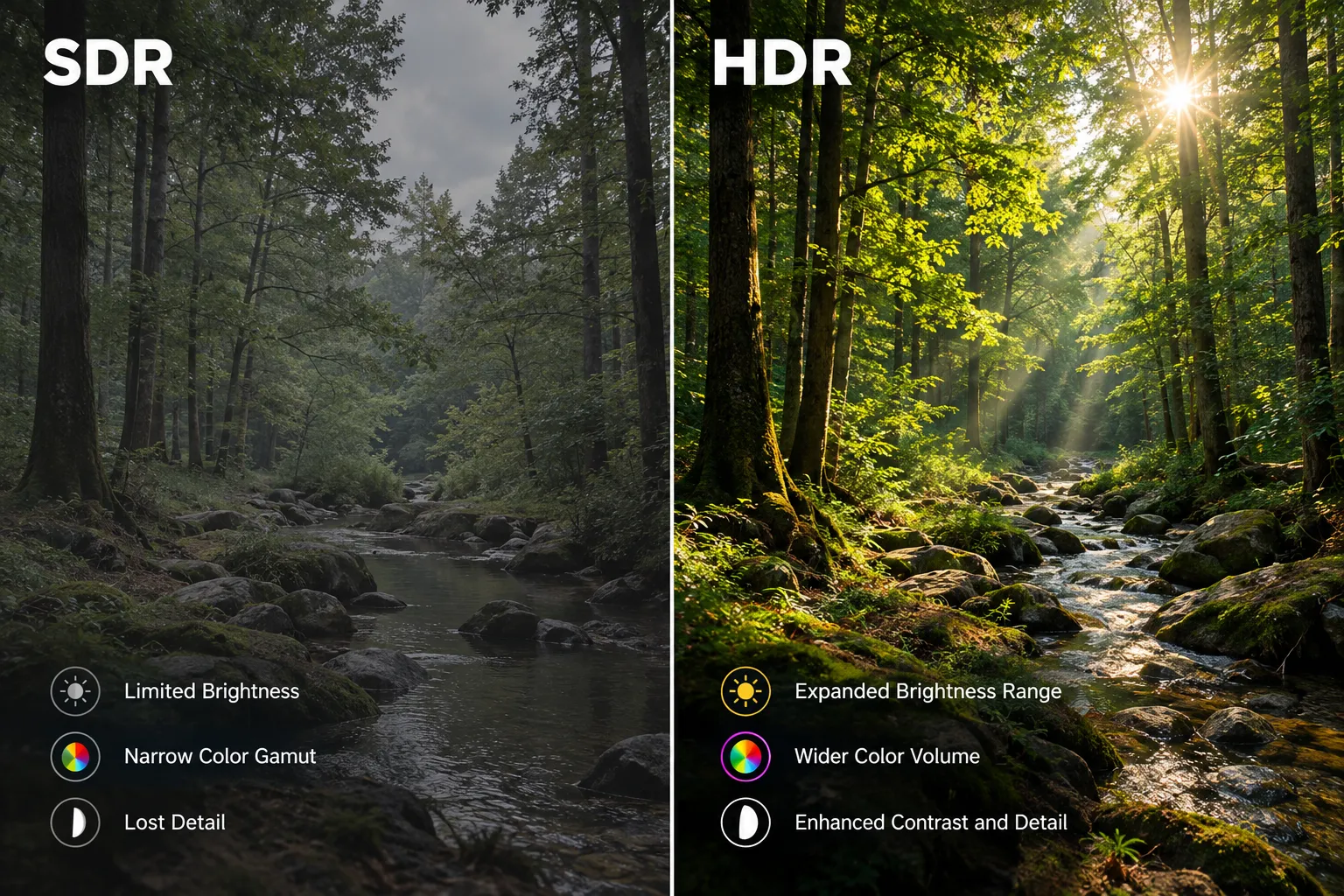
HDR, or High Dynamic Range, refers to a video and imaging technology designed to display a broader and more accurate range of colors, greater contrast between the lightest and darkest parts of an image, and finer detail across the entire brightness spectrum.
The International Telecommunication Union’s HDR-TV standard describes technical parameters for HDR television signals, including Perceptual Quantization (PQ) and Hybrid Log-Gamma (HLG).
Standard Dynamic Range (SDR), the technology used for decades, handles a much smaller range, often leading to “blown out” highlights or “crushed” shadows where detail is lost. HDR aims to replicate what the human eye can see more closely, offering a more immersive and realistic visual experience.
We consider HDR a notable upgrade for anyone focused on picture quality. It enhances visual depth and realism significantly. For example, a scene with bright sunlight streaming through a window will show details in both the glare and the shadowed room, which would be lost in SDR. This improved detail in both extremes makes content appear more vibrant and three-dimensional.
How Does What is HDR Work? Display and Content Requirements
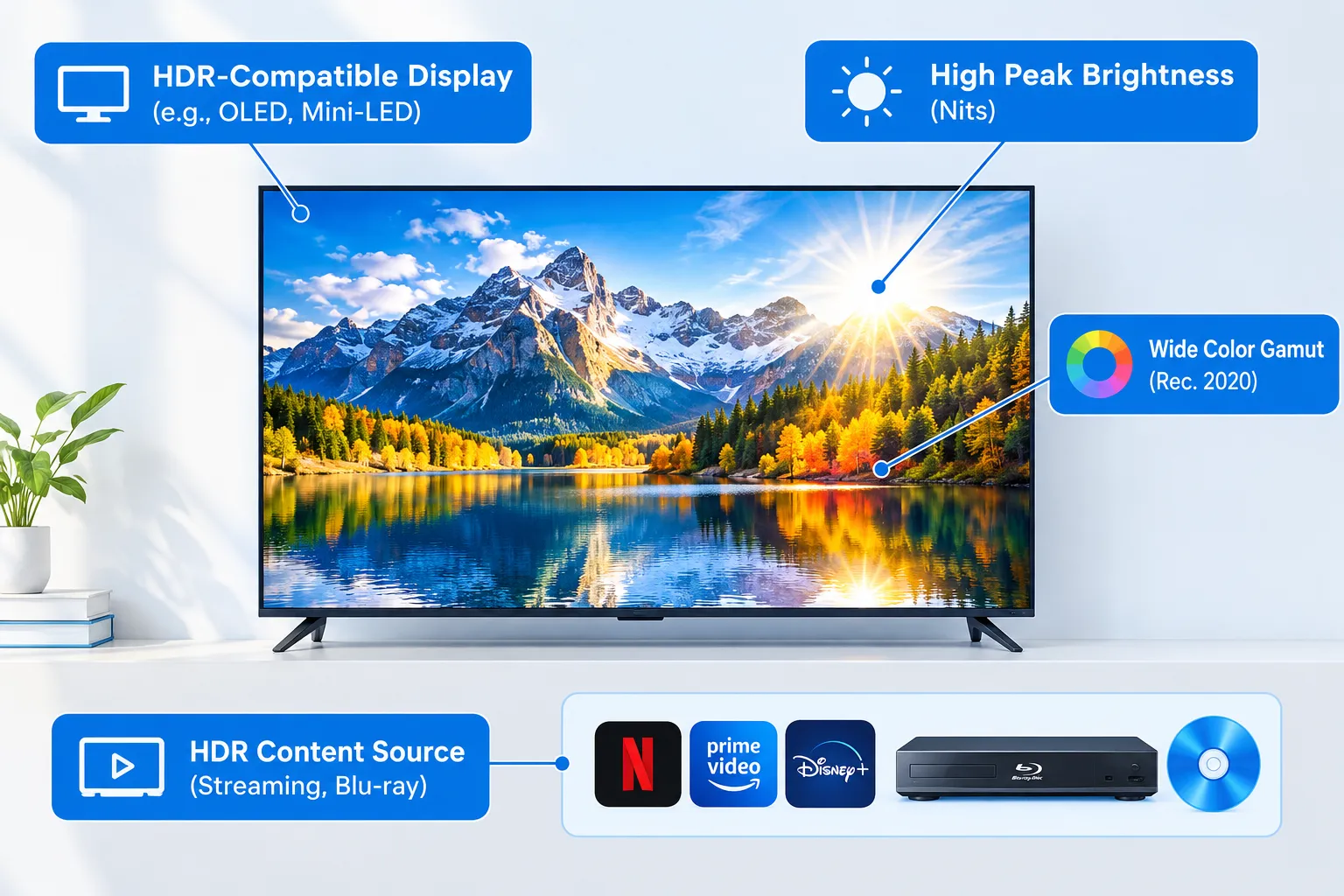
To experience HDR, you need two main components: HDR content and an HDR-compatible display. The Consumer Technology Association’s definition of an HDR-compatible display outlines requirements such as processing HDR10 metadata and applying the appropriate electro-optical transfer function.
The technology itself relies on processing and displaying HDR image information differently from SDR.
- Expanded Brightness: HDR displays can achieve much higher peak brightness levels, often measured in nits (candela per square meter), compared to SDR displays. This allows for truly bright highlights, like reflections off metal or sunlight.
- Deeper Black Levels: Alongside brighter whites, HDR also aims for deeper, more nuanced black levels. The greater separation between light and dark points increases the overall contrast ratio, making images pop.
- Wider Color Gamut: HDR leverages a wider color gamut (often Rec. 2020) than SDR (Rec. 709). This means it can reproduce a larger palette of colors, resulting in more vibrant and true-to-life hues. This can make colors like deep reds and vivid greens appear much richer.
- Metadata: HDR content includes metadata, which tells the display how to process the image. This metadata can be static (like in HDR10, applying to the entire film) or dynamic (like in Dolby Vision and HDR10+, adjusting scene-by-scene or frame-by-frame).
When shopping for a new TV or monitor, checking its peak brightness and HDR standard support is key. For example, an OLED TV offers perfect blacks that enhance HDR contrast, while Mini-LED displays often achieve very high peak brightness for impactful highlights.
Peak brightness is one factor in HDR performance, but it is not a guarantee of picture quality on its own.
For professional Dolby Vision content-creation displays, Dolby’s HDR display evaluation guidance distinguishes between display tiers using criteria such as peak luminance, black level, contrast, and color gamut. Consumer viewing results will also depend on local dimming, tone mapping, and the content being played.
What Are the Key HDR Standards?
There are several HDR standards, each with its own specifications and licensing. Understanding these can help you pick the right display and content.
- HDR10: This is the most common open-standard HDR format. It uses static metadata, meaning the brightness and color information is set once for the entire piece of content. Most HDR-compatible devices and streaming services support HDR10. It’s the baseline for an HDR experience.
- Dolby Vision: A proprietary format developed by Dolby, Dolby Vision uses dynamic metadata. This allows brightness and color mapping to be adjusted for scenes or frames, helping compatible displays render the image according to their capabilities. See Dolby’s official Dolby Vision overview for details. Displays and content must be licensed for Dolby Vision, but it often provides a superior visual experience due to its granular control.
- HDR10+: Developed as an open-source alternative to Dolby Vision, HDR10+ also uses dynamic metadata. It aims to offer similar scene-by-scene optimization capabilities without the licensing fees associated with Dolby Vision. Samsung has been a strong proponent of HDR10+.
- HLG (Hybrid Log-Gamma): Primarily designed for broadcast television, HLG is a backward-compatible HDR standard. It can be carried over existing SDR infrastructure and allows compatible TVs to display HDR, while SDR TVs display it as SDR. This makes it ideal for live broadcasts where a single signal needs to serve both types of displays.
Choosing a display that supports multiple standards, especially HDR10 and Dolby Vision, gives you the most flexibility in content playback. While many TVs support HDR10 by default, Dolby Vision and HDR10+ compatibility are often found in higher-end models.
The Real-World Impact of What is HDR on Viewing Experience
The practical benefit of HDR is a more engaging and immersive viewing experience. Content looks more true-to-life, with greater depth and visual pop.
- Movies and TV Shows: Cinematic content often benefits the most. Dark scenes retain detail in shadows, while explosions or sunlit landscapes are genuinely brilliant, without losing detail in the brightest areas.
- Gaming: HDR can make games significantly more immersive, especially in titles designed with HDR in mind. Environments feel more realistic, and special effects like magic spells or muzzle flashes are more impactful.
- Photography: For photographers, HDR allows for capturing and displaying images that more closely match the dynamic range seen by the human eye, reducing the need for compromises in exposure.
While HDR offers substantial improvements, it requires high-quality content mastered in HDR. Upscaling SDR content to HDR by your TV can sometimes improve visuals, but it won’t replicate true native HDR.
Does HDR Have Any Drawbacks?
While HDR offers significant visual benefits, there are a few considerations to keep in mind.
- Compatibility Complexity: Not all devices or streaming services support all HDR formats. You might find a movie in Dolby Vision but your TV only supports HDR10, meaning you’ll get the HDR10 version.
- Brightness Requirements: To really showcase HDR, a display needs sufficient peak brightness. Lower-end HDR TVs might technically support HDR, but their limited brightness prevents them from delivering the full impact. This can sometimes lead to a less impressive experience than expected.
- Content Availability: While HDR content is becoming more widespread, not everything is available in HDR. Older movies or some broadcast content might still be SDR-only.
- Calibration: Achieving the best HDR picture often requires proper calibration of your display settings. Right out of the box, some TVs might have HDR modes that are overly aggressive, leading to unnatural colors or crushed blacks. We recommend experimenting with picture modes or consulting professional reviews for optimal settings.
For most people, the benefits outweigh these minor complexities. However, if you’re shopping on a budget, ensure the “HDR” label isn’t just a marketing gimmick for a low-brightness panel.
HDR vs. SDR: A Clear Comparison
The core difference between HDR and SDR lies in their ability to reproduce light, shadow, and color.
| Feature | SDR (Standard Dynamic Range) | HDR (High Dynamic Range) |
|---|---|---|
| Brightness Range | Limited, typically 100-300 nits peak | Significantly wider, 600-2000+ nits peak |
| Black Levels | Good, but often lacks fine detail in deep shadows | Deeper and more nuanced, with greater detail visibility |
| Color Gamut | Rec. 709 (standard definition color space) | Wider (e.g., Rec. 2020), enabling more vibrant colors |
| Contrast | Standard contrast ratio, can appear flat | Dramatically improved contrast, more lifelike imagery |
| Metadata | None | Contains metadata for display optimization (static/dynamic) |
| Visual Impact | Good, but lacks depth and vibrancy of real-world scenes | More immersive, realistic, and impactful |
Based on our testing, the visual upgrade from SDR to well-implemented HDR is substantial, especially for cinematic content. If you value picture quality, an HDR-capable display is a strong contender for your next purchase.
FAQS
Does HDR make a big difference?
Yes, HDR generally makes a noticeable difference by offering brighter highlights, deeper shadows, and a wider range of colors, resulting in a more realistic and impactful image.
Is HDR worth it for gaming?
HDR is definitely worth it for gaming if you have a compatible console/PC and an HDR monitor or TV. It enhances visual immersion and makes game worlds appear more vibrant.
Do I need a special HDMI cable for HDR?
The cable you need depends on the resolution, refresh rate, and video features in your setup. The HDMI Licensing Administrator’s Premium High Speed HDMI Cable guidance says certified Premium High Speed cables are tested for 18Gbps and features including 4K at 60Hz and HDR; Ultra High Speed HDMI cables support up to 48Gbps. Check the requirements of your source and display rather than relying on the cable name alone.
Can all TVs do HDR?
No, not all TVs can do HDR. Only TVs specifically designed and labeled as HDR-compatible, with the necessary peak brightness and color gamut capabilities, can display HDR content properly.
What’s the best HDR format?
Many consider Dolby Vision the best HDR format due to its dynamic metadata, which optimizes content scene-by-scene. However, HDR10+ offers a similar benefit, and standard HDR10 is widely supported.
Why does my HDR look bad?
Your HDR might look bad if your display isn’t bright enough, if the content isn’t true HDR, or if your TV’s HDR settings are poorly calibrated. Ensure all components are HDR-compatible and adjust picture settings.
Should I always use HDR?
You should use HDR when available and when your display properly supports it. However, if HDR on your display looks dim or washed out, it might be better to revert to SDR for that specific content.
Is HDR the same as 4K?
No, HDR is not the same as 4K. 4K refers to resolution (the number of pixels), while HDR refers to the range of brightness and colors those pixels can display. They often go together, but one does not imply the other.
Conclusion
Understanding what is HDR is essential for anyone looking to maximize their visual experience with modern displays. It’s a technology that fundamentally changes how light, shadow, and color are presented, moving beyond the limitations of older SDR standards.
While there are different HDR formats and varying levels of implementation, the core promise of a more lifelike and engaging picture holds true.
When you’re considering a new TV, monitor, or even a smartphone, prioritizing HDR compatibility and looking for robust brightness specifications will ensure you get the most out of your investment. We recommend opting for displays that support at least HDR10 and ideally Dolby Vision for the best flexibility and picture quality.
