


Apple has announced a new Apple TV 4K with a faster processor, hands-free Siri, and a more flexible home theater setup. The fourth-generation streaming device costs $299 in the United States and is scheduled to arrive in stores on November 13, 2026.
The launch matters because Apple is changing more than the hardware inside its streaming box. It is bringing conversational AI into the living room and connecting entertainment more closely with smart-home controls and wireless speakers.
However, the new features come at a higher entry price than many competing streaming devices. Buyers also need to separate Apple’s performance claims from results that independent testing has not yet established.
This guide explains what changed, how the features could affect everyday viewing, and whether the new Apple TV 4K makes sense for your home.
Key Takeaways
- The new Apple TV 4K costs $299. Its A19 chip, AV1 decoder, and hands-free Siri are meaningful upgrades, but independent performance tests are still needed.
- You do not necessarily need to replace an older Apple TV to get Siri AI. Apple says Siri AI is available in beta on second-generation and newer Apple TV 4K models, subject to software and device requirements.
- The four-speaker HomePod setup is optional. Compare the total cost with a soundbar or traditional surround-sound system before investing in Apple’s home theater ecosystem.
Table of Contents
- What Apple announced
- Price and availability
- What the A19 chip and AV1 decoder change
- Siri AI and hands-free voice control
- The new Siri Remote
- Four-speaker HomePod surround sound
- Smart-home features and privacy
- What the new device does not change
- Should you upgrade?
- What to watch next
- Frequently asked questions
What Apple announced
On October 13, Apple announced the fourth-generation Apple TV 4K. The new device combines an A19 processor with a dedicated AV1 decoder, three far-field microphones, and expanded HomePod audio support.
Apple also updated the Siri Remote with Find My features. The remote can play a sound to help users locate it, while compatible iPhones can provide more precise location information.
The new streaming box is part of a broader connected-home announcement. Apple also introduced HomePod mini 2 and HomeView, a smart display designed for household controls, video calls, and personalized information.
The important distinction is that Apple TV 4K remains a streaming device. It does not replace the television’s display panel, and its new processor does not automatically improve the panel’s native picture quality.
Instead, the device focuses on processing, content discovery, connectivity, and audio integration. These changes may make the television easier to use without changing its underlying screen technology.
For people with older televisions, that can still be useful. A modern streaming device can provide a newer interface and updated applications while allowing the owner to keep a working television.
Price and availability
Apple has set the US price of the fourth-generation Apple TV 4K at $299. Preorders opened on October 13, and retail availability begins November 13, 2026.
The price places the device in a premium position within the streaming-device market. Many buyers will need to decide whether the new features offer enough practical value to justify spending that amount on a device that connects to a television they may already own.
The full cost can rise if you add the new audio setup. Four HomePod speakers represent a separate purchase unless you already own compatible units.
You may also need an HDMI cable, depending on what you have available. Apple lists an HDMI cable as a separate requirement for connecting Apple TV hardware to a television. Check the included accessories and connection requirements before ordering.
Is $299 reasonable?
The answer depends on how you use your television.
If you regularly watch streaming services, use Apple services, and want conversational voice control, the new model may offer a more convenient experience.
If you mainly watch a few streaming applications, an existing device may already meet your needs. The upgrade becomes harder to justify when the current device loads applications reliably and supports your preferred video formats.
Buyers should also consider whether their television’s built-in operating system already offers the applications and features they need. A separate streaming box is not automatically necessary for every smart-TV owner.
What the A19 chip and AV1 decoder change
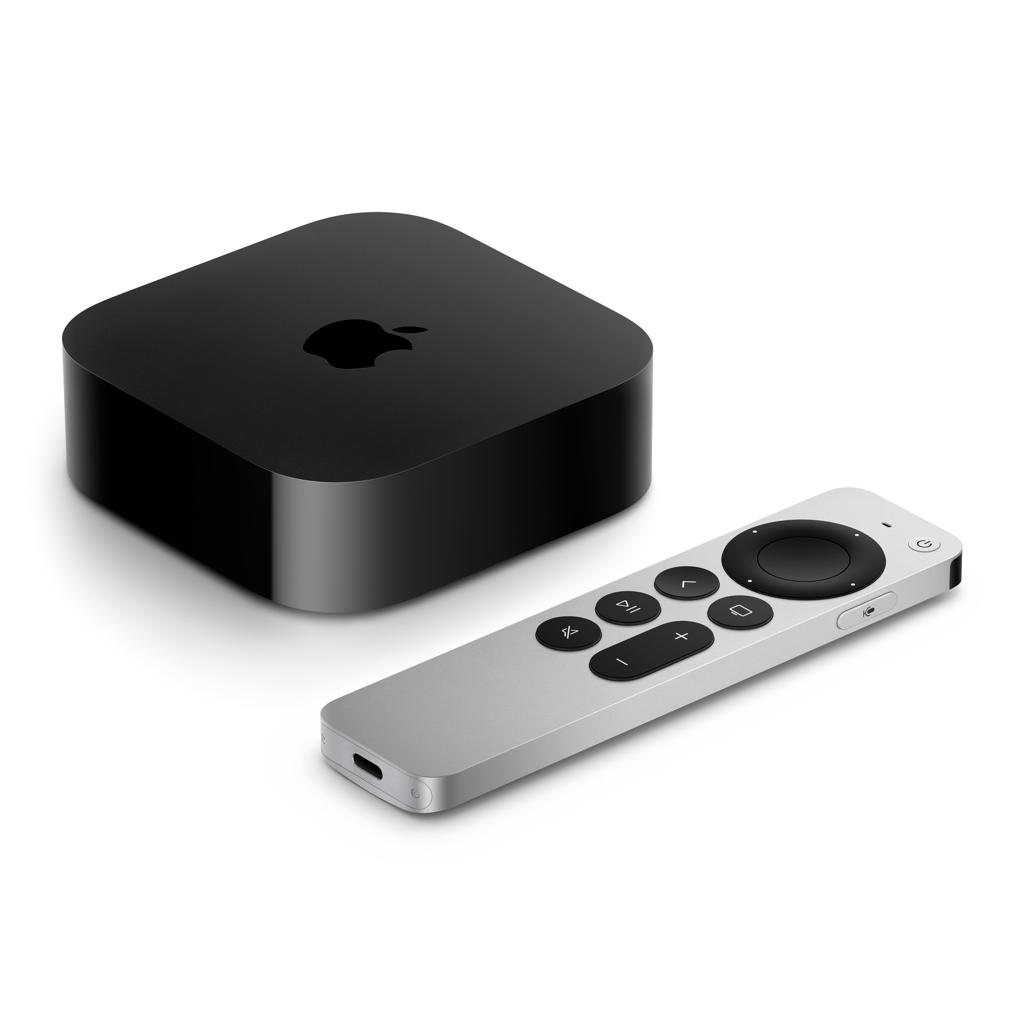
The A19 chip is one of the main hardware changes in the new Apple TV 4K. Apple says it delivers up to 50% faster CPU performance and up to twice the GPU performance of the previous generation. Those figures are manufacturer’s comparisons and should be treated as such until independent testing confirms the results.
The CPU helps manage system tasks, application behavior, and general processing. The GPU handles graphics-related work. Both can contribute to a responsive interface, but the visible difference depends on the software and tasks involved.
For a typical viewer, the most useful result would be faster navigation, smoother menus, and responsive interactions with Siri. Those improvements matter more during daily use than a processor specification alone.
Why AV1 decoding matters
The new device also includes a dedicated AV1 decoder. AV1 is a video-compression format designed to deliver video efficiently at a given level of quality.
Compression matters because streaming services must send video across internet connections with different speeds and levels of congestion. More efficient encoding and decoding can help services deliver high-quality video while managing bandwidth demands.
However, a decoder does not automatically make every stream sharper. The streaming service must provide compatible content, and the playback device must receive a suitable stream.
Your internet speed, the service’s encoding choices, and the original video quality still influence the result. A dedicated AV1 decoder is a useful hardware addition, but its benefits depend on the content and services you use.
Does the faster processor improve picture quality?
Not necessarily.
The new processor can help with interface performance and supported video-processing tasks. It does not turn an ordinary LCD television into an OLED panel, nor does it automatically add local dimming, increase native brightness, or change the screen’s refresh rate.
If you want better black levels or brighter HDR highlights, compare the television itself. TechOzea’s guides to OLED display technology and Mini-LED technology explain how panel and backlight design affect picture quality.
Siri AI and hands-free voice control
Apple is making Siri a more central part of the living-room experience. The fourth-generation Apple TV 4K has three far-field microphones that allow users to issue voice commands without picking up the remote.
Apple says the microphones use echo cancellation to help recognize speech while audio is playing. The company also describes a more conversational Siri AI experience that can help users discover shows and ask follow-up questions.
For example, a viewer could ask for nature documentaries, request recommendations, or ask a question about a show. Apple says responses can appear on screen without requiring viewers to leave the content they are watching.
That approach could make voice search more useful than a basic command system. Instead of entering a title one letter at a time, viewers can describe what they want and refine their request.
Siri AI has important requirements
The new hardware is not the only factor that determines access to Siri AI. Apple’s announcement says the feature is available in beta on Apple TV 4K models beginning with the second generation, subject to the company’s software, language, and device requirements.
The new model’s built-in microphones make hands-free interaction possible. Older compatible devices do not gain those microphones through a software update, so users should not assume that every Siri feature works in the same way across all models.
Apple also describes personal-context features that can use information from a compatible Apple Intelligence-enabled iPhone. These capabilities depend on the required devices and settings.
Before buying the new device specifically for AI, check which features are available in your region and which require another Apple product. Availability during a beta can also differ from the experience offered after a feature reaches a stable release.
Will AI make content discovery better?
It could, particularly for viewers who find streaming catalogs difficult to search.
A conversational assistant can help narrow a broad request into a smaller group of options. It may also provide context about a program without requiring viewers to pause and search on another device.
But useful AI depends on answer quality, catalog coverage, and the ability to interpret requests correctly. An assistant that repeatedly misunderstands a title or recommends unavailable content could add friction instead of removing it.
Independent long-term testing will be needed to judge Siri AI’s accuracy and everyday usefulness. Apple’s demonstrations show the intended experience, not proof that every query will produce a helpful answer.
The new Siri Remote
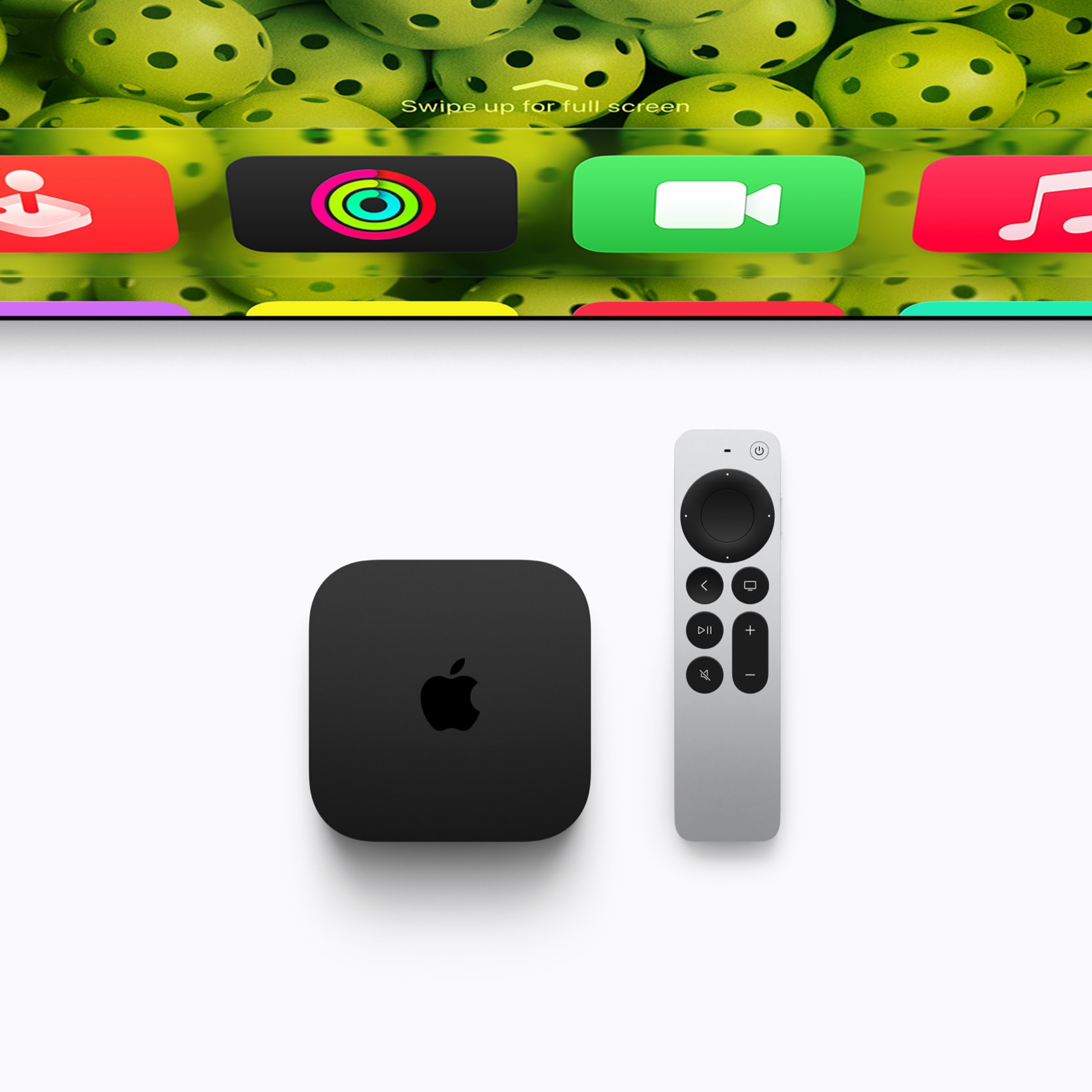
The updated Siri Remote adds Find My support, including a sound function that helps users locate a misplaced remote. Apple is also selling the remote separately for $59, and it works with supported older Apple TV models.
This is a useful change because a misplaced remote can make a streaming device frustrating to use. Voice search and on-screen navigation do not help much when the controller has disappeared between sofa cushions.
The standalone option is also important for existing owners. If your current Apple TV still works well, you may be able to get the improved remote without buying the new streaming box.
Precision Finding has compatibility limits
The remote’s more precise location feature requires a compatible newer iPhone. The Verge reports that Precision Finding works with specified recent iPhone models that support the necessary Bluetooth channel-sounding technology.
This means the feature is not identical for every Apple household. A user with an older iPhone may still benefit from the remote’s sound function, but should not assume that every precision-location capability will be available.
Before purchasing, check the compatibility details rather than relying on the Find My name alone.
Four-speaker HomePod surround sound
One of Apple’s most notable home theater changes is support for a four-speaker HomePod arrangement. The fourth-generation Apple TV 4K can work with four compatible speakers arranged in matching front and rear pairs. Apple says the system automatically calibrates timing and audio levels for the room.
This gives Apple users another way to build a home theater without starting with a traditional receiver and separate wired speakers.
The new HomePod mini 2 is part of that plan. Apple announced it at $149 in the United States, with store availability beginning October 30. Siri AI support for the speaker is scheduled for a future software update, so buyers should not assume every announced AI feature will be available immediately.
Four speakers do not guarantee the best sound
A speaker count alone cannot determine audio quality.
The result depends on speaker placement, room shape, acoustic reflections, content format, calibration, and the listener’s preferences. A dedicated soundbar or receiver-based system may offer different features, connection options, or performance characteristics.
The total price matters, too. Four speakers can add substantial cost to the streaming device. A buyer who mainly watches television shows may prefer to spend that money on a good soundbar or on a larger, better television.
Before choosing Apple’s setup, compare the complete cost with other systems in your budget. If you already own compatible HomePods, the calculation may look different because you will not need to purchase all the speakers.
What about Dolby Atmos?
Do not assume that a four-speaker arrangement automatically matches every dedicated Dolby Atmos system.
Apple describes its new configuration as a surround-sound experience. That claim does not establish equivalence with every receiver, soundbar, or speaker system that supports Dolby Atmos.
Buyers who care about specific audio formats should check the supported formats, device requirements, and behavior of their preferred streaming services. They should also look for independent listening tests once reviewers have access to retail hardware.
Smart-home features and privacy
Apple TV 4K continues to play a role in Apple’s connected-home strategy. Apple says the device can control compatible accessories and scenes, display compatible doorbell notifications, and support smart-home functions involving Thread and HomeKit Secure Video.
For households using compatible accessories, this could reduce the need to switch between devices. A viewer might receive a doorbell notification on the television or control a home scene through Siri.
The value depends on the household’s existing equipment. People who mainly use smart-home products from other ecosystems should verify compatibility before treating Apple TV as a central control device.
Privacy deserves attention
Hands-free microphones and personalized AI create additional questions about data handling. Apple says the new Apple TV 4K uses Secure Exclaves to isolate microphone processing and that Siri requests may use on-device processing or Private Cloud Compute.
These are Apple’s stated security design claims. They should not be presented as an independent guarantee that every possible security risk has been eliminated.
Users should review microphone permissions, Siri settings, and the requirements for personal-context features. They should also understand whether a feature uses a connected iPhone or other account-linked information.
The practical question is simple: does the convenience of voice control justify having an always-available microphone in the living room? Different households will make different choices.
What the new device does not change
The new Apple TV 4K is not a new television panel technology. It does not change the physical display in your television.
If your current TV has limited brightness, poor black levels, or visible blooming around bright objects, a new streaming box will not correct those hardware limits. It may improve the interface and playback experience, but the display still determines how the image looks.
The same applies to gaming. A streaming device’s processor specifications do not automatically improve the television’s native refresh rate or add gaming features to unsupported HDMI inputs.
Buyers considering a television upgrade should compare the actual display technologies. TechOzea’s QLED technology guide explains another common display category and why buyers should look beyond marketing labels.
The distinction is important because streaming-device announcements often use performance language that can sound like a picture-quality upgrade. Those are separate questions.
Should you upgrade to the new Apple TV 4K?
The right decision depends on your current device, the features you want, and your budget.
Upgrade if you want hands-free Siri
The built-in microphone array is one of the clearest hardware differences. If you frequently use voice search and want to speak without picking up a remote, the new model may be attractive.
However, check Siri AI’s software requirements and current beta limitations first. Do not buy the device based only on a demonstration of a feature that may change as the software develops.
Upgrade if you want the new HomePod setup
If you already own compatible HomePods, the four-speaker configuration may offer a convenient way to expand your home theater.
If you need to buy all four speakers, compare the full cost with a soundbar or dedicated surround system. The most expensive configuration is not automatically the best value for your room.
Keep your current Apple TV if it still works well
An existing Apple TV that reliably runs your favorite applications may not need replacing. Apple says Siri AI is available in beta on second-generation and newer Apple TV 4K models, subject to its stated requirements.
If your main problem is a missing remote, the separately sold $59 Siri Remote may be the more economical option. That purchase is especially relevant if the current box still meets your streaming needs.
Consider the television before spending more
If you are unhappy with your current picture quality, the television itself may deserve more attention than its streaming box.
For example, a viewer who wants better contrast for movies should compare OLED models. Someone who watches daytime sports in a bright room may prioritize brightness and reflection handling.
TechOzea’s Samsung Micro RGB vs OLED comparison explains why display technology, room lighting, and the specific model matter more than a single marketing label.
The best purchase is the one that solves your actual problem. A new streaming box cannot compensate for every limitation in an older television.
What to watch next
Three developments will determine how useful the new Apple TV 4K becomes.
First, independent performance testing. Reviewers need to measure actual interface speed, application behavior, and the benefits of the A19 chip. Apple’s stated performance gains provide a starting point, not a final verdict.
Second, Siri AI’s real-world quality. Testing should examine whether the assistant understands natural-language requests, produces useful recommendations, and handles follow-up questions accurately.
Third, the home theater experience. Independent comparisons should evaluate the four-HomePod setup against soundbars and conventional surround systems. Buyers need evidence about dialogue clarity, room coverage, bass, and the value of the complete system.
The new product also needs to be assessed after retail availability begins on November 13. Until then, long-term reliability, broad compatibility, and sustained everyday performance remain open questions.
Conclusion
The fourth-generation Apple TV 4K is a meaningful update to Apple’s streaming hardware. Its A19 chip, dedicated AV1 decoder, hands-free microphones, updated remote, and four-speaker HomePod support give it more capabilities than a basic streaming box.
However, its $299 price makes the buying decision more demanding. The most valuable features will differ between people who want conversational AI, existing Apple households, and viewers who simply need reliable streaming applications.
The sensible approach is to compare the new features with what you already own. If your current Apple TV works well, you may not need to replace it. If you want hands-free Siri or plan to build a compatible HomePod home theater, the new model deserves closer consideration.
Wait for independent testing before treating Apple’s performance and audio claims as proven advantages. That evidence will help determine whether the new Apple TV 4K delivers enough practical value to justify its price.
Frequently Asked Questions
How much does the 2026 Apple TV 4K cost?
Apple announced a US price of $299. Preorders opened October 13, 2026, and store availability begins November 13.
What is new in the Apple TV 4K?
The fourth-generation model adds an A19 chip, a dedicated AV1 decoder, three far-field microphones, hands-free Siri, and support for a four-speaker HomePod surround setup.
Does Siri AI require the newest Apple TV?
No. Apple says Siri AI is available in beta on Apple TV 4K models beginning with the second generation, subject to its software, language, and compatible-device requirements. The new model’s built-in microphones enable hands-free interaction.
Can the new Siri Remote work with an older Apple TV?
Yes. The updated remote is compatible with Apple TV HD and Apple TV 4K models. Its Find My support and sound function can be useful to existing owners. Precision Finding requires a compatible newer iPhone.
Can Apple TV 4K use four HomePod speakers?
Yes. The fourth-generation device supports a four-speaker setup using compatible HomePod speakers in matching front and rear pairs. Apple says the system automatically calibrates audio timing and levels.
Does the new Apple TV improve picture quality on every television?
No. It can improve the streaming interface and supported playback experience, but it does not change the television’s native panel technology, brightness, contrast, or refresh rate.
Should you upgrade from an older Apple TV?
Upgrade if you need the new hardware features and find them worth the price. If your current device works well, consider keeping it or purchasing the updated remote separately.
