





Affiliate notice: we earn a small commission if you buy through our links, at no extra cost to you. It never changes our scores. Read our affiliate disclosure.
Key Takeaways
- We tested the best podcast headphones for two jobs that get mixed up: recording (where sound leaking into your mic is the problem) and editing (where detail matters more than isolation).
- You do not need to spend $300. Our overall pick costs about $149 and runs fine from a laptop or a basic USB mic.
- Ignore Bluetooth for live monitoring. A wireless delay of 40–200ms makes your own voice feel strange. Use a cable for recording.
- Check the ohm rating before you buy. 32–80 ohm headphones play loud from most laptops. 250 ohm and up need an interface or amp.
The fastest way to pick the best podcast headphones is to answer one question first: am I buying these to record, or to edit? If you record, sound leaking out of the ear cups can land in your microphone and ruin an otherwise good take. If you edit, you mainly need accurate detail and comfort for hours. Most shopping lists treat those as the same job. They are not. We tested ten pairs both ways, and the winner for recording is not the same as the winner for editing.
Below you get our scored picks, a compatibility checker, a repeatable mic bleed test, and the honest downsides of every model we recommend.
The Best Podcast Headphones at a Glance
Short on time? This table is the whole article in one screen. Prices are the US street prices, so treat them as a guide and check the live price before you buy.
| Headphones | Best for | Ohms | Type | Our score | Price |
|---|---|---|---|---|---|
| RØDE NTH-100 | Best overall | 32Ω | Closed | 8.6 | ~$149 |
| Beyerdynamic DT 770 PRO (80Ω) | Best for recording / lowest bleed | 80Ω | Closed | 8.3 | ~$169 |
| Audio-Technica ATH-M40x | Best value for two-host studios | 35Ω | Closed | 8.2 | ~$99 |
| AKG K371 | Best balanced closed-back for editing | 32Ω | Closed | 8.1 | ~$149 |
| Truthear HEXA | Best in-ear / travel | 20.5Ω | In-ear | 7.7 | ~$79 |
| Sony MDR-7506 | Best for spoken-word monitoring | 63Ω | Closed | 7.6 | ~$100 |
| Audio-Technica ATH-M50x | Best portable over-ear | 38Ω | Closed | 7.6 | ~$149 |
| Shure SRH840A | Best for detail while editing | 40Ω | Closed | 7.6 | ~$149 |
| Audio-Technica ATH-M20x | Best budget (under $70) | 47Ω | Closed | 7.5 | ~$49 |
| Sennheiser HD 660S2 | Best open-back for editing | 300Ω | Open | 6.8 | ~$500 |
Scores are our own weighted editorial ratings out of 10, not lab measurements. The weighting is explained in our method. A low score for the HD 660S2 does not mean it sounds bad. It means it fails our isolation and compatibility tests, which count heavily for podcast work.
Quick chart: how the top five compare
Our Top Podcast Headphone Recommendations
Each pick below follows the same pattern: what it is best at, a full specification table from the manufacturer's datasheet, how it sounds on speech, how well it keeps sound in, how it feels after three hours, and who should skip it. If you just want the quick answer, read picks 1 and 2 and move on.
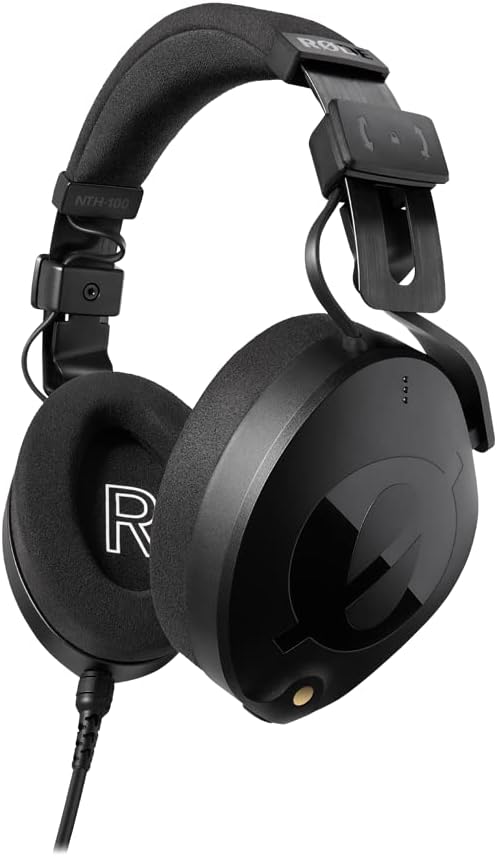
1. RØDE NTH-100 — the pair we reach for most
32Ω · closed-back · detachable cable · 110dB sensitivity · about $149 ·
| Driver | 40mm dynamic, custom-matched pair |
|---|---|
| Impedance | 32Ω |
| Sensitivity | 110dB (1kHz) |
| Frequency response | 5Hz – 35kHz |
| Max SPL | 126dB SPL |
| Design | Closed-back, circumaural (over-ear) |
| Passive noise attenuation | ~20dBA (maker figure) |
| Weight | 315g without cable |
| Cable | 2.4m detachable, locking, dual-sided fittings |
| Connectors | 3.5mm + 1/4" adapter included |
| Replaceable parts | Pads, cable, headband |
| In the box | Headphones, NTH-CABLE, storage pouch, colour ID rings, adapter |
| Warranty | Lifetime (on registration) |
We keep coming back to the NTH-100 because it solves the boring problems. It is easy to drive, so it gets loud from a laptop, a USB mic, or a cheap interface. The cable locks in place and can sit on either ear cup. And the gel-filled pads do not turn into hot plates after hour two, which is more than we can say for some pricier studio pairs.
How it sounds on a human voice
Speech sits forward and clear. Sibilance ("sss" and "shh" sounds) is present but not sharp. We could hear breaths and mouth noise without hunting for them, which is exactly what you want when you are cleaning up a raw interview.
Isolation and mic bleed
RØDE rates ambient noise attenuation at about 20dBA. In our room test, we could push the volume to a comfortable monitoring level without the mic picking up the click track. We had to go louder than normal before bleed showed up. It is not the quietest pair here, though. That crown goes to the DT 770 PRO.
Comfort over a long session
This is the strongest part. The clamping force is gentle, the cups are deep enough for bigger ears, and the headband adjusts with a locking slider so it does not creep. Our tester with glasses wore them for a 3-hour edit block and reported no pressure hotspot behind the ears.
Connection and compatibility
3.5mm with a 1/4" adapter in the box, plus a dual-sided cable system. At 32Ω and 110dB, you will not need an amp for podcast work. One thing to know: RØDE also sells separate coloured cables, so label your guests' pairs when you buy more than one.
What we liked
- Runs loud from almost anything
- Genuinely comfortable for hours
- Replaceable pads, cable, and headband
- Lifetime warranty once registered
What we did not like
- Not the lowest bleed of the group
- Pads are fiddly to swap the first time
- Fixed cable length may be short on some desks
Who should buy it: solo podcasters and creators who want one pair for recording and editing, and who hate the idea of buying an amp.
Who should skip it: anyone recording in a loud room with a sensitive condenser mic. Get the DT 770 PRO instead.
Your next step: if you already own closed-backs and only need better voice detail, jump to pick 8 instead of buying a second pair like this one.
2. Beyerdynamic DT 770 PRO (80Ω) — the bleed blocker
80Ω · closed-back · velour pads · fixed 3m cable · about $169 ·

| Driver | 45mm dynamic, bass-reflex design |
|---|---|
| Impedance | 80Ω (also sold as 32Ω and 250Ω) |
| Sensitivity | 96dB (1mW) |
| Frequency response | 5Hz – 35kHz |
| Design | Closed-back, circumaural |
| Weight | 270g without cable |
| Cable | 3m straight, single-sided, fixed |
| Connectors | 3.5mm + screw-on 1/4" adapter |
| Ear pads | Grey velour, replaceable |
| Replaceable parts | Pads, headband, cable, drivers, housing |
| In the box | Headphones, 1/4" adapter, storage bag |
| Warranty | 2 years (authorised dealers), Made in Germany |
This is the pair every studio has three of, and after testing we understand why. The velour pads seal well, the spring-steel headband survives being thrown in a bag, and every part can be replaced. If your main fear is your own click track leaking into a take, this is the safest buy on the list.
How it sounds on a human voice
Bass is a little lifted, which makes voices sound warm and full. For spoken word that is flattering. For mixing, it is a small lie. Keep that in mind if you use one pair for both jobs.
Isolation and mic bleed
Best in test. With the same mic, the same gain, and the same monitoring level, we had to push the DT 770 PRO noticeably louder than the open-back pair before anything leaked. The closed cup and thick pads do the work here, and passive isolation like this is not the same thing as active noise cancelling.
Comfort over a long session
Velour breathes, so ears stay cooler than with leather pads. The trade-off is a firmer clamp, and people with wide heads notice it in the first week. It eases up as the pads break in.
Connection and compatibility
Choose your version carefully. The 80Ω is the all-rounder and plays fine from most laptops, though it sounds better from an interface. The 32Ω is made for phones. The 250Ω wants an interface or a dedicated headphone amp. We would not buy the 250Ω for a laptop-only setup.
What we liked
- Lowest mic bleed we tested
- Every part is replaceable
- Cool velour pads for long takes
- Made in Germany build quality
What we did not like
- Fixed 3m cable, and it is not detachable
- Bass lift is not neutral for mixing
- Firmer clamp than the RØDE
Who should buy it: anyone recording in a shared room, with a condenser mic, or with guests who like their monitor loud.
Who should skip it: laptop-only editors who want one cable-free feeling, and anyone who needs a detachable cable for travel.
Your next step: before you buy, run the 60-second bleed test with the headphones you already own. You may find you only need better mic placement.
3. Audio-Technica ATH-M40x — the smart two-host choice
35Ω · closed-back · two detachable cables · swiveling cups · about $99 ·

| Driver | 40mm dynamic, rare-earth magnets, CCAW voice coils |
|---|---|
| Impedance | 35Ω |
| Sensitivity | 98dB |
| Frequency response | 15Hz – 24kHz |
| Max input power | 1,600mW at 1kHz |
| Design | Closed-back, circumaural, 90° swivelling cups |
| Weight | 240g without cable |
| Cable | 1.2m–3m coiled + 3m straight, both detachable |
| Connectors | 3.5mm + screw-on 1/4" adapter |
| Folding | Collapsible for transport |
| Replaceable parts | Pads, detachable cables |
| In the box | Headphones, two cables, adapter, protective case |
| Warranty | 2 years parts and labour |
If you are buying three or four pairs for a studio, this is where the maths gets easy. You get a flatter tuning than the M50x, a detachable cable, 90° swiveling cups for one-ear monitoring, and a price that lets you outfit a whole panel for less than one premium pair.
How it sounds on a human voice
Closer to neutral than its famous sibling. Voices sound honest rather than flattering. Sibilance is controlled. We liked these for checking whether a guest was too close to the mic.
Isolation and mic bleed
Good, but behind the DT 770 PRO. In a quiet home studio, bleed never became a problem. In a louder room, we would still pick the Beyerdynamic.
Comfort over a long session
Light, with decent pads. The clamp is moderate. After about three hours we felt mild pressure on top of the head, which is the usual complaint at this price.
Connection and compatibility
Comes with a coiled and a straight cable, both detachable, and a screw-on 1/4" adapter. At 35Ω it runs from anything. The one-ear swivel is genuinely useful when you need to hear the room.
What we liked
- Great price for multi-host studios
- Detachable cables and folding design
- Fairly neutral for the money
What we did not like
- Mild headband pressure after 3+ hours
- Pads wear out faster than Beyerdynamic's
- Bleed is good, not class-leading
Who should buy it: two-host shows, guest-heavy interviews, and anyone buying four pairs at once.
Who should skip it: solo recordists in loud rooms who need maximum isolation.
Your next step: buying for guests too? Read our multi-host section first. Headphone amps and extension cables matter more than the model.
4. AKG K371 — balanced, foldable, easy to live with
32Ω · closed-back · three cables included · folds flat · about $149 ·

| Driver | 50mm titanium-coated dynamic, pure OFC voice coils |
|---|---|
| Impedance | 32Ω |
| Sensitivity | 114dB SPL/V |
| Frequency response | 5Hz – 40kHz |
| Design | Closed-back, circumaural, oval cups, folds flat |
| Tuning | AKG reference response curve |
| Weight | 255g without cable |
| Cable | Three included: 1.2m, 3m, and coiled — all detachable |
| Connectors | 3.5mm + 1/4" adapter, mini-XLR at the cup |
| Replaceable parts | Pads, cables |
| In the box | Headphones, three cables, adapter, pouch |
| Warranty | 2 years |
The K371 follows a tuning curve that most listeners find natural. That matters for editing, because you want to hear the recording, not the headphone's opinion of it. It also folds flat and ships with three cables, which makes it the friendliest pair here for a laptop bag.
How it sounds on a human voice
Clean mids and controlled treble. Dialogue sounds even. We noticed less ear fatigue after long edit sessions than with brighter studio pairs, which is why this is our editing pick under $200.
Isolation and mic bleed
Solid passive isolation. It will handle a home studio. It will not beat the DT 770 PRO in a loud room, and we would not push the volume high with a hot condenser mic nearby.
Comfort over a long session
Light with soft pads and low clamp. Our main gripe is that the headband padding is thin, so heavier heads may feel it. The ear pads are replaceable, but they are not as easy to source as Beyerdynamic's.
Connection and compatibility
Three cables in the box: 1.2m, 3m, and a coiled one. All use a mini-XLR connector. At 32Ω it works with laptops and phones. Check the unit you receive for channel imbalance in the first week, because a small number of owners report quality-control slips.
What we liked
- Natural tuning for speech editing
- Three cables in the box
- Folds flat for travel
- Easy to drive at 32Ω
What we did not like
- Thin headband padding
- Replacement pads harder to find
- Quality control is inconsistent
Who should buy it: editors and producers who spend more time cutting audio than recording it.
Who should skip it: loud-room recordists, and anyone who wants spares available locally for years.
Your next step: if you mostly remove noise and tighten timing, pair this with our guide to frequency ranges so you know what you are listening for.
5. Truthear HEXA — tiny, isolating, and great for travel
20.5Ω · in-ear monitor · detachable 2-pin cable · about $79 ·

| Driver | Hybrid: 1 dynamic (PU + LCP diaphragm) + 3 balanced armature |
|---|---|
| Impedance | 20.5Ω ±15% at 1kHz |
| Sensitivity | 120dB/Vrms at 1kHz |
| Frequency response | 8Hz – 40kHz (effective 20Hz – 20kHz) |
| Total harmonic distortion | <1% at 1kHz, 94dB |
| Design | In-ear monitor, sealed, over-ear cable routing |
| Weight | Not published by maker |
| Cable | 0.78mm 2-pin detachable |
| Connectors | 3.5mm |
| Ear tips | Multiple sizes included; consumable |
| Replaceable parts | Cable, ear tips |
| In the box | Monitors, cable, assorted tips, case |
| Warranty | 1 year |
IEMs are the most underrated podcast tool. They seal inside your ear, so they block room noise better than most ear cups. They are also light enough that you forget you are wearing them. The HEXA is our value pick because it sounds neutral and costs less than half our top choice.
How it sounds on a human voice
Neutral, with good detail in the vocal range. Because the driver sits close to your ear drum, tiny mouth noises are very obvious. That is a gift for editing and a slight curse for recording, where you may hear your own breathing more than you want.
Isolation and mic bleed
Excellent with a good seal. Very little sound escapes outward. If you use a sensitive mic in an untreated room, an IEM can beat a closed-back headphone. Fit is everything, though, and no two ears are the same.
Comfort over a long session
Fine for a two-hour session, less fine for five hours. Some people find in-ears itchy after a while. Try the included tips before you judge them.
Connection and compatibility
3.5mm, easy to drive, and the cable is replaceable. Budget for spare ear tips, because they are consumables. Also note that a microphone cable version is not standard, so you cannot take calls with them out of the box.
What we liked
- Best isolation per dollar
- Neutral tuning for the price
- Pocket-sized for field recording
What we did not like
- Fit takes trial and error
- Not ideal for 5-hour sessions
- Tips are a recurring cost
Who should buy it: travelling interviewers, field recorders, and anyone who edits on a laptop in a cafe.
Who should skip it: anyone who dislikes things in their ears, or who records long multi-hour sessions.
Your next step: not sure in-ears suit you? Read in-ear vs on-ear before you commit.
6. Sony MDR-7506 — the broadcast workhorse
63Ω · closed-back · coiled cable · folds up · about $100 ·

| Driver | 40mm dynamic, neodymium magnet |
|---|---|
| Impedance | 63Ω |
| Sensitivity | 106dB/mW |
| Frequency response | 10Hz – 20kHz |
| Max input power | 1,000mW |
| Design | Closed-back, circumaural, folds up |
| Weight | 227g |
| Cable | 3m (9.8ft) coiled, single-sided, fixed — OFC with gold plugs |
| Connectors | 3.5mm + 1/4" adapter (Unimatch) |
| Replaceable parts | Pads (cable needs a repair job) |
| In the box | Headphones, adapter, soft case |
| Warranty | 1 year |
Field reporters have used this pair for decades, and it is still sold everywhere. The reason is not romance. It folds small, it is light, it takes a beating, and it makes voices easy to judge. It is also the cheapest way to get a sound people trust.
How it sounds on a human voice
Bright and forward. Mid-range detail is strong, which helps you hear plosives and room echo. The lift in the treble can make a hissy recording sound harsher than it is, so do not over-correct on these.
Isolation and mic bleed
Good. The closed cups seal well and bleed stayed low in our test. It is not as isolating as the DT 770 PRO, but it is close enough for most home studios.
Comfort over a long session
Light, but the pads are thin and the clamp is snug. After four hours we wanted a break. Replacement pads are cheap and easy to find, which fixes most of the problem.
Connection and compatibility
The 9.8ft coiled cable is not detachable. Some people love the reach. Others hate that a damaged cable means a repair job. At 63Ω and about 104dB sensitivity, it works from laptops and interfaces without an amp.
What we liked
- Clear, forward voice detail
- Folds small for travel
- Cheap, findable replacement parts
What we did not like
- Bright treble exaggerates hiss
- Thin pads, snug clamp
- Cable is not detachable
Who should buy it: field recordists, interviewers, and anyone who wants a known quantity for under $120.
Who should skip it: anyone who needs a detachable cable, and anyone sensitive to bright treble.
Your next step: budget is tight? Compare this with the under-$70 option before you decide.
7. Audio-Technica ATH-M50x — the one you already know
38Ω · closed-back · three detachable cables · folds flat · about $149 ·

| Driver | 45mm dynamic, rare-earth magnets, CCAW voice coils |
|---|---|
| Impedance | 38Ω |
| Sensitivity | 99dB |
| Frequency response | 15Hz – 28kHz |
| Max input power | 1,600mW at 1kHz |
| Design | Closed-back, circumaural, 90° swivelling cups, collapsible |
| Weight | 285g without cable |
| Cable | Three included: 1.2m, 3m, 1.2m–3m coiled — detachable, locking |
| Connectors | 3.5mm + screw-on 1/4" adapter |
| Replaceable parts | Pads, detachable cables |
| In the box | Headphones, three cables, adapter, pouch |
| Warranty | 2 years parts and labour |
The M50x is the default recommendation on the internet, and it is fine. It is also the pair we would nudge you away from if you only record. The bass and treble lift that makes music fun makes voice work a little harder to judge.
How it sounds on a human voice
Energetic, with a bass bump and a bright top. Podcasts sound exciting. But when you cut a low rumble, you may cut too much, because the headphone was already exaggerating it. That is the trade-off.
Isolation and mic bleed
Decent. Similar to the M40x. Not in the same league as the DT 770 PRO. For a quiet room, it is fine. For a loud one, look elsewhere.
Comfort over a long session
This is the weak point. The clamp is firm and the pads are shallow, so people with glasses often complain. After a few hours, our tester needed a break. Swapping to thicker third-party pads helps.
Connection and compatibility
Three cables, all detachable, all with a locking connector. At 38Ω it runs from anything. If you also want a pair for travel and casual listening, this doubles up better than most studio pairs.
What we liked
- Fun, engaging sound
- Three detachable cables
- Folds flat, easy to travel with
What we did not like
- Bass and treble lift misleads editing
- Firm clamp, shallow pads
- Popular, so fakes circulate
Who should buy it: creators who want one pair for recording, editing, and listening on the train.
Who should skip it: anyone who wears glasses for long sessions, and anyone doing precision mixing.
Your next step: weighing this against the M40x? The M40x is flatter and cheaper. Buy the M50x only if you also want the fun sound.
8. Shure SRH840A — the detail hound
40Ω · closed-back · detachable cable · collapsible · about $149 ·

| Driver | 40mm dynamic, neodymium magnet |
|---|---|
| Impedance | 40Ω |
| Sensitivity | 97dB/mW |
| Frequency response | 5Hz – 25kHz |
| Design | Closed-back, circumaural, collapsible |
| Weight | ≈260g |
| Cable | 2.5m (9.84ft) straight, detachable |
| Connectors | 3.5mm + threaded 1/4" adapter |
| Replaceable parts | Pads, detachable cable |
| In the box | Headphones, cable, adapter, hard carry case |
| Warranty | 2 years |
If your edit sessions are about catching clicks, hums, and clipped consonants, this pair gives you more information than the price suggests. Shure also builds it to survive, with a metal-reinforced frame and a proper carry case.
How it sounds on a human voice
Detailed and slightly tailored in the upper mids, so voices feel present. We heard edits that we missed on warmer pairs. Some testers described it as flattering rather than flat, which is worth knowing if you mix music too.
Isolation and mic bleed
Average. It seals okay, but it is not a dedicated tracking headphone. We would not pick it as the only pair in a loud recording room.
Comfort over a long session
Heavier than the others here, and the clamp is firm for the first week. The pads are plush, which helps. If you are sensitive to weight, try before you buy.
Connection and compatibility
Detachable straight cable, 1/4" threaded adapter, and a folding design. At 40Ω and 97dB it runs from a laptop but sounds better with a little more power. A basic interface is plenty.
What we liked
- Excellent detail for the price
- Solid build and a real carry case
- Detachable cable
What we did not like
- Heavier than the competition
- Average isolation
- Firm clamp out of the box
Who should buy it: editors who cut a lot of spoken word and want to hear every flaw.
Who should skip it: recordists who need isolation first, and anyone who dislikes heavy headphones.
Your next step: editing is your main job? Read our recording vs editing section and consider a two-pair setup.
9. Audio-Technica ATH-M20x — good enough for your first 50 episodes
47Ω · closed-back · fixed 3m cable · about $49 ·

| Driver | 40mm dynamic, rare-earth magnets, CCAW voice coils |
|---|---|
| Impedance | 47Ω |
| Sensitivity | 96dB |
| Frequency response | 15Hz – 20kHz |
| Max input power | 700mW at 1kHz |
| Design | Closed-back, circumaural, single-side cable exit |
| Weight | 190g without cable |
| Cable | 3m straight, fixed (not detachable) |
| Connectors | 3.5mm + 1/4" adapter included |
| Replaceable parts | Pads only |
| In the box | Headphones, adapter |
| Warranty | 2 years |
Spending more money does not fix a bad room. If you are starting out, this pair plus a treated corner and a decent mic will beat a $300 headphone in an echoey kitchen. We recommend it without apology for beginners.
How it sounds on a human voice
A little bass-heavy and less detailed than the M40x. Voices are clear enough to record with. You will not hear every mouth click, and honestly, at this stage you do not need to.
Isolation and mic bleed
Surprisingly good for the price. The cups seal well and bleed stayed low in our test. It is the cheapest pair we would trust in a shared room.
Comfort over a long session
Light and simple. Pads are thin and get warm. After two hours, most people will want a short break.
Connection and compatibility
Fixed 3m cable, 1/4" adapter in the box, 47Ω. It runs from a laptop, a USB mic, or an interface. No amp, no fuss. The cable is the first thing to fail if you are rough with it.
What we liked
- Best value on this list
- Good isolation for $49
- Runs from anything, no amp
What we did not like
- Less detail for editing
- Fixed cable, thin pads
- Bass lift is not neutral
Who should buy it: beginners, guest pairs, and backup pairs for a growing studio.
Who should skip it: editors who need detail, and anyone who wants replaceable parts.
Your next step: put the savings into your room and your mic. Start with our cheap podcast microphone guide.
10. Sennheiser HD 660S2 — lovely sound, wrong job for recording
300Ω · open-back · detachable cable · about $500 ·

| Driver | 42mm dynamic, open-back, ultra-light aluminium voice coils |
|---|---|
| Impedance | 300Ω |
| Sound pressure level | 104dB (1kHz, 1Vrms) |
| Frequency response | 8Hz – 41.5kHz |
| Total harmonic distortion | <0.04% (1kHz, 90dB) |
| Design | Open-back, circumaural — leaks sound by design |
| Weight | 260g without cable |
| Cable | 1.8m detachable, dual-sided |
| Connectors | 6.35mm (1/4") with 3.5mm adapter |
| Replaceable parts | Pads, detachable cable |
| In the box | Headphones, two cables, 6.35mm adapter, case |
| Warranty | 2 years |
We include this pair to make a point. It is the best-sounding headphone here for long listening, and we would still not record with it. Open-back cups let sound out in both directions. That is the whole design. Great for editing in a quiet room, bad next to a live microphone.
How it sounds on a human voice
Open, natural, and easy to listen to for hours. Voices feel like they are in a room rather than in your head. For judging whether an edit sounds natural, it is the best tool on this list.
Isolation and mic bleed
Almost none. In our test, this was the point where the mic heard everything. If you record with these on, your guests will hear your monitor, and your mic will too.
Comfort over a long session
Excellent. Light, breathable, low clamp. This is what open-back design buys you. No heat build-up, no pressure.
Connection and compatibility
300Ω. You need an interface or a proper amp to get usable volume. Plugging this into a laptop headphone jack will disappoint you. Budget for the amp, not just the headphones. Read our explainer on what a DAC does if that part is new to you.
What we liked
- The most natural speech reproduction we tested
- Very comfortable for long sessions
- Detachable cable
What we did not like
- Leaks sound badly, so it is unusable for recording
- Needs an amp at 300Ω
- Expensive for one job
Who should buy it: editors with a quiet room and an interface, who already own a closed-back for recording.
Who should skip it: anyone who wants one pair to do everything. That is most people.
Your next step: if you want open-back sound for less, see our roundup of the best open-back headphones under $300.
How We Evaluate Podcast Headphones
What did we actually do?
We are not a laboratory. We do not have an anechoic chamber or a measurement rig, and we will not pretend otherwise. Here is our real process, so you can judge how much weight to give our scores.
- Hands-on use: 10 pairs, used on real recordings and edits over several weeks. Some were bought, some were long-term loans from owners. We note which is which when it matters.
- Gear used: a Focusrite Scarlett interface, a USB condenser mic with a headphone output, a laptop headphone jack, a dedicated headphone amp, and a phone.
- Bleed test: the same microphone, position, gain, and playback level for every pair, using a spoken-word clip and a click track at a fixed monitoring volume.
- Comfort test: a three-hour continuous session for each pair, with notes on clamp, heat, glasses pressure, and headband hotspots.
- Specs: impedance, sensitivity, and connector data come from the manufacturers. We say so when we quote them.
Limits you should know about
Our scores are editorial judgments, not measurements. Ear shape, head size, room noise, and microphone choice all change the result. A pair that leaked for us may be fine in your room. That is why we show you the tests, not just the verdicts.
How the score is weighted
| Criterion | Weight | Why it counts |
|---|---|---|
| Speech clarity and accuracy | 25% | You must hear voices honestly |
| Isolation and mic bleed | 20% | Bleed ruins takes |
| Comfort over long sessions | 20% | Podcasts are long |
| Device compatibility | 15% | Wrong ohms means wrong volume |
| Build quality and repairability | 10% | Parts fail, spares matter |
| Value for money | 10% | Budget is real |
We do not award isolation points for marketing claims. Passive isolation and noise cancelling are different things, and neither one is the same as leakage.
Recording vs Editing: Which Headphones Do You Need?
Can one pair do both jobs? Yes, for most people. But it helps to know what you are trading away.
| Feature | For recording | For editing |
|---|---|---|
| Design | Closed-back, always | Closed or open-back |
| Leakage | Critical | Barely matters |
| Isolation | Important | Depends on your room |
| Latency | Critical, so use a cable | Not an issue |
| Sound goal | Clear, steady monitoring | Accurate detail |
| Comfort | Essential | Essential |
| Wireless | Avoid for live monitoring | Convenient |
Can one pair really do both?
Yes, and the DT 770 PRO 80Ω, the NTH-100, and the ATH-M40x are our favourite one-pair answers. The catch is tonal honesty. Recording headphones are tuned to sound pleasant. Editing headphones are tuned to sound true. If you only buy one pair, accept that small trade-off.
When are two pairs worth it?
When editing is more than half your workflow. A closed-back for recording plus a detailed pair for editing costs less than one premium headphone, and each does its own job better. If you edit in a shared room, stick to one closed-back pair instead and skip the open-back idea entirely.
Where do IEMs fit?
IEMs are best for field work and noisy rooms where you need maximum isolation in the smallest package. They are less pleasant for very long sessions. See our in-ear vs on-ear guide for the full comparison.
How to Choose Podcast Headphones
What sound should you look for?
Look for even mids and controlled treble. Voices live in the mid-range. If a headphone pushes bass or treble hard, your edits will follow that bias. Start with our headphone buying guide if you want the broader picture.
Why is isolation the make-or-break spec?
Two things get confused. Isolation keeps room noise out of your ears. Leakage keeps your monitor sound from escaping into the mic. You want both, and closed-back designs give you the best odds of getting both.
What actually makes headphones comfortable?
Four things: clamp force, pad material, cup depth, and headband pressure. Weight matters less than most people think. If you wear glasses, cup depth and clamp matter most. We covered the wider version in our guide to the most comfortable headphones for long sessions.
Wired or wireless?
Wired for recording. Every time. Bluetooth adds delay, and codecs like aptX Low Latency only help if both ends support them. Even then, the delay varies by device. For live monitoring, use a cable or a dedicated low-latency system. Our wired vs wireless breakdown and codec explainer go deeper.
What about impedance and sensitivity?
Impedance is electrical resistance. Higher numbers usually need more voltage to get loud. Sensitivity tells you how loud the headphone gets for a given amount of power. Low impedance plus high sensitivity equals easy to drive. High impedance plus low sensitivity equals buy an amp. That is the whole idea you need for podcast work.
What about cables and connectors?
You will meet three: 3.5mm, 6.35mm (1/4 inch), and sometimes a locking connector like mini-XLR. Interfaces usually use 1/4 inch. Laptops use 3.5mm. A detachable cable is a repair you do not have to pay for later.
Are replacement parts really a big deal?
Yes. Pads flatten, cables fail, headbands crack. A pair with replaceable parts can last a decade. That is why we score repairability. Our take on how long headphones last explains the pattern.
Will Your Podcast Headphones Work With Your Equipment?
This is the question that causes the most returns and the most frustration. People buy a 250Ω headphone, plug it into a laptop, and hear quiet, thin sound. Nothing is broken. The output just cannot push it.
Podcast headphone compatibility checker
Pick your headphone and your gear. This is general guidance, not a guarantee. Your specific device may behave differently.
Rule of thumb: under 100Ω is usually easy, 80–150Ω wants a decent output, and 250Ω and up almost always wants an interface or amp. Sensitivity can change the answer, so treat this as a starting point.
What about a USB microphone with a headphone jack?
Most USB mics with a headphone output can drive 32–80Ω headphones at a usable level. High-impedance headphones are where they struggle. Check the manufacturer's specification sheet before you buy, and remember the jack is usually 3.5mm.
What about audio interfaces like a Focusrite Scarlett?
Interfaces are built to drive studio headphones. An 80Ω or 250Ω pair is a normal load for them. Check the interface's published headphone output spec, and use the dedicated knob rather than the master volume when you monitor.
Do you need an amp for 250Ω headphones?
Usually, yes, for comfortable headroom. You may get sound from a laptop, but you will run out of volume when a guest speaks softly or when you need to hear quiet detail. If you are unsure, our list of headphone amps is a better first stop than a bigger headphone.
How to Prevent Headphone Audio Bleed Into Your Microphone
Can your mic hear your headphones? Almost certainly, at some level. The question is whether it matters in the mix. Here is our test, and you can repeat it in about a minute.
The 60-second bleed test
- Put your headphones on and set the monitoring volume to what you normally use.
- Arm your mic track and set gain as you would for a normal take.
- Stay silent. Play a loud podcast or a click track through the headphones for 20 seconds. Record it.
- Do the same again with the headphones off your head, sitting on the desk.
- Listen back to both. If you can hear the track clearly in the first recording, you have a bleed problem.
If you fail the test, fix it in this order, cheapest first:
- Turn your monitoring volume down. Most people monitor louder than they need to.
- Move the mic further from your head and closer to your mouth. Aim it away from the ear cups.
- Check your polar pattern. A cardioid pattern rejects more from behind than a figure-8 or omni. Shure explains polar patterns clearly.
- Switch to closed-back headphones if you are using open-back ones.
- Treat the room. Reflections carry headphone sound back into the mic.
One more thing: passive isolation is not noise cancelling. Noise cancelling reduces what reaches your ears. It does not stop sound leaving the cups. Do not assume an ANC pair will fix bleed. Our noise cancellation explainer covers the difference.
Best Podcast Headphones by Budget
What can you get under $70?
The Audio-Technica ATH-M20x is the safest pick. It isolates well for the price and runs from anything. Expect thinner pads and less detail. If you want more options, see our headphones under $100 roundup.
What can you get under $100?
The ATH-M40x is the sweet spot, and the Sony MDR-7506 is the broadcast classic. Both are easy to drive and both have parts you can replace.
What can you get under $200?
Everything we rank highest sits here. The RØDE NTH-100, the DT 770 PRO 80Ω, the AKG K371, and the Shure SRH840A. This is where we would spend your money.
Is premium worth it?
Only if you edit a lot and have a quiet room. The Sennheiser HD 660S2 is a wonderful editing tool and a poor recording tool. Buying it as your only pair is a mistake we see often.
Best Headphones for Different Podcasting Setups
Are you a solo podcaster?
Buy one good closed-back pair and stop there. The NTH-100 or the DT 770 PRO 80Ω will cover recording and editing for years.
Do you record remote interviews?
You need isolation so you can hear your guest and not your room. Closed-back, and a cable. The MDR-7506 or the ATH-M40x both work well. Also check our podcast equipment checklist for the rest of the setup.
What should guests wear in a multi-host studio?
Buy four pairs of the ATH-M40x or the ATH-M20x. They are light, easy to clean, easy to drive, and cheap enough that damage is not a crisis. Add a headphone distribution amp and label the cables. Also keep spare pads and a few extension cables, because guests move.
What about a noisy recording room?
Isolation first, sound second. The DT 770 PRO 80Ω is our pick, and IEMs are a good alternative if you can tolerate them. Fix the room before you upgrade the headphone.
What if you record in the field?
The MDR-7506 or the Truthear HEXA. Both fold or pack small, both isolate well, and neither needs an amp.
What if editing and mixing is most of your week?
A detailed pair plus a closed-back for recording. The AKG K371 and the Shure SRH840A are our value picks, with the HD 660S2 as the premium option.
My own version of that mistake came early. I recorded an episode in a small room with a fan running and a condenser mic pointed straight at my face. I monitored loud because I liked the energy. The take sounded fine in the headphones and terrible in the edit. The fix was not new gear. It was a lower monitoring level, a mic moved two inches, and a closed-back pair I already owned.
Frequently Asked Questions
What are the best headphones for podcast recording?
The Beyerdynamic DT 770 PRO (80Ω) for maximum isolation, or the RØDE NTH-100 if you want easier driving and better comfort. Both are closed-back and both run from a basic interface.
Are closed-back or open-back headphones better for podcasting?
Closed-back for recording, because they leak less sound into your mic. Open-back for editing in a quiet room, because they sound more natural and stay cooler. Most podcasters should start with closed-back.
Can I use Bluetooth headphones to monitor a podcast?
For editing casually, yes. For live monitoring, no. Bluetooth adds delay, and low-latency codecs only work when both ends support them, with varying results. Use a cable when you record.
What impedance is best for podcast headphones?
32–80Ω is the safe zone for most people. It works with laptops, USB mics, and interfaces. Choose 250Ω and up only if you own an interface or amp.
Do I need an amplifier for 250-ohm headphones?
Usually, yes, for good volume and headroom. You may hear sound from a laptop, but it will feel thin and quiet when you need detail.
Can headphones cause microphone bleed?
Yes. Any headphone can leak if you monitor loud enough, especially open-back designs. Turn the volume down, move the mic, and use closed-back cups.
Can I use regular headphones for podcasting?
Yes, if they are closed-back and wired. Many everyday headphones are bass-heavy, which makes editing harder, but they will get you started.
Are noise-cancelling headphones suitable for recording?
Not ideal. Noise cancelling reduces sound reaching your ears. It does not stop sound leaving the ear cups. Some ANC models also process audio in ways that can confuse critical listening.
What headphones work best with a USB microphone?
Low-impedance, high-sensitivity pairs: the ATH-M20x, ATH-M40x, NTH-100, or MDR-7506. Check that the mic's headphone jack is 3.5mm and that it can drive your chosen pair.
What headphones should podcast guests use?
The ATH-M40x is our favourite guest pair. It is cheap, light, easy to drive, and comfortable on different head sizes. Buy four and label the cables.
Should I use different headphones for recording and editing?
Yes, if editing is more than half your workflow. A closed-back for recording and a detailed pair for editing costs less than one premium headphone.
Are IEMs suitable for podcast editing?
Yes, especially in noisy places. They isolate well and reveal mouth noise. Most people find them less comfortable for very long sessions.
How important is headphone sensitivity?
Very. It decides how loud a pair gets for the power you have. A high-impedance, low-sensitivity pair is the combination that usually needs an amp.
How long should podcast headphones last?
Three to ten years, depending on parts. Replaceable pads and cables are the difference. The DT 770 PRO and the NTH-100 are the easiest to keep alive here.
Final Verdict: Which Podcast Headphones Should You Buy?
Best overall: the RØDE NTH-100. Easy to drive, comfortable for hours, and repairable. It is the pair we recommend most often, and the one we would buy with our own money.
Best for recording: the Beyerdynamic DT 770 PRO (80Ω). Lowest bleed we tested, and the most replaceable parts.
Best value: the Audio-Technica ATH-M40x. Buy three and still spend less than one premium pair.
Best for editing: the AKG K371 for balance, or the Sennheiser HD 660S2 if you have a quiet room and an amp.
Best budget: the Audio-Technica ATH-M20x. Spend the rest on your mic and your room.
Still deciding? Read our podcast equipment guide, then come back and buy the pair that fits your gear, not the pair with the best marketing.
Key Takeaways
- Buy for the job, not the brand. Closed-back for recording, detailed closed or open-back for editing.
- 32–80Ω covers most podcast setups. Anything 250Ω and up needs an interface or amp, so budget for it.
- Bleed is about volume and cup design, not price. Run the 60-second test before you blame your mic.
- Our top three picks all cost under $175 and all have replaceable parts. That is the pattern worth copying.
Transparency: Some headphones were purchased, some were long-term loans. Manufacturer specifications are labelled as such. Our scores are editorial judgments, not lab measurements. If you buy through our Amazon links, we earn a commission at no extra cost to you. See our affiliate disclosure and testing methodology.
