




A DAC, or Digital-to-Analog Converter, is an essential electronic component that transforms digital audio data (like the 0s and 1s from your MP3 or streaming service) into an analog electrical signal, which your headphones or speakers can then interpret as sound. Analog Devices explains that a DAC converts digital words into analog voltage signals.
Without a DAC, you wouldn’t hear anything from your digital devices, making it a critical link in the audio chain for everything from smartphones to high-fidelity sound systems.
Key Takeaways
- Core Function: A DAC converts digital audio (binary data) into analog electrical signals.
- Ubiquitous Technology: Every device that plays digital audio, phones, laptops, TVs, car stereos, has a built-in DAC.
- Impact on Sound: The quality of a DAC directly influences the fidelity and clarity of the audio output, especially with high-resolution source material.
- External vs. Internal: While all devices have internal DACs, external DACs can significantly improve sound quality by bypassing less capable built-in components.
- Not Just for Audiophiles: While often associated with high-end audio, understanding a DAC’s role benefits anyone seeking better sound from their existing gear.
- Hi-Res Audio: Some high-resolution formats require compatible hardware. For example, Apple says its Hi-Res Lossless catalog can reach 24-bit/192kHz, while compatible playback hardware may be required for sample rates above 48kHz.
- Pairing is Key: A great DAC is only one part of the equation; it must be paired with good headphones or speakers to truly shine.
What Is a DAC (Digital-to-Analog Converter) and Why Does It Matter?
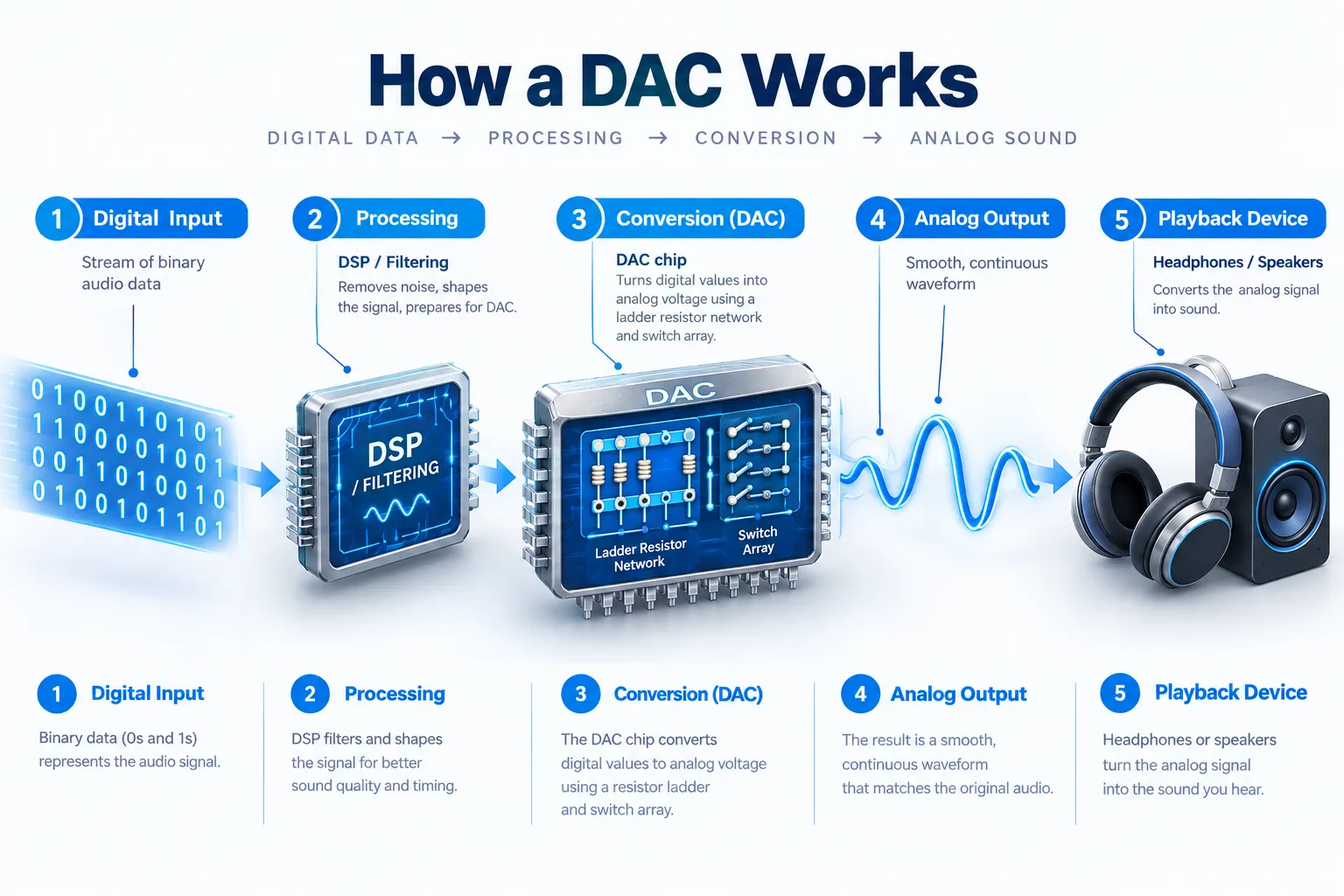
A DAC, short for Digital-to-Analog Converter, is a specialized electronic circuit responsible for taking digital audio information and translating it into an analog electrical signal.
This signal is what your headphones, earbuds, or speakers need to produce the actual sound waves that reach your ears. Without a DAC, the digital music files stored on your phone or streamed from Spotify would remain nothing more than incomprehensible data.
It matters because every single audible sound you hear from a digital source has passed through a DAC, making its quality fundamental to your listening experience.
Think of it like this: your music files (MP3s, FLAC, streaming data) are digital blueprints. They tell the DAC exactly how the sound should be constructed. The DAC’s job is to precisely follow those instructions and build the actual audio waveform.
A high-quality DAC can reconstruct this waveform with greater accuracy, detail, and less noise, resulting in clearer, more dynamic, and immersive sound. Conversely, a poor DAC might introduce subtle distortions or lose fine details, dulling the audio even if your source file is pristine.
It’s why you might spend hundreds on the best headphones under 200 only to find them underperforming when plugged directly into a subpar laptop audio jack.
How Does a DAC (Digital-to-Analog Converter) Work? Unpacking the Process
At its core, a DAC takes discrete digital values and produces a corresponding analog electrical output.
Modern audio DACs can use architectures such as delta-sigma conversion, while other DAC designs use resistor-based architectures. Analog Devices’ technical documentation explains how DAC architectures translate binary input codes into analog output levels.
Here’s a simplified breakdown of how a DAC operates:
- Digital Input: The process begins with digital audio data, which consists of a series of numerical values (0s and 1s) representing the amplitude of the original sound wave at specific points in time. This data might come from a CD, an MP3 file, or a streaming service.
- Digital Processing/Filtering: Before conversion, the digital signal often undergoes some processing. This can include digital filtering to remove unwanted high-frequency noise (aliasing) that can occur during the digital recording process. Some DACs also apply upsampling or oversampling to improve the perceived resolution.
- Conversion to Analog: The DAC converts the digital sample values into an analog electrical output. Different DAC architectures accomplish this in different ways. Some designs use resistor networks or current sources, while many audio DACs use delta-sigma modulation. Texas Instruments’ PCM1690, for example, uses a multi-level delta-sigma modulator and supports sampling rates up to 192kHz.
- Analog Reconstruction Filter: After the digital-to-analog conversion, the output is a stepped, staircase-like waveform. To smooth this out and remove any remaining high-frequency digital artifacts (quantization noise), the signal passes through an analog low-pass filter. This filter rounds off the “steps” to create a continuous, smooth analog waveform that accurately represents the original sound.
- Analog Output: The now-continuous analog signal is amplified (often by an integrated headphone amplifier) and sent to your headphones, earbuds, or speakers, which convert the electrical signal into physical sound waves.
The entire process happens almost instantaneously, ensuring there’s no perceptible delay between the digital file and the sound you hear. This is why even a cheap built-in DAC in your noise-canceling headphones can produce sound, but a high-end external DAC will do so with far greater precision.
Why Should I Care About My DAC? External vs. Internal DACs
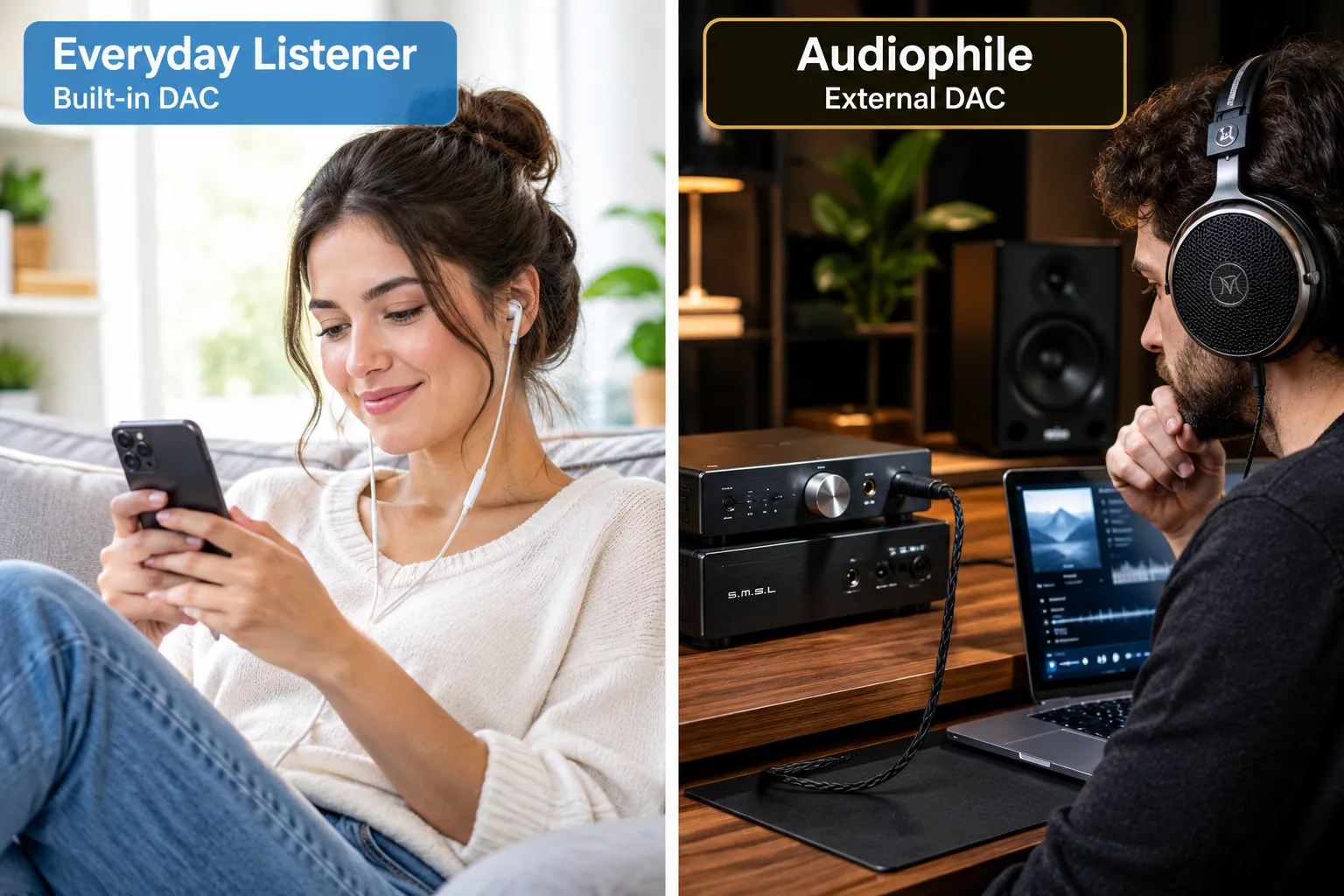
Every single device that outputs digital audio, from your smartphone to your laptop and even your car’s stereo, has a built-in DAC. So, if you already have one, why should you even consider an external DAC? The answer lies in fidelity, power, and noise reduction.
Most built-in DACs in consumer electronics are designed to be compact, power-efficient, and cost-effective. They do the job, but they often cut corners on components and isolation from other noisy electrical parts within the device. This can lead to:
- Higher Noise Floor: You might hear a subtle hiss or static, especially with sensitive headphones.
- Reduced Dynamic Range: Quieter parts of the music might be lost, and louder parts might sound compressed.
- Less Detail and Clarity: The subtle nuances, instrumental textures, and vocal intricacies can be masked or smeared.
- Lack of Power: Many built-in DACs/amps struggle to properly drive higher-impedance headphones, resulting in low volume and poor bass response.
An external DAC, on the other hand, is a dedicated device optimized purely for audio conversion. Here’s why it’s often a SUPERIOR choice:
- Dedicated Design: External DACs are built with higher-quality components, often from specialized audio manufacturers, chosen specifically for their sonic performance.
- Isolation from Noise: By being external, they are physically separated from the noisy digital components (like CPUs, Wi-Fi modules) of your source device, dramatically reducing interference.
- Robust Power Supply: External DACs can use dedicated power supplies, providing cleaner and more stable power, which is crucial for accurate audio conversion.
- Better Headphone Amplification: Many external DACs include powerful, high-quality headphone amplifiers that can effortlessly drive even demanding audiophile headphones, unlocking their full potential.
- Support for High-Resolution Audio: While some internal DACs support hi-res, external DACs are often built from the ground up to handle high-resolution audio files (like 24-bit/192kHz FLAC) without downsampling or compromise. If you’re invested in true lossless audio, a dedicated DAC is NON-NEGOTIABLE.
Which should YOU buy?
- Stick with internal if: You primarily listen to compressed audio (e.g., standard Spotify, YouTube) on basic earbuds or budget noise-canceling headphones, and portability is your absolute top priority. The difference won’t be significant enough to warrant an extra device.
- Consider an external if: You’re an enthusiast or audiophile, you listen to high-resolution audio, you own premium headphones, or you simply want to extract every ounce of detail and clarity from your music collection. An external DAC and headphone amp combo can truly elevate your listening experience from “good enough” to “WOW.”
- For lossless audio: Don’t assume that lossless music automatically requires an expensive external DAC. For example, Spotify currently supports lossless audio up to 24-bit/44.1kHz FLAC, while Apple Music offers Hi-Res Lossless up to 24-bit/192kHz. Whether you need an external DAC depends on the capabilities of your existing playback device.
Types of DACs: Finding the Right Fit for Your Setup
Not all DACs are created equal, and their form factor often dictates their intended use and capabilities. Understanding the different types helps you decide which one, if any, is right for your audio journey.
Here are the main categories:
- Integrated DACs (Built-in):
- Where you find them: Every smartphone, laptop, tablet, smart TV, gaming console, and car stereo.
- Pros: Convenient, always available, no extra cost or cables.
- Cons: Often basic quality, susceptible to internal electronic noise, limited power for demanding headphones. Ideal for casual listening and when absolute portability is key.
- USB DAC/Amps (Dongle DACs):
- Where you find them: Small, thumb-drive-sized devices that plug into your phone or computer’s USB port.
- Pros: Significant upgrade over built-in DACs, highly portable, often include a decent headphone amplifier.
- Cons: Can drain phone battery, some may require adapters for different ports (e.g., USB-C to Lightning). These are GREAT budget-friendly entry points for improved audio from your phone or laptop.
- Portable DAC/Amps:
- Where you find them: Slightly larger devices, often battery-powered, designed to be carried with a smartphone or portable player.
- Pros: Excellent sound quality on the go, powerful amplification for a wide range of headphones, dedicated battery.
- Cons: Another device to carry and charge, more expensive than dongles. Perfect for serious listeners who demand high-fidelity sound when commuting or traveling.
- Desktop DAC/Amps:
- Where you find them: Larger, mains-powered units designed to sit on a desk, connecting to a computer or dedicated music streamer.
- Pros: Top-tier sound quality, robust power for any headphone, often multiple input/output options.
- Cons: Not portable, requires a dedicated space and power outlet. This is the choice for audiophiles building a serious home listening setup.
- Network Streamers/Music Servers with Built-in DACs:
- Where you find them: Dedicated audio components that connect to your home network to stream music from local storage or online services.
- Pros: All-in-one solution for digital music playback, often very high-end DAC implementations, seamless integration with home audio systems.
- Cons: Can be very expensive, requires some network setup knowledge.
- AV Receivers/Soundbars with Built-in DACs:
- Where you find them: Home theater components designed to decode and amplify audio for multiple speakers.
- Pros: Centralized audio processing for TV, movies, and music; handle various digital audio formats.
- Cons: DAC quality varies wildly; often prioritized for surround sound over pure stereo musicality.
Choosing the right type depends entirely on your usage: from simple dongle DACs for your phone to elaborate desktop setups. If you’re just starting, a portable USB DAC/amp is often the best brand for headphones and a cost-effective way to hear a tangible improvement.
DAC Specifications: What to Look For and What Matters
When diving into the world of DACs, you’ll encounter a dizzying array of specifications. While it’s easy to get lost in the numbers, a few key specs truly indicate a DAC’s potential performance.
- Sample Rate (kHz) and Bit Depth (bit): This refers to the highest resolution audio the DAC can process. For example, “24-bit/192kHz” means it can handle audio sampled 192,000 times per second with 24 bits of information per sample.
- Why it matters: Higher numbers generally mean greater detail and dynamic range. For high-resolution audio, ensure your DAC supports at least 24-bit/96kHz, preferably 24-bit/192kHz. Anything higher (like 32-bit/384kHz or DSD) is often overkill for most ears and content but indicates a very capable chip.
- Signal-to-Noise Ratio (SNR): Measured in dB, this indicates how much cleaner the audio signal is compared to the background noise.
- Why it matters: A higher SNR (e.g., 110dB or more) means less audible hiss or interference, resulting in a cleaner, blacker background for your music. It’s crucial for sensitive headphones.
- Total Harmonic Distortion + Noise (THD+N): Also measured as a percentage, this indicates the level of unwanted harmonics and noise added to the signal by the DAC.
- Why it matters: A lower THD+N (e.g., 0.001% or less) means a more accurate, transparent sound with fewer introduced distortions.
- Output Impedance: Important for DACs with integrated headphone amplifiers.
- Why it matters: A low output impedance (typically less than 2 ohms) ensures consistent frequency response with a wide range of headphones. High output impedance can alter the sound signature of certain headphones. This is especially important when considering what kind of headphones are best for your ears.
- Inputs and Outputs: Consider what sources you want to connect (USB, optical, coaxial) and what you’re connecting to (headphones, powered speakers, stereo system).
- Why it matters: Ensures compatibility with your existing and future gear. If you have a computer, a USB input is essential. For TVs or game consoles, optical (Toslink) is common.
Our Expert Advice: Don’t get overly fixated on chasing the absolute highest numbers for every spec. A DAC with great engineering, good power delivery, and a well-implemented analog stage often sounds better than one with slightly superior specs but poor execution.
Focus on reputable brands and look for objective measurements from independent review platforms like ours. Often, a well-engineered 24-bit/96kHz DAC will sound far better than a poorly implemented 32-bit/384kHz one.
Common DAC Myths and Misconceptions
The world of audio is rife with myths, and DACs are no exception. Separating fact from fiction can save you money and prevent unnecessary upgrades.
- Myth 1: All DACs sound the same.
- Reality: This is a common claim, especially among those who haven’t experienced high-quality audio setups. While competent DACs might sound similar to the untrained ear with compressed audio and average headphones, significant differences emerge with higher resolution audio and better playback systems. Superior DACs offer better noise rejection, lower distortion, and more accurate soundstage reproduction.
- Myth 2: You need an expensive DAC to hear a difference.
- Reality: Not true. Even a $50-$100 USB dongle DAC can provide a noticeable upgrade over a cheap built-in laptop or phone DAC. The law of diminishing returns definitely applies here; improvements become smaller as prices climb.
- Myth 3: Bit depth and sample rate are the only things that matter.
- Reality: While crucial for resolution, they aren’t the sole determinants of sound quality. The overall implementation, the analog output stage, power supply, and noise isolation are just as, if not more, critical. A well-designed 24-bit/96kHz DAC can easily outperform a poorly engineered 32-bit/384kHz model.
- Myth 4: A DAC will magically make bad recordings sound good.
- Reality: A DAC is a converter; it cannot add information that isn’t already present in the source file. If you’re listening to a low-bitrate MP3 or a poorly mastered track, even the most expensive DAC will only accurately reproduce that poor quality. It’s garbage in, garbage out.
- Myth 5: DACs need to be “burned in” to sound their best.
- Reality: This is a contentious topic in audiophile circles. While some components like capacitors might undergo minor electrical changes in their initial hours of use, any audible difference is highly debated and often attributed to psychological effects or the listener getting used to the sound signature. Digital circuits like the DAC chip itself don’t “burn in.”
Conclusion
The Digital-to-Analog Converter (DAC) is the unsung hero behind virtually every sound we hear from our digital devices. From the simplest smartphone to the most intricate audiophile setup, the DAC is the vital bridge that transforms cold, hard binary data into the rich, continuous analog waveforms our ears and brains can perceive as music.
For the everyday listener, acknowledging your device’s built-in DAC is enough. But for those seeking to truly elevate their audio experience, understanding what a DAC is and how it works opens the door to a world of enhanced fidelity, clarity, and immersion.
Whether it’s a small USB dongle or a full-fledged desktop unit, an external DAC can make a profound difference, unlocking the full potential of your high-quality headphones and high-resolution music files. Don’t let a subpar DAC be the weak link in your audio chain, invest wisely and hear your music the way it was meant to be heard.
Related Reading
- What Is Active Noise Cancelling (ANC)? Complete Beginner Guide
- How Do Wireless Headphones Work? Explained In 2 Min
- What Headphones Have The Longest Battery Life
- What Is The 60 60 Rule For Headphones
- When Were Wireless Headphones Invented? (And What “Wireless” Even Meant Back Then)
FAQs
What is the main purpose of a DAC?
The main purpose of a DAC (Digital-to-Analog Converter) is to convert digital audio data (0s and 1s) into an analog electrical signal that headphones or speakers can use to produce sound.
Do I need an external DAC?
You don’t need an external DAC as all devices have built-in ones. However, an external DAC can significantly improve sound quality by providing a cleaner signal, better amplification, and support for high-resolution audio, especially if you use high-quality headphones or listen to lossless files.
Where is the DAC in my phone or computer?
Every smartphone, laptop, and computer has a DAC integrated directly into its audio circuitry or system-on-a-chip (SoC) to enable sound playback.
Can a DAC improve sound quality for streaming services like Spotify?
Yes, a DAC can improve sound quality for streaming services like Spotify, especially if you’re using their premium tiers with higher bitrate streaming or lossless options. A better DAC can more accurately reproduce the details and dynamics present in the streamed audio.
What is the difference between a DAC and a headphone amplifier?
A DAC converts digital signals to analog, while a headphone amplifier boosts the analog signal’s power to drive headphones. Many external DACs include a built-in headphone amplifier, often referred to as a “DAC/Amp” combo.
What does 24-bit/192kHz mean for a DAC?
24-bit/192kHz refers to the maximum audio resolution a DAC can process. 24-bit is the bit depth (dynamic range), and 192kHz is the sample rate (how many times per second the sound wave is measured). Higher numbers indicate the ability to handle high-resolution audio files.
How do I connect an external DAC to my device?
Most external DACs connect to your source device (computer, smartphone, music player) via a USB cable. Some also offer optical (Toslink) or coaxial inputs for other digital audio sources like TVs or CD players.
Does cable quality affect DAC performance?
For digital cables (USB, optical, coaxial), as long as the cable is working correctly and within reasonable lengths, it generally won’t affect the DAC’s sound quality but can impact connection stability. For analog interconnects from the DAC to an amplifier, higher quality cables can reduce interference, but the effect is often subtle.
Last updated: October 2, 2027
