


Apple is expanding beyond smartphones with a new collection of connected-home products designed to work closely with the iPhone. Announced on October 13, the Apple Home Collection includes cameras, a video doorbell, a smart deadbolt, thermostats, and temperature sensors developed with LG Electronics and Schneider Electric.
The announcement matters to smartphone users because Apple is not treating these accessories as isolated gadgets. It is presenting them as parts of a connected system managed through the Apple Home app, with Siri AI, automations, and iPhone-based setup at the center. Apple says the products can be added to the Home app without separate apps or accounts for the accessories.
But convenience is only part of the buying decision. The products have premium starting prices, some features depend on compatible Apple devices, and the new HomeView display has limitations that consumers should understand before committing to the ecosystem.
This guide explains what Apple announced, how the products fit together, what the prices mean for US buyers, and what to check before purchasing.
Key Takeaways
- Check the complete system cost. The announced prices range from $39.95 sensors to a $399.95 floodlight camera, and mounting, installation, or subscription costs may add to the total.
- Verify compatibility before buying. iPhone-based setup and the Apple Home app are central to the new collection, but Matter support does not mean every product feature works on every platform.
- Do not buy on privacy promises alone. Apple’s encryption and local-processing approach is relevant, but buyers should still secure accounts, review access permissions, and check how camera recordings are handled.
Table of Contents
- What Apple Announced on October 13
- Apple Home Collection: Products and US Prices
- How the iPhone Fits Into Apple’s New Smart Home
- What Matter and Thread Mean for Compatibility
- Apple HomeView: The Hub Behind the Strategy
- Privacy and Security: What Buyers Should Check
- The Costs Beyond the Advertised Price
- How Apple’s Strategy Compares With Other Platforms
- Who Should Consider Apple Home Collection?
- What Buyers Should Check Before Purchasing
- What Happens Next?
- Conclusion
- Frequently Asked Questions
What Apple Announced on October 13
Apple introduced the Home Collection as a lineup of smart-home accessories developed in collaboration with LG Electronics and Schneider Electric.
The collection covers several everyday household needs: checking who is at the door, monitoring indoor and outdoor areas, managing home access, and controlling temperature. Apple says the accessories can be set up using an iPhone and managed through the Apple Home app.
This is different from simply launching another smart speaker. The Home Collection puts the iPhone at the beginning of the setup process and makes the Home app the main interface for managing the new devices.
For consumers, that approach could reduce the effort required to configure a home with several connected products. Instead of learning separate interfaces for a doorbell, camera, lock, and thermostat, users could manage supported devices through a common interface.
That is the intended benefit. Whether it translates into a better experience will depend on product reliability, compatibility, installation, and the quality of the software once the accessories reach customers.
Apple has announced the collection’s US pricing and a broad availability window beginning in December 2026. Some accessories are scheduled to arrive in early 2027, so buyers should not assume every product will be available on the same day.
Why this is smartphone news
The announcement is not a new iPhone launch. Its smartphone significance lies in the way Apple is expanding the role of the iPhone.
A phone can already control supported lights, locks, cameras, and thermostats. Apple’s new strategy is to combine that control with its own recommended accessories, a dedicated home display, smart speakers, and a streaming device.
This gives Apple another reason for customers to remain within its ecosystem. A person who already uses an iPhone, Apple Watch, and HomePod may find a common interface attractive. Someone who uses Android phones or a mixture of devices from different manufacturers may need to examine compatibility more carefully.
For context on Apple’s broader hardware strategy, TechOzea has also covered the company’s recent phone releases in its iPhone 18 Pro variable-aperture camera analysis.
Apple Home Collection: Products and US Prices
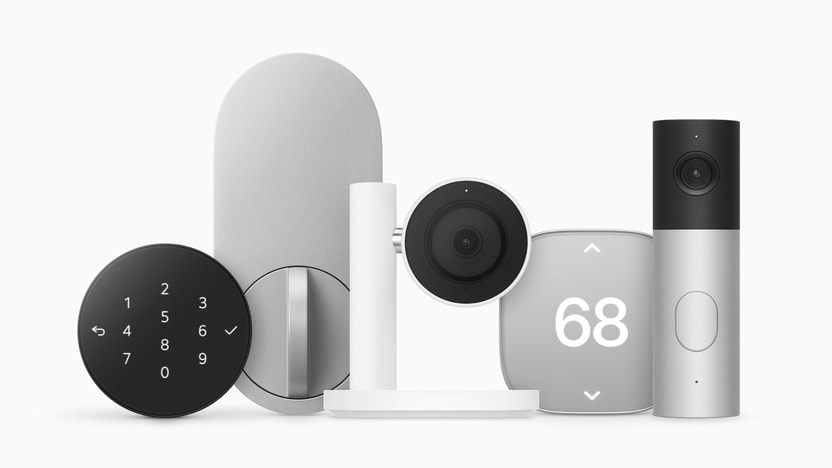
Apple’s announcement includes products at different price points, from relatively inexpensive sensors to cameras and a smart deadbolt.
| Product | Announced US starting price | Primary purpose |
|---|---|---|
| LG Indoor Cam Plug-In | $199.95 | Indoor monitoring |
| LG Video Doorbell Wired | $249.95 | Doorbell and visitor/package views |
| LG Outdoor Cam Plug-In | $299.95 | Outdoor monitoring |
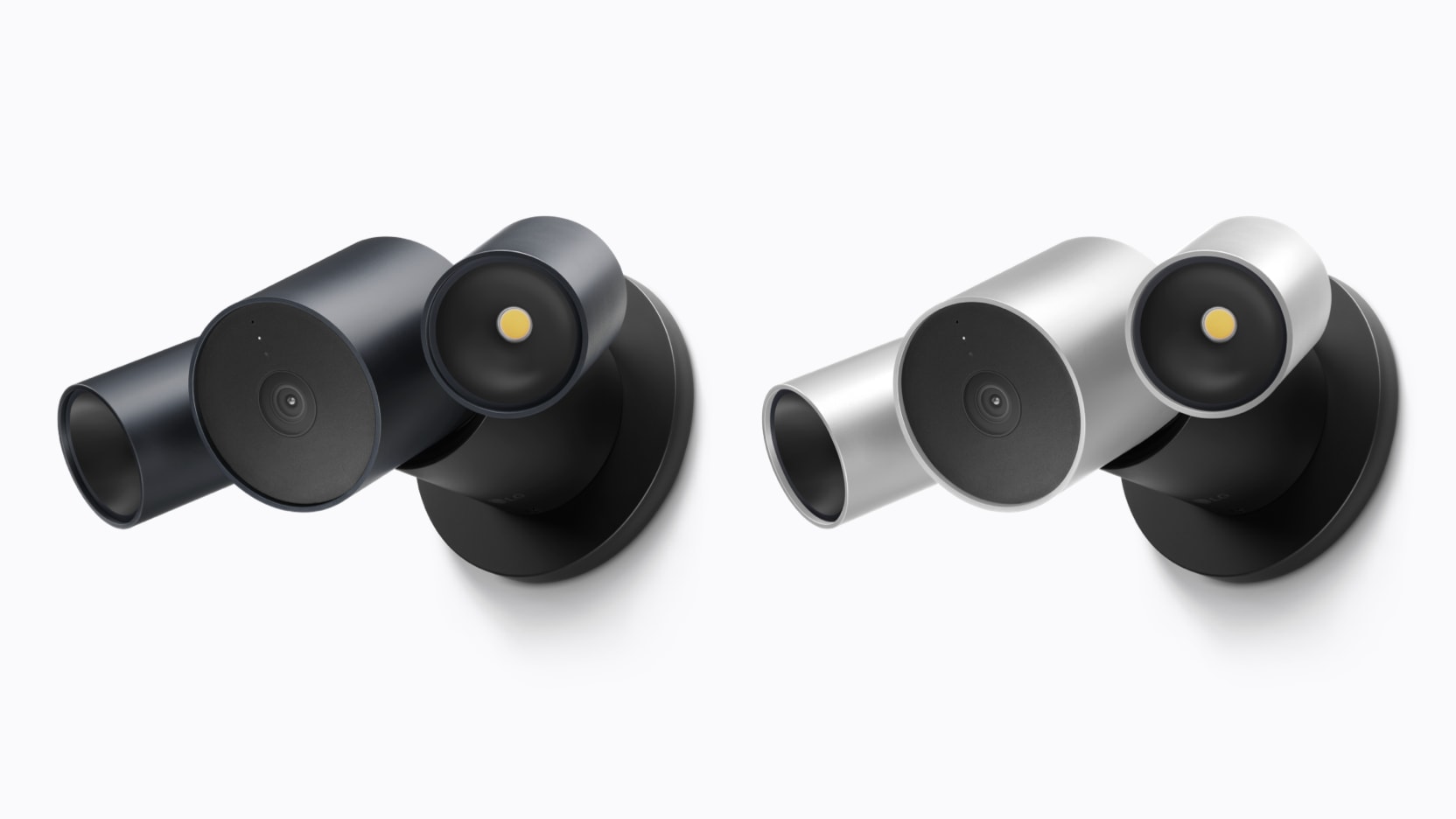
| LG Floodlight Cam | $399.95 | Outdoor monitoring with floodlights |
| LG Smart Deadbolt Lock | $349.95 | Connected door access |
| LG Smart Thermostat | $199.95 | Heating and cooling control |
| Schneider Home Smart Thermostat | $199.95 | Heating and cooling control |
| LG Temperature Sensor | $39.95 | Temperature monitoring |
| Schneider Home Room Sensor | $39.95 | Room temperature and humidity monitoring |
These are announced starting prices. Apple says the collection begins becoming available in December, with select accessories following in early 2027.
Cameras and the video doorbell
The camera lineup includes indoor and outdoor models, plus a floodlight camera. Apple’s announcement describes features such as person, pet, vehicle, and package recognition, alongside support for compatible iCloud+ plans and video history.
The LG Video Doorbell Wired is designed to capture separate views of visitors and packages. Apple says its front camera captures 2.5K-resolution video, while the lower camera captures Full HD video.
Those features could be useful for people who want to distinguish a visitor standing at the door from a parcel left on the ground.
However, buyers should not treat resolution as a complete measure of camera quality. Field of view, night performance, motion detection, notification delays, installation position, and image quality in difficult lighting will all affect the real experience.
Because the collection has not yet completed a full retail release, its long-term recording reliability and real-world detection accuracy still need independent testing.
The indoor camera’s privacy approach
Apple says the LG Indoor Cam can adjust its viewing direction and tilt upward when a household member returns, stopping its normal monitoring position until the camera is needed again. The view can also be adjusted manually or in the Home app.
This is a useful design choice, but buyers should distinguish a camera changing its viewing direction from a guarantee that all recording has stopped.
Before installing an indoor camera, review its actual recording settings, activity indicators, account permissions, and behavior when household members arrive or leave. A physical or clearly visible privacy control can also be useful where cameras may otherwise feel intrusive.
The smart deadbolt
The LG Smart Deadbolt Lock is listed at $349.95. Apple says it uses Ultra Wideband technology to detect a user’s proximity and can unlock automatically when an authorized person approaches with a compatible iPhone or Apple Watch and an appropriately configured home key.
The lock also supports a PIN pad and a hidden backup key slot. Apple says users can share guest access through the Home app and receive information about whether the door has been opened, closed, or tampered with.
These features could make access management more convenient for families, visitors, or people who need to let a house sitter inside.
But an automatic unlocking feature deserves careful setup. Users should understand which devices are authorized, how guest access is removed, and what fallback options remain if a phone battery dies or the wireless system becomes unavailable.
A connected lock should not be judged solely by how quickly it unlocks. Reliable physical access, sensible permission controls, and an understandable recovery process are equally important.
Thermostats and temperature sensors
The collection includes thermostats from LG and Schneider Electric, both listed at $199.95, plus room and temperature sensors starting at $39.95.
Apple says the thermostats can work with the Home app’s Adaptive Temperature features, which use information about household routines to adjust settings. In the contiguous United States, its Clean Energy Guidance can also help shift heating and cooling to lower-cost periods for users with a compatible utility plan.
This is potentially more practical than a novelty feature because heating and cooling affect household energy use every day.
Still, the actual savings will depend on the home, HVAC equipment, electricity or gas rates, utility plan, insulation, weather, and temperature preferences. A smart thermostat does not automatically guarantee a lower bill.
Homeowners should confirm HVAC compatibility and installation requirements before ordering. Apple lists thermostat installation accessories separately, so the initial device price may not be the complete installation cost.
How the iPhone Fits Into Apple’s New Smart Home
The iPhone has three main roles in the Home Collection: setup, everyday control, and personalization.
Setup and control
Apple says each accessory can be added to Apple Home with an iPhone, and the devices can be managed through the Home app without requiring a separate app or account for each product.
For consumers, fewer setup steps can be a genuine advantage. Multiple accounts and separate manufacturer apps often make connected-home systems harder to maintain.
A common interface can also make household routines easier to understand. For example, a user could configure supported devices to turn off lights, adjust a thermostat, and activate a camera routine when the household leaves.
Apple’s existing Home app documentation explains how compatible accessories, automations, and home hubs fit into the platform.
Personalization and household access
Apple is also connecting its home products to personal context from its devices. The company’s HomeView announcement says that personal content can be shown when the system recognizes a household member and the paired iPhone or iPad is present and has been recently unlocked.
This is intended to let a shared household screen behave differently for different people without displaying everyone’s private information indiscriminately.
The approach could be useful in a family kitchen or shared living space. But it also introduces dependencies: users need compatible devices, supported software, the correct accounts, and appropriate household permissions.
Consumers should test these requirements before relying on personalized features for everyday routines.
What if you use Android?
The new collection is designed around Apple Home, and iPhone-based setup is a central part of Apple’s description. Android users should not assume that the experience will be equivalent on their existing phones.
Matter can improve interoperability between supported devices and platforms, but that does not guarantee that every product-specific feature will work outside Apple Home. A smart lock’s Apple-specific digital-key experience, for example, may differ from its broader connectivity capabilities.
If a household includes iPhone and Android users, confirm the supported platforms and the features each user can access before choosing the system.
What Matter and Thread Mean for Compatibility
Two technical terms matter when evaluating Apple’s new smart-home products: Matter and Thread.
Matter: a common smart-home language
Matter is a smart-home interoperability standard developed through the Connectivity Standards Alliance. Its purpose is to make supported devices easier to integrate across compatible ecosystems.
Apple says the Home Collection builds on existing Works with Apple Home and Matter accessories. Its thermostats and smart lock are listed as Matter-compatible.
The standard can reduce the need to select every accessory from the same manufacturer. It does not, however, make all connected devices identical or guarantee that every advanced feature is available in every platform.
The Connectivity Standards Alliance’s Matter 1.6 announcement describes improvements to device setup, cross-ecosystem experiences, and device-status communication. The Alliance also notes that product support depends on manufacturers and platform developers implementing the relevant features.
That distinction is important: a standard can define a capability before a particular product or app supports it.
Thread: connectivity for supported devices
Thread is a low-power networking technology used by some smart-home devices. Apple says the new Home Collection accessories support Thread, helping maintain connectivity when a Wi-Fi connection drops.
That claim should not be interpreted as meaning every product will continue functioning normally during every network outage. Thread connectivity, internet access, local automation, remote control, cloud services, and video storage are separate considerations.
For example, a lock may retain some local access functions while remote notifications or cloud-based features are unavailable. Camera recording behavior can also depend on the product’s hardware and configuration.
Before buying, ask which functions work locally, which require an internet connection, and which rely on a home hub or subscription.
Apple HomeView: The Hub Behind the Strategy
HomeView is Apple’s new 7-inch smart display, announced at $299. It is designed to bring home controls, household information, FaceTime, Siri AI, and selected entertainment functions together in one place. Apple says US availability begins November 13, 2026.
It is important to separate HomeView from the Home Collection. HomeView is a display and hub; the Home Collection consists of accessories such as cameras, locks, and thermostats.
A household can evaluate these components separately rather than assuming it must buy the entire lineup.
The extra cost of wall mounting
Apple lists both tabletop and wall-mounted HomeView models at $299, but the wall-mounted version needs separate mounting and power hardware.
The announced options include a USB-C wall connector starting at $59.95, an AC-wired mount starting at $79.95, and a PoE-wired mount starting at $129.95, with the PoE option scheduled for early 2027.
That means the advertised price is not necessarily the finished price for a wall installation.
Consumers should also check where power will come from, whether any wiring work is needed, and whether professional installation would be preferable. A wall-mounted device is less flexible to relocate than a tabletop display.
HomeView is not a replacement for every Apple device
Independent reporting has identified limitations in HomeView’s entertainment capabilities. The Verge reported on October 14 that Apple TV, Apple Books audiobooks, Apple Music Classical, and Apple News Plus are not natively supported, with certain uses requiring a nearby compatible iPhone and AirPlay.
This matters because a display that can show entertainment-related content may still depend on another device for some functions.
The practical buying advice is simple: purchase HomeView for the features it actually supports, especially home control and shared household information. Do not assume that its screen works like a full iPad or that every Apple service runs independently on it.
Privacy and Security: What Buyers Should Check
Apple says Home Collection data is protected with end-to-end encryption within Apple Home. Its announcement states that home data is intended to remain inaccessible to Apple, LG Electronics, and Schneider Electric. Apple also describes local processing and encrypted storage for supported camera footage.
These are meaningful design claims, but they should be attributed to Apple rather than treated as a guarantee that every possible risk has been eliminated.
Security depends on more than encryption. Weak account credentials, compromised phones, overly broad guest access, insecure household Wi-Fi, and poor camera placement can still create problems.
Use strong account protection
Secure the Apple Account used to manage the home. Use a strong, unique password and enable available multifactor authentication. Keep the iPhone and connected devices updated, and remove access for people who no longer need it.
This is particularly important for smart locks and cameras because access to the system can reveal household routines or affect physical entry.
Review shared access
Household sharing is useful, but permission levels should match what each person needs. A guest who only needs temporary access should not automatically receive unrestricted access to every camera, lock, or automation.
Review access after a house sitter, contractor, or temporary resident no longer needs it.
Treat camera recognition as assistance, not certainty
Apple describes features that recognize people, familiar faces, pets, packages, and vehicles in supported camera setups.
Such features can make notifications more useful, but users should not treat automated recognition as infallible. Lighting, camera angle, occlusion, and the scene itself can affect results.
Use alerts as information to check, not as an absolute guarantee about who is outside or what happened.
Understand subscriptions and storage
Apple says the cameras work with supported iCloud+ plans for event-video history and certain intelligent features. The company advertises up to 10 days of event video history for compatible configurations.
Before purchasing, confirm the eligible plan, the number of cameras it supports, the features included, and what happens if the subscription changes.
A device’s hardware price is only one part of the long-term cost.
The Costs Beyond the Advertised Price
The Home Collection spans several products, and buying more than one can make the total rise quickly.
For example, a household that buys an indoor camera at $199.95, a video doorbell at $249.95, and a smart deadbolt at $349.95 would spend $799.85 before tax, installation, and any applicable subscription costs. The calculation uses Apple’s announced starting prices and does not include a thermostat or HomeView.
Add HomeView at $299, and the combined announced starting prices reach $1,098.85 before tax and additional costs.
That is not necessarily poor value. A household replacing several devices may value a common interface, shared access, and a consistent support experience. But it is a significant commitment, and consumers should compare the cost with their actual needs.
Buy one problem-solving device first
A sensible approach is to start with the problem that matters most.
- If the priority is seeing visitors, compare doorbells.
- If the priority is monitoring a room, evaluate indoor cameras and privacy controls.
- If the priority is home access, compare smart locks, backup entry methods, and permission management.
- If the priority is energy management, confirm thermostat compatibility and likely savings before purchasing.
This approach reduces the risk of buying an entire ecosystem before understanding whether its features are useful.
Do not pay for a hub you do not need
HomeView is designed as a central display, but it is not automatically necessary for every Apple Home setup. Apple documents the use of compatible Apple TV and HomePod devices as home hubs for supported accessories and remote access.
Before buying HomeView, identify which functions your existing devices already provide. You may decide the display is worthwhile for a shared household interface, but that should be an intentional purchase rather than an assumed requirement.
How Apple’s Strategy Compares With Other Platforms
Apple is entering a market in which Amazon and Google already offer smart displays, voice assistants, cameras, and connected-home controls.
The important comparison is not simply which company has the most features. It is which platform best fits the devices, accounts, privacy expectations, and routines a household already uses.
Apple: integration with the iPhone
Apple’s strongest argument is integration. Setup and control take place within Apple Home, and personal context can connect supported home features to the user’s Apple devices.
This can be attractive for households already invested in iPhone, Apple Watch, HomePod, and Apple TV.
The trade-off is dependency on Apple’s ecosystem. Buyers should check whether the features they care about remain useful if a family member uses Android or if they later change phone platforms.
Amazon and Google: established alternatives
Amazon Echo Show and Google Nest Hub devices offer alternative approaches to displays, voice assistants, and connected-home management. The Verge’s HomeView reporting highlights a practical difference: certain entertainment services available through competing smart displays are not natively supported on HomeView.
That does not establish that Amazon or Google is universally better. Feature availability, subscription requirements, device compatibility, and privacy policies vary across products.
The right choice depends on the household’s priorities.
Matter can help, but does not eliminate every trade-off
Matter support may give consumers more flexibility when choosing compatible accessories. Yet platform-specific features, such as personal context, particular digital-key implementations, or specialized camera processing, can still differ.
If interoperability is a priority, check the exact product’s certification and feature list rather than relying on a general statement that it supports Matter.
Who Should Consider Apple Home Collection?
The collection may appeal most to people who already use Apple devices and want to consolidate smart-home control.
It could be worth considering if you:
- Use an iPhone as your primary smartphone.
- Want supported cameras, locks, and thermostats in a common interface.
- Prefer managing devices through Apple Home rather than several separate apps.
- Are comfortable with the announced price range.
- Understand the role of iCloud+ and compatible home hubs.
- Want to build a system gradually rather than replace everything at once.
The products are less compelling if you want a platform-neutral setup, have a strict budget, or expect every smart display to function like a tablet.
Android users should pay particular attention to setup and feature compatibility. Matter may help with supported devices, but Apple’s stated setup and personalization experience is closely tied to iPhone and other Apple hardware.
What Buyers Should Check Before Purchasing
Before ordering any Home Collection accessory, work through this checklist.
1. Confirm the actual availability date
Apple announced a December start for the Home Collection, with select products arriving in early 2027. Confirm the specific accessory’s order and delivery date rather than assuming every item launches simultaneously.
2. Check compatibility
Confirm that the device works with your iPhone, software version, home hub, network, and existing accessories. Check feature-level compatibility as well as basic connection support.
3. Calculate the complete cost
Include the device, required accessories, installation, taxes, and recurring subscriptions. If you choose wall-mounted HomeView, add the required mounting and power hardware.
4. Check the installation requirements
Doorbells, deadbolts, and thermostats may require wiring or other home-specific considerations. Confirm that your door, wiring, HVAC system, and mounting location are suitable.
5. Review recording and access controls
Understand how video history works, what subscription is required, who can view recordings, and how shared household access is managed.
6. Plan for network problems
Check which functions work locally and which depend on internet access, a home hub, or cloud services. Do not assume that all camera, notification, and remote-access features continue working identically during an outage.
7. Wait for independent testing if performance is critical
Apple’s specifications explain the intended functionality, but they do not establish long-term reliability. For cameras and locks in particular, independent testing of real-world performance and failure modes is valuable.
What Happens Next?
Three developments will determine whether Apple’s strategy succeeds.
First, retail availability. The collection’s announced prices and broad release window are useful, but consumers will need actual order dates and delivery estimates for individual accessories.
Second, independent testing. Reviewers will need to test camera quality, motion detection, lock reliability, thermostat behavior, connectivity, and the consistency of automations in real homes.
Third, software and compatibility. HomeView’s entertainment limitations, Siri AI’s feature availability, and the behavior of Matter-enabled accessories will shape the day-to-day experience.
The most important measure of success will not be how many devices Apple announces. It will be whether a household can install them, use them reliably, manage permissions, and maintain the system without unnecessary complexity.
Conclusion
Apple’s Home Collection is a significant expansion of the iPhone ecosystem into everyday home management. Its cameras, doorbell, deadbolt, thermostats, and sensors are designed to work through Apple Home, while HomeView offers a dedicated screen for household control.
The strategy has a clear appeal: fewer separate interfaces and closer integration with devices people already use. But the announced prices are substantial, compatibility needs checking, and the system’s practical value will depend on performance after release.
For US buyers, the sensible approach is to identify one specific need, compare the total cost, verify compatibility, and wait for independent testing where reliability matters most.
The bottom line: Apple’s new home products could make an iPhone more useful beyond the screen in your pocket, but consumers should buy the functions they need—not the promise of an entire ecosystem.
Frequently Asked Questions
What is Apple Home Collection?
Apple Home Collection is a new lineup of smart-home accessories developed with LG Electronics and Schneider Electric. It includes cameras, a video doorbell, a smart deadbolt, thermostats, and temperature sensors that integrate with Apple Home.
How much does Apple Home Collection cost?
Announced US starting prices range from $39.95 for certain sensors to $399.95 for the LG Floodlight Cam. Other products include a $249.95 video doorbell, a $349.95 smart deadbolt, and thermostats starting at $199.95.
When will Apple Home Collection be available?
Apple says availability begins in December 2026, with select accessories arriving in early 2027. Check the specific product’s listing for its actual release date.
Do you need an iPhone to set up Apple Home Collection?
Apple says setup for the new accessories starts with an iPhone, and the products are managed through Apple Home. Buyers should verify the required iPhone model and software version for the features they intend to use.
Does Matter guarantee compatibility with Android?
No. Matter is intended to improve interoperability for supported devices, but it does not guarantee that every accessory or advanced feature will work identically across Apple, Google, Amazon, and other platforms.
Is Apple Home Collection secure?
Apple says its Home data is end-to-end encrypted and describes local processing for supported features. Buyers should still secure their accounts, keep devices updated, review shared access, and understand camera and subscription settings.
Do you need Apple HomeView to use Apple Home Collection?
Apple presents HomeView as a dedicated display for home control, but its documentation also describes Apple Home working with supported accessories and compatible home hubs such as Apple TV and HomePod. Confirm the hub requirements of the specific features and accessories you plan to use.
