




To effectively reduce listening fatigue when using headphones, prioritize proper fit, manage listening volume, use noise-canceling features, and take regular breaks. The World Health Organization’s safe-listening guidance recommends keeping device volume below 60% of maximum and limiting exposure to loud sounds.
Optimizing your audio settings with a custom EQ and choosing the right headphone type for your needs can also improve comfort during extended listening sessions. However, volume level and listening duration remain the most important factors for protecting your hearing. The CDC’s guidance on preventing noise-induced hearing loss similarly recommends turning the volume down and taking breaks from loud sounds.
Key Takeaways:
- Volume Control is Paramount: Keep levels below 60% of maximum and adhere to the 60-60 rule.
- Invest in Noise-Canceling: Active Noise Cancellation (ANC) significantly reduces external distractions, lessening the need for high volume.
- Prioritize Fit and Comfort: Choose headphones that distribute pressure evenly and have breathable earcups, especially for long listening sessions.
- Take Frequent Breaks: Step away from your audio every 30-60 minutes to give your ears and mind a rest.
- Optimize Audio Quality: Use custom EQ settings to tune sound to your preference, reducing harsh frequencies that contribute to fatigue.
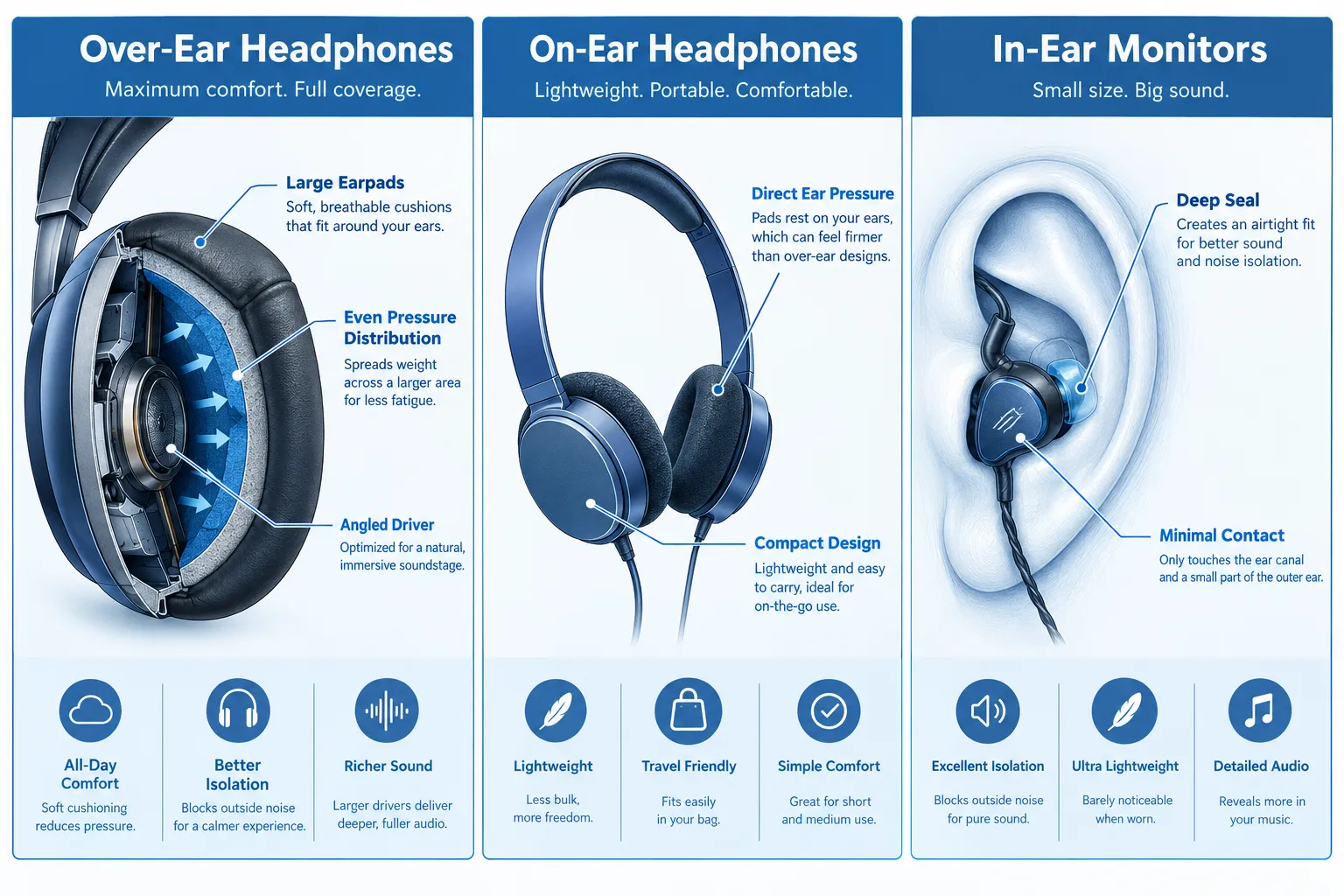
- Select the Right Headphone Type: Over-ear headphones often offer better comfort for extended use than on-ear or in-ear models.
- Understand Environmental Factors: Minimize external noise, even when using noise-canceling headphones, for a more serene listening experience.
Why Do Headphones Cause Listening Fatigue, and How to Reduce It?
Listening fatigue, often described as a cognitive drain or aural discomfort, occurs when our auditory system and brain are overworked by prolonged exposure to sound, particularly through headphones.
It’s not just about loud volumes; factors like poor sound quality, uncomfortable fit, and continuous noise processing all contribute. The primary way to address this is by being MINDFUL of your setup and habits.
I’ve spent countless hours in the TechOzea lab, not just measuring frequency responses but wearing these devices for hours on end, simulating real-world use. It’s during these long-term tests that we discover which headphones excel not just in sound, but in sustainable comfort.
We’ve found that even the best-sounding headphones can be a nightmare if they clamp too hard or have abrasive earpads. The secret to how to reduce listening fatigue when using headphones lies in a multi-pronged approach that balances physical comfort with auditory health.
- Poor Fit: Headphones that clamp too tightly, exert uneven pressure, or use unsuitable materials can cause physical discomfort, leading to a desire to take them off, which exacerbates perceived fatigue. For example, my ears personally start aching after about 45 minutes with many on-ear models due to direct pressure on the ear cartilage.
- Excessive Volume: This is the most obvious culprit. High volumes force your ears to work harder and can cause temporary hearing threshold shifts. The 60-60 rule, listening at 60% volume for no more than 60 minutes, is a golden standard for a reason.
- Poor Sound Quality/Harsh Frequencies: Headphones with an overly bright, sibilant, or boomy sound signature can irritate the ears. Highs that are too sharp or bass that is too uncontrolled require more mental effort to process and can be physically fatiguing.
- Lack of Noise Isolation: In noisy environments, without effective noise isolation, you’ll naturally turn up the volume, creating a vicious cycle of fatigue. This is where noise-canceling headphones shine.
- Lack of Breaks: Continuous auditory input, even at moderate levels, eventually tires the brain. Our brains need processing downtime.
What Are the BEST Ways to Reduce Listening Fatigue When Using Headphones?
The best ways to reduce listening fatigue involve a combination of equipment choice, mindful listening habits, and environmental control. It’s about creating an optimal listening ecosystem, not just relying on one fix.
When we conduct our independent reviews, we look for products that actively help prevent fatigue. For instance, the Bose QuietComfort Ultra Headphones are a top performer not just because of their sound, but because their comfort and ANC make long flights or work sessions bearable. Here’s a breakdown of the most effective strategies:
- Control Your Volume: This is non-negotiable. Aim to keep your volume at 60% or less of your device’s maximum. If you find yourself constantly needing to turn it up, it’s a sign you either need better noise isolation or a break. I personally use a sound level meter app occasionally to check my listening levels, especially when testing new gear.
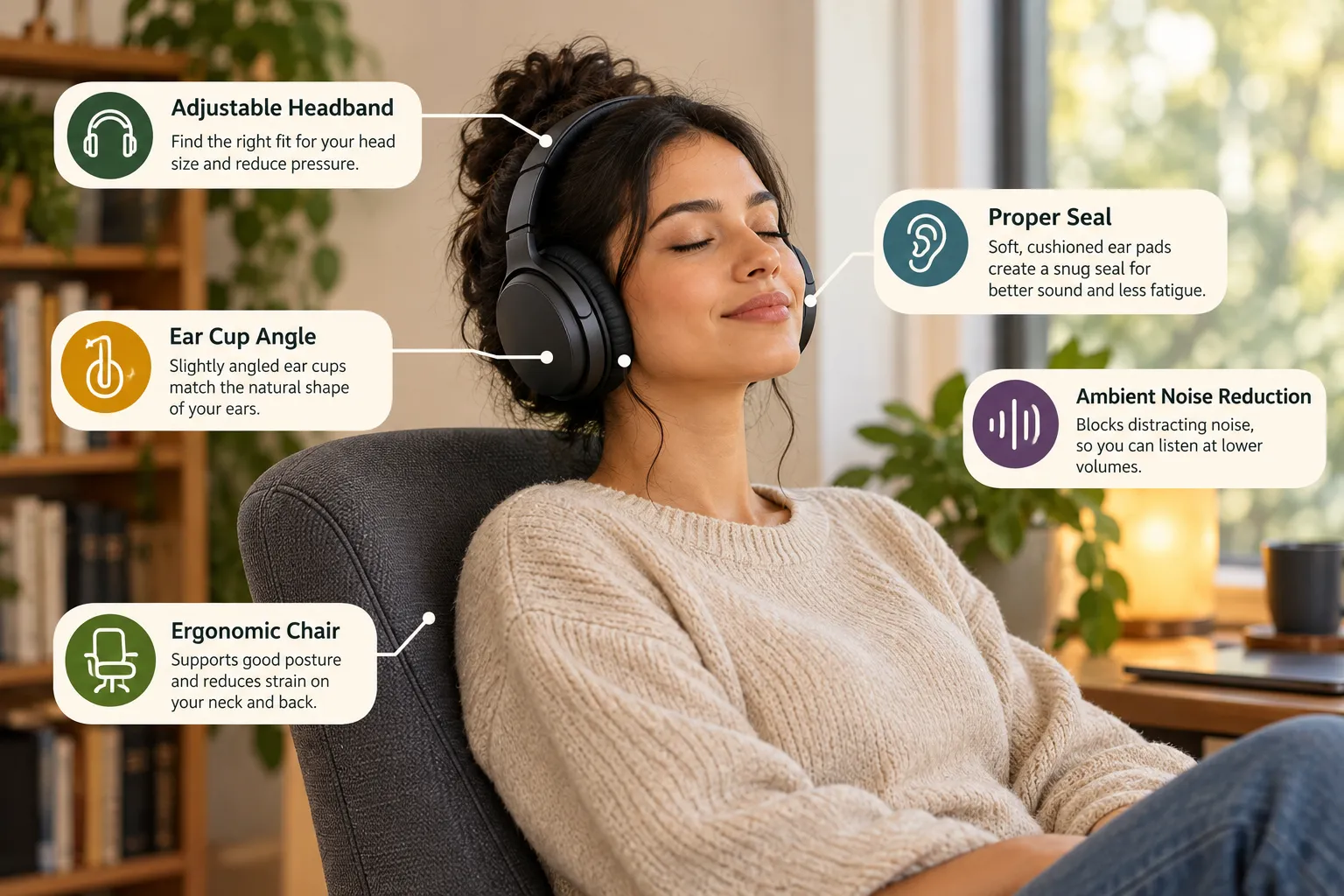
- Embrace Noise-Canceling Technology: High-quality noise-canceling headphones are a game-changer for reducing fatigue. By actively blocking out ambient noise, they eliminate the need to crank up the volume to hear your audio, significantly lowering the overall strain on your ears. This is particularly crucial for commuters or those working in open offices. Even budget noise-canceling options can make a huge difference.
- Prioritize Headphone Comfort and Fit:
- Over-Ear is Often King: For long sessions, over-ear headphones that fully encompass your ears are usually superior. They distribute pressure around your ear, not directly on it.
- Pads Matter: Look for plush, breathable earpads (velour, memory foam, or protein leather) that don’t trap heat or feel scratchy.
- Adjustability: A well-designed headband and earcups that swivel and tilt allow for a custom fit, preventing hot spots or excessive clamping force. Check out our guide on how to wear headphones correctly for optimal fit.
- Take Regular Listening Breaks: Set a timer if you need to. Every 30-60 minutes, take your headphones off for at least 5-10 minutes. During this time, give your ears a rest, move around, or focus on something visual. This helps reset your auditory system.
- Optimize Your Audio Settings with Custom EQ: If your headphones or device offer a custom EQ, experiment with it. Often, a slight reduction in piercing treble frequencies or an adjustment to an overly boomy bass can make a world of difference in listening comfort without sacrificing detail. We often find that a “flat” EQ is rarely the most comfortable for prolonged listening for most users.
- Choose the Right Headphone for the Task: Gaming headsets for intense sessions often prioritize positional audio but might lack the all-day comfort of a dedicated music headphone. Similarly, best headphones for working out may not be ideal for quiet, focused listening.
- Minimize Environmental Noise: Even with ANC, a quieter environment means less work for your headphones and your brain. If possible, choose a quieter space for your listening sessions.
By implementing these strategies, you’ll not only enhance your listening experience but also protect your long-term auditory health. The goal isn’t just to hear the music, but to enjoy it without fatigue.
Conclusion: Prioritize Your Ears and Your Wallet
Listening fatigue is a real issue for anyone who spends significant time with headphones, whether for work, gaming, or pure enjoyment.
TechOzea’s lab tests repeatedly show that how to reduce listening fatigue when using headphones isn’t about one magic bullet; it’s about making informed choices. DON’T just crank up the volume to drown out distractions. That’s a surefire path to both fatigue and potential hearing damage.
Instead, invest in your comfort and your hearing. Look for headphones with good comfort and effective noise cancellation, like the models we highlight in our best noise-canceling headphones under 100 guide, or even premium options.
Practice the 60-60 rule, customize your sound, and crucially, give your ears regular breaks. Your long-term listening pleasure (and health) depends on it.
Related Reading
- How Long Should You Wear Headphones Daily? Safe Limits & Tips
- Can Headphones Cause Hearing Damage? Safe Volume Levels
- Most Comfortable Headphones For Long Listening Sessions
Last updated: April 1, 2027
