


Buying a laptop in late 2026 requires more than comparing processors, RAM capacities, screen quality, and battery life. Buyers must also consider a market in which component costs, supply constraints, and manufacturer inventory decisions are influencing prices.
The latest shipment figures provide a clear indication of the pressure.
According to the official IDC Q3 2026 PC market report, worldwide PC shipments fell 20.1% year over year, reaching 62.7 million units. Omdia reported a similar decline and found that notebook shipments fell 20.6% during the quarter.
These figures matter to American consumers, but they require careful interpretation.
A decline in shipments does not mean that laptop sales in the United States fell by the same percentage. Nor does it automatically mean that prices will rise or that retailers will run out of particular models.
Instead, the data reveals an industry dealing with higher component costs, inventory adjustments, and uncertainty about consumer demand.
Understanding those factors can help buyers decide whether to purchase a laptop now, look for a discount, or postpone a nonessential upgrade.
Key Takeaways
- PC shipments fell sharply: IDC reported a 20.1% year-over-year decline in worldwide PC shipments during Q3 2026. Omdia reported a similar contraction, including a 20.6% drop in notebook shipments.
- Higher component costs create pricing pressure: Memory and storage are taking a larger share of PC production costs, potentially affecting retail prices and the configurations manufacturers offer.
- Buy according to your needs, not a market forecast: Promotions may still appear, but neither an immediate price increase nor a broad price decline is guaranteed for every laptop.
Table of Contents
- What Happened to PC Shipments in Q3 2026?
- Why IDC and Omdia Report Different Numbers
- Why Laptop Prices Are Under Pressure
- How Memory and Storage Costs Affect Laptop Prices
- Why Inventory Matters More Than Many Buyers Realize
- What the Decline Means for U.S. Laptop Buyers
- Will Budget Laptops Be Affected More Than Premium Models?
- What About Gaming Laptops and Workstations?
- Are AI PCs Contributing to the Problem?
- Should You Buy a Laptop Now or Wait?
- How to Evaluate Laptop Deals in a Volatile Market
- What to Watch Through the End of 2026
- Conclusion
- Frequently Asked Questions
What Happened to PC Shipments in Q3 2026?
IDC’s preliminary figures show worldwide PC shipments falling from 78.5 million units in Q3 2025 to 62.7 million units in Q3 2026.
That represents a year-over-year decline of 20.1%. Shipments also fell 9.1% compared with Q2 2026.
The figures cover traditional PCs, including desktops, notebooks, and workstations. They do not represent a direct measurement of consumer laptop purchases alone.
The distinction is important because the shipment data describes the movement of devices through the PC market rather than providing a complete account of every transaction at a retailer.
A manufacturer can ship computers to a distributor before those devices reach stores. A retailer can also sell computers from existing inventory without receiving an equivalent quantity of new shipments during the same period.
Consequently, shipments and retail sales do not necessarily rise and fall together.
What the major manufacturers experienced
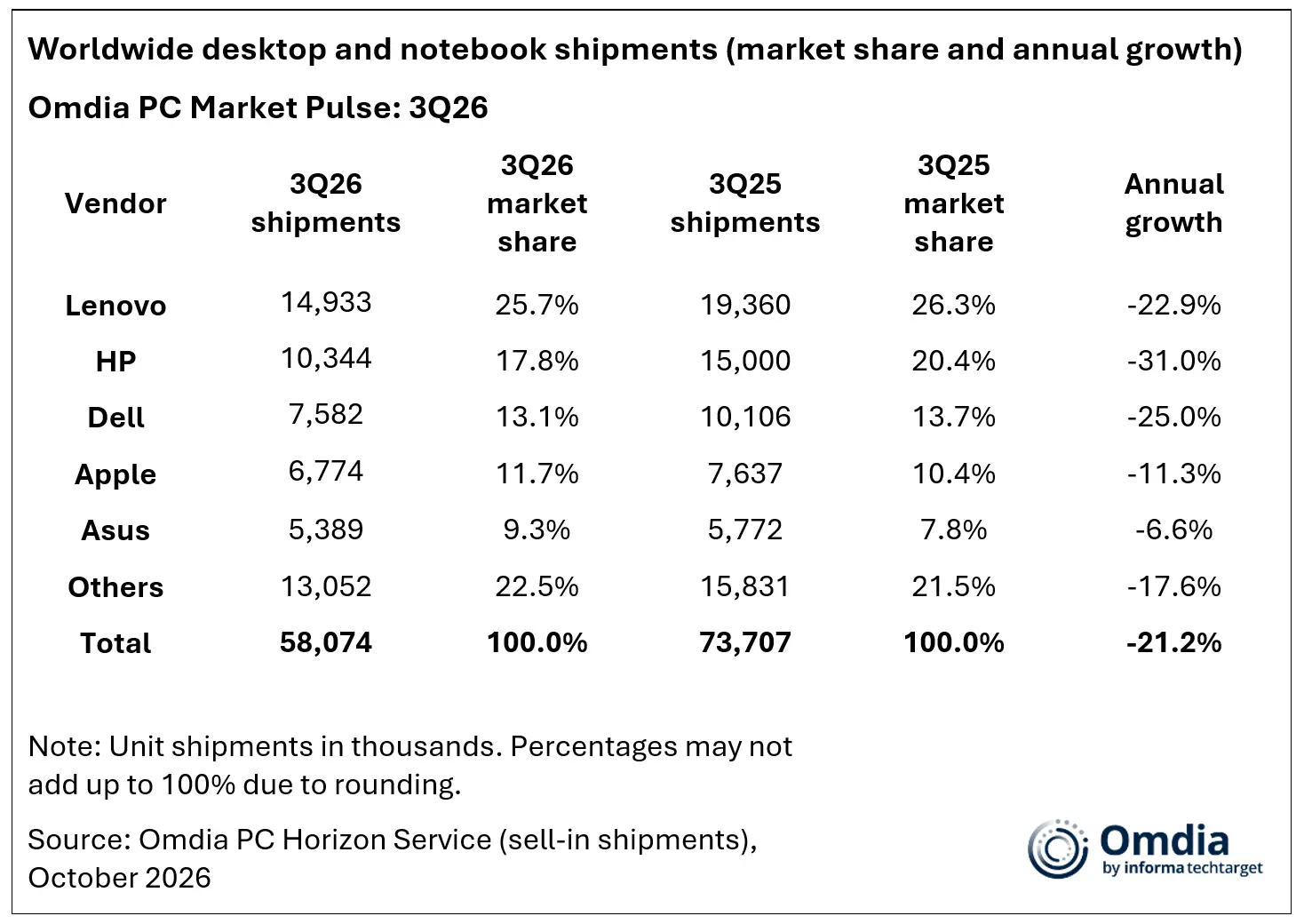
IDC’s Q3 figures show that the downturn affected all five of the leading vendors it listed.
| Manufacturer | Q3 2026 shipments | Year-over-year change |
|---|---|---|
| Lenovo | 14.9 million | -22.6% |
| HP | 10.3 million | -30.9% |
| Dell | 7.6 million | -25.0% |
| Apple | 5.9 million | -11.3% |
| ASUS | 5.5 million | -8.6% |
These figures are preliminary estimates from IDC’s tracker, not audited counts of laptops purchased by individual consumers.
HP recorded the steepest year-over-year decline among these five vendors, while ASUS recorded the smallest.
Apple’s shipments also declined, but less sharply than the overall market.
These differences are worth watching, although a single quarter does not establish that one company’s laptops are becoming less competitive or that another company’s products are necessarily better purchases.
Product availability, channel inventory, pricing, business demand, and product launch schedules can all affect shipment results.
Why IDC and Omdia Report Different Numbers
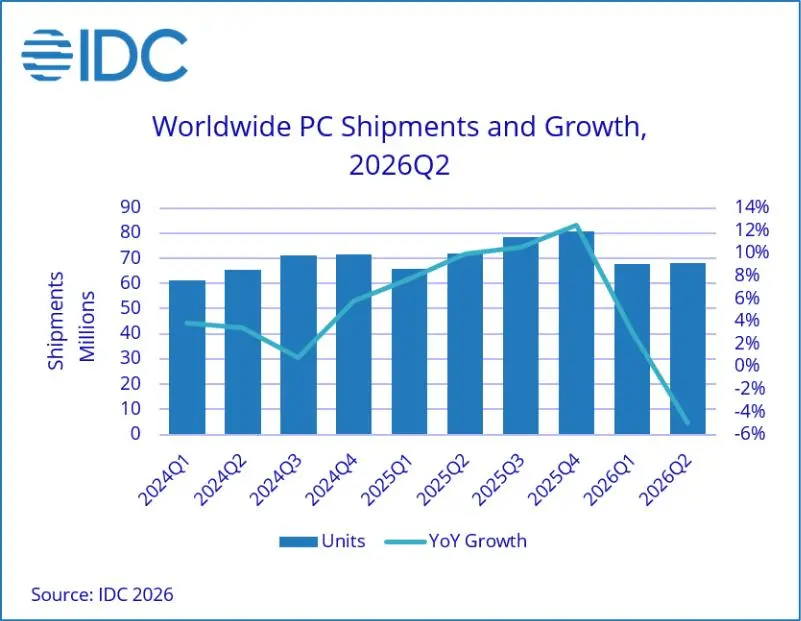
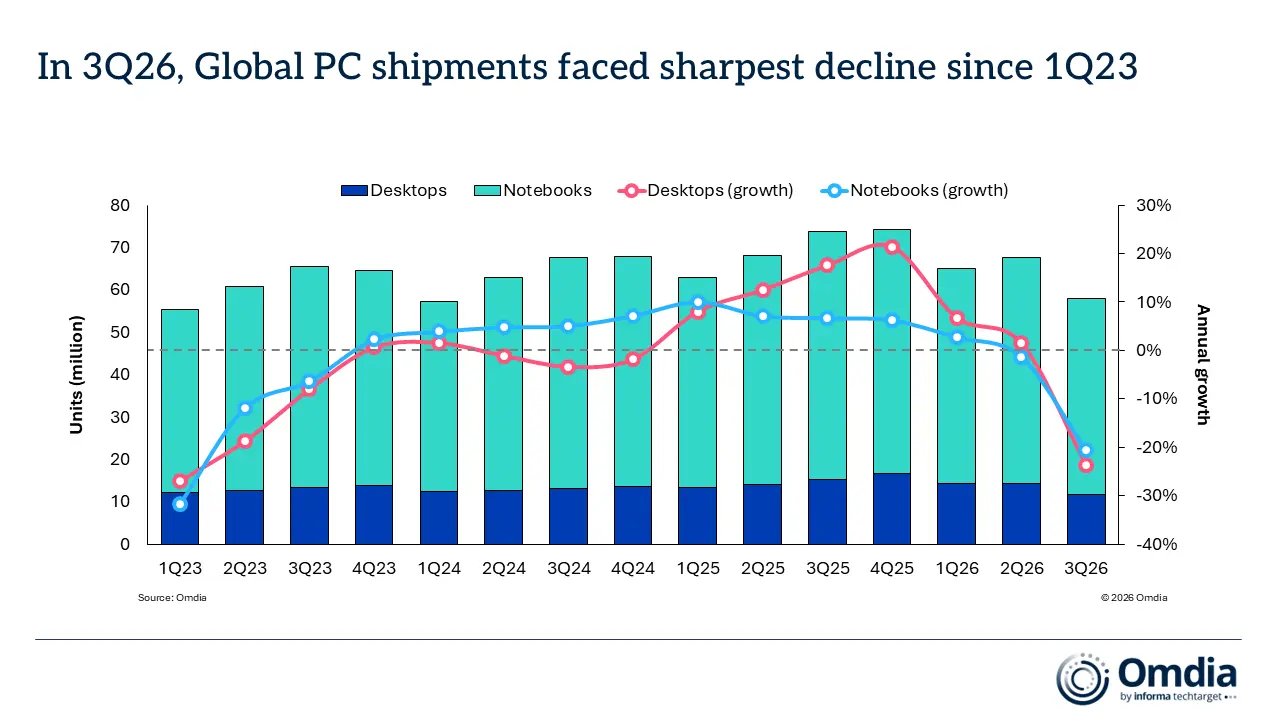
Two research firms have reported similar trends, but their totals are not identical.
IDC reported 62.7 million worldwide PC shipments in Q3 2026. Omdia reported 58.1 million shipments across desktops, notebooks, and workstations. Omdia also reported that notebook shipments, including mobile workstations, fell 20.6% to 46.4 million units.
These figures should not be combined into a single total or treated as contradictory measurements of precisely the same dataset.
The firms maintain their own tracking systems, estimates, and methodologies. Their reported totals and category definitions may differ.
What matters for the consumer analysis is that both firms identify a substantial contraction.
The notebook-specific figure from Omdia is especially relevant to laptop buyers because it separates notebook shipments from the wider desktop and workstation market.
Even so, it remains a global shipment estimate. It does not establish the percentage change in U.S. retail laptop sales.
That limitation should remain clear throughout any discussion of the American market.
Why Laptop Prices Are Under Pressure
The shipment decline comes amid rising costs for important PC components, particularly memory and storage.
These components are fundamental to modern laptops. RAM supports active applications and multitasking, while solid-state drives store the operating system, applications, and personal files.
Their costs influence the economics of producing a complete computer.
Omdia reported that DRAM and SSDs had increased from a typical share of around 15% of PC costs to nearly 40%. That is an industry-level estimate, not a universal cost breakdown for every laptop configuration.
When memory and storage become more expensive, manufacturers have several choices.
They can increase retail prices, absorb some of the additional expense, reduce promotional activity, change configurations, or combine these approaches.
For example, a manufacturer could maintain a laptop’s advertised starting price while offering a lower storage capacity in its entry-level configuration. Another company might keep its existing specifications but increase the price.
These are possible responses to cost pressure, not proof that any specific manufacturer has already made a particular change because of the latest shipment figures.
Why entry-level laptops deserve attention
Memory and storage costs can represent a substantial portion of a budget computer’s production cost.
That creates a potential challenge for manufacturers competing in lower price brackets.
A premium laptop selling for several thousand dollars may have more room to absorb a component-cost increase than an inexpensive device sold on a narrow margin.
Manufacturers may therefore find it difficult to preserve both low prices and attractive specifications in the budget segment.
However, buyers should not assume that every inexpensive laptop will become more expensive or that all premium laptops will remain unaffected.
The outcome depends on each manufacturer’s costs, inventory, pricing strategy, and product lineup.
How Memory and Storage Costs Affect Laptop Prices
To understand why component prices matter, consider the main hardware choices that determine a laptop’s configuration.
RAM affects multitasking
RAM provides working space for applications and data that the computer is actively using.
A laptop with sufficient memory can handle a browser, office applications, video calls, and other programs without relying excessively on slower storage for memory management.
If a manufacturer reduces the RAM capacity of an entry-level configuration to control costs, the initial purchase price may remain attractive while the computer becomes less suitable for demanding workloads.
For many buyers, a laptop with 16GB of RAM is a sensible starting point for general productivity, although the appropriate capacity depends on the operating system, applications, and workload.
Developers, creators, and users who run virtual machines may benefit from more memory.
TechOzea’s guide to programming laptops under $500 provides a useful starting point for comparing budget configurations and considering how memory affects a laptop’s intended use.
SSD capacity affects storage flexibility
An SSD stores applications, documents, photographs, videos, and other files.
A 256GB drive can be sufficient for lightweight work, but users with large photo libraries, game collections, or development environments may need substantially more capacity.
If rising component costs lead a manufacturer to offer a smaller SSD in the entry-level model, buyers should compare the actual configuration rather than judging a laptop by its starting price alone.
Storage upgrades can also be expensive, particularly when the laptop’s internal drive is difficult to replace or the memory and storage are integrated into a design that limits upgrades.
Configuration changes can be harder to notice than price increases
A visible price increase is easy to identify.
A configuration change can be less obvious.
A buyer comparing two laptops may find that one model has less RAM, a smaller SSD, or a different display option than an earlier version sold at the same price.
That does not automatically make the newer model a poor purchase. Manufacturers can also improve processors, screens, battery systems, or other features.
The practical lesson is to compare complete specifications and the total purchase cost rather than assuming that an unchanged advertised price means an unchanged product.
Why Inventory Matters More Than Many Buyers Realize
The PC market’s shipment decline cannot be understood through component prices alone.
IDC says vendors and distribution channels purchased inventory earlier in the year to get ahead of anticipated price increases. That activity helped pull shipments forward, leaving less demand for new shipments in Q3.
This is an example of how inventory decisions can distort the apparent timing of demand.
Imagine a retailer expecting laptop costs to rise in a future quarter.
The retailer may order more devices than usual in advance. Those shipments appear in the earlier period, even though the computers may remain in the retailer’s warehouse or store for weeks or months.
When the retailer begins selling that inventory, it may need fewer new shipments.
The result can be a decline in manufacturer shipments even if consumers continue purchasing computers.
The reverse can also happen. If a retailer expects stronger demand, it may order additional inventory before the products are sold.
Why inventory can create short-term discounts
Retailers holding more inventory than they want may discount selected products to free warehouse space or improve cash flow.
This can create opportunities for buyers.
However, discounts are not guaranteed. Retailers may prefer to preserve their margins, particularly when replacement inventory is expensive.
IDC’s assessment is that promotions may provide some temporary relief, but prices are expected to remain elevated compared with a year earlier.
That is a more useful conclusion than predicting either an immediate price collapse or universal price increases.
What the Decline Means for U.S. Laptop Buyers
For American consumers, the most useful question is not whether global PC shipments have fallen.
It is whether the change affects the price, availability, or value of the laptop they need.
The answer depends on the product category and purchasing circumstances.
Students and budget-conscious households
Buyers seeking an inexpensive laptop should pay particular attention to the actual specifications included at the advertised price.
A laptop may appear inexpensive but provide insufficient memory or storage for its intended workload.
Students who primarily use web applications, documents, and video calls have different requirements from students running engineering software, video-editing applications, or development environments.
The right purchase is therefore not necessarily the cheapest device. It is the least expensive model that meets the buyer’s needs without forcing an immediate upgrade.
Before choosing a low-cost machine, compare memory capacity, SSD size, display quality, battery performance, keyboard comfort, and the manufacturer’s warranty.
Professionals who need a laptop immediately
For workers whose existing computer is unreliable or incompatible with required software, delaying an upgrade solely because of market forecasts can be counterproductive.
A laptop that fails during important work can impose costs through lost time, reduced productivity, and repair expenses.
In these circumstances, it makes sense to establish a budget, identify required specifications, and compare currently available options.
TechOzea’s business laptop buying guide can help readers evaluate practical requirements such as ports, security features, memory, storage, and portability.
The objective should be to purchase an appropriate machine at a reasonable price rather than attempting to predict the exact bottom of the market.
Buyers who want a thin-and-light laptop
Portable laptops can be especially attractive to students, commuters, and professionals who travel frequently.
But portability should not come at the expense of the specifications needed for everyday work.
Compare the laptop’s weight, battery capacity, display, memory, storage, port selection, and charging requirements.
TechOzea’s guide to lightweight laptops offers a starting point for comparing portable options.
If the machine has soldered memory or limited storage-upgrade options, choose a configuration that provides sufficient capacity for the expected period of ownership.
That decision can matter more over several years than a relatively small difference in the initial price.
Will Budget Laptops Be Affected More Than Premium Models?
Budget laptops face a particular challenge when component costs rise because manufacturers have less room to increase prices without affecting their value proposition.
A low-cost laptop may compete primarily on affordability, whereas a premium model can justify a higher price through its display, materials, performance, support, or specialized features.
This does not mean premium models are immune to cost increases.
Premium laptops often contain expensive processors, advanced displays, dedicated graphics, and larger memory configurations. These components can also experience pricing pressure.
The distinction is that the same absolute increase in production cost can have different effects on products sold at different price points.
A manufacturer might respond by adjusting the specifications of a budget model, increasing its price, or reducing the frequency of discounts.
A premium manufacturer might preserve the configuration while raising the price or reducing promotional incentives.
These are possible responses, not confirmed changes across the industry.
For buyers, the most reliable strategy is to compare the total value of each configuration.
An inexpensive machine with insufficient memory may become frustrating quickly. A premium laptop with features the buyer never uses may also be poor value.
The best purchase balances price, performance, reliability, and expected lifespan.
What About Gaming Laptops and Workstations?
Gaming laptops and mobile workstations require additional consideration because their configurations can be expensive and power-hungry.
Gaming systems may include dedicated graphics processors, advanced cooling systems, high-refresh-rate displays, and substantial memory and storage capacities.
Workstations may prioritize memory, professional graphics capabilities, processor performance, and support for specialized applications.
These machines can be affected by changes in the cost of several components at once.
However, the latest PC shipment data does not establish that every gaming laptop or workstation will increase in price.
Buyers should compare the complete configuration and consider whether a lower-cost model can meet their actual performance requirements.
For gaming, graphics performance and the laptop’s cooling design matter alongside RAM and storage.
For professional applications, software compatibility, memory requirements, GPU acceleration, and support arrangements can be equally important.
It is also worth distinguishing between advertised performance claims and independent testing. Two laptops using similarly named graphics processors can perform differently because of cooling, power limits, and overall system design.
A market downturn does not eliminate these technical considerations.
Are AI PCs Contributing to the Problem?
Artificial intelligence is relevant to the current PC market, but the relationship requires careful explanation.
AI data centers use substantial computing resources, including advanced processors and high-bandwidth memory. Meanwhile, ordinary laptops depend on their own supply chains for DRAM, NAND storage, processors, and other components.
Omdia identifies AI-related infrastructure demand and rising component costs among the pressures affecting the PC market. It also reports that memory and storage account for a substantially larger share of PC costs than they typically did.
This supports the conclusion that the broader AI infrastructure boom is contributing to supply and cost pressures.
It does not establish that AI demand is the sole cause of the shipment decline.
Inventory purchases, pricing, supply constraints, and changing consumer demand are also important.
Why local AI laptops may still attract buyers
New laptops designed for local AI workloads are approaching the market, including Microsoft’s Surface Laptop Ultra and other systems based on NVIDIA’s RTX Spark platform.
Manufacturers are promoting these computers for running AI models and creative workloads locally rather than relying exclusively on cloud processing.
But the value depends on the intended workload.
A developer who regularly runs compatible AI models may benefit from local computing resources. A student who mainly uses a browser and office applications may receive little practical benefit from spending thousands of dollars on a specialized AI laptop.
Local execution also does not automatically mean that every feature works offline or that every application keeps all information on the device.
Buyers should evaluate the actual software, supported models, memory capacity, performance, and privacy controls before paying a premium.
Should You Buy a Laptop Now or Wait?
There is no single answer that works for every buyer.
The latest data indicates that the PC market is under pressure, but it does not identify a universally optimal purchasing date.
Instead, use the following framework.
Buy now if your current laptop is no longer adequate
If your current computer cannot reliably run essential applications, has serious hardware problems, or prevents you from completing important work, replacing it may be sensible.
Set a realistic budget and compare the best available configurations.
Do not purchase a more expensive machine simply because a manufacturer claims that it is future-proof or optimized for AI.
Choose the hardware that fits your real workload.
Consider waiting if your upgrade is optional
If your existing laptop works well and your planned upgrade is mainly for convenience, monitoring prices may be worthwhile.
Compare current promotions with the laptop’s normal selling price, specifications, and competing models.
However, waiting does not guarantee a better price.
Component costs, retailer inventory, manufacturer promotions, and product launches can move in different directions.
Use a clear set of buying criteria
Before purchasing, identify:
- The applications you need to run.
- The amount of memory and storage you require.
- Your preferred display size and quality.
- Your minimum acceptable battery life.
- The ports and connectivity features you need.
- The total price you are willing to pay.
- The warranty and repair options available.
This approach prevents market headlines from replacing practical buying decisions.
How to Evaluate Laptop Deals in a Volatile Market
Discounts can be useful, but a large percentage reduction does not automatically make a laptop a good purchase.
Start by checking the actual model number and configuration.
Confirm whether the advertised product includes the expected processor, memory, storage, display, and operating system.
Then compare the price with competing models offering similar specifications.
A laptop with 16GB of RAM and a 512GB SSD may offer better long-term value than a cheaper configuration with less memory and storage, depending on the buyer’s needs.
Also examine the warranty, return policy, and availability of replacement parts.
If a model cannot be upgraded easily, consider whether its initial configuration will remain adequate for several years.
Finally, treat time-limited deals cautiously.
A promotion advertised in an article published yesterday may already have expired. Verify the current price and terms at the retailer before making a purchase.
What to Watch Through the End of 2026
Several developments will help clarify the outlook for laptop buyers.
Further PC shipment reports
New IDC and Omdia data will indicate whether the Q3 decline represents a temporary inventory adjustment or a more persistent contraction.
One quarter alone cannot establish the direction of the entire market.
Component prices
Memory and storage prices are important indicators because they influence the cost of building complete computers.
Watch for new industry forecasts and manufacturer statements, while distinguishing estimates from observed retail prices.
Manufacturer configurations
Laptop brands may adjust starting prices, memory capacities, SSD options, and promotional strategies.
Buyers should compare specifications across generations rather than assuming that every product retains the same value.
Holiday promotions
Retailers may discount selected inventory to attract buyers and prepare for new products.
But the presence of discounts does not necessarily indicate that the broader cost of producing laptops has fallen.
Product availability
New product launches and changes in production schedules may affect individual models differently.
The relevant question is whether a particular laptop is available at a competitive price, not whether every computer manufacturer is experiencing the same market conditions.
Conclusion
The 20.1% decline in global PC shipments reported by IDC is an important warning sign for the computer industry.
Omdia’s notebook-specific findings reinforce the picture of a market under pressure from component costs, inventory adjustments, and weaker shipment volumes.
For American consumers, the implications are more nuanced than a simple prediction of higher prices.
Some laptops may become more expensive. Others may retain their prices but offer different configurations. Selected products may receive discounts as retailers manage inventory.
The latest figures do not establish the exact future price of any particular model.
For buyers, the most effective response is to focus on specifications, current prices, warranty coverage, and genuine workload requirements.
If a replacement laptop is essential, compare available options and buy a machine that meets your needs. If an upgrade is optional, monitor prices without assuming that waiting will automatically save money.
In a volatile market, a well-informed purchase is more valuable than trying to predict the exact moment when laptop prices will reach their lowest point.
Frequently Asked Questions
Why did PC shipments fall 20.1% in Q3 2026?
IDC attributed the decline to factors including earlier inventory purchases, supply constraints, and higher prices. The figures reflect worldwide PC shipments, not a direct count of consumer laptop purchases.
Does a decline in PC shipments mean laptop prices will fall?
No. Lower shipments do not automatically produce lower retail prices. Component costs, inventory, demand, and manufacturer pricing decisions can influence the outcome.
Will laptops become more expensive in the United States?
Prices may increase for some models, but the latest global shipment data does not establish a uniform increase across the U.S. market. Buyers should compare current prices and configurations.
Why do memory and SSD prices matter?
RAM and SSDs are important components in laptop manufacturing. Higher costs can affect a manufacturer’s pricing, profit margins, promotions, or the specifications offered in entry-level models.
Should I buy a laptop now or wait until 2027?
Buy now if you need a reliable computer for essential work or study. If your current laptop is adequate, monitoring promotions may be worthwhile. Neither immediate price increases nor future discounts are guaranteed.
Are budget laptops at greater risk of price increases?
Budget laptops can be more sensitive to component-cost increases because manufacturers have less room to raise prices while remaining competitive. However, actual changes depend on the manufacturer and product.
Are AI laptops responsible for the entire PC market decline?
No. AI infrastructure demand is one factor affecting component costs, but inventory adjustments, supply constraints, pricing, and consumer demand also matter.
