


Microsoft’s October 7, 2026 Windows and Surface event could become an important moment for the Windows laptop market.
The reason is not simply another Surface refresh.
The bigger story is the technology underneath Microsoft’s new premium hardware: NVIDIA RTX Spark.
RTX Spark is NVIDIA’s attempt to bring its Blackwell GPU architecture, CUDA software ecosystem, Arm CPU technology and large unified memory into a Windows laptop platform designed specifically for local AI, content creation and gaming.
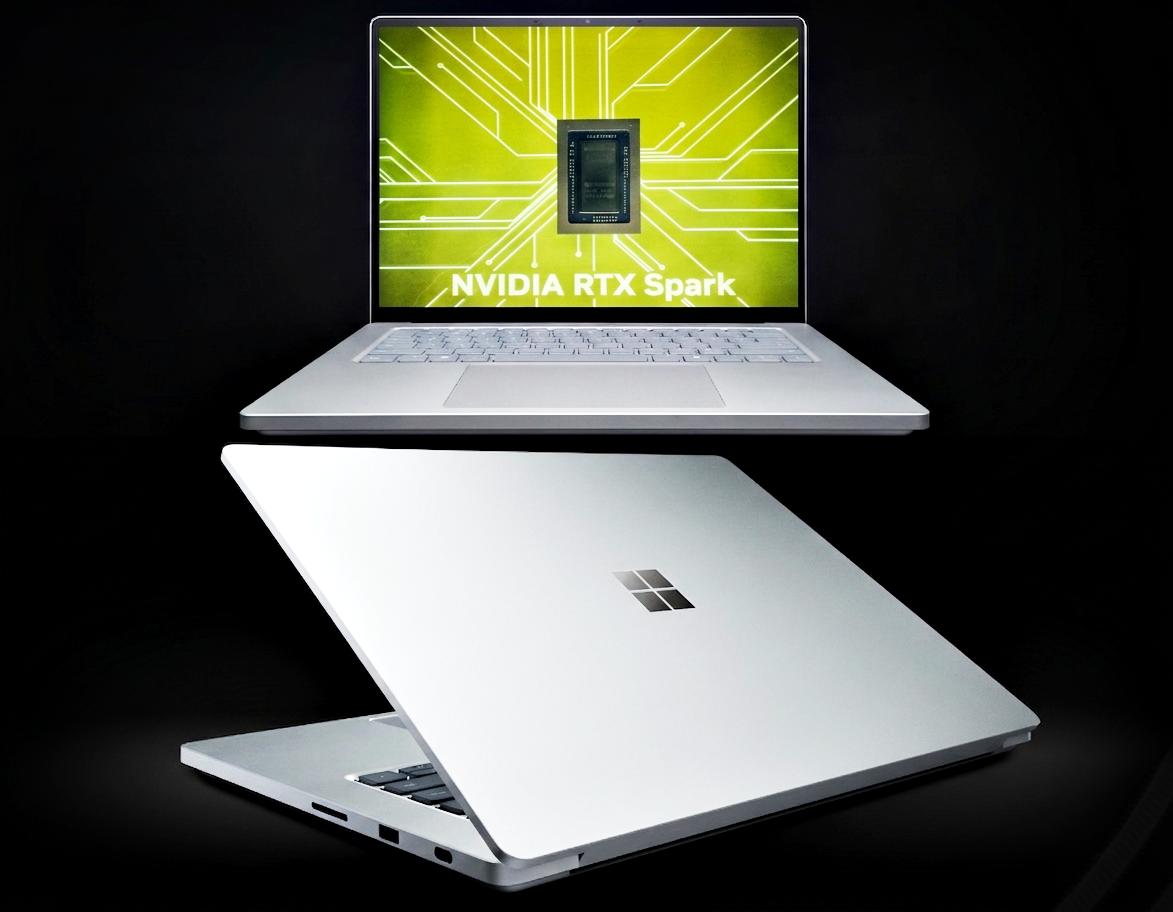
Microsoft has already announced the Surface Laptop Ultra, a 15-inch Windows laptop built around RTX Spark. The company describes it as its most powerful Surface Laptop yet, with up to 128GB of unified memory, full CUDA support, a Blackwell RTX GPU and up to 1 petaflop of theoretical FP4 AI performance.
But there is an important distinction between what has been announced and what consumers can actually buy.
Microsoft has not yet disclosed final US pricing or confirmed the full retail configuration and availability details. The company also explicitly identifies Surface Laptop Ultra as a pre-release product whose specifications can change and whose sale is subject to regulatory approval.
That makes October 7 important.
For consumers thinking about spending $1,500, $2,000, $3,000 or more on a premium Windows laptop, the event could provide information worth waiting for.
Key Takeaways
- RTX Spark is more than another laptop GPU: it combines a Blackwell GPU, Grace CPU and unified memory into one Windows-oriented platform.
- The October 7 Microsoft event is worth watching before buying a premium Windows laptop, because pricing and availability for RTX Spark systems remain incomplete.
- Do not buy based on AI numbers alone: independent battery, application, gaming and thermal testing will be more useful than NVIDIA’s theoretical AI-performance figures.
Table of Contents
- What is RTX Spark?
- Why Microsoft’s October 7 event matters
- RTX Spark specifications explained
- Why unified memory is important
- RTX Spark and local AI
- What RTX Spark means for gaming
- Windows on Arm and application compatibility
- Surface Laptop Ultra
- RTX Spark versus conventional Windows laptops
- What RTX Spark could mean for battery life
- Who should consider an RTX Spark laptop?
- Who should wait?
- The pricing question
- What competitors are doing
- What to watch after October 7
- Conclusion
- FAQs
What is RTX Spark?
RTX Spark is a new NVIDIA computing platform designed for Windows PCs.
At its highest configuration, NVIDIA lists a 20-core Grace CPU, a 6,144-core Blackwell RTX GPU and up to 128GB of unified LPDDR5X memory. NVIDIA also lists a second configuration with an 18-core CPU, 5,120-core GPU and up to 64GB of unified memory.
That makes RTX Spark fundamentally different from a conventional Windows laptop that combines an Intel or AMD CPU with a separate NVIDIA GeForce Laptop GPU.
In a conventional design, the CPU has system RAM while the discrete GPU has its own VRAM.
RTX Spark takes a different approach.
The CPU and GPU can work with the same memory pool.
That is particularly interesting for artificial intelligence.
Large AI models can require significant memory, and moving data between separate CPU and GPU memory pools can create additional overhead.
A unified architecture can simplify that relationship.
However, consumers should not interpret “128GB unified memory” as meaning the laptop has a conventional 128GB graphics card.
It does not.
The memory is shared across the system.
That distinction matters.
Why Microsoft’s October 7 event matters
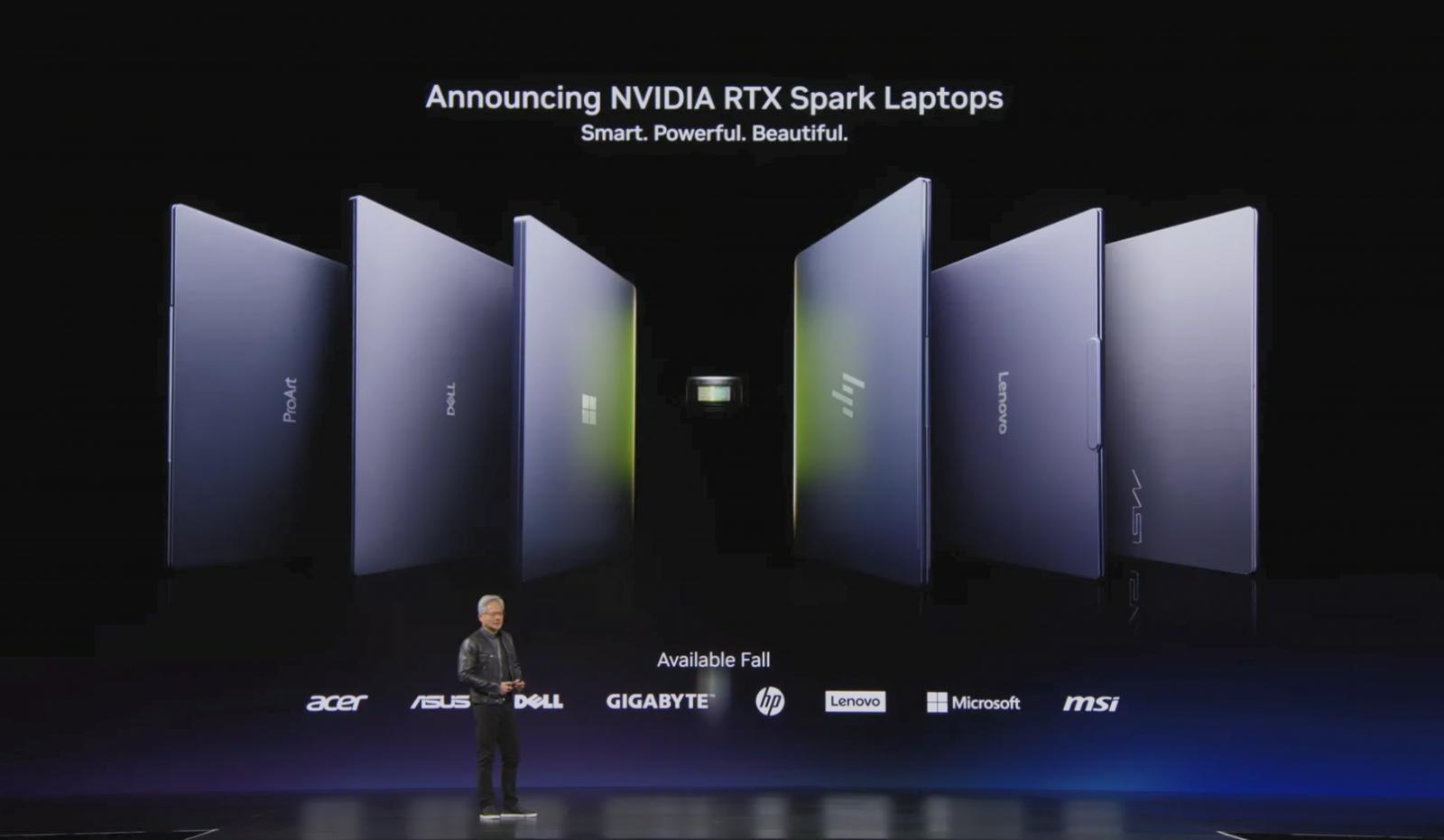
Microsoft has scheduled its Windows and Surface event for October 7, 2026, at 10 a.m. Pacific Time / 1 p.m. Eastern Time.
The company has framed the event around how local AI will shape the next chapter of the PC. NVIDIA CEO Jensen Huang is also expected to appear.
That combination is significant.
Microsoft controls Windows.
NVIDIA controls one of the world’s most important AI and graphics platforms.
And Surface Laptop Ultra is the first Microsoft laptop officially designed around NVIDIA RTX Spark.
Microsoft says the Surface Laptop Ultra combines a Blackwell RTX GPU, up to 128GB unified memory and full CUDA support.
The company also says it is designed for developers, creators and AI builders rather than being a conventional mainstream laptop.
That positioning is important.
RTX Spark is not necessarily intended to replace every Intel, AMD or Qualcomm Windows laptop.
Instead, it creates another high-end path.
RTX Spark specifications explained
NVIDIA’s current specifications show two laptop-oriented RTX Spark N1X configurations.
The higher configuration has:
- 20-core NVIDIA Grace CPU
- 6,144-core Blackwell RTX GPU
- Up to 128GB LPDDR5X unified memory
- 45–80W listed power range
- Fourth-generation ray-tracing cores
- Fifth-generation Tensor cores
- CUDA support
- DLSS
- NVIDIA Reflex
- NVIDIA Broadcast
- Windows 11 support
The other listed configuration has:
- 18-core Grace CPU
- 5,120-core Blackwell RTX GPU
- Up to 64GB LPDDR5X unified memory
- 45–80W listed power range
- Fourth-generation ray tracing
- Fifth-generation Tensor cores
- CUDA support
- Windows 11 support.
The specifications are impressive on paper.
But laptop buyers should remember that specifications do not automatically translate into equivalent performance between different chassis.
Cooling matters.
Power limits matter.
Memory configuration matters.
Firmware matters.
Drivers matter.
And the laptop manufacturer’s thermal design can significantly influence sustained performance.
That is why independent reviews will be essential once retail systems become available.
Why unified memory is important
Unified memory is arguably the most interesting technical feature of RTX Spark.
Imagine a traditional laptop as having two warehouses.
The CPU uses one warehouse.
The GPU uses another.
If a workload needs information from the other warehouse, data has to move between them.
RTX Spark changes the arrangement.
The CPU and GPU can access a shared pool.
This architecture is already familiar to Apple Silicon users, although NVIDIA’s implementation is aimed at a very different software and performance ecosystem.
The practical benefit becomes more interesting when AI workloads become large.
An AI developer may need to load a large model into memory.
A creator may simultaneously process large video files.
A developer may run multiple AI services.
A workstation user may combine 3D rendering, compilation and AI inference.
With enough unified memory, those workloads can potentially coexist without the same rigid division between system RAM and GPU VRAM.
But there is an important caveat.
More memory does not automatically mean more performance.
A model can fit in memory and still run slowly.
The memory capacity solves one limitation.
It does not solve every computational limitation.
That is why independent application testing will matter more than capacity numbers alone.
RTX Spark and local AI
AI is clearly the central reason NVIDIA created RTX Spark.
NVIDIA advertises up to 1 petaflop of FP4 AI performance and up to 128GB of unified memory.
Microsoft says the Surface Laptop Ultra can support local models with as many as 120 billion parameters.
Those are major capability claims.
But they need context.
A theoretical FP4 performance figure is not the same as the speed a consumer will experience in ChatGPT-like applications, image-generation software or a local coding assistant.
AI workloads vary enormously.
A model may be limited by:
- compute throughput;
- memory bandwidth;
- model architecture;
- quantization;
- software optimization;
- framework support;
- storage speed;
- CPU performance;
- thermal limits;
- context size.
For that reason, TechOzea should treat the 1-petaflop figure as a manufacturer specification, not an independent performance result.
The more useful future benchmarks will answer questions such as:
- How many tokens per second can a local model generate?
- How quickly can an image model generate an image?
- How does RTX Spark compare with an RTX 5090 Laptop GPU?
- How much power does it use during sustained inference?
- How much performance is retained after 30 or 60 minutes?
- Can creators run large models while simultaneously editing video?
- How well do CUDA applications perform on the Windows platform?
Those are the tests consumers actually need.
What RTX Spark means for gaming
RTX Spark is not exclusively an AI platform.
NVIDIA also positions it for gaming.
The platform supports NVIDIA’s RTX ecosystem, including ray tracing, DLSS and Reflex.
That creates an interesting possibility.
For years, gaming laptops have largely required a compromise.
More GPU performance usually means:
- larger cooling systems;
- bigger chargers;
- heavier chassis;
- higher fan noise;
- greater power consumption.
RTX Spark is designed to change that balance.
NVIDIA says RTX Spark can fit into thin Windows laptops while maintaining RTX graphics capabilities.
The company has also promoted 1440p gaming at more than 100 frames per second with ray tracing and DLSS as a capability target. That should be treated as a company performance claim, not an independent benchmark.
The real test will be retail hardware.
A 14-inch RTX Spark laptop with limited cooling will behave differently from a larger 16-inch design.
And a laptop manufacturer may configure the same platform differently.
Therefore, buyers should wait for independent gaming benchmarks before deciding that RTX Spark is a replacement for a conventional high-powered GeForce gaming laptop.
Windows on Arm and application compatibility
This may be the most important issue for everyday Windows users.
RTX Spark is based on an Arm-oriented architecture.
That creates an immediate question:
Will my Windows software work?
Windows on Arm has improved significantly.
Microsoft’s Prism emulation system allows Windows 11 on Arm to run x86 and x64 applications. Microsoft explains that Prism translates x86 instructions into Arm64 instructions and includes optimizations intended to improve performance.
Microsoft has also expanded support for native Arm applications.
Its Windows-on-Arm documentation lists native versions of applications including Microsoft 365 applications and other popular software.
That is good news.
But compatibility is not simply a yes-or-no question.
A basic productivity application may work perfectly.
A specialized application with a custom kernel driver may be more complicated.
A game with aggressive anti-cheat technology can introduce additional complications.
Professional hardware software can also depend on specialized drivers.
So if you are buying an RTX Spark laptop for work, do not ask only:
“Does Windows support my software?”
Ask:
“Does my exact application, plugin, driver and peripheral setup work properly on Windows on Arm?”
That is a much better buying question.
Surface Laptop Ultra
Surface Laptop Ultra is the most visible RTX Spark laptop.
Microsoft describes it as its most powerful Surface Laptop yet.
The machine has a 15-inch mini-LED PixelSense Ultra touchscreen with up to 2,000 nits peak HDR brightness and 262 pixels per inch. Microsoft also lists HDMI, USB-C, USB-A, SD card and a headphone jack.
Those ports are notable because many premium thin laptops are increasingly USB-C-centric.
For creators, an SD card reader can be useful.
For photographers and videographers, it reduces the need for adapters.
For general users, HDMI can simplify presentations and external displays.
Microsoft also emphasizes repairability as part of the Surface Laptop Ultra design philosophy, although the exact service procedures and component-level replacement options should be independently assessed after retail availability.
TechOzea’s best lightweight laptop guide is useful background for understanding why the combination of high performance and portability matters in this category.
RTX Spark versus conventional Windows laptops
The simplest comparison is architectural.
Traditional premium Windows laptop
Typically:
- Intel or AMD CPU
- DDR5/LPDDR5X system memory
- Separate NVIDIA GPU in performance models
- Dedicated GPU memory
- Windows x86-64 ecosystem
RTX Spark laptop
Typically:
- NVIDIA Grace Arm CPU
- NVIDIA Blackwell GPU
- Unified memory
- CUDA
- Windows 11
- Arm-based architecture
Neither approach is automatically better.
They target different priorities.
A traditional Intel/AMD/NVIDIA laptop can offer a highly mature software ecosystem.
RTX Spark offers a tighter CPU/GPU/memory architecture and direct access to NVIDIA’s AI and CUDA ecosystem.
For a consumer who mostly uses Microsoft Office, Chrome, Zoom and streaming services, RTX Spark may be unnecessary.
For an AI developer, CUDA developer or creator running GPU-accelerated applications, the platform could be far more compelling.
What RTX Spark could mean for battery life
Battery life is another area where marketing claims need caution.
NVIDIA describes RTX Spark as an efficient platform designed for all-day battery life.
Microsoft similarly says Surface Laptop Ultra offers all-day battery life, but explicitly notes that the claim is based on internal testing of pre-release units and varies according to usage and settings.
That is exactly the distinction buyers should make.
Company claim: all-day battery life.
Independent fact: not yet established for retail configurations.
AI workloads are especially demanding.
Running a browser is not equivalent to generating AI content locally.
Gaming is not equivalent to reading email.
A 120-billion-parameter model is not equivalent to watching YouTube.
Therefore, the first serious reviews should test:
- web browsing;
- office productivity;
- video playback;
- video calls;
- local AI inference;
- photo editing;
- video editing;
- gaming;
- sleep/standby;
- charging time.
Only then can consumers understand the real battery-life trade-off.
Who should consider an RTX Spark laptop?
RTX Spark deserves serious attention if you are:
An AI developer
CUDA compatibility and large unified memory could make RTX Spark particularly interesting for local model development.
A creator
Video, 3D and AI-assisted creative applications can benefit from GPU acceleration and large memory pools.
A developer
Local AI agents and large development workloads could benefit from having more compute available without relying entirely on cloud services.
A gamer who also works with AI
This could be one of the most interesting user groups because RTX Spark combines NVIDIA gaming technologies with local AI capabilities.
A professional who needs high-end portable compute
The Surface Laptop Ultra and other RTX Spark systems are designed around the idea of bringing workstation-class workloads into a more portable form.
Who should wait?
Most everyday laptop buyers should not rush to buy an RTX Spark system.
If you mainly:
- browse the web;
- use Microsoft 365;
- attend Zoom meetings;
- stream Netflix;
- write documents;
- use social media;
- manage email;
you probably do not need 128GB of unified memory and a high-end Blackwell GPU.
You may get more value from a lighter and less expensive laptop.
For example, TechOzea’s Best MacBook guide provides useful context for comparing Apple’s unified-memory approach with mainstream Windows alternatives.
Likewise, buyers specifically seeking touch input can review TechOzea’s touchscreen laptop guide.
The point is not that RTX Spark is bad.
It is that capability should match workload.
The pricing question
Pricing is currently one of the biggest unknowns.
Microsoft has not yet announced final Surface Laptop Ultra pricing in the information available before the October 7 event. Windows Central also identified pricing and availability as major details still outstanding.
That makes the October 7 event especially important.
The value calculation will depend heavily on the entry configuration.
A $1,500 RTX Spark laptop would be a very different proposition from a $3,000 workstation-class machine.
The same is true of memory.
A 32GB system may be appropriate for many professionals.
A 64GB system could appeal to advanced creators.
A 128GB configuration is much more specialized.
Buyers should not automatically assume that the highest memory configuration is the best choice.
What competitors are doing
RTX Spark enters an increasingly crowded AI-PC market.
Apple has already normalized unified memory through Apple Silicon.
Qualcomm has pushed Windows on Arm with Snapdragon X platforms.
AMD has expanded Ryzen AI systems with NPUs capable of local AI acceleration.
Intel continues to develop Core Ultra platforms with integrated NPUs and graphics.
Microsoft itself has made Copilot+ PCs an important part of its Windows strategy.
The difference is that RTX Spark emphasizes a much stronger NVIDIA GPU and CUDA ecosystem.
That could be its biggest competitive advantage.
For AI developers, CUDA compatibility can matter more than a simple processor benchmark.
For gamers, NVIDIA’s established RTX ecosystem is also valuable.
For everyday consumers, however, those advantages may not justify a premium.
The biggest risk: buying before independent testing
This is the most important advice for potential buyers.
Do not purchase RTX Spark solely because NVIDIA says it can run large AI models.
Do not purchase it solely because Microsoft calls Surface Laptop Ultra its most powerful Surface.
Do not assume a theoretical 1-petaflop number translates directly into real-world speed.
Wait for independent testing where possible.
The important tests will be:
- sustained CPU performance;
- sustained GPU performance;
- AI inference;
- application compatibility;
- battery life;
- gaming;
- fan noise;
- chassis temperatures;
- display quality;
- storage performance;
- Wi-Fi performance;
- webcam quality;
- charging;
- sleep/standby behavior.
That information will determine whether RTX Spark is genuinely revolutionary or simply another expensive high-end platform.
What to watch on October 7
The most important details from Microsoft’s event will be:
1. US pricing
This determines whether Surface Laptop Ultra is a luxury workstation or a genuinely competitive premium laptop.
2. Retail availability
A product announcement is not the same thing as a product consumers can buy.
3. Final configurations
Memory and storage options could significantly change the value equation.
4. Battery testing
Microsoft’s internal claim needs independent verification.
5. Windows compatibility
This is crucial for mainstream adoption.
6. AI software
Hardware alone will not make local AI useful.
Microsoft needs software that takes advantage of the platform.
7. Independent benchmark availability
This may ultimately matter more than any keynote specification.
What happens next?
RTX Spark could push the Windows laptop market in an interesting direction.
Instead of treating AI as simply another feature inside a CPU, manufacturers could increasingly build laptops around large local models.
That would change the hardware requirements.
Instead of asking whether a laptop has a 40 or 50 TOPS NPU, consumers could eventually ask:
- How much AI model memory can it support?
- How fast is local inference?
- Which models can run locally?
- Which AI applications use the GPU?
- Does the software work offline?
- How much energy does local AI consume?
- How private is local processing?
That would be a more meaningful definition of an AI PC.
RTX Spark could help accelerate that transition.
But the technology still needs to prove itself outside demonstrations and specifications.
Conclusion
NVIDIA RTX Spark is one of the more interesting developments in the Windows laptop market this year.
Its importance comes from the combination of technologies.
It is not simply an Arm processor.
It is not simply a GPU.
It is not simply an AI accelerator.
RTX Spark combines an Arm CPU, Blackwell RTX graphics and a large unified memory architecture while retaining access to NVIDIA’s CUDA ecosystem.
That creates a potentially powerful platform for local AI, development, creative work and gaming.
Microsoft’s Surface Laptop Ultra shows what the architecture can look like in a premium portable computer.
But consumers should remain disciplined.
The headline numbers are impressive, yet several important questions remain unanswered.
How much will RTX Spark laptops cost?
How long will their batteries actually last?
How well will Windows applications work?
How fast will local AI inference be?
How much performance will the thin chassis sustain?
And how will these machines compare with the best Intel, AMD, Qualcomm and Apple laptops once independent reviewers test them?
Those questions are more important than a single AI-performance number.
For that reason, the October 7 Microsoft event is worth watching before making a major premium-laptop purchase.
If you need a laptop today for ordinary productivity, there is little reason to wait.
But if you are an AI developer, creator, advanced Windows user or gamer considering a high-end machine, RTX Spark could make the next generation of Windows laptops considerably more interesting.
The technology is promising.
The buying decision should wait for the evidence.
FAQS
What is NVIDIA RTX Spark?
RTX Spark is an NVIDIA computing platform combining an Arm-based Grace CPU, Blackwell RTX GPU and unified memory for Windows PCs.
How much memory can RTX Spark support?
NVIDIA lists configurations with up to 128GB of unified LPDDR5X memory.
Is RTX Spark a CPU or GPU?
It is better understood as a combined system platform. The RTX Spark superchip integrates NVIDIA Grace CPU and Blackwell GPU technology.
Can RTX Spark run Windows?
Yes. NVIDIA lists Windows 11 as the supported operating system for its RTX Spark configurations.
Is Surface Laptop Ultra an RTX Spark laptop?
Yes. Microsoft says Surface Laptop Ultra is engineered around NVIDIA RTX Spark and includes a Blackwell RTX GPU and up to 128GB unified memory.
Is Surface Laptop Ultra available now?
Not according to the information available before Microsoft’s October 7 event. Microsoft says the product will be available later in 2026 and identifies it as a pre-release product.
Should I buy an RTX Spark laptop?
Wait for independent reviews if your workload depends on performance, compatibility or battery life. The platform is particularly interesting for AI developers, creators and advanced users, but may be unnecessary for basic productivity.
Will all Windows applications work on RTX Spark?
Windows 11 on Arm supports x86 and x64 application emulation through Prism, and native Arm software support continues to expand. However, specialized applications, drivers and peripherals can still require compatibility testing.
