




Apple’s iPhone 18 Pro already had one of the most unusual smartphone camera upgrades of the year: a mechanical variable aperture on its 48MP Fusion Main camera.
Now Apple has given that hardware a much more practical reason to exist.
On September 29, Apple released Final Cut Camera 2.4, a major update to its professional iPhone video-recording application. The update adds direct support for the iPhone 18 Pro‘s variable aperture, along with aperture-priority and shutter-priority shooting, professional video scopes, cleaner monitoring tools, Genlock offset and clean SDI output.
That changes the story.
When Apple introduced the iPhone 18 Pro, variable aperture sounded like a significant camera specification. But a camera feature is only as useful as the software that exposes it.
Final Cut Camera now does exactly that.
For everyday iPhone owners, the update may not radically change how they take photos or videos.
For creators, journalists, filmmakers, livestreamers and advanced mobile shooters, however, the update is considerably more important.
It turns variable aperture from a headline specification into a controllable part of the video-production workflow.
Key Takeaways
- Final Cut Camera 2.4 makes the iPhone 18 Pro’s variable aperture genuinely useful, adding direct aperture control plus aperture- and shutter-priority shooting for more deliberate video production.
- Professional creators gain a much more capable mobile workflow, including video scopes, improved exposure and focus controls, ProRes and Apple Log workflows, clean SDI output, and Genlock support.
- The update does not turn the iPhone 18 Pro into a cinema camera. Larger sensors, interchangeable lenses, ergonomics, heat management, storage, and specialized accessories still give traditional cameras important advantages.
- The biggest opportunity is for creators who want portability without giving up manual control. Everyday users can continue using the standard Camera app, while filmmakers, journalists, YouTubers, and livestreamers can take advantage of the deeper controls.
Table of Contents
- What Apple Changed
- Why Variable Aperture Matters
- How the iPhone 18 Pro Aperture Works
- What Final Cut Camera 2.4 Adds
- Aperture Priority vs. Shutter Priority
- Why This Matters for Video
- ProRes and Apple Log Become More Useful
- Cinematic Effects After Recording
- Video Scopes Bring a More Professional Workflow
- What Clean SDI Output Actually Means
- Why Genlock Matters
- The Third-Party Camera-App Competition
- What Everyday iPhone Owners Gain
- What Professional Creators Gain
- What the Update Does Not Prove
- iPhone 18 Pro vs. Traditional Cameras
- Battery, Storage and Workflow Considerations
- Who Should Use Final Cut Camera?
- Who Probably Doesn’t Need It?
- What to Watch Next
- Conclusion
- FAQs
What Apple changed
The headline feature in Final Cut Camera 2.4 is support for the iPhone 18 Pro’s variable aperture.
Apple says the new version allows creators to precisely adjust aperture settings or choose aperture-priority and shutter-priority modes.
That sounds technical because it is.
But the underlying idea is simple.
A smartphone camera normally tries to make most of the exposure decisions for you.
That is exactly what most people want.
You point the camera, press record and expect the phone to produce usable footage.
Professional video work is different.
A filmmaker may deliberately choose a shutter speed because they want a particular amount of motion blur.
A creator may choose an aperture because they want more or less depth of field.
A journalist may need exposure monitoring tools to prevent highlights from clipping.
A livestream operator may need a clean video output rather than a screen filled with camera controls.
Final Cut Camera is designed for those situations.
The update therefore matters less because it adds another button and more because it gives creators access to a more complete camera-control workflow.
Why variable aperture matters
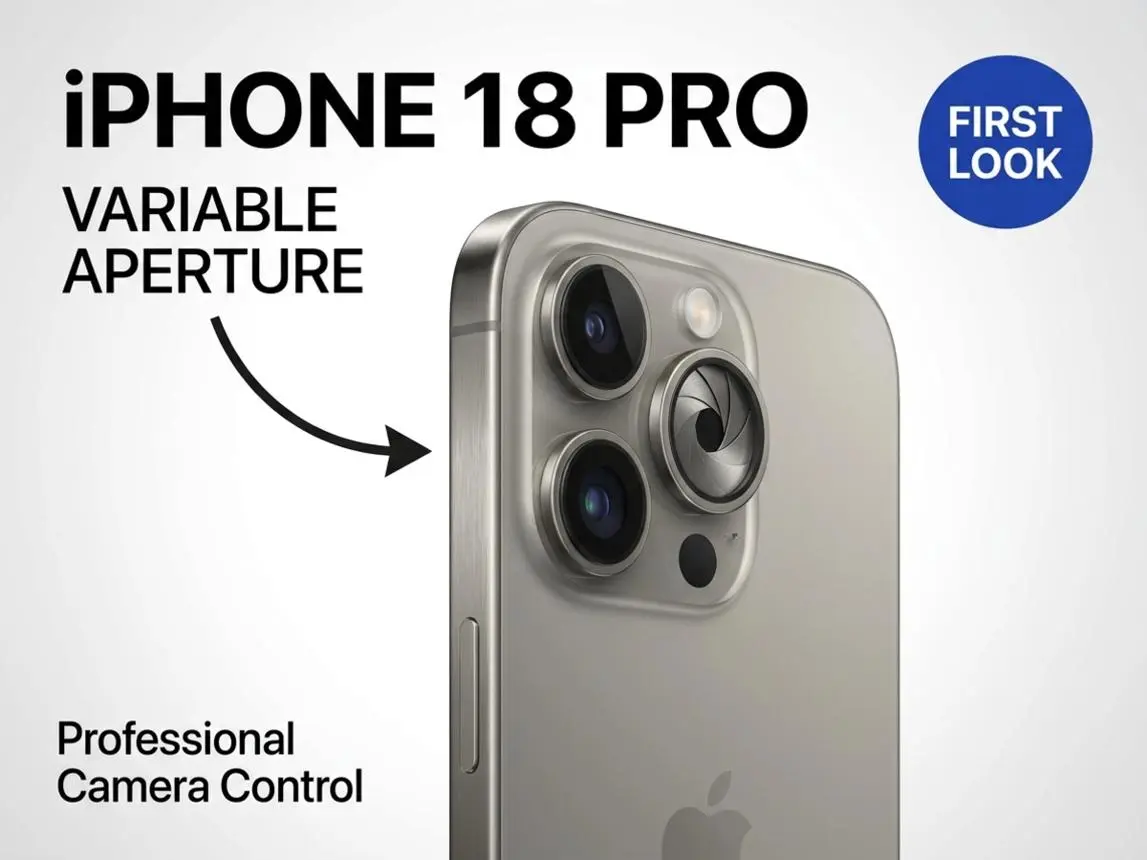
Aperture describes the opening through which light enters a camera lens.
The lower the f-number, the wider the opening.
The iPhone 18 Pro’s Fusion Main camera can move between ƒ/1.48, ƒ/1.8, ƒ/2.8 and ƒ/4.0.
At ƒ/1.48, the lens is at its widest listed setting.
At ƒ/4.0, it is significantly narrower.
That creates two major photographic consequences.
First, the amount of light reaching the sensor changes.
Second, the depth of field changes.
A wider aperture can help isolate a subject, while a narrower aperture can keep more of a scene acceptably sharp.
On a smartphone, the effect is more limited than on a large interchangeable-lens camera because smartphone sensors and lenses are physically smaller.
That distinction matters.
It would be misleading to tell buyers that an iPhone 18 Pro at ƒ/1.48 suddenly produces the same optical rendering as a full-frame camera with a large professional lens.
It does not.
But that does not make variable aperture useless.
It gives the camera another physical control over light and depth of field.
And Final Cut Camera makes that control accessible during video recording.
How the iPhone 18 Pro aperture works
Apple’s system uses a mechanical aperture in the Fusion Main camera.
The four official settings are:
| Aperture | General effect |
|---|---|
| ƒ/1.48 | Maximum listed light gathering and shallower depth of field |
| ƒ/1.8 | General-purpose setting |
| ƒ/2.8 | More depth of field with less light |
| ƒ/4.0 | Maximum listed depth of field |
Confirmed: These four aperture positions are part of Apple’s iPhone 18 Pro camera specification.
Company claim: Apple says ƒ/1.48 delivers approximately 50% better low-light performance.
That second statement should not be confused with an independent laboratory result.
The practical benefit depends on the entire imaging pipeline, including sensor behavior, image processing, shutter speed, ISO and scene conditions.
This is one reason Final Cut Camera is interesting.
It allows the creator to make more of those decisions deliberately.
What Final Cut Camera 2.4 adds
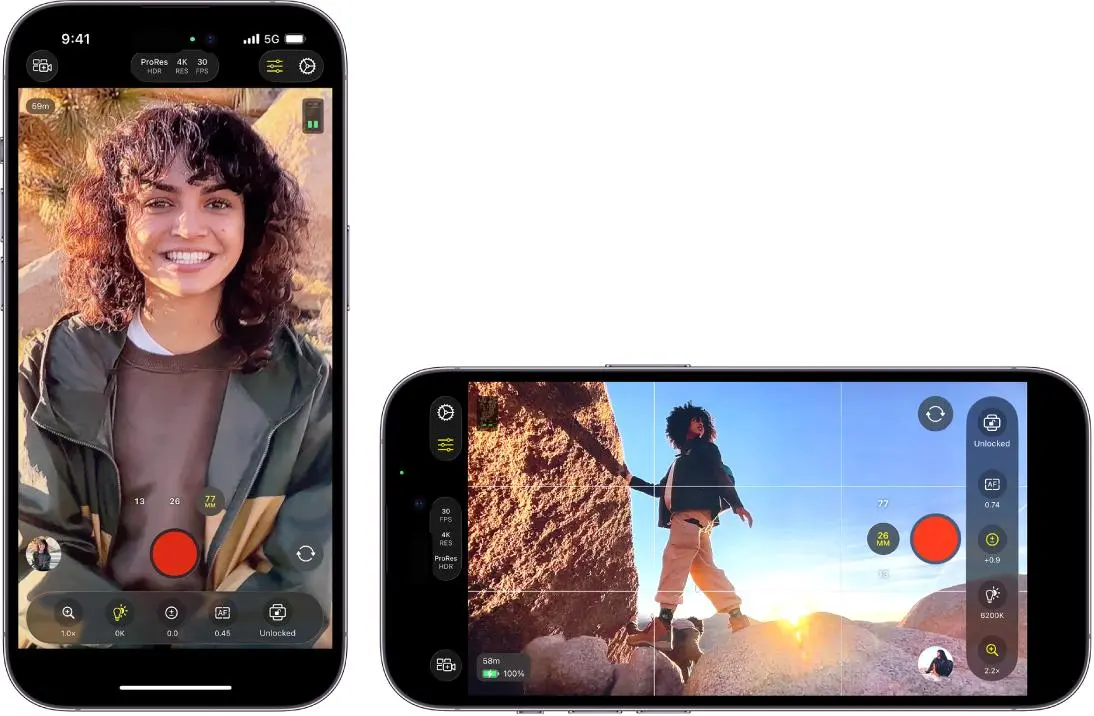
Apple’s update includes a surprisingly broad collection of professional controls.
The redesigned application provides easier access to:
- shutter angle;
- ISO;
- white balance;
- aperture;
- focus controls;
- exposure monitoring.
It also adds customizable overlays including false color and clipping indicators. Focus peaking has been improved with sensitivity control. A recording tally light indicates when recording is underway. A two-finger tap can clear the viewfinder controls so the creator can concentrate on the composition.
Individually, none of these features changes the iPhone into a cinema camera.
Together, they create something more useful: a workflow that gives an experienced operator more control over the recording process.
That distinction is important.
The real value of professional camera software isn’t necessarily that it makes footage automatically better.
It allows skilled users to make deliberate decisions.
Aperture priority versus shutter priority
This is where the update becomes more interesting for people who understand exposure.
Aperture priority
In aperture-priority shooting, the creator selects the aperture while the camera manages shutter speed to maintain exposure.
That can be useful when depth of field is the creative priority.
For example, imagine filming an interview.
You may want the subject to remain visually separated from the background.
You can select a wider aperture and allow the camera to manage other exposure variables.
Shutter priority
Shutter priority reverses the emphasis.
You choose the shutter behavior, while the camera adjusts other exposure parameters.
This is particularly useful when motion rendering is important.
A filmmaker might want to maintain a particular shutter relationship while filming movement.
That is a much more meaningful professional control than simply adding another camera-mode icon.
Manual control
Manual operation gives the creator the most direct control.
That is useful when consistency matters.
If you’re recording multiple takes under the same lighting conditions, constantly changing automatic exposure can make clips harder to match.
Manual control can reduce those changes.
Again, however, this is primarily an advanced-user feature.
Most people should probably continue using Apple’s simpler automatic camera modes.
Why this matters for video
Variable aperture has a particularly interesting role in video.
In photography, you capture one frame.
In video, you’re capturing a sequence of frames where consistency matters.
Automatic exposure changes can become visible.
A camera that suddenly changes brightness because someone walks into the frame can make footage look less polished.
Having direct control over aperture, shutter behavior and ISO gives a trained operator more tools to manage those transitions.
That doesn’t mean manual shooting is always better.
Automatic exposure can be extremely useful when conditions change rapidly.
The advantage is flexibility.
The creator can choose automation when it is useful and manual control when consistency matters.
ProRes and Apple Log become more useful
Final Cut Camera 2.4 also extends Cinematic effects to regular video, including footage recorded in ProRes and Apple Log. Apple says creators can then adjust focus points and depth of field during editing in Final Cut Pro.
This is a major workflow improvement for people who already use Apple’s professional video ecosystem.
ProRes provides a production-oriented video format designed for editing workflows.
Apple Log is intended to preserve more flexibility for color grading.
The important point is that the camera and editing pipeline are becoming more closely integrated.
Instead of:
record → accept the phone’s processing → export
the workflow can become:
control exposure → record in a production format → edit → adjust focus/depth effects → grade → export
That is much closer to how dedicated video production works.
It still isn’t identical to a cinema-camera workflow.
But the gap is narrower than it was.
Cinematic effects after recording
Apple’s update allows Cinematic effects to be applied to regular video.
This is another example of Apple’s computational photography approach working alongside physical camera controls.
The phone captures the footage, then software can provide additional focus and depth-of-field manipulation during post-production.
That creates an interesting hybrid.
The aperture provides physical optical control.
The software provides computational control.
The two systems do different things.
Physical aperture changes how light enters the lens.
Computational processing can analyze the scene and modify the appearance of focus or depth effects.
The advantage is flexibility.
The disadvantage is that computational effects can make mistakes.
Hair, transparent objects, complex backgrounds and fast movement can be difficult for depth-estimation systems.
That is why creators should treat software-generated depth effects as a tool rather than a replacement for optical control.
Video scopes bring a more professional workflow
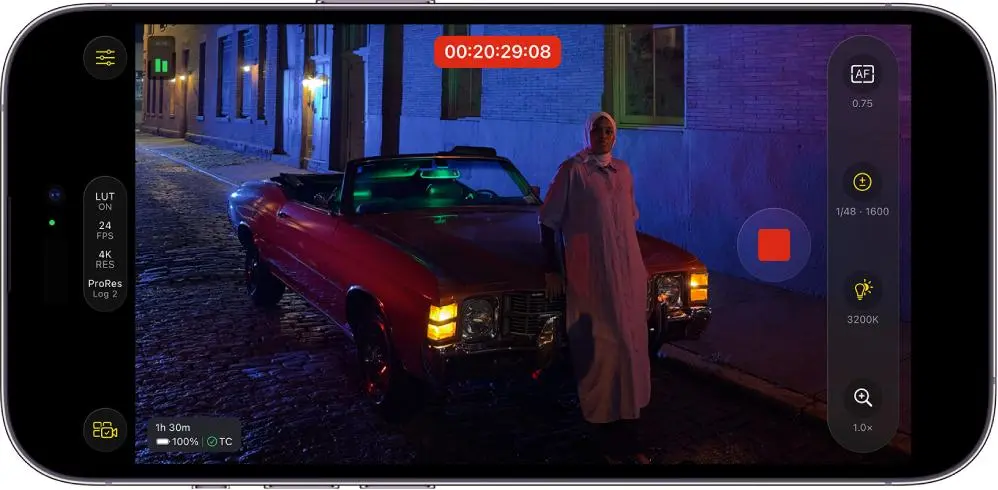
One of the less glamorous but more important additions is support for professional video scopes.
Apple specifically mentions an RGB Parade and histogram.
These tools help creators evaluate exposure and color.
A histogram provides a visual representation of brightness distribution.
An RGB Parade separates red, green and blue channels, making it easier to identify color imbalance and exposure problems.
For casual users, this may look intimidating.
For a video professional, it can be far more useful than simply judging the image by eye.
A phone display can look bright and attractive while the recorded image contains clipped highlights or problematic color balance.
Scopes provide objective information.
That is one reason this update matters beyond aperture.
Apple is not simply adding a camera slider.
It is adding monitoring tools associated with professional production.
What clean SDI output actually means
Apple also added clean SDI output support through an HDMI-to-SDI converter.
This is a highly specialized feature.
SDI, or Serial Digital Interface, is widely used in professional video infrastructure.
The important word here is clean.
Instead of sending a phone interface filled with controls, a clean output provides the video signal for external equipment.
That can matter in broadcast and livestreaming environments.
It is unlikely to matter to the average iPhone owner.
But its inclusion tells us something about Apple’s target audience for Final Cut Camera.
The company is no longer positioning the app merely as a better alternative to the standard Camera application.
It is building tools for users who connect phones to professional video systems.
Why Genlock matters
Genlock is another specialist feature that most consumers will never use.
The basic problem is synchronization.
When multiple cameras or displays are involved, tiny timing differences can produce artifacts or latency issues.
Apple says Genlock offset in Final Cut Camera can compensate for image artifacts from recording a display or latency differences between the iPhone and other genlocked cameras.
For a person recording TikTok videos, this is irrelevant.
For a production team using multiple cameras, it can be important.
That distinction is worth emphasizing because smartphone specifications increasingly include professional features that sound impressive but have little relevance to everyday buyers.
The presence of Genlock does not make the iPhone better for everyone.
It makes the iPhone more adaptable to certain professional workflows.
The third-party camera-app competition
Perhaps the most interesting development is that Apple isn’t the only company exploiting the iPhone 18 Pro’s aperture hardware.
The Verge reports that Halide Mark III has added more granular manual aperture control, allowing users to select aperture values across the iPhone 18 Pro’s range instead of being limited to Apple’s four native positions.
That creates a broader ecosystem around the hardware.
It also illustrates why APIs matter.
Apple can build the underlying camera hardware, but third-party developers can decide how to expose it to photographers.
Other camera applications are also moving quickly.
The Verge has reported on updates from Blackmagic Camera and Moment that provide more granular aperture controls on the iPhone 18 Pro.
This creates an interesting competitive situation.
Apple controls the hardware.
Apple controls iOS.
But professional camera developers compete over how best to use that hardware.
That competition could ultimately make the iPhone 18 Pro more useful than Apple’s own camera application alone would suggest.
What everyday iPhone owners gain
For ordinary users, the answer is surprisingly simple:
Not much has to change.
You don’t need Final Cut Camera to take better vacation photos.
You don’t need to understand shutter angle to record your child’s birthday.
You don’t need a histogram to film a quick social-media clip.
The standard Camera app remains the appropriate tool for those situations.
The advantage of the iPhone 18 Pro’s variable aperture is that automatic systems can use it when appropriate.
Apple says the camera can adjust aperture automatically based on lighting and depth-of-field conditions.
So ordinary users can benefit from the hardware without learning professional photography.
That’s actually a strength.
Advanced controls can exist underneath a simple interface.
What professional creators gain
The benefits are much larger for advanced users.
A filmmaker can control aperture.
A camera operator can monitor exposure with scopes.
A livestream producer can send clean video output.
A multicamera production can use Genlock-related controls.
A colorist can work with Apple Log.
A video editor can work with ProRes.
A photographer can use third-party apps for more granular aperture control.
Those capabilities do not necessarily make the iPhone 18 Pro the best camera for every production.
They make it a more flexible production tool.
That is an important distinction.
What the update does not prove
There is a temptation to interpret this update as evidence that the iPhone 18 Pro has replaced traditional cameras.
That conclusion would go too far.
The iPhone still has physical limitations.
Sensor size matters.
Lens selection matters.
Ergonomics matter.
Heat management matters.
Storage matters.
Audio matters.
Battery capacity matters.
Long-duration recording can place significantly different demands on a smartphone than taking short clips.
A dedicated camera can also provide interchangeable lenses, larger sensors, physical controls and professional accessories.
The iPhone’s advantage is portability.
It combines camera, editing computer, communication device, storage, networking and display in one pocketable product.
That can be enormously valuable.
But portability is not the same thing as absolute image quality.
iPhone 18 Pro versus traditional cameras
The comparison should therefore be made by workflow rather than by marketing language.
The iPhone advantage
- extremely portable;
- connected to cellular networks;
- immediate editing;
- easy sharing;
- computational photography;
- integrated stabilization;
- professional video software;
- built-in display;
- multiple cameras;
- rapid software updates;
- increasingly sophisticated manual controls.
Traditional-camera advantages
- larger sensors;
- interchangeable lenses;
- stronger optical flexibility;
- larger physical controls;
- greater accessory ecosystem;
- stronger long-duration production ergonomics;
- specialized audio and monitoring options.
The iPhone does not need to win every category.
Its value is that it can cover a surprisingly large portion of a production workflow with a device people already carry.
Battery, storage and workflow considerations
Professional video features have another consequence: storage and power consumption.
ProRes video can consume substantially more storage than heavily compressed consumer formats.
High-resolution recording also places greater demands on the processor and storage system.
Creators therefore need to think about:
- available storage;
- external storage workflows;
- battery level;
- heat;
- recording duration;
- file transfer;
- editing storage;
- backup.
A phone that can technically record professional footage is not automatically convenient for a two-hour production.
The practical workflow matters.
This is particularly important for journalists and creators who may be away from a computer.
The iPhone’s connectivity becomes a major advantage in those scenarios.
Footage can be uploaded, transferred or shared without returning to a traditional workstation.
Who should use Final Cut Camera?
Final Cut Camera makes the most sense for:
- professional videographers;
- journalists;
- YouTubers;
- filmmakers;
- livestreamers;
- mobile documentary creators;
- advanced hobbyists;
- creators already using Final Cut Pro.
It can also be useful for anyone who specifically wants manual exposure control.
Who probably doesn’t need it?
Most people.
If you use your iPhone for:
- family photos;
- Instagram;
- TikTok;
- short clips;
- video calls;
- travel snapshots;
the default Camera application is likely sufficient.
Professional controls introduce complexity.
The best camera interface is often the one that lets you get the shot without making you think about the camera.
What to watch next
The most interesting development will be independent testing.
We need to see controlled comparisons of:
- ƒ/1.48 versus ƒ/1.8;
- ƒ/1.8 versus ƒ/2.8;
- ƒ/2.8 versus ƒ/4;
- low-light video;
- motion rendering;
- skin tones;
- highlight retention;
- depth-of-field differences;
- stabilization;
- sustained recording;
- heat;
- battery consumption.
We also need more testing of third-party camera apps.
The competition between Final Cut Camera, Halide, Blackmagic Camera and Moment could become one of the most interesting parts of the iPhone 18 Pro camera story.
Apple built the hardware.
Now developers are exploring what that hardware can actually do.
The bigger smartphone-camera trend
This update also says something important about where smartphone cameras are going.
For years, smartphone photography moved toward automation.
The phone decided exposure.
The phone decided HDR processing.
The phone decided noise reduction.
The phone decided sharpening.
The phone decided focus.
The computational pipeline became increasingly sophisticated.
Now we’re seeing a partial return of manual control.
That does not mean computational photography is going away.
Quite the opposite.
The next generation of smartphone cameras will likely combine physical controls with computational intelligence.
The phone can automate the difficult parts when the user wants convenience.
It can expose deeper controls when the user wants creative control.
That hybrid model may be more useful than either extreme.
Conclusion
Final Cut Camera 2.4 is more important than a normal camera-app update because it completes part of the iPhone 18 Pro’s variable-aperture story.
When Apple introduced the iPhone 18 Pro, variable aperture was an impressive hardware specification.
Now users have more meaningful ways to control it.
Final Cut Camera provides aperture-priority and shutter-priority shooting, professional monitoring tools, better exposure controls, ProRes and Apple Log workflows, Cinematic effects, clean SDI output and Genlock offset.
Third-party applications are pushing the hardware even further, with Halide and other camera developers offering more granular control.
But the update does not make every iPhone owner a filmmaker.
It does not make the iPhone 18 Pro equivalent to a cinema camera.
And Apple’s low-light claims remain manufacturer claims until independent testing confirms how much improvement users actually see.
The more defensible conclusion is simpler.
Apple has built a smartphone camera that is becoming much more configurable, and its software ecosystem is finally catching up with the hardware.
For everyday users, that means better automatic flexibility without requiring them to understand aperture.
For creators, it means something more valuable: the ability to take control when the shot actually demands it.
That may ultimately be the most important part of Apple’s camera strategy.
FAQs
What is new in Final Cut Camera 2.4?
Version 2.4 adds iPhone 18 Pro variable-aperture support, aperture and shutter priority, redesigned controls, professional video scopes, improved focus peaking, false-color and clipping indicators, clean SDI output and Genlock offset.
Does Final Cut Camera support the iPhone 18 Pro’s variable aperture?
Yes. Apple says Final Cut Camera 2.4 can directly control the iPhone 18 Pro’s variable-aperture Fusion Main camera.
What aperture settings does the iPhone 18 Pro have?
Apple lists four aperture settings: ƒ/1.48, ƒ/1.8, ƒ/2.8 and ƒ/4.0.
Does variable aperture make iPhone photos look like DSLR photos?
Not necessarily. Variable aperture provides additional optical control, but the iPhone’s small sensor and fixed smartphone-camera architecture remain important limitations.
Does Final Cut Camera replace the normal iPhone Camera app?
No. Final Cut Camera is aimed at creators who want deeper manual and professional video controls. Most consumers can continue using Apple’s standard Camera application.
What are ProRes and Apple Log useful for?
They are production-oriented recording formats designed to provide more flexibility during professional editing and color workflows than ordinary highly processed consumer video.
What is Genlock used for?
Genlock is used to synchronize video systems. In Final Cut Camera, Apple says Genlock offset can compensate for display-recording artifacts and latency differences between the iPhone and other genlocked cameras.
Is Apple’s 50% low-light improvement independently verified?
No independent result was identified in this research that establishes Apple’s exact “approximately 50 percent” figure as an independent benchmark. It should therefore be presented as an Apple claim, not as an independently measured result.
- September 9: Apple announces iPhone 18 Pro and variable aperture.
- September 12: Pre-orders begin.
- September 18: iPhone 18 Pro becomes available.
- September 29: Final Cut Camera 2.4 launches with variable-aperture support.
- October 1: Third-party camera ecosystem continues adding deeper aperture control.
